1. Pengenalan
This manual provides instructions for the proper use and maintenance of your Paulmann 500.01 Smart Home Bluetooth Remote Control. This remote allows you to control various Paulmann Smart Home Bluetooth lighting products, offering convenient operation without the need for a smartphone or tablet application.
2. Produk Lebihview
The Paulmann 500.01 remote control is designed for intuitive control of your Paulmann Smart Home lighting. It features dedicated buttons for power, brightness adjustment, color temperature control, and scene selection.

Imej 1: Depan view of the Paulmann 500.01 Smart Home Bluetooth Remote Control. It is a black, rectangular remote with multiple buttons for controlling smart home lighting functions.
2.1. Ciri-ciri Utama
- Controls all Paulmann Bluetooth Smart Home products.
- Operating range of up to 10 meters in open field conditions.
- Battery-powered for portability (requires AAA batteries).
2.2. Kandungan Pakej
- Paulmann 500.01 Smart Home Bluetooth Remote Control
- Manual Pengguna (dokumen ini)
- Nota: Bateri AAA tidak disertakan dan mesti dibeli secara berasingan.
3. Persediaan
3.1. Pemasangan Bateri
- Cari penutup petak bateri di belakang alat kawalan jauh.
- Luncurkan atau cungkil perlahan-lahan buka penutup.
- Masukkan dua (2) bateri AAA, pastikan kekutuban (+ dan -) yang betul seperti yang ditunjukkan di dalam petak.
- Gantikan penutup petak bateri sehingga ia terkunci pada tempatnya.
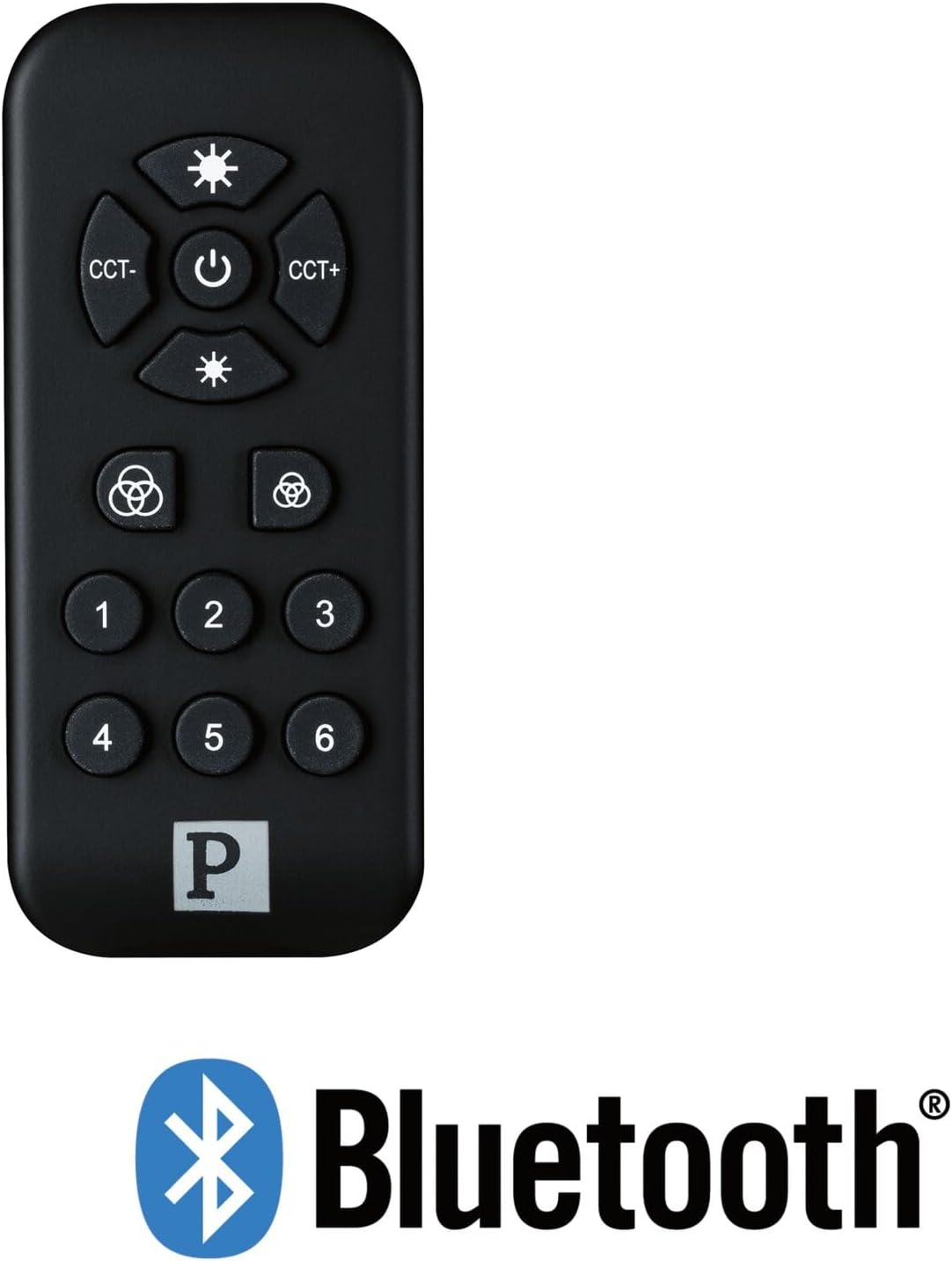
Imej 2: The Paulmann 500.01 remote control displayed alongside the Bluetooth logo, indicating its wireless connectivity technology.
3.2. Pairing with Smart Home Devices
To use the remote control, it must be paired with your Paulmann Smart Home Bluetooth lighting products. The specific pairing process may vary slightly depending on the individual lighting product. Generally, the steps involve:
- Ensure your Paulmann Smart Home lighting device is powered on and in pairing mode (refer to the specific device's manual for details on how to activate pairing mode).
- Pada alat kawalan jauh, tekan dan tahan butang kuasa button (or a designated pairing button, if available) for several seconds until an indicator light on the remote or the lighting device confirms pairing initiation.
- Once paired, the lighting device should respond to commands from the remote control.
- If pairing fails, ensure the remote is within range (up to 10 meters) and repeat the process.
For detailed pairing instructions, always consult the user manual of the specific Paulmann Smart Home lighting product you intend to control.
4. Arahan Operasi
The Paulmann 500.01 remote control features several buttons for controlling your Smart Home lighting:
- Butang Kuasa (Tengah): Press to turn the connected lighting devices ON or OFF.
- Brightness Up (Top Sun Icon): Increases the brightness of the light.
- Brightness Down (Bottom Sun Icon): Decreases the brightness of the light.
- CCT- (Left CCT Button): Adjusts the color temperature towards warmer white.
- CCT+ (Right CCT Button): Adjusts the color temperature towards cooler white.
- Color Cycle / Scene Buttons (Color Wheel Icons): These buttons typically cycle through predefined color modes or activate specific lighting scenes. Refer to your lighting device's manual for exact functionality.
- Butang Bernombor (1-6): These buttons are usually used to select or save specific lighting scenes or groups of devices. Their function can often be customized through the Paulmann Smart Home app or by following specific pairing procedures with your lighting products.
5. Penyelenggaraan
5.1. Pembersihan
To clean the remote control, use a soft, dry cloth. Do not use abrasive cleaners, solvents, or harsh chemicals, as these may damage the surface or internal components.
5.2. Penggantian Bateri
When the remote control's performance degrades or it stops responding, it is likely time to replace the batteries. Follow the battery installation steps outlined in Section 3.1. Always replace both AAA batteries simultaneously with new ones.
6. Penyelesaian masalah
| Masalah | Kemungkinan Punca | Penyelesaian |
|---|---|---|
| Jauh tidak bertindak balas. | Bateri mati atau tidak dipasang dengan betul. | Gantikan bateri, pastikan polariti yang betul. |
| Jauh tidak bertindak balas. | Luar kawasan. | Move closer to the lighting device (within 10 meters). |
| Jauh tidak bertindak balas. | Not paired with the device. | Ikut arahan berpasangan dalam Bahagian 3.2. |
| Intermittent control. | Gangguan atau isyarat lemah. | Ensure no obstructions between remote and device. Check for other Bluetooth devices causing interference. |
7. Spesifikasi
- Jenama: Paulman
- Nombor Model: 50001
- Teknologi Ketersambungan: Bluetooth
- warna: Hitam
- Peranti Serasi: Paulmann Smart Home lighting products
- Jenis Pengawal: Kawalan Butang
- Julat Maksimum: 10 meter
- Keperluan Bateri: 2 x bateri AAA
8. Waranti dan Sokongan
For warranty information and technical support, please refer to the official Paulmann website or contact Paulmann customer service directly. Keep your purchase receipt as proof of purchase for any warranty claims.
Anda biasanya boleh mencari maklumat hubungan dan sumber sokongan pada pegawai pengilang webtapak: www.paulmann.com


