UNIC UC46 Mini Projector User Manual
Model: UC46 IDSP-011
1. Pengenalan
This user manual provides detailed instructions for the operation, setup, and maintenance of your UNIC UC46 Mini Projector. Please read this manual thoroughly before using the product to ensure proper and safe operation. Keep this manual for future reference.
Maklumat Keselamatan
- Jangan lihat terus ke dalam kanta projektor apabila lamp sedang aktif.
- Ensure proper ventilation around the projector to prevent overheating. It is recommended to rest the projector after 4-5 hours of continuous operation.
- Jauhkan projektor daripada air atau sebarang cecair.
- Gunakan hanya penyesuai kuasa yang dibekalkan dengan projektor.
- Jangan cuba membuka atau membaiki projektor sendiri. Hubungi kakitangan servis yang berkelayakan untuk mendapatkan bantuan.
- This projector is designed for home entertainment and is not suitable for professional teaching, meetings, or business presentations.
2. Ciri-ciri Produk
- Reka Bentuk Mudah Alih: Compact and lightweight, ideal for home use, camping, and outdoor parties.
- Kecerahan yang tinggi: 1200 lumens LED lamp for clear and vibrant images.
- Resolusi Asli: 800x480 pixels, supporting up to 1920x1080 (Full HD) via input.
- Saiz Unjuran Besar: Projects images from 34 to 130 inches.
- Pelbagai Pilihan Kesambungan: HDMI, VGA, USB, AV, SD Card, and IR.
- Kesambungan Tanpa Wayar: Supports WiFi, Miracast, and DLNA for seamless smartphone integration (iOS, Android, Windows).
- Jangka hayat LED yang panjang: Lamp life of approximately 20,000 hours.
3. Kandungan Pakej
Sila tandai kotak untuk item berikut:
- UNIC UC46 Mini Projector
- Kabel Kuasa
- Kabel AV 3-dalam-1
- Alat Kawalan Jauh
- Manual Pengguna (dokumen ini)
4. Produk Lebihview
Familiarize yourself with the different parts and controls of your UNIC UC46 Mini Projector.
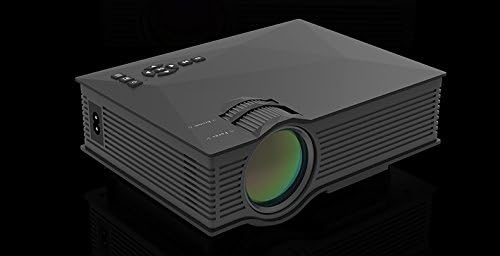
Rajah 4.1: Bahagian Depan dan Bahagian Sisi View of the UNIC UC46 Mini Projector. Shows the main lens, focus wheel, and ventilation grilles.

Rajah 4.2: Belakang View of the Projector. Displays various input ports including HDMI, USB, AV, SD card slot, and audio output.

Rajah 4.3: Atas View of the Projector. Shows the control panel buttons for navigation, power, and input selection.

Figure 4.4: Lens Focus and Keystone Adjustment Diagram. Illustrates the location of the lens focus and keystone correction wheels, along with a diagram of the remote control functions.
5. Persediaan
5.1 Penempatan
Place the projector on a stable, flat surface. Ensure there is adequate space around the projector for ventilation. The projection distance will determine the screen size. Refer to the specifications for recommended distances.
5.2 Sambungan Kuasa
- Connect the power cable to the projector's AC power input port.
- Plug the other end of the power cable into a standard electrical outlet (100-240V, 50/60Hz).
- Lampu penunjuk kuasa pada projektor akan menyala.
5.3 Kuasa Awal Hidup
- Tekan butang Kuasa pada projektor atau alat kawalan jauh untuk menghidupkan peranti.
- The projector will display the startup screen.
5.4 Pelarasan Imej
- Fokus: Rotate the focus wheel (located near the lens) until the projected image is clear and sharp.
- Pembetulan Keystone: If the image appears trapezoidal, adjust the keystone correction wheel (usually next to the focus wheel) to square the image.
6. Arahan Operasi
6.1 Menyambung Peranti
The UNIC UC46 projector supports various input sources:
- HDMI: Connect a PC, laptop, DVD player, game console (PS3, PS4), or Smart TV box using an HDMI cable. Select "HDMI" as the input source.
- VGA: Connect a PC or laptop using a VGA cable. Select "VGA" as the input source.
- USB: Masukkan pemacu kilat USB untuk memainkan media files (videos, photos, music, text). Select "USB" as the input source and navigate through the files.
- DARI: Use the included 3-in-1 AV cable to connect devices with AV output (e.g., older DVD players, VCRs). Select "AV" as the input source.
- Kad SD: Insert an SD card into the slot to play media files. Select "SD" as the input source.
6.2 Wireless Connectivity (WiFi)
The projector supports WiFi connectivity for screen mirroring from smartphones (iOS, Android, Windows) and DLNA.
- Go to the "WiFi" or "Wireless" menu on the projector.
- Select your WiFi network and enter the password to connect the projector to your home network.
- For screen mirroring (Miracast/AirPlay):
- Ensure your smartphone and the projector are connected to the same WiFi network.
- On your smartphone, enable screen mirroring (e.g., "Screen Mirroring," "Smart View," "AirPlay," "Wireless Display").
- Pilih projektor daripada senarai peranti yang tersedia.
- For DLNA:
- Ensure your smartphone and the projector are connected to the same WiFi network.
- Use a DLNA-compatible app on your smartphone to stream media to the projector.
6.3 Keluaran Audio
The projector has a built-in speaker. For enhanced audio, you can connect external speakers or a sound system via the 3.5mm audio output port.
7. Penyelenggaraan
7.1 Membersihkan Lensa
Gunakan kain lembut dan bebas lin yang direka khusus untuk kanta optik untuk mengelap kanta projektor dengan perlahan. Jangan gunakan pembersih atau pelarut yang melelas.
7.2 Membersihkan Badan Projektor
Wipe the exterior of the projector with a soft, dry cloth. For stubborn dirt, a slightly damp kain boleh digunakan, diikuti dengan kain kering.
7.3 Pengudaraan
Regularly check that the ventilation grilles are not blocked by dust or debris. Use a soft brush or compressed air to clean them if necessary. Proper airflow is crucial for preventing overheating and extending the projector's lifespan.
7.4 Lamp kehidupan
LED lamp has an estimated life of 20,000 hours. To maximize lamp life, avoid frequent on/off cycles and allow the projector to cool down properly after use.
8. Penyelesaian masalah
| Masalah | Kemungkinan Punca | Penyelesaian |
|---|---|---|
| Tiada imej ditayangkan | Power cable not connected; Projector not turned on; Incorrect input source selected; Input device not connected or powered on. | Check power connection; Press power button; Select correct input source (HDMI, VGA, USB, AV, SD); Ensure input device is connected and powered on. |
| Imej kabur | Lens out of focus; Incorrect projection distance. | Adjust the focus wheel; Adjust the projection distance. |
| Imej adalah trapezoid | Projector not perpendicular to the screen. | Laraskan roda pembetulan keystone. |
| Tiada bunyi | Volume too low; Muted; External audio device not connected or powered on; Audio format not supported. | Increase volume; Unmute; Check external audio connection; Ensure audio format is supported. |
| Alat kawalan jauh tidak berfungsi | Batteries dead or incorrectly inserted; Obstruction between remote and IR receiver. | Replace batteries; Ensure clear line of sight to the projector's IR receiver. |
| Overheating / Shuts down automatically | Blocked ventilation; Prolonged use. | Ensure ventilation grilles are clear; Allow projector to rest after 4-5 hours of use. |
9. Spesifikasi

Figure 9.1: Detailed Specifications of the UNIC UC46 Mini Projector.
| Ciri | Perincian |
|---|---|
| Sistem Imej | LCD |
| Lamp | LED |
| Resolusi Asli | 800 x 480 piksel |
| Resolusi Maks Disokong | 1920 x 1080 piksel (HD Penuh) |
| Kecerahan | 1200 Lumen |
| Nisbah Kontras | 800:1 |
| Penggunaan Kuasa | 50-55 Watt |
| Bekalan Kuasa | 100-240V, 50/60Hz |
| Tahap Kebisingan | <25dB |
| Saiz Unjuran | 34 - 130 inci |
| Jarak Lontar | 1.07 hingga 3.8 meter (3.51 hingga 12.47 kaki) |
| Nisbah Aspek | 4:3 / 16:9 |
| Berat Bersih | 1 kg |
| Lensa | Multi-layer coated glass lens |
| Terminal Input | USB, SD, HDMI, AV, VGA, IR |
| Terminal Keluaran | Fon kepala, Pembesar Suara |
| Tanpa wayar | WiFi 2.4G |
| Dimensi Produk | 201mm x 153mm x 67.5mm |
10. Waranti dan Sokongan
Untuk maklumat waranti dan sokongan teknikal, sila rujuk kepada pembungkusan produk atau hubungi peruncit anda. Simpan resit pembelian anda sebagai bukti pembelian.


