1. Pengenalan
Thank you for choosing the UNIC UC18 Mini Projector. This compact and portable projector is designed to provide a versatile viewing experience for home entertainment, presentations, and more. Featuring an LED lighting system, built-in speaker, and multiple input options, the UC18 offers convenience and functionality. Please read this manual thoroughly to ensure proper setup, operation, and maintenance of your device.
2. Maklumat Keselamatan
- Bekalan Kuasa: Gunakan hanya penyesuai kuasa yang ditentukan. Pastikan voltage matches the projector's requirements.
- Pengudaraan: Do not block ventilation openings. Ensure adequate space around the projector for proper airflow to prevent overheating.
- Kelembapan: Jauhkan projektor daripada air, hujan dan kelembapan berlebihan. Jangan kendalikan dengan tangan yang basah.
- Pembersihan: Disconnect power before cleaning. Use a soft, dry cloth. Avoid liquid or aerosol cleaners.
- Pengendalian: Kendalikan projektor dengan berhati-hati. Elakkan daripada menjatuhkan atau mendedahkannya kepada hentaman yang kuat.
- Perlindungan Mata: Jangan lihat terus ke dalam kanta projektor apabila lamp is on, as the bright light can cause eye strain or damage.
- Pembongkaran: Jangan cuba membuka atau membaiki projektor itu sendiri. Rujuk semua servis kepada kakitangan yang berkelayakan.
3. Kandungan Pakej
Sila semak kandungan pakej semasa membuka kotak. Jika ada barang yang hilang atau rosak, hubungi peruncit anda.
- UNIC UC18 Mini Projector
- Kabel Kuasa
- Kabel AV 3-dalam-1
- Remote Control (requires lithium battery, not included)
- Manual Pengguna
4. Produk Lebihview
Projector Layout
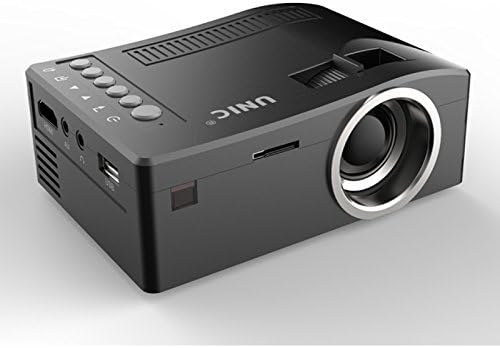
Depan dan sisi view of the UNIC UC18 Mini Projector, showing the lens, ventilation, and various ports.
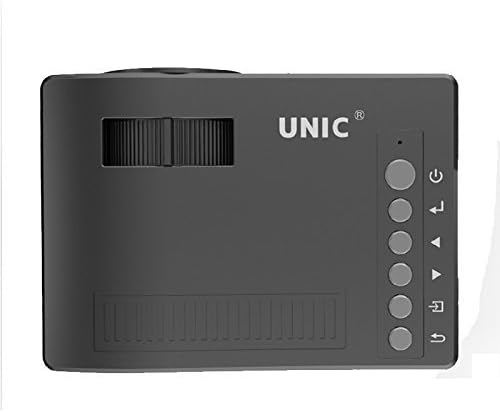
Atas view of the UNIC UC18 Mini Projector, highlighting the control buttons and focus wheel.
Pelabuhan dan Kawalan
The UNIC UC18 Mini Projector features a range of ports and controls for easy connectivity and operation:
- Kanta: Menayangkan imej ke skrin.
- Roda Fokus: Pelarasan manual untuk kejelasan imej.
- Butang Kuasa: Menghidupkan atau mematikan projektor.
- Butang Menu: Mengakses menu tetapan projektor.
- Butang Navigasi (Atas/Bawah/Kiri/Kanan): Digunakan untuk menavigasi menu dan melaraskan tetapan.
- Butang OK: Mengesahkan pilihan dalam menu.
- Butang Sumber: Selects the input source (HDMI, USB, AV, TF).
- Port USB: Menyambung peranti storan USB untuk main balik media.
- Port HDMI: Connects to HDMI-enabled devices like laptops, gaming consoles, or media players.
- Pelabuhan AV: Connects to devices using the included 3-in-1 AV cable.
- Slot Kad TF: Inserts a TF (Micro SD) card for media playback.
- Bicu Fon Kepala 3.5mm: Connects external headphones or speakers.
- Penerima IR: Menerima isyarat dari alat kawalan jauh.
5. Persediaan
5.1 Sambungan Kuasa
- Sambungkan kabel kuasa ke port input kuasa projektor.
- Palamkan hujung kabel kuasa yang lain ke dalam salur keluar kuasa yang sesuai.
- Lampu penunjuk kuasa pada projektor akan menyala.
5.2 Menyambungkan Peranti Input
- HDMI: Connect an HDMI cable from your source device (e.g., laptop, DVD player) to the projector's HDMI port.
- USB: Masukkan pemacu kilat USB ke dalam port USB.
- DARI: Use the provided 3-in-1 AV cable to connect to devices with AV output. Match the yellow, white, and red connectors.
- Kad TF: Insert a TF (Micro SD) card into the TF card slot.
5.3 Meletakkan Kedudukan Projektor
Place the projector on a stable, flat surface. For optimal image quality, position the projector perpendicular to the projection surface (wall or screen). The throw distance can range from 0.48 to 2.43 meters, producing a picture size from 12 to 66 inches.
6. Arahan Operasi
6.1 Menghidupkan/Mematikan
Press the Power button on the projector or the remote control to turn the device on or off.
6.2 Melaraskan Fokus
After powering on, if the image appears blurry, rotate the manual focus wheel located near the lens until the image becomes clear and sharp.

Close-up of the manual focus wheel on the UNIC UC18 Mini Projector, located near the lens.
6.3 Memilih Sumber Input
Press the 'Source' button on the projector or remote control. Use the navigation buttons to select your desired input source (HDMI, USB, AV, TF) and press 'OK' to confirm.
6.4 Menu Navigasi
Press the 'Menu' button to access the projector's settings. Use the navigation buttons to browse options and 'OK' to select. Press 'Menu' again to exit.
6.5 Keluaran Audio
The projector has a built-in speaker. For private listening or connecting to external audio systems, plug headphones or external speakers into the 3.5mm headphone jack.
7. Penyelenggaraan
7.1 Membersihkan Lensa
Gunakan kain lembut dan tidak berbulu yang direka khas untuk kanta optik. Lap kanta dengan lembut untuk menghilangkan habuk atau kotoran. Elakkan menggunakan bahan kasar atau bahan kimia yang keras.
7.2 Membersihkan Badan Projektor
Wipe the exterior of the projector with a soft, dry cloth. Do not use liquid cleaners or solvents.
7.3 Penyimpanan
Apabila tidak digunakan untuk tempoh yang lama, simpan projektor di tempat yang sejuk dan kering, jauh daripada cahaya matahari langsung dan suhu yang melampau. Tutup kanta untuk melindunginya daripada habuk.
8. Penyelesaian masalah
| Masalah | Kemungkinan Punca | Penyelesaian |
|---|---|---|
| Tiada imej dipaparkan | Power not connected; Incorrect input source; Loose cable connection | Check power cable; Select correct input source; Reconnect cables securely |
| Imej kabur | Fokus tidak dilaraskan; Projektor terlalu dekat/jauh | Adjust the focus wheel; Reposition the projector within recommended throw distance |
| Tiada bunyi | Volume too low; Muted; Audio cable not connected; Source device audio issue | Increase volume; Unmute; Check audio cable connection; Verify audio output on source device |
| Alat kawalan jauh tidak berfungsi | Batteries low/incorrectly inserted; Obstruction between remote and projector | Replace batteries (lithium battery required); Ensure clear line of sight to IR receiver |
| Projektor terlalu panas | Blocked ventilation; Prolonged use in hot environment | Ensure ventilation openings are clear; Operate in a well-ventilated area; Allow to cool down |
9. Spesifikasi
Spesifikasi Teknikal
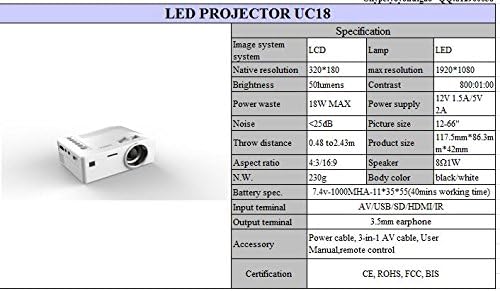
Detailed technical specifications for the UNIC UC18 Mini Projector, including resolution, contrast, and dimensions.
| Ciri | Spesifikasi |
|---|---|
| Jenama | UNIC |
| Nama Model | UC18 |
| Teknologi Paparan | QVGA (LCD) |
| Resolusi Asli | 320 x 240 piksel |
| Resolusi Maksimum Disokong | 1920 x 1080 pixels (1080P) |
| Kecerahan | 50 Lumen |
| Nisbah Kontras | 500:1 |
| Nisbah Aspek | 16:9 (also supports 4:3) |
| Jarak Lontar | 0.48m - 2.43m (1.57ft - 7.97ft) |
| Saiz Gambar | 12 - 66 inci |
| Terminal Input | AV, USB, SD (TF), HDMI, IR |
| Terminal Keluaran | Jack fon telinga 3.5mm |
| Ciri Khas | Pembesar Suara Terbina Dalam, Mudah Alih |
| Penggunaan Kuasa | 24 Watt (Maks 18W) |
| Bekalan Kuasa | 12V 1.5A / 5V 2A |
| Tahap Kebisingan | <25dB |
| Dimensi Produk (L x W x H) | 117.5mm x 86.3mm x 42mm |
| Berat Bersih | 230g |
| Jenis Pemasangan | Lekap di dinding |
| Alat Kawalan Jauh | Yes (battery not included) |
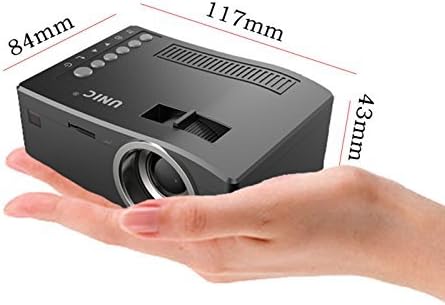
The UNIC UC18 Mini Projector held in a hand, illustrating its compact size and dimensions (117mm x 84mm x 43mm).
10. Waranti dan Sokongan
Untuk maklumat jaminan atau sokongan teknikal, sila rujuk dokumentasi yang disediakan semasa pembelian atau hubungi peruncit anda. Simpan bukti pembelian anda untuk sebarang tuntutan jaminan.


