1. Pengenalan
The UNIC UC30 LED Mini Projector is a compact and versatile multimedia device designed for home theater projection. It supports a wide range of input sources and file formats, making it suitable for various entertainment and presentation needs.
Ciri-ciri utama termasuk:
- Multiple Input Interfaces: AV, VGA, HDMI, USB, SD, and TV input.
- Luas File Format Support: Compatible with various video, audio, image, and e-book formats.
- Keystone Correction: Adjusts image distortion for optimal viewing.
- Integrated Speaker: Built-in 2.0W *2 stereo speakers for audio output.
- Flexible Projection: Supports front and rear projection models.

Rajah 1: Depan view of the UNIC UC30 LED Mini Projector, showcasing reka bentuk dan lensanya yang padat.
2. Persediaan
2.1 Membongkar dan Meletakkan
Carefully remove the projector and all accessories from the packaging. Place the projector on a stable, flat surface. Ensure adequate ventilation around the unit to prevent overheating.
2.2 Sambungan Kuasa
- Sambungkan penyesuai kuasa ke port input kuasa projektor.
- Palamkan penyesuai kuasa ke salur keluar elektrik yang sesuai.
2.3 Menyambungkan Peranti Input
The UC30 projector offers multiple input options. Connect your desired source device (e.g., laptop, DVD player, game console, USB drive) to the corresponding port on the projector.

Rajah 2: Belakang view of the white UNIC UC30 projector, showing various input ports including AV, VGA, HDMI, and USB.
- HDMI: Untuk video dan audio digital definisi tinggi.
- VGA: For connecting computers or laptops.
- DARI: For standard definition video and stereo audio (using the included 3-in-1 AV cable).
- USB: Untuk bermain media files terus daripada pemacu denyar USB.
- Kad SD: Untuk bermain media files directly from an SD memory card.
- TV: For connecting to a TV signal source (if applicable to your region/model).
2.4 Fokus dan Pembetulan Keystone
After powering on the projector, adjust the focus ring around the lens until the projected image is clear. Use the keystone correction feature (usually a dial or button on the projector) to correct any trapezoidal distortion in the image, ensuring a rectangular projection.
3. Arahan Operasi
3.1 Hidupkan/Mati Kuasa
Tekan butang kuasa pada projektor atau alat kawalan jauh untuk menghidupkan atau mematikan unit. Biarkan beberapa saat untuk projektor memanaskan atau menyejukkan.
3.2 Memilih Sumber Input
Use the "Source" button on the projector or remote control to cycle through the available input options (HDMI, VGA, AV, USB, SD, TV) until your desired source is displayed.
3.3 Main Semula Media (USB/SD)
When a USB drive or SD card is inserted, the projector's media player interface will typically appear. Navigate through the menus using the directional buttons on the projector or remote to select and play your desired files.
- Format Video yang Disokong: AVI, MOV, VOB, DAT, MPEG, MPG, RM, RMVB (encoding: MPEG1/MPEG2/MPEG4/DivX/Xvid).
- Format Audio yang Disokong: MP3, WMA, WAV.
- Format Imej yang Disokong: JPEG, BMP, GIF, PNG.
- Format E-buku yang Disokong: TXT.

Figure 3: The UNIC UC30 projector displaying a video of a man in a soccer jersey, demonstrating its video playback capability.
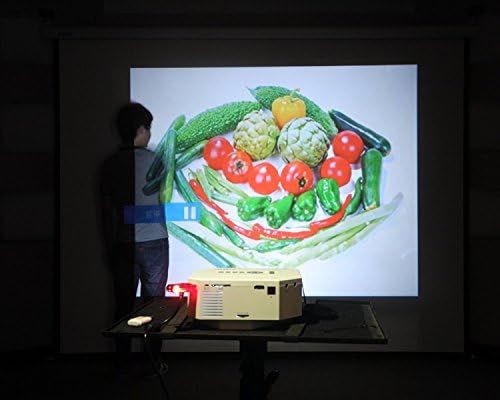
Figure 4: The UNIC UC30 projector displaying a vibrant image of vegetables, showcasing its image display quality.
3.4 Keluaran Audio
The projector has built-in stereo speakers. For private listening or connecting to external audio systems, use the stereo earphone output terminal.
3.5 Projection Model
The projector supports both front and rear projection. This setting can typically be adjusted in the projector's menu to suit your setup (e.g., projecting from behind a translucent screen).
4. Penyelenggaraan
4.1 Membersihkan Lensa
Gunakan kain lembut dan tidak berbulu yang direka khas untuk kanta optik untuk mengelap kanta projektor dengan lembut. Elakkan menggunakan pembersih yang kasar atau daya yang berlebihan, yang boleh menggaru kanta.
4.2 Membersihkan Badan Projektor
Lap bahagian luar projektor dengan kain lembut dan kering. Untuk tanda degil, sedikit damp kain boleh digunakan, tetapi pastikan tiada cecair memasuki bukaan pengudaraan.
4.3 Pengudaraan
Ensure the projector's ventilation ports are clear of dust and obstructions. Proper airflow is crucial for maintaining optimal operating temperature and extending the lifespan of the LED lamp.
5. Penyelesaian masalah
5.1 No Image or "No Signal" Message
- Check if the projector is powered on and the power indicator light is active.
- Verify that the input cable (HDMI, VGA, AV) is securely connected to both the projector and the source device.
- Ensure the correct input source is selected on the projector (use the "Source" button).
- If using a computer, ensure its display output is enabled (e.g., press Fn + F8 or similar key combination).
5.2 Imej Kabur
- Adjust the focus ring around the projector lens until the image is sharp.
- Pastikan jarak unjuran berada dalam julat yang disyorkan (1-3.5 meter).
- Bersihkan kanta projektor jika ia kelihatan kotor.
5.3 Tiada Bunyi
- Periksa tahap kelantangan pada kedua-dua projektor dan peranti sumber.
- If using HDMI, ensure the source device is sending audio through HDMI.
- If using AV, ensure the red and white audio cables are correctly connected.
- If external speakers are connected, ensure they are powered on and functioning correctly.
5.4 Image Distortion (Trapezoid Shape)
- Adjust the keystone correction feature on the projector to square the image.
- Ensure the projector is placed on a level surface and is as perpendicular to the screen as possible.
6. Spesifikasi
Below are the detailed technical specifications for the UNIC UC30 LED Mini Projector:
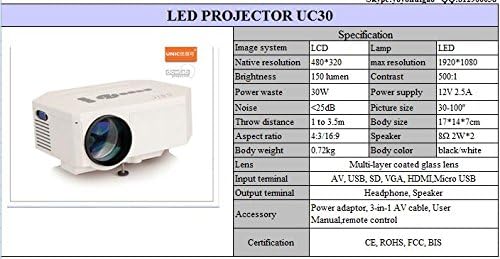
Figure 5: Official specification table for the UNIC UC30 LED Mini Projector, detailing its technical characteristics.
| Ciri | Perincian |
|---|---|
| Sistem Imej | LCD |
| Resolusi Asli | 480 x 320 Piksel |
| Sokongan Resolusi Maks | 1920 x 1080 (HD Penuh) |
| Kecerahan | 150 LUX (150 lumen) |
| Nisbah Kontras | 500:1 |
| Penggunaan Kuasa | 30W |
| Bekalan Kuasa | 12V 2.5A |
| Tahap Kebisingan | <25dB |
| Jarak Lontar | 1 hingga 3.5 meter |
| Saiz Gambar | 30-120 inci |
| Nisbah Aspek | 4:3 / 16:9 |
| Berat Badan | 0.72 kg |
| Saiz Badan | 17 x 14 x 7 cm |
| Penceramah | 2.0W *2 Stereo |
| Lensa | Multi-layer coated glass lens |
| Terminal Input | AV, USB, SD, VGA, HDMI, Micro USB |
| Terminal Keluaran | Stereo Earphone, Speaker |
| Termasuk Aksesori | Power adapter, 3-in-1 AV cable, User Manual, Remote control |
| Pensijilan | CE, ROHS, FCC, BIS |
7. Waranti dan Sokongan
For information regarding warranty coverage, technical support, or service, please refer to the warranty card included with your product or contact the retailer or manufacturer directly. Keep your purchase receipt as proof of purchase.


