1. Pengenalan
Thank you for choosing the Sencor SES 9350CH Automatic Espresso/Cappuccino Machine. This manual provides essential information for the safe and efficient use, maintenance, and troubleshooting of your new appliance. Please read these instructions carefully before first use and keep them for future reference.
2. Arahan Keselamatan
Sentiasa patuhi langkah berjaga-jaga keselamatan asas semasa menggunakan peralatan elektrik untuk mengurangkan risiko kebakaran, kejutan elektrik dan kecederaan.
- Pastikan voltage yang ditunjukkan pada perkakas sesuai dengan sumber listrik tempatan andatage sebelum menyambung.
- Jangan rendamkan perkakas, kord kuasa, atau palamkan ke dalam air atau sebarang cecair lain.
- Jauhkan perkakas daripada kanak-kanak.
- Jangan kendalikan perkakas jika kord kuasa atau palam rosak, atau jika perkakas tidak berfungsi atau telah rosak dalam apa jua cara.
- Always place the appliance on a stable, flat, heat-resistant surface, away from hot surfaces or open flames.
- Exercise caution when handling hot components and steam.
- Unplug the appliance from the mains socket before cleaning and when not in use.
- Hanya gunakan aksesori yang disyorkan oleh pengilang.
3. Produk Lebihview
Familiarize yourself with the main components of your Sencor SES 9350CH machine.

Rajah 3.1: Depan view of the Sencor SES 9350CH Automatic Espresso/Cappuccino Machine, showing the color LCD display, coffee spout, and integrated milk system.
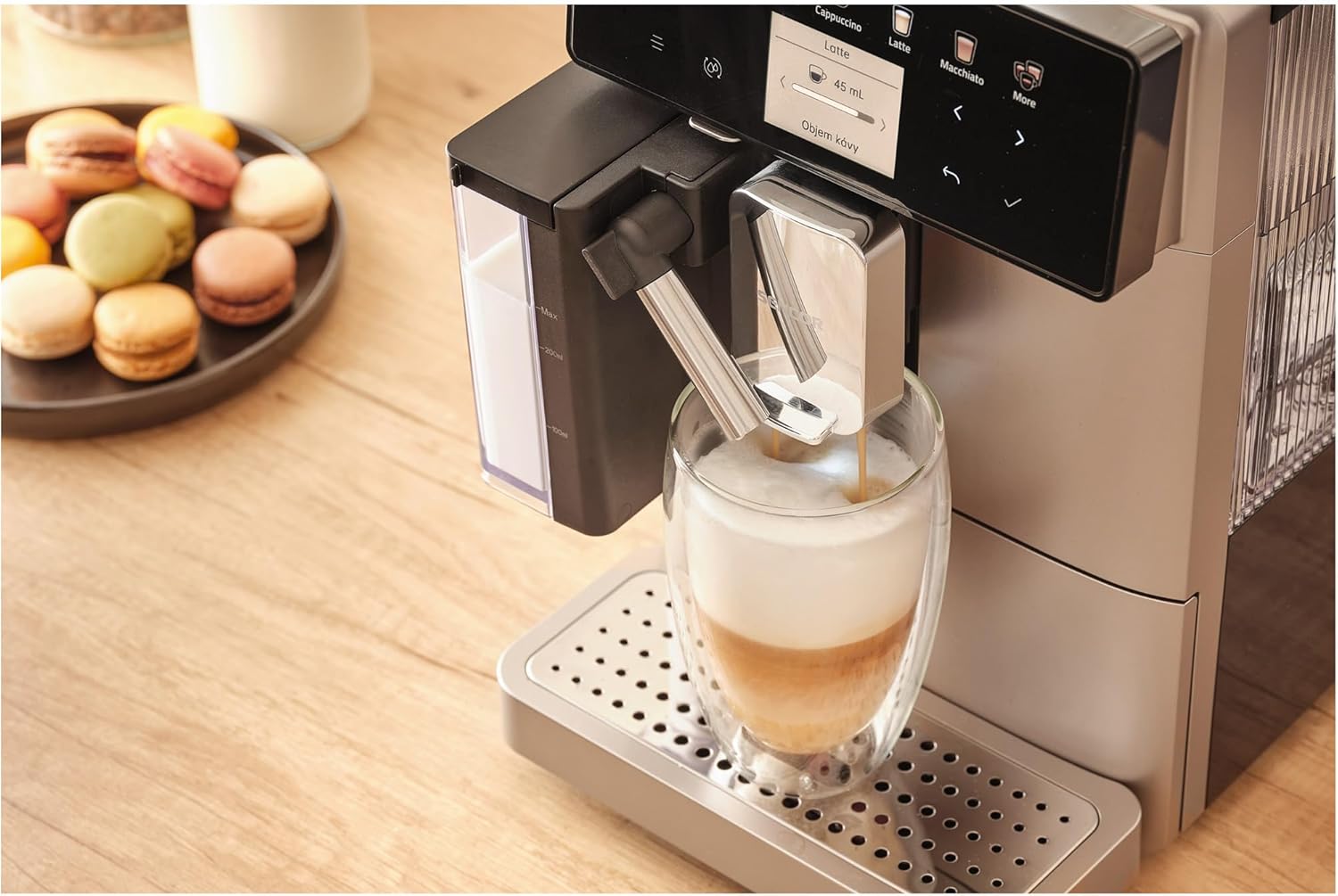
Rajah 3.2: Jarak dekat view of the EasyLatte milk system and adjustable coffee spout, demonstrating milk frothing directly into a glass.
Komponen Utama:
- Paparan LCD Warna: Intuitive interface for beverage selection and machine status.
- Corong Biji Kopi: Located at the top, for whole coffee beans (200g capacity).
- Tangki Air: Removable, 1.3-liter capacity, typically located at the side or back.
- EasyLatte Milk System: Integrated milk container (300ml) for automatic milk frothing.
- Muncung Kopi: Adjustable height to accommodate various cup sizes.
- Chute Kopi Tanah: Untuk menggunakan kopi yang telah dikisar.
- Dulang Drip: Mengumpul lebihan cecair, boleh ditanggalkan untuk pembersihan.
- Bekas Kopi: Collects used coffee pucks, removable for emptying.
4. Persediaan
4.1 Penyediaan Penggunaan Pertama
- Membongkar: Keluarkan mesin dari pembungkusannya dengan berhati-hati. Tanggalkan semua filem pelindung dan bahan pembungkusan.
- penempatan: Place the machine on a stable, level surface. Ensure adequate ventilation around the appliance.
- Komponen Bersih: Wash the water tank, milk container, and drip tray with warm water and a mild detergent. Rinse thoroughly and dry.
- Isi Tangki Air: Fill the removable 1.3-liter water tank with fresh, cold tap water up to the MAX level. Reinsert it securely.
- Isi Corong Kacang: Open the lid of the coffee bean hopper and fill it with fresh whole coffee beans (up to 200g). Close the lid.
- Sambungkan Kuasa: Palamkan kord kuasa ke soket dinding yang dibumikan.
4.2 Kitaran Bilas Permulaan
Upon first power-on, the machine will guide you through an initial rinse cycle to prime the system and clean internal components. Follow the instructions on the color LCD display.
5. Arahan Operasi
The Sencor SES 9350CH offers a wide range of 15 beverages and intuitive controls via its color LCD display.
5.1 Making Espresso or Coffee
- Pastikan tangki air diisi dan corong kacang mengandungi biji kopi.
- Letakkan cawan di bawah muncung kopi. Laraskan ketinggian muncung jika perlu.
- On the LCD display, select your desired beverage (e.g., "Espresso" or "Coffee").
- You can adjust coffee strength and volume using the on-screen options. The machine also features a coffee cup size memory function.
- Press the "Start" button (often indicated by a play icon or a specific beverage button) to begin brewing.
- The machine will grind the beans, pre-brew (for fuller flavor), and dispense the coffee.
5.2 Preparing Milk-Based Beverages (e.g., Cappuccino, Latte)
- Fill the 300ml EasyLatte milk container with fresh, cold milk. Attach it securely to the machine.
- Place a suitable cup or glass under the coffee and milk spouts.
- Select your desired milk-based beverage (e.g., "Cappuccino," "Latte," "Macchiato") from the LCD display.
- The machine will automatically froth the milk and dispense it, followed by the coffee, creating a layered drink.
- After preparing milk-based drinks, the machine may prompt for a quick milk system rinse. Follow the on-screen instructions.
5.3 Menggunakan Kopi Kisar
Jika anda lebih suka menggunakan kopi pra-kisar, ikuti langkah berikut:
- Pastikan mesin dihidupkan dan sedia digunakan.
- Open the lid of the ground coffee chute (usually located near the bean hopper).
- Add one scoop of pre-ground coffee (do not overfill).
- Select the "Ground Coffee" option on the display, then choose your desired beverage.
- Press "Start" to brew.
5.4 Fungsi Air Panas
For tea or Americano, select the "Hot Water" function on the display. Place a cup under the hot water spout and press "Start."
6. Penyelenggaraan
Regular cleaning and maintenance ensure optimal performance and longevity of your Sencor SES 9350CH.
6.1 Pembersihan Harian
- Dulang Titis dan Bekas Kopi: Empty and rinse daily. The machine will signal when the grounds container needs emptying.
- Sistem susu: After each milk-based beverage, perform the quick rinse cycle. For thorough cleaning, disassemble the milk container and rinse all parts with warm water.
- Luaran: Lap bahagian luar mesin dengan kain lembutamp kain.
6.2 Weekly/Bi-Weekly Cleaning
- Unit Pembuatan Bir: The integrated professional brewing unit is typically self-cleaning or easily removable for rinsing under tap water. Refer to the on-screen instructions for specific guidance.
- Tangki Air: Bilas tangki air dengan teliti.
6.3 Penyahkelasan
The machine features an indicator and a dedicated descaling program. When prompted by the "Descaling Indicator," follow the on-screen instructions to perform the descaling process using a suitable descaling solution (not included). Regular descaling is crucial for preventing mineral buildup and maintaining machine performance.

Rajah 6.1: Sisi view of the Sencor SES 9350CH, illustrating its compact design and access points for maintenance.
7. Penyelesaian masalah
This section addresses common issues you might encounter with your Sencor SES 9350CH machine.
| Masalah | Kemungkinan Punca | Penyelesaian |
|---|---|---|
| Tiada kopi yang dikeluarkan. | Water tank empty; machine not primed; brewing unit blocked. | Fill water tank; perform initial rinse cycle; clean brewing unit. |
| Kopi terlalu lemah/kuat. | Incorrect grind setting; insufficient coffee dosage; wrong beverage selection. | Adjust grind setting (9 levels available); increase coffee dosage via display; select appropriate beverage. |
| Susu tidak berbuih dengan betul. | Milk system dirty; milk type/temperature incorrect; milk container not properly attached. | Clean milk system thoroughly; use fresh, cold, full-fat milk; ensure milk container is securely attached. |
| Mesej "Menyahkerak" dipaparkan. | Mesin memerlukan penyahkerak. | Perform the descaling program as instructed on the display. |
| Machine displays an error code. | Isu dalaman khusus. | Refer to the full instruction manual for a list of error codes and their solutions. If the problem persists, contact customer support. |
8. Spesifikasi
| Jenama | SENCOR |
| Nombor Model | SES 9350CH |
| warna | Hitam |
| Dimensi Produk (W x D x H) | 21.5 x 34 x 45.5 cm |
| Kapasiti Tangki Air | 1.3 Liter |
| Kapasiti Corong Biji Kopi | 200g |
| kuasa | 1400 Watt |
| Voltage | 240 Volt |
| Tekanan Pam | 19 Bar |
| Berat Barang | 9.5 Kilogram |
| Ciri Khas | Compact design, Portable |
| Komponen Termasuk | Manual arahan |
9. Waranti dan Sokongan
For detailed warranty information and customer support, please refer to the warranty card included with your product or contact Sencor customer service. Keep your proof of purchase for any warranty claims.


