pengenalan
This manual provides instructions for the proper setup, operation, maintenance, and troubleshooting of your Excalibur Deluxe Virtual Casino 5-in-1 Video Game. Please read this manual thoroughly before using the device to ensure optimal performance and longevity.
The Excalibur Deluxe Virtual Casino is a handheld electronic gaming device featuring five classic casino games: Poker, Blackjack, Slots, Craps, and Roulette. It is designed for portable entertainment.
Persediaan
1. Pemasangan Bateri
The Excalibur Deluxe Virtual Casino requires 3 AAA batteries (not included) for operation.
- Cari penutup petak bateri di bahagian belakang peranti.
- Geser penutup terbuka ke arah yang ditunjukkan oleh anak panah.
- Insert 3 AAA batteries, ensuring the correct polarity (+ and -) as marked inside the compartment.
- Gantikan penutup petak bateri, pastikan ia terpasang dengan selamat pada tempatnya.
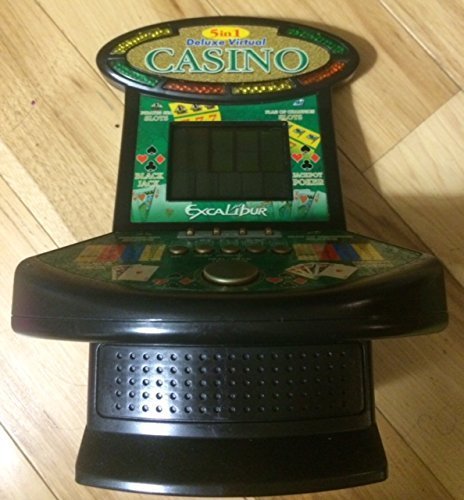
Rajah 1: Excalibur Deluxe Virtual Casino handheld device. This image shows the front of the device, featuring the LED display and control buttons, which include a directional pad and action buttons.
2. Hidupkan Kuasa Awal
After installing batteries, press the KUASA button, usually located on the top or front of the device, to turn it on. The screen should illuminate, displaying the main menu or game selection screen.
Arahan Operasi
Kawal Selesaiview
- Pad Arah (D-Pad): Used for navigating menus and making selections within games.
- SELECT/MENU Button: Typically used to confirm selections or access in-game menus.
- ACTION Buttons (A, B, C, etc.): Used for specific game actions, such as dealing cards, spinning reels, or placing bets. Refer to individual game instructions for specific button functions.
- SOUND/VOLUME Button: Adjusts the device's sound level or mutes audio.
- Butang kuasa: Menghidupkan atau mematikan peranti.
Pemilihan Permainan
Dari menu utama, gunakan D-Pad to highlight your desired game (Poker, Blackjack, Slots, Craps, or Roulette). Press the PILIH button to confirm your choice and start the game.
Basic Gameplay (General)
- Placing Bets: Gunakan D-Pad to select bet amounts or areas on the table (for Craps/Roulette). Confirm with an TINDAKAN butang.
- Game Actions: Follow on-screen prompts. For example, in Poker/Blackjack, use TINDAKAN buttons to "Hit," "Stand," "Deal," or "Fold." In Slots, press an TINDAKAN button to "Spin."
- Viewing Rules: Some games may have an option to view rules within their respective menus. Access this via the MENU butang jika ada.
Penyelenggaraan
Pembersihan
To clean the device, gently wipe the exterior with a soft, dry cloth. Do not use abrasive cleaners, solvents, or immerse the device in water. For the screen, use a soft, lint-free cloth specifically designed for electronics displays.
Penjagaan dan Penyimpanan Bateri
- Tanggalkan bateri jika peranti tidak akan digunakan untuk tempoh yang lama untuk mengelakkan kebocoran.
- Simpan peranti di tempat yang sejuk dan kering, jauh dari cahaya matahari langsung dan suhu yang melampau.
- Jangan campurkan bateri lama dan baharu, atau jenis bateri yang berlainan.
Menyelesaikan masalah
| Masalah | Kemungkinan Punca | Penyelesaian |
|---|---|---|
| Peranti tidak dihidupkan. | Bateri mati atau tidak dipasang dengan betul. | Periksa polariti bateri. Gantikan dengan bateri AAA yang baru. |
| Skrin kosong atau berkelip. | Bateri lemah atau gangguan perisian sementara. | Replace batteries. Turn the device off and on again. |
| Butang tidak bertindak balas. | Low batteries or a software issue. | Replace batteries. Turn the device off and on again. Ensure buttons are not stuck. |
| Tiada bunyi. | Volume is muted or set too low. | Tekan ke SOUND/VOLUME button to adjust volume or unmute. |
Spesifikasi
- model: B01GGZSPTA
- Jenama: Excalibur
- Jenis Paparan: LED
- Faktor Bentuk: pegang tangan
- Sumber Kuasa: 3 x Bateri AAA (tidak termasuk)
- Permainan Termasuk: Poker, Blackjack, Slots, Craps, Roulette
Waranti dan Sokongan
Excalibur products are designed for quality and reliability. For information regarding warranty coverage, please refer to the warranty card included with your purchase or visit the official Excalibur webtapak.
For technical support or customer service inquiries, please contact Excalibur customer support through their official channels. Contact details are typically available on the product packaging or the manufacturer's webtapak.


