pengenalan
Terima kasih kerana membeliasing the Amazon Basics Portable Wireless, 2.1 Bluetooth Speaker. This manual provides important information regarding the setup, operation, maintenance, and troubleshooting of your new speaker. Please read it thoroughly before use and retain it for future reference.
Produk Selesaiview
The Amazon Basics Portable Wireless, 2.1 Bluetooth Speaker offers high-quality sound with a portable design. It features Bluetooth connectivity for wireless audio streaming, a 3.5mm aux-in jack for wired connections, and a built-in microphone for hands-free calling.
Kandungan Pakej
- Amazon Basics Portable Wireless, 2.1 Bluetooth Speaker
- Kabel Pengecas USB
- Manual Arahan
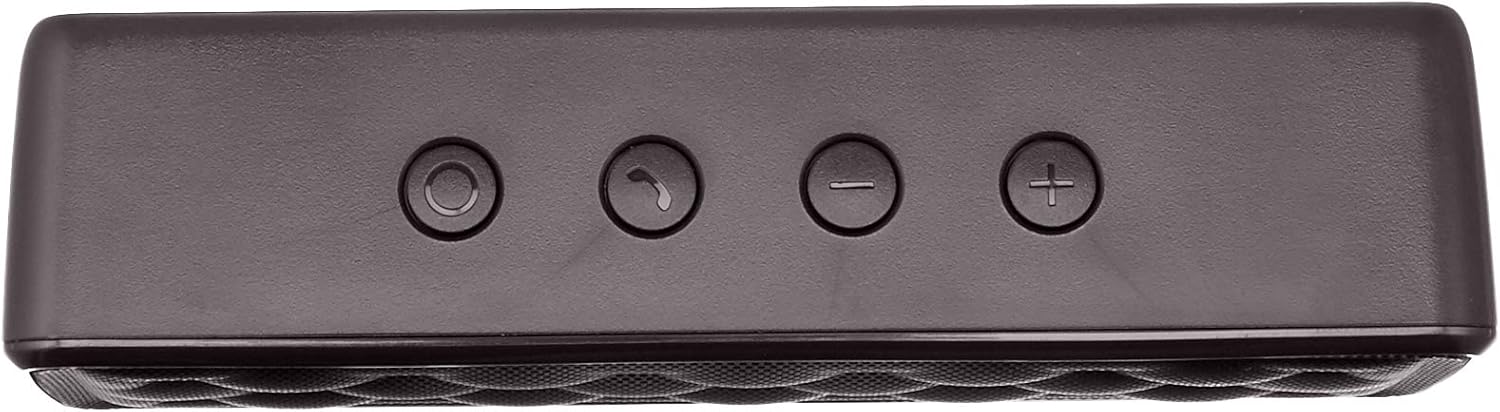
Komponen Pembesar Suara


Persediaan
1. Mengisi Speaker
Before first use, fully charge the speaker. Connect the supplied USB charging cable to the Micro USB port on the speaker and the other end to a USB power source (e.g., computer USB port, USB wall adapter). The charging indicator light will illuminate during charging and turn off when fully charged. A full charge takes approximately 3 hours.
2. Menghidupkan/Mematikan
To power on the speaker, slide the ON/OFF switch located on the rear panel to the "ON" position. To power off, slide the switch to the "OFF" position.
Arahan Operasi
Berpasangan Bluetooth
- Pastikan pembesar suara dihidupkan dan dalam jarak 33 kaki (10 meter) dari peranti berkemampuan Bluetooth anda.
- The speaker will automatically enter pairing mode, indicated by a flashing blue LED light.
- Pada peranti anda, pergi ke tetapan Bluetooth dan cari peranti yang tersedia.
- Select "Amazon Basics Speaker" from the list.
- Once paired, the blue LED light will stop flashing and remain solid. You can now stream audio wirelessly.
Note: If pairing fails, turn off the speaker and your device's Bluetooth, then repeat the steps. The speaker will attempt to reconnect to the last paired device automatically when powered on.
Main Balik Audio
- Kawalan Kelantangan: Use the '+' and '-' buttons on the top panel of the speaker to adjust the volume. You can also control the volume from your connected device.
- Main/Jeda: Use the controls on your connected device to play or pause audio.
Panggilan Bebas Tangan
When connected via Bluetooth, the speaker's built-in microphone allows for hands-free calling.
- Jawab/Tamatkan Panggilan: Press the Call/Bluetooth button once to answer an incoming call or end an ongoing call.
- Tolak Panggilan: Press and hold the Call/Bluetooth button for 2 seconds to reject an incoming call.
- Panggil semula: Double-press the Call/Bluetooth button to redial the last number.
Mod Input AUX
To connect non-Bluetooth audio devices, use the 3.5mm AUX input jack on the rear panel. Connect one end of a 3.5mm audio cable (not included) to the speaker's AUX port and the other end to your audio device's headphone jack. The speaker will automatically switch to AUX mode when a cable is inserted.

Penyelenggaraan
- Bersihkan pembesar suara dengan kain lembut dan kering. Jangan gunakan pembersih atau pelarut yang melelas.
- Elakkan daripada mendedahkan pembesar suara kepada suhu yang melampau, kelembapan atau cahaya matahari langsung.
- Do not immerse the speaker in water. It is not waterproof.
- Simpan pembesar suara di tempat yang sejuk dan kering apabila tidak digunakan untuk tempoh yang lama.
Menyelesaikan masalah
| Masalah | Kemungkinan Punca | Penyelesaian |
|---|---|---|
| Speaker tidak dihidupkan. | Bateri habis. | Cas pembesar suara menggunakan kabel USB yang dibekalkan. |
| Tidak boleh berpasangan melalui Bluetooth. | Bluetooth is off on your device; speaker is out of range; speaker is already paired to another device. | Ensure Bluetooth is enabled on your device. Move the speaker closer to your device (within 33 feet). Disconnect from other devices or restart the speaker to enter pairing mode. |
| Tiada bunyi atau kelantangan rendah. | Volume is too low on speaker or device; incorrect input mode. | Increase volume on both the speaker and your connected device. Ensure the correct input mode (Bluetooth or AUX) is active. |
| Penyelewengan bunyi. | Volume is too high; speaker is too far from the device. | Reduce the volume on the speaker and/or your device. Move the speaker closer to your device. |
Spesifikasi
| Nama Model | BSK30BK |
| Teknologi Ketersambungan | Bluetooth, Bantu |
| Julat Tanpa Wayar | Sehingga 33 kaki (10 meter) |
| Kuasa Keluaran Pembesar Suara | 2 x 2.5 Watt (jumlah 5 Watt) |
| Hayat Bateri | Sehingga 8 jam (dengan cas penuh) |
| Masa Mengecas | Lebih kurang 3 jam |
| Dimensi (L x W x H) | 6.3" x 1.5" x 2.6" (16 cm x 3.8 cm x 6.6 cm) |
| Berat badan | 8.1 auns (0.23 kg) |
| Mikrofon Terbina dalam | ya |
| Kalis air | Tidak |
Maklumat Waranti
This product is covered by a Limited Warranty. For detailed information regarding warranty terms and conditions, please refer to the documentation included with your purchase or visit the Amazon Basics official webtapak.
Sokongan Pelanggan
For further assistance, troubleshooting, or product information, please visit the Amazon Basics support page or contact customer service through your Amazon account.
Maklumat Keselamatan Penting
- Jangan buka, baiki atau ubah suai produk.
- Keep the product away from water and high humidity.
- Elakkan pendedahan berpanjangan kepada cahaya matahari langsung atau haba melampau.
- Jangan jatuhkan atau letakkan produk kepada kesan yang kuat.
- Buang produk dan baterinya secara bertanggungjawab mengikut peraturan tempatan.
Video Produk
No official instructional videos from the seller are available for this product at this time.


