1. Pengenalan
This user manual provides comprehensive instructions for the operation, maintenance, and troubleshooting of your PRO 12 Pro12 2-in-1 Touchscreen Tablet PC. The Pro12 is designed to offer a versatile computing experience, combining the portability of a tablet with the functionality of a laptop through its detachable keyboard. Featuring a 12.2-inch Full HD IPS display and powered by Android 6.0 (Marshmallow), this device is equipped with a quad-core processor and 64GB of expandable flash storage. Please read this manual thoroughly to ensure proper use and to maximize the lifespan of your device.
2. Produk Lebihview dan Ciri
The PRO 12 Pro12 offers a range of features designed for productivity and entertainment:
- paparan: 12.2-inch Full HD IPS touchscreen with a resolution of 1920 x 1200 pixels.
- Pemproses: 1.3 GHz Quad Core CPU for efficient performance.
- Memori & Storan: 2GB RAM and 64GB internal flash storage, expandable via microSD card up to 128GB (card not included).
- Sistem pengendalian: Android 6.0 (Marshmallow).
- Kamera: Front-facing 2MP webcam and rear-facing 8MP webcam.
- Ketersambungan: Wi-Fi, Bluetooth 4.0, USB 2.0 port, miniHDMI output, and 3.5mm headphone jack.
- papan kekunci: Full-width detachable keyboard with a proprietary Magnalink connection for secure docking and an enhanced typing experience.
- Hayat Bateri: Hayat bateri sehingga 8 jam.
- Berat: Approximately 2.78 lbs (tablet with keyboard).

Figure 2.1: Key features of the PRO 12 Pro12 Tablet PC.
3. Komponen dan Pelabuhan
Familiarize yourself with the physical components and connection ports of your Pro12 tablet.

Figure 3.1: PRO 12 Pro12 Tablet PC with Keyboard.

Figure 3.2: PRO 12 Pro12 Tablet (without keyboard).
3.1. Reka Letak Pelabuhan
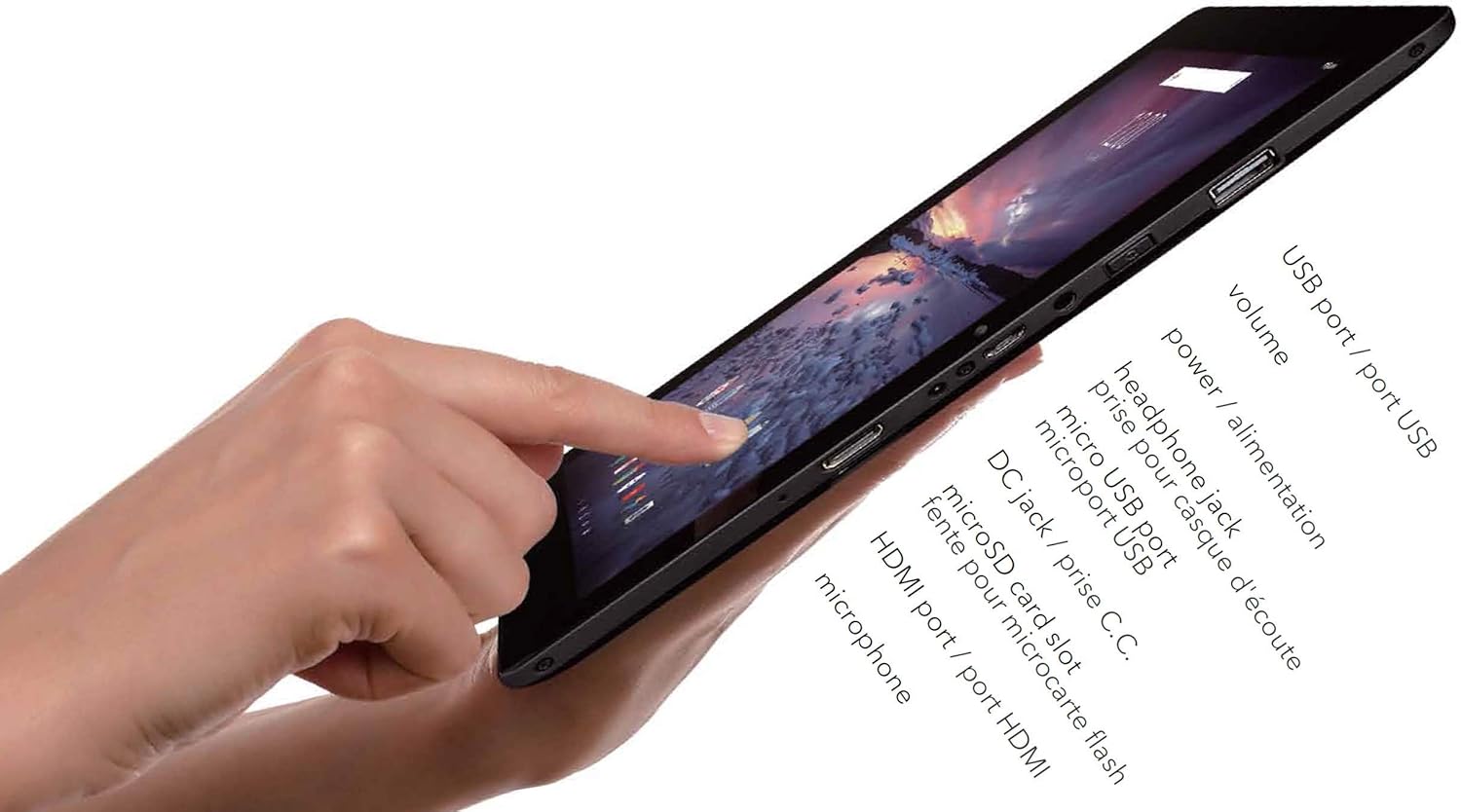
Rajah 3.3: Sisi view of the Pro12 Tablet showing ports.
- Port USB (USB 2.0): Untuk menyambungkan peranti USB luaran.
- Butang Kelantangan: Laraskan tahap output audio.
- Butang Kuasa: Turns the device on/off or puts it to sleep/wakes it up.
- Bicu Fon Kepala (3.5mm): Untuk menyambungkan fon kepala atau pembesar suara luaran.
- Port USB Mikro: Alternative charging port and for data transfer.
- Port Pengecasan DC: Primary charging port for faster charging.
- Slot Kad MicroSD: Untuk mengembangkan kapasiti storan.
- MiniHDMI Out: Untuk menyambung ke paparan luaran.
- mikrofon: Untuk input audio.
4. Persediaan
4.1. Pengecasan Awal
Before first use, fully charge your Pro12 tablet. Connect the provided power adapter to the DC Charging Port on the tablet and plug it into a wall outlet. The charging indicator light will illuminate. A full charge may take several hours. You can also use the Micro USB port for charging, though it may be slower.
4.2. Attaching and Detaching the Keyboard
The Pro12 features a proprietary Magnalink connection for its detachable keyboard.
- Melampirkan: Align the tablet's bottom edge with the keyboard's docking connector. The magnetic connection will guide the tablet into place, securing it firmly.
- Melepaskan: Gently pull the tablet upwards from the keyboard. Avoid excessive force to prevent damage to the connectors.

Figure 4.1: Pro12 Tablet with keyboard attached.
4.3. Menghidupkan/Mematikan
- Untuk Menghidupkan: Tekan dan tahan Butang Kuasa sehingga skrin menyala.
- Untuk Mematikan: Press and hold the Power Button until a power-off menu appears on the screen. Select "Power off" and confirm.
- Tidur/Bangun: Briefly press the Power Button to put the tablet to sleep or wake it up.
4.4. Persediaan Android Awal
Upon first power-on, you will be guided through the Android 6.0 (Marshmallow) setup wizard. Follow the on-screen prompts to:
- Pilih bahasa anda.
- Sambung ke rangkaian Wi-Fi.
- Sign in with your Google Account or create a new one. This is essential for accessing the Google Play Store and other Google services.
- Set up screen lock options (PIN, pattern, password).
- Review dan menerima terma dan syarat.
5. Arahan Operasi
5.1. Navigasi skrin sentuh
The 12.2-inch touchscreen supports standard Android gestures:
- Ketik: Untuk memilih item atau membuka aplikasi.
- Ketik & Tahan: Untuk mengakses menu kontekstual atau mengalihkan ikon.
- Leret: To scroll through lists or switch between home screens.
- Cubit-untuk-Zum: Untuk mengezum masuk atau keluar pada imej dan web muka surat.
5.2. Menyambung ke Wi-Fi
Untuk menyambung ke rangkaian wayarles:
- Pergi ke tetapan > Wi-Fi.
- Ensure Wi-Fi is turned On.
- Pilih rangkaian yang anda inginkan daripada senarai.
- Jika digesa, masukkan kata laluan rangkaian dan ketik Sambung.
5.3. Menggunakan Kamera
The Pro12 is equipped with a 2MP front camera and an 8MP rear camera. Open the Camera application to take photos or record videos. You can switch between front and rear cameras within the app interface.
5.4. Pengurusan Storan
Your tablet has 64GB of internal storage. To expand storage:
- Insert a microSD card (up to 128GB, not included) into the microSD card slot.
- The tablet will recognize the card, and you can use it for storing photos, videos, and other files.
- Manage storage by going to tetapan > Storan & USB.
5.5. Menyambung Peranti
- Peranti USB: Connect USB flash drives, external hard drives, or other USB peripherals to the full-size USB 2.0 port.
- Peranti Bluetooth: Pair Bluetooth headphones, speakers, or other accessories via tetapan > Bluetooth.
- External Display (miniHDMI): Use a miniHDMI to HDMI cable (not included) to connect your tablet to a TV or monitor. The tablet screen content will be mirrored on the external display.
6. Penyelenggaraan
6.1. Pembersihan
Gunakan kain lembut dan tidak berbulu untuk membersihkan skrin dan badan tablet. Untuk calitan degil, sedikit dampen the cloth with water or a screen cleaner solution. Avoid using harsh chemicals or abrasive materials.
6.2. Penjagaan Bateri
- Elakkan menyahcas sepenuhnya bateri dengan kerap.
- Do not expose the tablet to extreme temperatures.
- Use only the provided charger or a compatible micro USB charger.
6.3. Kemas Kini Perisian
Semak kemas kini sistem secara berkala untuk memastikan prestasi dan keselamatan yang optimum. Pergi ke tetapan > Mengenai tablet > Kemas kini sistem.
7. Penyelesaian masalah
This section addresses common issues you might encounter with your Pro12 tablet.
| Masalah | Kemungkinan Punca / Penyelesaian |
|---|---|
| Tablet tidak dihidupkan. | Battery may be completely drained. Connect to charger and wait a few minutes before attempting to power on. |
| Slow performance or apps freezing. | Too many applications running in the background. Close unused apps. Clear cache from tetapan > Storan & USB. Restart the tablet. |
| Tidak dapat menyambung ke Wi-Fi. | Ensure Wi-Fi is enabled. Check Wi-Fi password. Restart your router. Move closer to the Wi-Fi router as the tablet's Wi-Fi antenna may have limited range. |
| Bateri cepat habis. | Screen brightness too high. Too many apps running. Background sync enabled. Adjust settings to conserve battery. Note that charging time can be long, and battery life may vary with usage. |
| Skrin sentuh tidak responsif atau tidak tepat. | Clean the screen. Restart the tablet. If issues persist, a mouse can be connected via the USB port for navigation. |
| Keyboard not recognized. | Ensure the Magnalink connection is clean and securely docked. Detach and reattach the keyboard. Restart the tablet. |
7.1. Tetapan Semula Kilang
If you experience persistent software issues, a factory reset can resolve them by restoring the tablet to its original settings. Warning: This will erase all data on your tablet. Back up important files sebelum meneruskan.
- Pergi ke tetapan > Sandarkan & tetapkan semula.
- Ketik Tetapan semula data kilang.
- Ketik Tetapkan semula tablet, kemudian Padamkan semuanya untuk mengesahkan.
8. Spesifikasi
| Ciri | Perincian |
|---|---|
| Nama Model | Pro12 (CT9223W97 DK) |
| Jenama | PRO 12 |
| Sistem Operasi | Android 6.0 (Marshmallow) |
| Saiz Skrin | 12.2 Inci |
| Resolusi Skrin | 1920 x 1200 (Full HD IPS) |
| Pemproses | 1.3 GHz Quad Core (VIA Chipset) |
| RAM | 2 GB (DDR3 SDRAM) |
| Storan Dalaman | Memori Denyar 64 GB |
| Storan Boleh Dikembangkan | Slot kad MicroSD (sehingga 128GB) |
| Kamera Depan | 2 MP |
| Kamera Belakang | 8 MP |
| Kesambungan Wayarles | Wi-Fi, Bluetooth 4.0 |
| Pelabuhan | USB 2.0, Micro USB, 3.5mm Headphone Jack, MiniHDMI Out, DC Charging Port |
| Hayat Bateri | Sehingga 8 jam (Purata) |
| Berat Barang | 3.08 paun |
| Dimensi Produk | 17 x 3 x 11 inci |
| warna | Hitam |
9. Maklumat Keselamatan
- Jangan dedahkan peranti kepada suhu yang melampau, cahaya matahari langsung atau kelembapan yang tinggi.
- Elakkan daripada menjatuhkan atau meletakkan peranti kepada kesan yang kuat.
- Jauhkan peranti daripada air dan cecair lain.
- Jangan cuba membuka atau membaiki peranti sendiri. Rujuk kepada kakitangan perkhidmatan yang berkelayakan.
- Gunakan hanya aksesori yang diluluskan pengilang.
- Buang peranti dan baterinya secara bertanggungjawab mengikut peraturan tempatan.
10. Waranti dan Sokongan
Specific warranty details are not provided in the product information. For warranty claims or technical support, please refer to the documentation included with your purchase or contact the PRO 12 customer service directly. You may also visit the official PRO 12 webtapak untuk sumber sokongan.


