Arahan Keselamatan Penting
BACA SEMUA ARAHAN DENGAN TELITI SEBELUM MENGGUNAKAN.
- Sentiasa cabut plag kipas dari salur keluar kuasa sebelum membersihkan, menservis atau mengalihkannya.
- Jangan masukkan jari atau sebarang objek lain melalui jeriji semasa kipas beroperasi.
- Jangan kendalikan mana-mana kipas dengan kord atau palam yang rosak. Buang kipas atau kembalikan ke kemudahan servis yang dibenarkan untuk pemeriksaan dan/atau pembaikan.
- Jangan gunakan tali di bawah permaidani. Jangan tutup tali dengan permaidani lempar, pelari, atau penutup yang serupa. Susun kord jauh dari kawasan lalu lintas dan di mana ia tidak akan tersandung.
- Jangan gunakan kipas dalam keadaan basah atau damp lokasi seperti bilik mandi atau kawasan dobi.
- Kipas ini bertujuan untuk kegunaan dalaman sahaja. Jangan gunakan di luar rumah.
- Keep the fan away from curtains, drapes, or any objects that may get caught in the fan blades.
- Supervise children when the fan is in use.
Produk Selesaiview
The Optimus 18-inch High Velocity Industrial Floor Fan is designed to provide powerful air circulation in various indoor environments. Its robust construction and high-velocity motor make it suitable for workshops, garages, and large rooms.
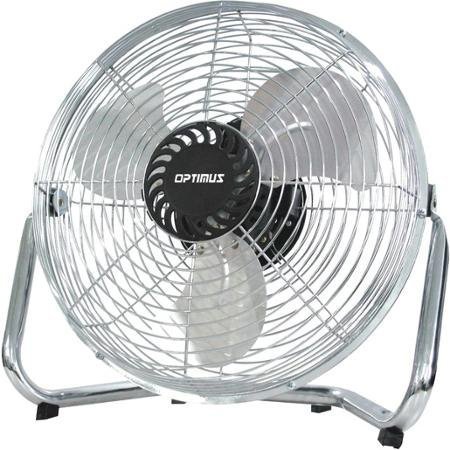
Image: Optimus 18-inch High Velocity Industrial Floor Fan. This image shows the fan with its silver metallic finish and sturdy floor stand.
Ciri-ciri Utama:
- 18-inch diameter for wide air distribution.
- Industrial-grade high velocity airflow.
- Durable metallic finish.
- Floor standing design for stable placement.
- Multiple power levels for adjustable airflow.
Arahan Persediaan
- Buka bungkus kipas: Carefully remove the fan and all components from the packaging. Retain packaging for future storage or transport.
- Assemble the Floor Stand:
- Attach the fan head to the floor stand using the provided screws and tools. Ensure all connections are secure.
- Verify the fan head can pivot smoothly on the stand.
- penempatan: Place the fan on a firm, level surface. Ensure there is adequate space around the fan for proper air circulation and to prevent obstruction of the air intake/output. Keep the fan at least 3 feet away from walls or furniture.
- Sambungan Kuasa: Ensure the fan is in the "OFF" position before plugging it into a standard 120V AC electrical outlet.
Arahan Operasi
This fan features push-button controls for easy operation. A remote control may also be included for convenience.
- Hidupkan/Mati Kuasa: Locate the power button on the control panel. Press the button once to turn the fan ON. Press it again to turn the fan OFF.
- Melaraskan Kelajuan Kipas: The fan has 4 power levels. After turning the fan ON, repeatedly press the speed control button to cycle through the available speed settings (Low, Medium, High, Max). The fan will operate at the selected speed.
- Melaraskan Arah Aliran Udara: The fan head can be tilted manually to direct airflow upwards or downwards. Gently tilt the fan head to the desired angle. Do not force the fan head beyond its intended range of motion.
Penyelenggaraan
Regular cleaning and maintenance will ensure optimal performance and extend the life of your fan.
- Membersihkan Kipas:
- Always unplug the fan from the power source before cleaning.
- Gunakan yang lembut, damp kain untuk mengelap permukaan luar kipas. Jangan gunakan pembersih yang kasar atau bahan kimia yang keras, kerana ini boleh merosakkan kemasan.
- To clean the fan blades, carefully remove the front grille (if detachable, refer to assembly instructions for details). Wipe the blades with a soft cloth. Ensure the grille is securely reattached before operating the fan.
- Pastikan semua bahagian kering sepenuhnya sebelum memasang semula kipas.
- Storan: Apabila tidak digunakan untuk tempoh yang lama, simpan kipas di tempat yang sejuk dan kering. Adalah disyorkan untuk menyimpannya di dalam pembungkusan asalnya untuk melindunginya daripada habuk dan kerosakan.
Menyelesaikan masalah
| Masalah | Kemungkinan Punca | Penyelesaian |
|---|---|---|
| Kipas tidak dihidupkan. | Not plugged in; power outlet not working; fan switch is off. | Ensure fan is securely plugged into a working outlet. Check household fuse/circuit breaker. Press the power button to turn the fan on. |
| Aliran udara rendah. | Fan speed set too low; obstructed intake/output; dirty blades. | Increase fan speed. Clear any obstructions. Clean fan blades and grilles as per maintenance instructions. |
| Bunyi atau gemerincing yang luar biasa. | Bahagian longgar; kipas tidak berada di atas permukaan yang rata; objek asing dalam bilah. | Unplug the fan and check for any loose screws or components. Place the fan on a stable, level surface. Carefully inspect for and remove any foreign objects. |
Spesifikasi
| Ciri | Perincian |
|---|---|
| Jenama | Optimus |
| Nama Model | Halaju Tinggi |
| Nombor Model Item | 306c1b92-f36b-4ccc-ac62-2ad33d5c9efb |
| Diameter | 18 Inci |
| warna | Perak |
| Gaya | Perindustrian |
| Sumber Kuasa | Elektrik Bertali |
| Bilangan Tahap Kuasa | 4 |
| Kaedah Kawalan | Kawalan Butang |
| Penggunaan Dalaman/Luar | Dalaman |
| Komponen yang Disertakan | Floor Stand, Remote Control |
| Spesifikasi Met | OSHA |
Waranti dan Sokongan
Optimus products are manufactured to high-quality standards. This product is covered by a limited warranty against defects in materials and workmanship from the date of purchase. Please refer to the warranty card included with your product for specific terms and conditions.
For technical support, troubleshooting assistance, or warranty claims, please contact Optimus customer service. Contact information can typically be found on the product packaging or the official Optimus webtapak.
Sila simpan bukti pembelian anda untuk tujuan waranti.


