1. Produk Lebihview
The Manhattan USB 2.0 Multi-Card Reader/Writer is designed for efficient data transfer and management across various flash memory card formats. This device allows you to easily access, download, and manage digital content such as pictures, music, and videos without directly connecting your media device to a computer. It supports simultaneous reading and writing on up to five different flash memory cards and functions as a USB mass storage device.
Ciri-ciri utama termasuk:
- Keserasian Berbilang Kad: Supports 79 card formats, including CompactFlash, Memory Stick, Secure Digital, MultiMedia, and XD.
- Operasi Palam dan Main: No driver installation required for most operating systems.
- Pemindahan Data Berkelajuan Tinggi: Achieves speeds up to 480 Mbps.
- Simultaneous Card Access: Read and write to five different card slots concurrently.
- Dikuasakan USB: No external power supply or adapters needed.

Figure 1: The Manhattan USB 2.0 Multi-Card Reader/Writer, showing its compact design and integrated USB cable.
2. Kandungan Pakej
Sahkan bahawa pakej anda mengandungi item berikut:
- Manhattan USB 2.0 Multi-Card Reader/Writer (Model 101998)
- Manual Pengguna (dokumen ini)
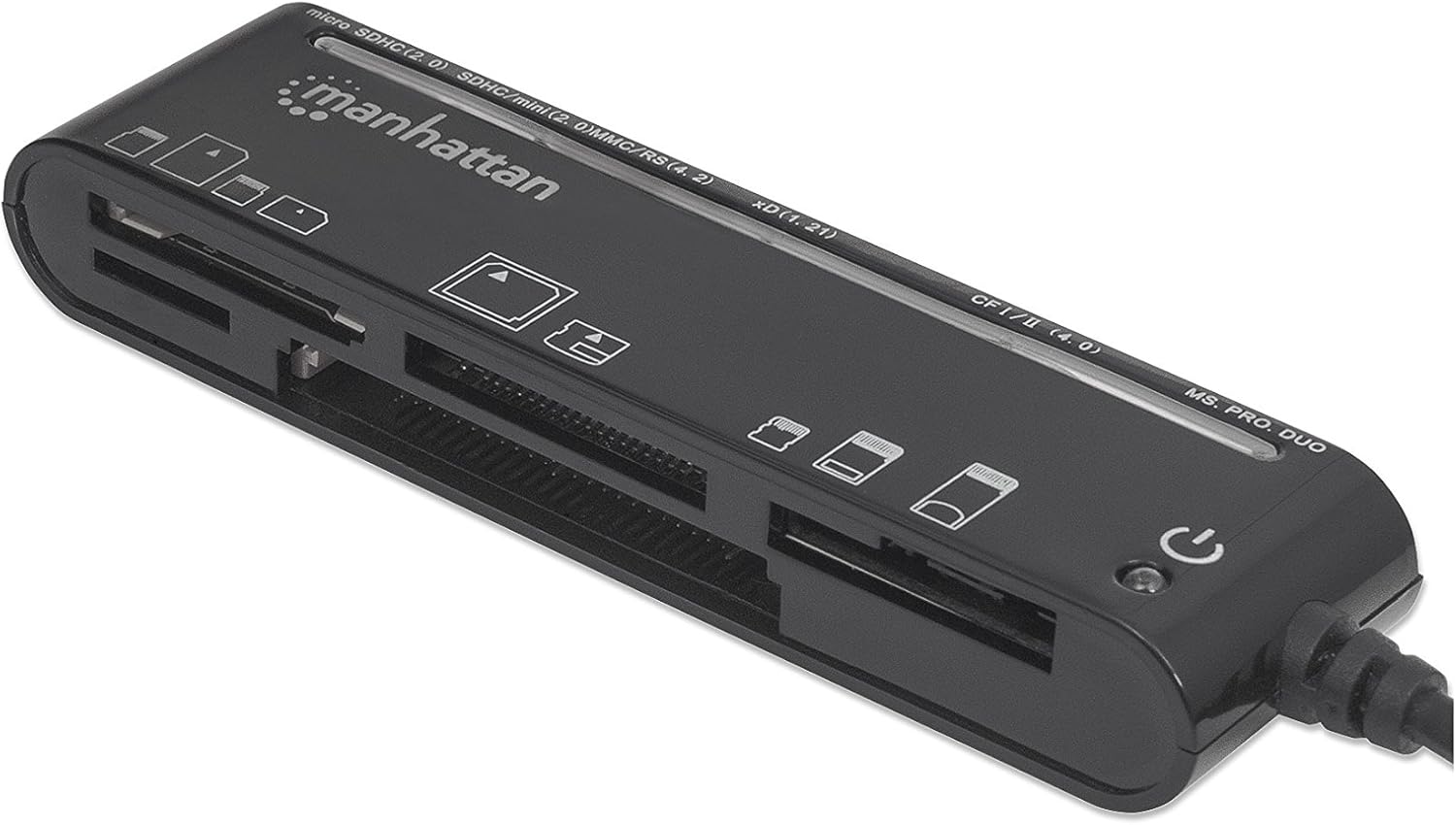
Figure 2: The Manhattan Multi-Card Reader/Writer shown in its retail packaging.
3. Keperluan Sistem
- Available USB 2.0 or 1.1 port
- Windows operating system (Windows XP/Vista/7/8/10/11)
- Mac operating system (macOS 10.x or later)
4. Arahan Persediaan
- Sambungkan Pembaca Kad: Plug the USB connector of the Manhattan Multi-Card Reader/Writer into an available USB port on your computer.
- Pemasangan Pemacu Automatik: Your operating system will automatically detect the device and install the necessary drivers. This process typically takes a few moments. No manual driver installation is required.
- Pengesahan: Once installed, the device will appear as several removable disk drives in your computer's "My Computer" (Windows) or "Finder" (Mac) section.

Figure 3: The card reader connected via its USB cable.
5. Arahan Operasi
5.1 Memasukkan Kad Memori
Identify the correct slot for your memory card type. The card reader features multiple slots, each designed for specific card formats. Refer to the labels on the device for guidance.

Rajah 4: Atas view of the card reader, highlighting the various card slots and their labels.
- Pilih Slot: Locate the appropriate slot for your memory card (e.g., SD, microSD, CF, MS PRO DUO, xD).
- Masukkan Kad: Gently insert the memory card into the designated slot until it is fully seated. Do not force the card; if it does not insert easily, verify the card's orientation.
- Akses Data: Once inserted, the card will appear as a removable drive on your computer. You can now access, copy, move, or delete files mengikut keperluan.
5.2 Removing a Memory Card
- Keluarkan dengan Selamat: Before physically removing the card, always safely eject the removable drive from your operating system to prevent data corruption.
- Windows: Right-click on the drive icon in "My Computer" and select "Eject."
- Mac: Drag the drive icon to the Trash or click the Eject button next to the drive in Finder.
- Alih Keluar Kad: Once safely ejected, gently pull the memory card out of its slot.
5.3 Akses Kad Serentak
The Manhattan Multi-Card Reader/Writer supports simultaneous access to multiple card types. You can insert different types of memory cards into their respective slots and access them as separate drives on your computer. This allows for easy data transfer between different card formats.
6. Penyelenggaraan
- Pembersihan: Gunakan kain lembut dan kering untuk membersihkan bahagian luar pembaca kad. Elakkan menggunakan pembersih cecair atau pelarut.
- Storan: Simpan peranti di tempat yang sejuk dan kering jauh dari cahaya matahari langsung dan suhu yang melampau apabila tidak digunakan.
- Pengendalian: Avoid dropping the device or subjecting it to strong impacts. Do not attempt to disassemble the unit.
7. Penyelesaian masalah
| Masalah | Kemungkinan Punca | Penyelesaian |
|---|---|---|
| Card reader not detected by computer. | Loose USB connection, faulty USB port, operating system issue. |
|
| Kad memori tidak dikenali. | Incorrect card slot, improper card insertion, damaged card, unsupported card format. |
|
| Kelajuan pemindahan data yang perlahan. | Using a USB 1.1 port, system resource contention, slow memory card. |
|
8. Spesifikasi
| Ciri | Perincian |
|---|---|
| Nombor Model | 101998 |
| Antara muka | USB 2.0 |
| Kelajuan Pemindahan Data | Sehingga 480 Mbps |
| Format Kad yang Disokong | CompactFlash (Type I/II, 4.0, Alpha, Elite Pro, PRO I/II, Turbo, Ultima I/II, UltraX, CF-PSP II, Extreme I/III/IV CF, Platinum II CF, ProMax CF/CF II), IBM/Hitachi/Seagate Microdrive, MagicStor, Memory Stick (MagicGate, MagicGate PRO, MagicGate Duo, High Speed Memory Stick PRO Duo, High Speed MagicGate PRO Duo, High Speed MagicGate PRO, Memory Stick, Memory Stick Duo, Memory Stick Extreme III PRO, Memory Stick Extreme III PRO Duo, Memory Stick Extreme PRO, Memory Stick PRO Duo, Memory Stick PRO Duo PSP, Memory Stick Ultra II PRO, Memory Stick Ultra II PRO Duo, Gaming Edition Memory Stick PRO Duo), SecureDigital (SD, Elite Pro SD, Extreme III SD, Gaming Edition SD, microSD/TransFlash, microSDHC, miniSD, miniSD Ultra II, miniSDHC, miniSD-Pro, Platinum II SD, SD Pro, SDHC, SDXC, SD-Max, SD-Pleomax, SD-Pro C, Super SD, Turbo SD, Ultima I SD, Ultima II SD, Ultimate SD, Ultra High Speed SD, Ultra II SD, Ultra II SD Plus, Ultra SD, Ultra-X SD), MultiMediaCard (MMC/MMC 4.0, DV-RS MMC, High Speed MMC/RS-MMC, MCCmobile, MMC Pro, MMCplus, MMCplus Turbo, RS-MMC), xD Picture Card (1.21/Type M/Type H) |
| Keserasian Sistem Pengendalian | Windows, Mac OS |
| kuasa | USB powered (5 Volts) |
| Dimensi (LxWxH) | 8.66 x 3.15 x 7.87 inci |
| Berat Barang | 1.28 auns |
9. Waranti dan Sokongan
This Manhattan product is backed by a Waranti Pengeluar 3 Tahun when purchased from the manufacturer or an authorized reseller. For warranty claims or technical support, please contact Manhattan customer service or visit their official webtapak.
Pengeluar: MANHATTAN LUXURY BRANDS LLC Parent Code
For further assistance, please refer to the official Manhattan webtapak atau hubungi saluran sokongan mereka.
10. Maklumat Keselamatan
AMARAN: Produk ini mungkin mengandungi bahan kimia yang diketahui oleh Negeri California boleh menyebabkan kanser dan kemudaratan reproduktif. Untuk maklumat lanjut, sila lawati P65WARNINGs.ca.gov.


