pengenalan
This manual provides comprehensive instructions for the safe and proper installation, operation, and maintenance of your Vogel's MA4000 Flat Screen Wall Mount. Please read all instructions carefully before installation and retain this manual for future reference.
The Vogel's MA4000 is designed to securely mount flat screen televisions ranging from 40 to 80 inches (102-203 cm) with a maximum weight capacity of 80 kg (176 lbs). It features a slim profile and a tilt function to optimize viewing angles and reduce glare.
Maklumat Keselamatan
AMARAN:
- Pastikan permukaan pelekap dapat menyokong berat gabungan pelekap dan televisyen dengan selamat.
- Always use appropriate tools and follow all installation steps precisely.
- Jangan melebihi kapasiti berat maksimum 80 kg (176 lbs).
- Verify VESA compatibility with your television before installation.
- Jika tidak pasti tentang mana-mana bahagian pemasangan, rujuk profesional yang berkelayakan.
Kandungan Pakej
Before beginning installation, please verify that all components are present and undamaged. Refer to the included parts list in your product packaging for a complete inventory.

Penerangan Imej: Satu overhed view of the Vogel's MA4000 Flat Screen Wall Mount, showing the main wall plate and the two vertical TV brackets. The mount is black and designed for flat panel televisions.
The image above displays the primary components of the Vogel's MA4000 wall mount: the wall plate and the two TV interface bars. Additional hardware such as screws, washers, and spacers are included in the retail package.
Spesifikasi
| Nombor Model | MA4000 (8554000) |
| Jenama | milik Vogel |
| Jenis Pemasangan | Flat, Tilting |
| bahan | Keluli Tahan Karat |
| warna | Hitam |
| Saiz TV yang Serasi | 40 - 80 inci (102 - 203 cm) |
| Kapasiti Berat Maksimum | 80 kg (176 lbs) |
| Keserasian VESA | Min 100x100 mm, Max 600x400 mm |
| Sudut Kecondongan Maksimum | 12 Darjah |
| Jarak Dinding | Kira-kira 30 mm (1.2 inci) |
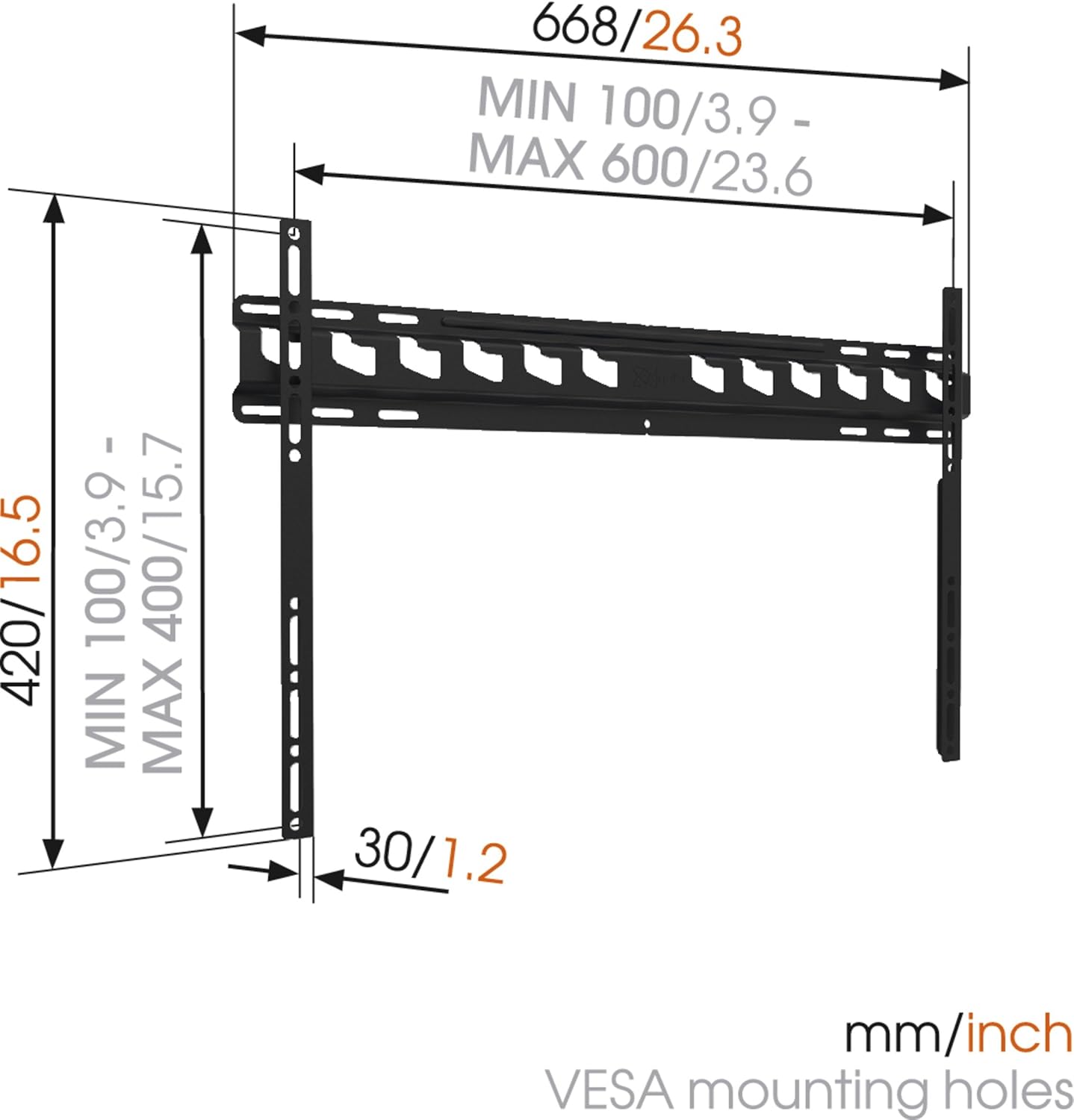
Penerangan Imej: A technical diagram illustrating the dimensions of the Vogel's MA4000 wall mount. It shows the overall width (668mm / 26.3 inches), height (420mm / 16.5 inches), and the minimum and maximum VESA mounting hole patterns (100-600mm horizontally, 100-400mm vertically). The distance from the wall is indicated as 30mm (1.2 inches).
Persediaan dan Pemasangan
This section outlines the general steps for installing your Vogel's MA4000 wall mount. Always refer to the detailed graphical instructions included with your product for specific drilling templates and hardware usage.
Alat Diperlukan (Tidak Termasuk):
- latih tubi
- Drill bits appropriate for your wall type (wood, concrete, brick, etc.)
- Stud finder (for wood stud walls)
- Tahap
- Pensel
- Pita pengukur
- Pemutar skru atau sepana
Langkah Pemasangan:
- Tentukan Lokasi Pemasangan: Choose a suitable location on your wall, ensuring it is structurally sound and free from electrical wires or plumbing. Use a stud finder if mounting to wood studs.
- Tandai Lubang Penggerudian: Hold the wall plate against the wall at the desired height and use a level to ensure it is straight. Mark the drilling holes with a pencil.
- Lubang gerudi: Drill pilot holes according to the marked positions and your wall type. Insert wall anchors if required.
- Pasang Plat Dinding: Secure the wall plate to the wall using the provided screws and washers. Ensure it is firmly attached and level.
- Pasang Kurungan TV pada TV: Attach the two vertical TV interface bars to the back of your television using the appropriate screws, washers, and spacers from the hardware kit. Ensure the brackets are centered and securely fastened to the VESA mounting points.
- Lekapkan TV ke Plat Dinding: Carefully lift the television and hook the TV brackets onto the wall plate. Ensure both brackets are properly seated.
- TV selamat: Engage the safety locking mechanism (if applicable) to prevent the TV from accidentally dislodging from the wall plate.

Penerangan Imej: Seorang pro sampinganfile view of a flat screen television mounted flush against a white wall, demonstrating the slim design and minimal wall distance achieved with the Vogel's MA4000 wall mount. The mount itself is barely visible behind the television.
Operating Instructions (Tilting Function)
The Vogel's MA4000 wall mount allows for a slight tilt to optimize your viewpengalaman dan mengurangkan silau.
- Melaraskan Kecondongan: Gently push or pull the bottom edge of the television to achieve the desired tilt angle. The mount supports a maximum tilt of 12 degrees.
- Securing Tilt: Some models may have a locking mechanism for the tilt. Refer to your product's specific instructions for details on securing the tilt position if available.
Penyelenggaraan
The Vogel's MA4000 wall mount requires minimal maintenance to ensure long-term performance and safety.
- Pemeriksaan Berkala: Periksa semua skru dan sambungan secara berkala untuk memastikan ia kekal ketat. Ketatkan semula jika perlu.
- Pembersihan: Bersihkan pelekap dengan kain lembut dan kering. Elakkan pembersih atau pelarut yang kasar yang boleh merosakkan kemasan.
- Had Berat: Never exceed the maximum weight capacity of 80 kg (176 lbs).
Menyelesaikan masalah
| Masalah | Kemungkinan Punca | Penyelesaian |
|---|---|---|
| TV tidak paras selepas dipasang. | Wall plate was not installed level. | Remove TV, adjust wall plate, and remount. Ensure a level is used during installation. |
| TV terasa tidak stabil di atas dudukan. | Screws are loose; TV not properly seated; safety lock not engaged. | Ensure all screws are tightened. Verify TV brackets are fully engaged with the wall plate. Engage safety lock. Do not exceed weight capacity. |
| Tidak dapat mencapai sudut kecondongan yang diingini. | Obstruction; maximum tilt angle reached. | Check for cables or other obstructions. The mount has a maximum tilt of 12 degrees. |
Waranti dan Sokongan
For warranty information and customer support, please refer to the documentation included with your product or visit the official Vogel's webtapak. Simpan bukti pembelian anda untuk tuntutan waranti.
Vogel's Official Webtapak: www.vogels.com


