pengenalan
This manual provides detailed instructions for the installation, operation, and maintenance of your INIM Alien/SN Touchscreen User Interface. Please read this manual thoroughly before using the device to ensure proper functionality and to prevent damage. Keep this manual for future reference.
Produk Selesaiview
The INIM Alien/SN is a 4.3-inch touchscreen user interface designed for i-bus systems. It integrates several features for enhanced control and monitoring within your environment.
Ciri-ciri Utama:
- 4.3-inch Touchscreen Display
- Penderia Kehampiran
- Penderia Suhu Ambien
- Integrated Microphone and Speaker
- Antaramuka USB
- Slot Kad SD
- Designed for i-bus systems
Komponen:
- INIM Alien/SN Touchscreen User Interface
- Kad SD (termasuk)
- Mounting hardware (not specified, typically included with wall-mount devices)
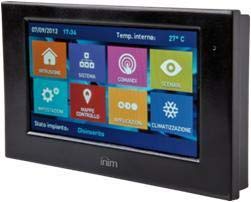
Imej ini menunjukkan bahagian hadapan view of the INIM Alien/SN Touchscreen User Interface, featuring its sleek black design and the 4.3-inch display.
Persediaan
Follow these steps for the initial setup of your INIM Alien/SN Touchscreen User Interface.
1. Memasang Peranti:
- Pilih Lokasi: Choose a suitable wall location, ensuring it is within reach of the necessary electrical cabling and i-bus connection.
- Sediakan Pendawaian: Ensure all power and i-bus wiring is safely routed to the mounting location.
- Pemasangan Selamat: Use appropriate wall-mounting hardware to securely attach the device's backplate or mounting bracket to the wall.
- Sambungan Pendawaian: Connect the electrical power cable and i-bus communication cables to the designated terminals on the device. Refer to the wiring diagram provided with your i-bus system documentation for specific connections.
- Lampirkan Peranti: Carefully attach the touchscreen unit to the mounted backplate, ensuring it clicks securely into place.
2. Pengaktifan Awal:
- Once mounted and wired, apply power to the device. The touchscreen should illuminate.
- Follow any on-screen prompts for initial configuration, such as language selection or network settings.
3. SD Card and USB:
- The included SD card is typically used for firmware updates, configuration backups, or data logging. Insert it into the designated slot if not already pre-installed.
- The USB interface can be used for direct connection to a computer for advanced configuration or diagnostics using INIM software.
Arahan Operasi
The INIM Alien/SN features an intuitive touchscreen interface for easy navigation and control.
1. Touchscreen Navigation:
- Ketik: Lightly touch the screen to select icons, buttons, or menu items.
- Leret: Drag your finger across the screen to scroll through lists or switch between screens.
- Penderia Kehampiran: The screen may automatically activate or adjust brightness when you approach it.
2. Kawalan Sistem:
- Access various functions of your i-bus system, such as arming/disarming security zones, viewing system status, or controlling connected devices.
- Specific menu structures and options will depend on your i-bus system configuration.
3. Audio Functions:
- The integrated microphone and speaker allow for two-way audio communication, typically used for intercom functions or alarm verification within the i-bus system.
- Adjust volume settings through the on-screen menu.
4. Pemantauan Suhu:
- The ambient temperature sensor displays the current room temperature.
- If configured as a thermostat, you can view and adjust temperature setpoints for HVAC systems directly from the interface.
Penyelenggaraan
Regular maintenance ensures the longevity and optimal performance of your touchscreen user interface.
Pembersihan:
- Skrin: Gunakan kain lembut dan tidak berbulu sedikit dampdibilas dengan air atau pembersih skrin yang tidak kasar. Jangan sembur pembersih terus ke skrin.
- Casing: Lap plastik casindengan kain lembut dan kering. Elakkan bahan kimia yang keras atau bahan yang melelas.
Kemas Kini Perisian:
- Periodically check the INIM Electronics website or consult your system installer for available firmware updates.
- Updates can be applied via the USB interface or by loading files onto the SD card, as per specific instructions provided with the update.
Menyelesaikan masalah
If you encounter issues with your INIM Alien/SN, refer to the following common problems and solutions.
Peranti Tidak Dihidupkan:
- Semak Sambungan Kuasa: Ensure the electrical cable is securely connected and receiving power.
- Verify i-bus Connection: Confirm the i-bus communication cable is properly connected, as some systems draw power through this connection.
- Pemutus litar: Check your building's circuit breaker for any tripped circuits.
Skrin sentuh Tidak Responsif:
- Mulakan semula Peranti: If possible, power cycle the device by temporarily disconnecting and reconnecting its power source.
- Skrin Bersih: Ensure the screen is clean and free of dirt or moisture that might interfere with touch detection.
No Audio from Speaker/Microphone:
- Tetapan Kelantangan: Check the on-screen volume settings to ensure they are not muted or set too low.
- Konfigurasi Sistem: Verify that audio functions are enabled and correctly configured within your i-bus system settings.
For persistent issues, contact your system installer or INIM Electronics technical support.
Spesifikasi
| Ciri | Spesifikasi |
|---|---|
| Pengeluar | INIM Electronics |
| Nombor Model | 8050617014619 |
| Jenis Paparan | Skrin sentuh 4.3 inci |
| warna | Hitam |
| bahan | plastik |
| Sumber Kuasa | Kabel Elektrik |
| Ketersambungan | USB |
| Ciri Khas | Integrated Microphone, Ambient Temperature Sensor, Proximity Sensor |
| Komponen yang Disertakan | Kad SD |
| Jenis Pemasangan | Lekap di dinding |
| Dimensi Produk | 15 x 10 x 3 cm |
| Berat Produk | 250 gram |
Waranti dan Sokongan
For warranty information, please refer to the documentation provided by your retailer or visit the official INIM Electronics webtapak. Terma dan syarat jaminan mungkin berbeza mengikut wilayah dan lokasi pembelian.
For technical support, assistance with installation, or troubleshooting beyond the scope of this manual, please contact your authorized INIM Electronics dealer or system installer. You may also find additional resources and contact information on the official INIM Electronics webtapak.
Webtapak: www.inim.biz (Please note: This is a generic placeholder for the manufacturer's website. Verify the correct URL if available.)


