pengenalan
This manual provides instructions for the safe and efficient operation of your Axess MS3912 Mini Entertainment System. Please read this manual thoroughly before using the device and retain it for future reference.
Ciri-ciri Utama:
- Radio AM/FM
- Pemain Kaset dan Perakam
- Pemain CD
- Port USB untuk Main Semula MP3
- Input Bantu
- Bicu Fon Kepala
- Portable/Detachable Speakers
- Alat Kawalan Jauh
- AC/DC Power Operation
Maklumat Keselamatan
AMARAN:
Produk ini mengandungi bahan kimia yang diketahui oleh Negeri California untuk menyebabkan kanser dan kecacatan kelahiran atau bahaya pembiakan lain.
Sentiasa ikuti langkah berjaga-jaga keselamatan asas apabila menggunakan peralatan elektrik untuk mengurangkan risiko kebakaran, renjatan elektrik dan kecederaan diri.
- Jangan dedahkan perkakas ini kepada hujan atau lembapan.
- Jangan sekat sebarang bukaan pengudaraan.
- Pastikan voltage supply (AC 120V/60Hz for US models, check local specifications).
- Do not open the unit's casing; merujuk semua perkhidmatan kepada kakitangan yang berkelayakan.
- Jauhkan unit daripada sumber haba, cahaya matahari langsung dan medan magnet yang kuat.
- Cabut palam unit semasa ribut petir atau apabila tidak digunakan untuk tempoh yang lama.
Kandungan Pakej
Sahkan bahawa semua item yang disenaraikan di bawah disertakan dalam pakej anda:
- Axess MS3912 Main Unit
- Detachable Speakers (2)
- Alat Kawalan Jauh
- Kord Kuasa AC
- Manual Pengguna (dokumen ini)
Kawalan dan Sambungan
Familiarize yourself with the various controls and connection points on your MS3912 system.
Kawalan Panel Hadapan
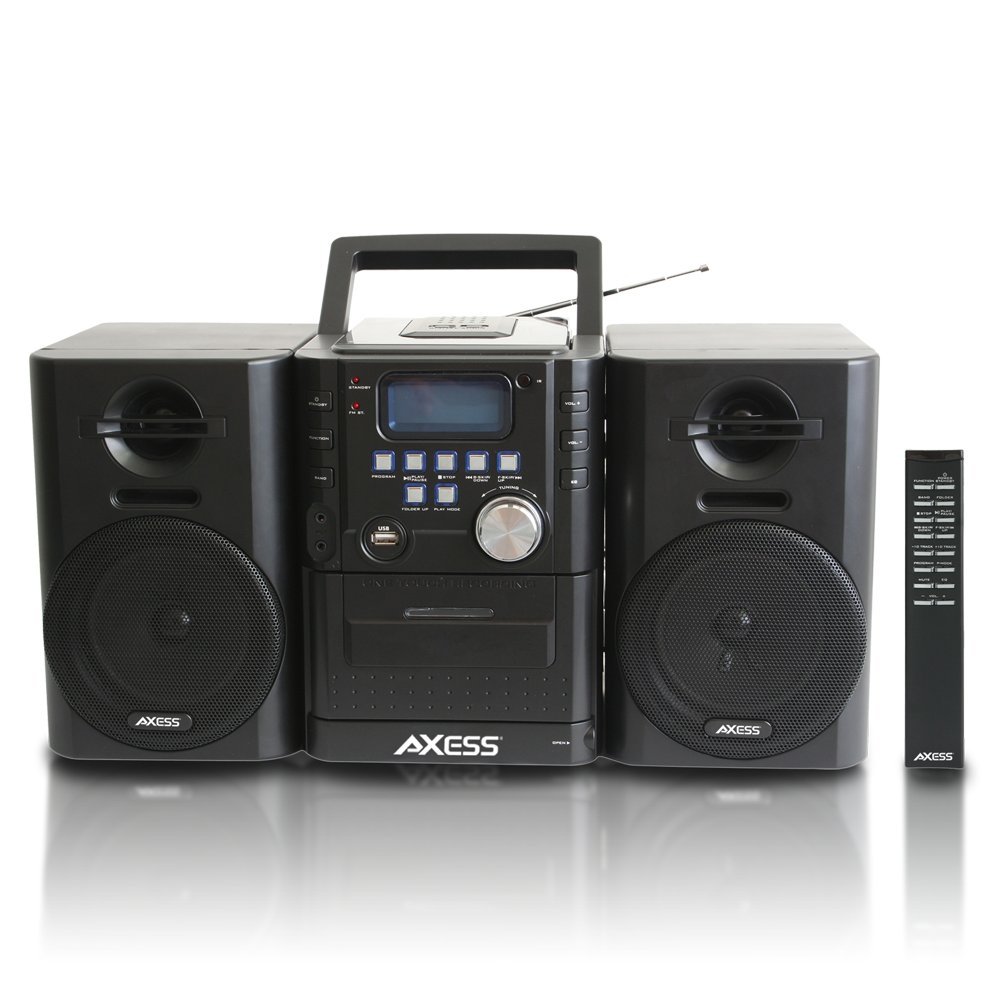
Imej: Depan view of the Axess MS3912 Mini Entertainment System, showing the central unit with display, control buttons, USB port, CD tray, cassette deck, and two detachable speakers. A remote control is also visible on the right.
- Butang STANDY: Menghidupkan atau mematikan unit.
- Butang FUNGSI: Selects between CD, USB, TAPE, AUX, and RADIO modes.
- Butang BAND: In Radio mode, switches between AM and FM bands.
- Butang PROGRAM: Used for programming CD/USB tracks.
- Butang PLAY/PAUSE: Starts or pauses playback for CD, USB, or Cassette.
- Butang STOP: Menghentikan main balik.
- Butang SKIP/CARI (<< / >>): Melangkau trek atau maju pantas/putar balik.
- FOLDER UP / PLAY MODE Buttons: Navigates folders on USB or changes play mode.
- Tombol VOLUME: Melaraskan tahap output audio.
- Port USB: Connects USB flash drives for MP3 playback.
- PC/AUX IN Jack: Menyambung peranti audio luaran.
- Bicu FON FON: Connects headphones for private listening.
- Ruang CD: Pemain CD muat atas.
- Dek Kaset: Front-loading cassette player/recorder.
- paparan: Shows current function, track number, radio frequency, etc.
Sambungan Panel Belakang

Imej: Belakang view of the Axess MS3912 Mini Entertainment System, showing the FM antenna, battery compartment, AC power input, and speaker connection jacks.
- Antena FM: Extend for optimal FM reception.
- Bicu pembesar suara: Sambungkan pembesar suara kiri dan kanan.
- Input Kuasa AC: Sambungkan kord kuasa AC.
- Petak Bateri: Holds batteries for portable operation.
Persediaan
1. Menyambung Pembesar Suara
Connect the speaker wires from the detachable speakers to the corresponding speaker jacks on the rear of the main unit. Ensure the polarity (+/-) matches for optimal sound quality.
2. Menghidupkan Unit
Operasi Kuasa AC:
Insert the AC power cord into the AC power input jack on the rear of the unit, then plug the other end into a standard wall outlet (AC 120V/60Hz).
DC (Battery) Power Operation:
Open the battery compartment cover on the rear of the unit. Insert the required number of C-size batteries (not included), ensuring correct polarity. Close the battery compartment cover securely. The unit will automatically switch to battery power when AC power is disconnected.
3. Persediaan Antena
For FM radio reception, fully extend the telescopic FM antenna. For AM reception, the unit has a built-in AM antenna, which may require rotating the unit for best reception.
Arahan Operasi
1. Hidupkan/Mati Kuasa
Tekan ke STANDBY butang pada panel hadapan atau alat kawalan jauh untuk menghidupkan atau mematikan unit.
2. Pemilihan Fungsi
Tekan ke FUNGSI button repeatedly to cycle through the available modes: CD, USB, TAPE, AUX, and RADIO.
3. Operasi Pemain CD
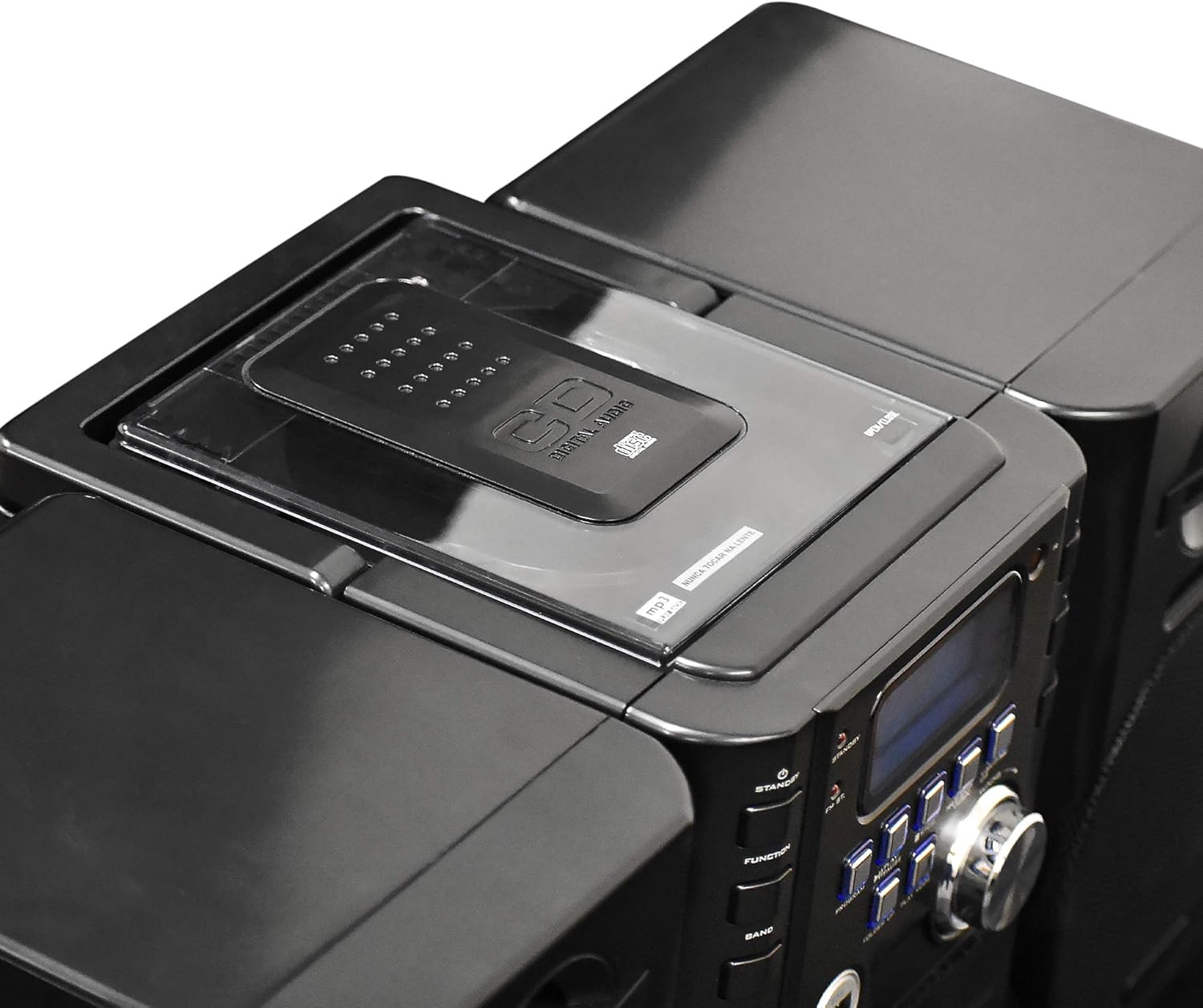
Imej: Atas view of the Axess MS3912 Mini Entertainment System, showing the transparent lid of the top-loading CD compartment.
- Tekan FUNGSI to select CD mode.
- Buka penutup petak CD.
- Letakkan CD dengan bahagian label menghadap ke atas.
- Close the CD compartment cover. The unit will read the disc.
- Tekan MAIN/JEDA untuk memulakan main balik.
- Gunakan Langkau / CARI butang untuk menavigasi trek.
- Tekan BERHENTI untuk menamatkan main balik.
4. USB/MP3 Player Operation

Imej: Sisi view of the Axess MS3912 Mini Entertainment System, highlighting the USB port and PC/AUX IN jack on the central unit.
- Masukkan pemacu kilat USB ke dalam port USB.
- Tekan FUNGSI untuk memilih mod USB.
- Unit ini akan mula memainkan MP3 secara automatik files daripada pemacu USB.
- guna MAIN/JEDA, BERHENTI, dan Langkau / CARI butang untuk kawalan.
- guna FOLDER KE ATAS to navigate between folders on the USB drive.
5. Operasi Pemain Kaset / Perakam
- Tekan FUNGSI to select TAPE mode.
- Open the cassette deck door and insert a cassette tape.
- Tekan MAIN/JEDA untuk memulakan main balik.
- Gunakan CEPAT KE HADAPAN dan REWIND buttons (often combined with SKIP/SEARCH buttons) to move through the tape.
- Tekan BERHENTI untuk menamatkan main balik.
- Rakaman: To record from CD, USB, or Radio, select the desired source, then press the REKOD button on the cassette deck (if available, or a combination of PLAY and RECORD). Ensure a blank, recordable cassette is inserted.
6. Operasi Radio AM/FM
- Tekan FUNGSI untuk memilih mod RADIO.
- Tekan BAND to select AM or FM.
- Gunakan MENALA tombol atau Langkau / CARI butang untuk menala ke stesen yang anda inginkan.
- For FM, extend the telescopic antenna. For AM, rotate the unit for best reception.
- Pratetap Stesen: Tune to a station, press PROGRAM, kemudian gunakan Langkau / CARI untuk memilih nombor pratetap, dan tekan PROGRAM sekali lagi untuk berjimat.
7. Auxiliary Input (AUX) Use
Sambungkan peranti audio luaran (cth., telefon pintar, pemain MP3) ke PC/AUX IN jack using a 3.5mm audio cable (not included). Press FUNGSI to select AUX mode. Audio from the external device will play through the MS3912 speakers.
8. Penggunaan Fon Kepala
Pasangkan fon kepala 3.5mm standard ke dalam Fon kepala jack for private listening. The speakers will automatically mute when headphones are connected.
9. Alat Kawalan Jauh
The included remote control allows for convenient operation of most functions from a distance. Ensure batteries are correctly inserted into the remote control.
Penyelenggaraan
Membersihkan Unit
Wipe the exterior of the unit with a soft, dry cloth. Do not use abrasive cleaners, waxes, or solvents. For the CD lens, use a specialized CD lens cleaner disc. For the cassette deck, use a head cleaning cassette.
Penyimpanan
If storing the unit for an extended period, remove all batteries to prevent leakage. Store in a cool, dry place away from direct sunlight and extreme temperatures.
Menyelesaikan masalah
| Masalah | Kemungkinan Punca | Penyelesaian |
|---|---|---|
| Tiada kuasa | AC cord not plugged in; Batteries depleted or incorrectly inserted. | Periksa sambungan kord AC; Gantikan bateri atau pastikan polariti yang betul. |
| Tiada bunyi | Volume too low; Headphones connected; Speakers not connected properly; Incorrect function selected. | Increase volume; Disconnect headphones; Check speaker connections; Select correct function (CD, USB, TAPE, AUX, RADIO). |
| CD melangkau atau tidak dimainkan | CD is dirty or scratched; CD inserted incorrectly; Unit is vibrating. | Clean CD with a soft cloth; Reinsert CD label side up; Place unit on a stable surface. |
| Penerimaan radio yang lemah | FM antenna not extended; Unit position for AM is poor; Interference. | Fully extend FM antenna; Rotate unit for better AM reception; Move unit away from other electronic devices. |
| USB tidak dimainkan | Pemacu USB tidak diformat dengan betul; Tidak serasi file types; USB drive not inserted fully. | Pastikan USB adalah format FAT32; Hanya MP3 files are supported; Reinsert USB drive. |
| Cassette recording not working | Tape is write-protected; No blank tape inserted; Incorrect source selected. | Check tape's write-protect tab; Insert a blank, recordable tape; Select the desired audio source (CD, USB, Radio, AUX). |
Spesifikasi
| Ciri | Spesifikasi |
|---|---|
| Nombor Model | MS3912 |
| Jenama | AXESS |
| Output Kuasa | Pembesar Suara 12W |
| Sumber Kuasa | AC 120V/60Hz or DC (C-size batteries, not included) |
| Frekuensi Radio | AM/FM |
| Media yang Disokong | CD, MP3 (via USB), Cassette Tape |
| Input | USB Port, 3.5mm AUX Input |
| Keluaran | Bicu Fon Kepala 3.5mm |
| Dimensi (L x W x H) | 43.82 x 21.59 x 24.13 sm (lebih kurang 17.25 x 8.5 x 9.5 inci) |
| Berat badan | 3.88 kg (8.55 lb lebih kurang) |


