1. Pengenalan
The HP USB Slim Business Keyboard is designed to provide efficient data entry and seamless connectivity for your HP Business PCs. This full-sized keyboard offers a comfortable and productive typing experience, optimized for use across multiple operating systems.
Ciri-ciri utama termasuk:
- 3 indicator lights for Caps Lock, Num Lock, and Scroll Lock.
- Integrated number pad for quick data entry.
- Spill-resistant construction for enhanced durability.
- Adjustable legs for customizable typing angles.
- Full-size 104-key layout, including Windows, Function, and Page Keys.
- Quiet key strokes to minimize typing noise.
- Plug-and-play USB connectivity for instant setup.

Rajah 1.1: Bersudut view of the HP USB Slim Business Keyboard, showcasing pro slimnyafile and full layout with the attached USB cable.
2. Panduan Persediaan
Setting up your HP USB Slim Business Keyboard is a straightforward process due to its plug-and-play design.
2.1 Menyambung Papan Kekunci
- Cari port USB yang tersedia pada komputer anda.
- Masukkan penyambung USB papan kekunci dengan kuat ke dalam port USB.
- Your operating system will automatically detect and install the necessary drivers. This process typically takes a few seconds.
- Once installed, the keyboard is ready for immediate use.
2.2 Melaraskan Sudut Papan Kekunci
For optimal comfort, you can adjust the typing angle of your keyboard:
- Flip the keyboard over to reveal the two adjustable legs located at the top corners of the underside.
- Gently pull out the legs to raise the back of the keyboard, providing a slight incline.
- Push the legs back in to return the keyboard to a flat position.

Rajah 2.1: Sisi view of the keyboard illustrating its slim profile and the adjustable leg extended for an inclined typing position.
3. Mengendalikan Papan Kekunci
The HP USB Slim Business Keyboard provides a standard 104-key layout for efficient and familiar typing.
3.1 Key Layout and Functions
The keyboard features a full QWERTY layout, a dedicated numeric keypad, and function keys (F1-F12) that may have secondary functions depending on your operating system and installed software.
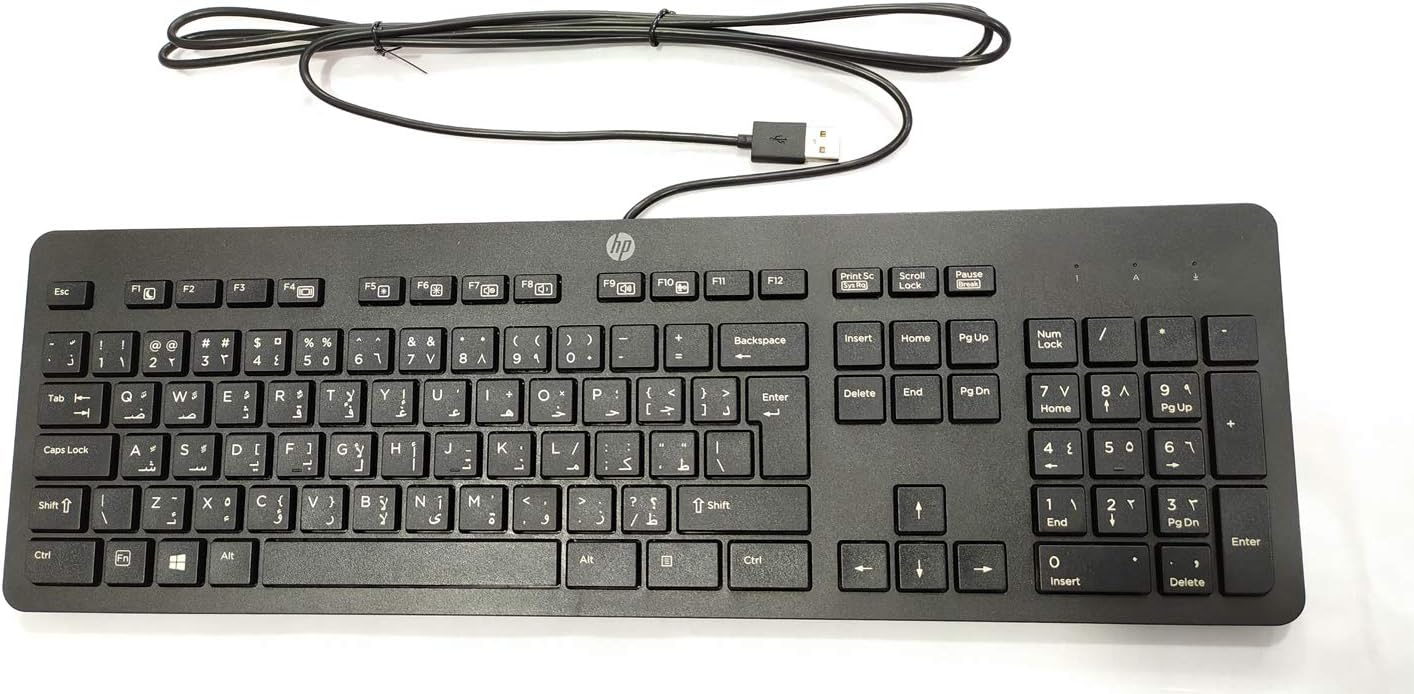
Rajah 3.1: Atas-bawah view of the keyboard, highlighting the full 104-key layout including the numeric keypad and function keys.
3.2 Lampu Penunjuk
Three LED indicator lights are located above the numeric keypad:
- Kunci nombor: Illuminates when the numeric keypad is active. Press the "Num Lock" key to toggle on/off.
- Caps Lock: Illuminates when Caps Lock is active, indicating that all typed letters will be uppercase. Press the "Caps Lock" key to toggle on/off.
- Kunci Tatal: Illuminates when Scroll Lock is active. Its function varies by application but is rarely used in modern operating systems.
3.3 Keserasian Pelbagai OS
This keyboard is designed to interact seamlessly with various operating systems, including Windows 10 and other compatible systems. Standard keyboard functions will operate without additional software installation.
4. Penyelenggaraan dan Penjagaan
Proper care will extend the life and maintain the performance of your HP USB Slim Business Keyboard.
4.1 Arahan Pembersihan
- Putuskan sambungan papan kekunci daripada komputer anda sebelum membersihkan.
- Gunakan kain lembut yang tidak berbulu dampdisapu dengan air atau larutan pembersih yang lembut dan tidak melelas.
- Wipe the keycaps and keyboard surface gently. Avoid excessive moisture.
- Untuk habuk dan serpihan di antara kunci, gunakan udara termampat.
- Pastikan papan kekunci benar-benar kering sebelum menyambungkannya semula ke komputer anda.
4.2 Spill Resistance
The keyboard features spill-resistant construction. While designed to withstand minor spills, it is not waterproof. In case of a liquid spill:
- Putuskan sambungan papan kekunci dari komputer anda dengan segera.
- Terbalikkan papan kekunci untuk membolehkan cecair mengalir keluar.
- Lap permukaan kering dengan kain bersih.
- Allow the keyboard to air dry completely for several hours (or overnight) before reconnecting.
5. Penyelesaian masalah
Jika anda menghadapi masalah dengan papan kekunci anda, rujuk langkah penyelesaian masalah biasa berikut:
| Masalah | Kemungkinan Punca / Penyelesaian |
|---|---|
| Papan kekunci tidak bertindak balas. |
|
| Certain keys are not working. |
|
| Indicator lights (Num Lock, Caps Lock) are not working. |
|
| Keyboard input is delayed or erratic. |
|
6. Spesifikasi
| Jenama | HEWLETT PACKARD |
| Nombor Model | 803181 |
| Teknologi Ketersambungan | USB (Berwayar) |
| Jenis Peranti | papan kekunci |
| warna | Hitam |
| Berat Barang | 7.2 auns (lebih kurang 204 gram) |
| Dimensi Produk (LxWxH) | 18 x 6.6 x 1.1 inci (lebih kurang 45.7 x 16.8 x 2.8 cm) |
| Bilangan Kunci | 104 |
| Keserasian Sistem Pengendalian | Windows 10 (optimized for multiple operating systems) |
| Ciri Khas | Ergonomic, Spill-resistant |
| Apa yang ada dalam Kotak | HP USB Slim Business Keyboard, USB Cable (integrated) |
7. Waranti dan Sokongan
7.1 Waranti Terhad
The HP USB Slim Business Keyboard comes with a one-year limited warranty. This warranty covers defects in materials and workmanship under normal use. Please retain your proof of purchase for warranty claims.
7.2 Sokongan Pelanggan
For technical assistance, warranty service, or additional product information, please visit the official HP support website or contact HP customer service. Refer to your product packaging or HP's official webtapak untuk maklumat hubungan terkini dan sumber sokongan.
Note: Specific support contact details may vary by region.


