1. Pengenalan
Thank you for choosing the SPYPOINT FORCE-11D Ultra Compact Trail Camera. This manual provides detailed instructions for setting up, operating, maintaining, and troubleshooting your camera to ensure optimal performance. The FORCE-11D is designed for capturing high-quality images and videos in various outdoor conditions.
Key features of the SPYPOINT FORCE-11D include:
- 11MP photo resolution and HD video recording with sound.
- 42 low glow LEDs for enhanced night imaging with a 100' flash range.
- Ultra-fast 0.07-second trigger speed, one of the fastest on the market.
- Blur Reduction and Infrared Boost technologies for clear images.
- 80' detection distance with a curved motion sensor lens.
- Multi-shot, time-lapse, and continuous camera modes.
- Integrated 2-inch viewing screen for easy setup and photo review.
2. Produk Lebihview
Familiarize yourself with the components of your SPYPOINT FORCE-11D camera.
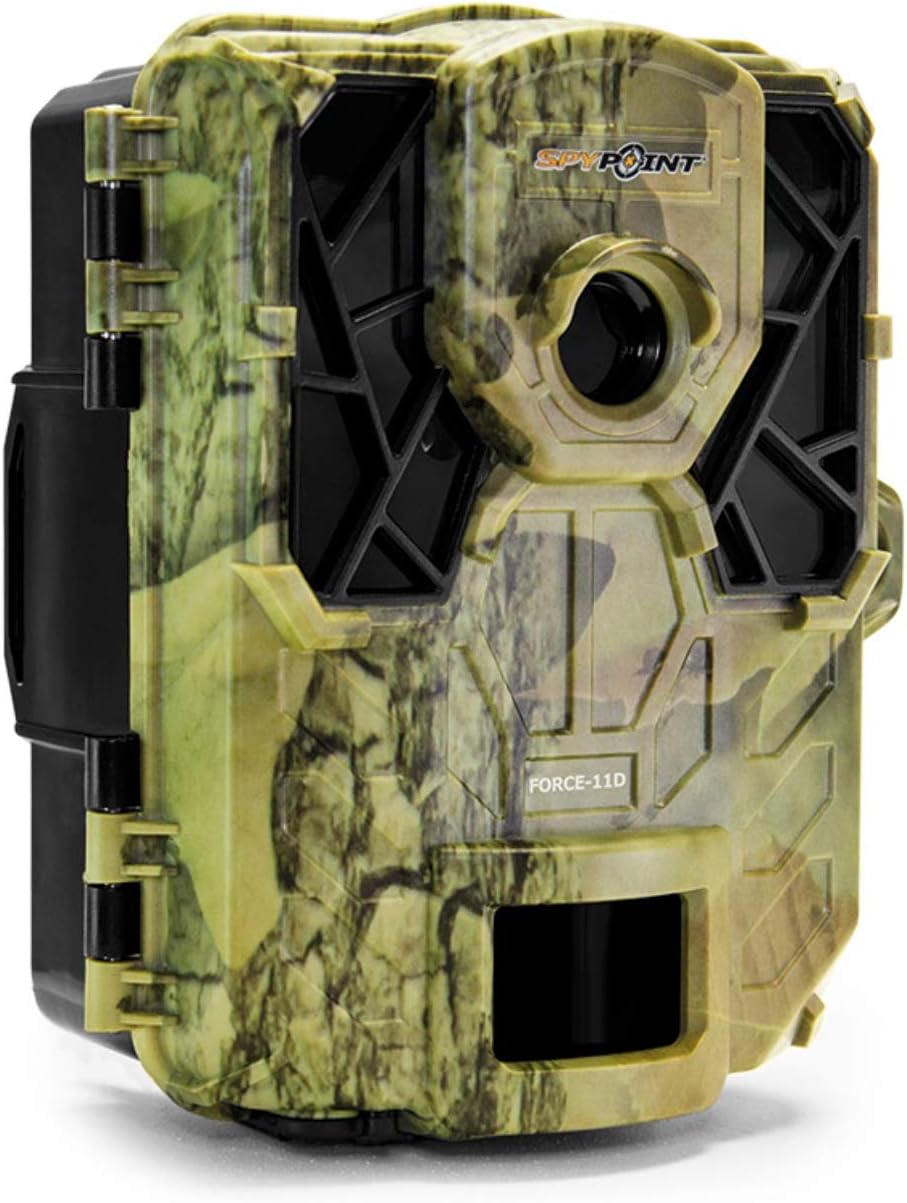
Rajah 2.1: Depan view of the SPYPOINT FORCE-11D trail camera, showing the camouflage casing, lens, and infrared LEDs.

Rajah 2.2: Di dalam view of the SPYPOINT FORCE-11D trail camera when opened, revealing the control panel, 2-inch viewing screen, battery compartments, and SD card slot.
Dalam Kotak:
- SPYPOINT FORCE-11D Trail Camera
- Pendakap Pemasangan
- Panduan Mula Pantas
- Tali Pemasangan
Items Not Included (Required for Operation):
- 6 AA Batteries (Alkaline or Lithium recommended)
- SD/SDHC Memory Card (up to 32GB, Class 10 recommended)
3. Persediaan dan Pemasangan
3.1. Pemasangan Bateri
- Buka kamera casing dengan membuka selak klip sisi.
- Locate the battery compartments.
- Masukkan 6 bateri AA, pastikan kekutuban (+/-) betul seperti yang ditunjukkan di dalam petak.
- Tutup penutup petak bateri dengan selamat.
3.2. Pemasangan Kad SD
- With the camera open, locate the SD card slot, typically near the viewskrin masuk.
- Insert an SD/SDHC memory card (up to 32GB) into the slot until it clicks into place. Ensure the card is inserted in the correct orientation.
- Untuk mengeluarkannya, tekan kad perlahan-lahan sehingga ia terkeluar.
3.3. Memasang Kamera
- Select a suitable location for your camera, such as a tree or post, ensuring a clear view daripada kawasan yang dikehendaki.
- Use the provided mounting strap to secure the camera. Thread the strap through the slots on the back of the camera and around the mounting surface.
- Tighten the strap firmly to prevent camera movement.
- Adjust the camera's angle to optimize the detection area. The curved motion sensor lens improves detection angle and distance.
4. Arahan Operasi
4.1. Menghidupkan/Mematikan
- Untuk Menghidupkan: Tekan ke OK button. The screen will illuminate.
- Untuk Mematikan: Tekan dan tahan butang OK butang selama 2 saat.
4.2. Menavigasi Menu
Gunakan butang anak panah (UP, TURUN, KIRI, BETUL) to navigate through menu options on the 2-inch viewing screen. Press OK untuk mengesahkan pilihan.
4.3. Setting Camera Modes
The FORCE-11D supports various capture modes:
- Mod Foto: Captures still images (11MP).
- Mod Video: Records HD video with sound.
- Multi-shot Mode: Captures multiple photos per trigger (up to 6 shots).
- Mod Selang Masa: Menangkap imej pada selang masa yang ditetapkan tanpa mengira gerakan.
- Mod Berterusan: Records continuously for a set duration.
Refer to the on-screen menu for specific settings related to each mode, including resolution, delay, and length.
4.4. ViewFoto dan Video
2 inci viewing screen allows you to review captured media directly on the camera. Navigate to the playback mode using the menu and use the arrow buttons to browse through files.
5. Penyelenggaraan
- Pembersihan: Gunakan kain lembut dan kering untuk membersihkan kanta kamera dan perumah. Elakkan pembersih atau pelarut yang melelas.
- Penggantian Bateri: Replace batteries when the low battery indicator appears on the screen or when performance degrades. Always use fresh batteries of the same type.
- Pengurusan Kad SD: Regularly format your SD card using the camera's menu option to ensure optimal performance and prevent data corruption. Back up important files sebelum memformat.
- Storan: When not in use for extended periods, remove batteries and store the camera in a cool, dry place away from direct sunlight.
6. Penyelesaian masalah
| Masalah | Kemungkinan Punca | Penyelesaian |
|---|---|---|
| Kamera tidak dihidupkan. | Bateri mati atau tidak dipasang dengan betul. | Periksa kekutuban bateri. Gantikan dengan bateri baharu. |
| No photos/videos recorded. | SD card full, corrupted, or not inserted correctly; incorrect settings; no motion detected. | Format or replace SD card. Check camera mode and sensitivity settings. Ensure camera is placed within detection range. |
| Poor night images. | Objects too close/far; IR Boost not enabled; low battery. | Ensure subjects are within 100' flash range. Check IR Boost setting. Replace batteries. |
| Gambar kabur. | Camera movement; subject movement; lens dirty. | Securely mount the camera. Ensure Blur Reduction is active. Clean the lens. |
7. Spesifikasi
| Ciri | Perincian |
|---|---|
| Nama Model | FORCE-11D |
| Resolusi Foto | 11 Megapiksel |
| Resolusi Video | 720 Pixels (HD) |
| Kecepatan Pencetus | 0.07 saat |
| Julat Denyar | 100 kaki (30 meter) |
| Jarak Pengesanan | 80 kaki (24 meter) |
| LED | 42 low glow LEDs |
| Skrin Paparan | 2 inci viewskrin masuk |
| Sokongan Kad Memori | SD/SDHC up to 32GB (not included) |
| Sumber Kuasa | 6 bateri AA (tidak termasuk) |
| Dimensi (L x W x H) | 12.7 x 8.3 x 10.2 cm (lebih kurang 5 x 3.25 x 4 inci) |
| Berat badan | 255 g (lebih kurang 0.56 lbs) |
| warna | penyamaran |
8. Waranti dan Sokongan
SPYPOINT offers a Waranti 2 tahun on trail cameras. For complete details regarding warranty coverage and terms, please refer to the official SPYPOINT webtapak atau hubungi sokongan pelanggan.
For technical assistance, troubleshooting beyond this manual, or warranty claims, please contact SPYPOINT customer support through their official channels. Keep your proof of purchase for warranty validation.
Sumber Dalam Talian:
- Official SPYPOINT Webtapak: www.spypoint.com (for complete details and support)


