1. Produk Lebihview
The STANLEY SurgeQuad AC and USB Wall Tap, Model 33202, is designed to expand a standard 2-outlet, 3-prong grounded wall outlet into a versatile power station. It provides four grounded AC outlets and two USB charging ports, along with surge protection for connected devices.
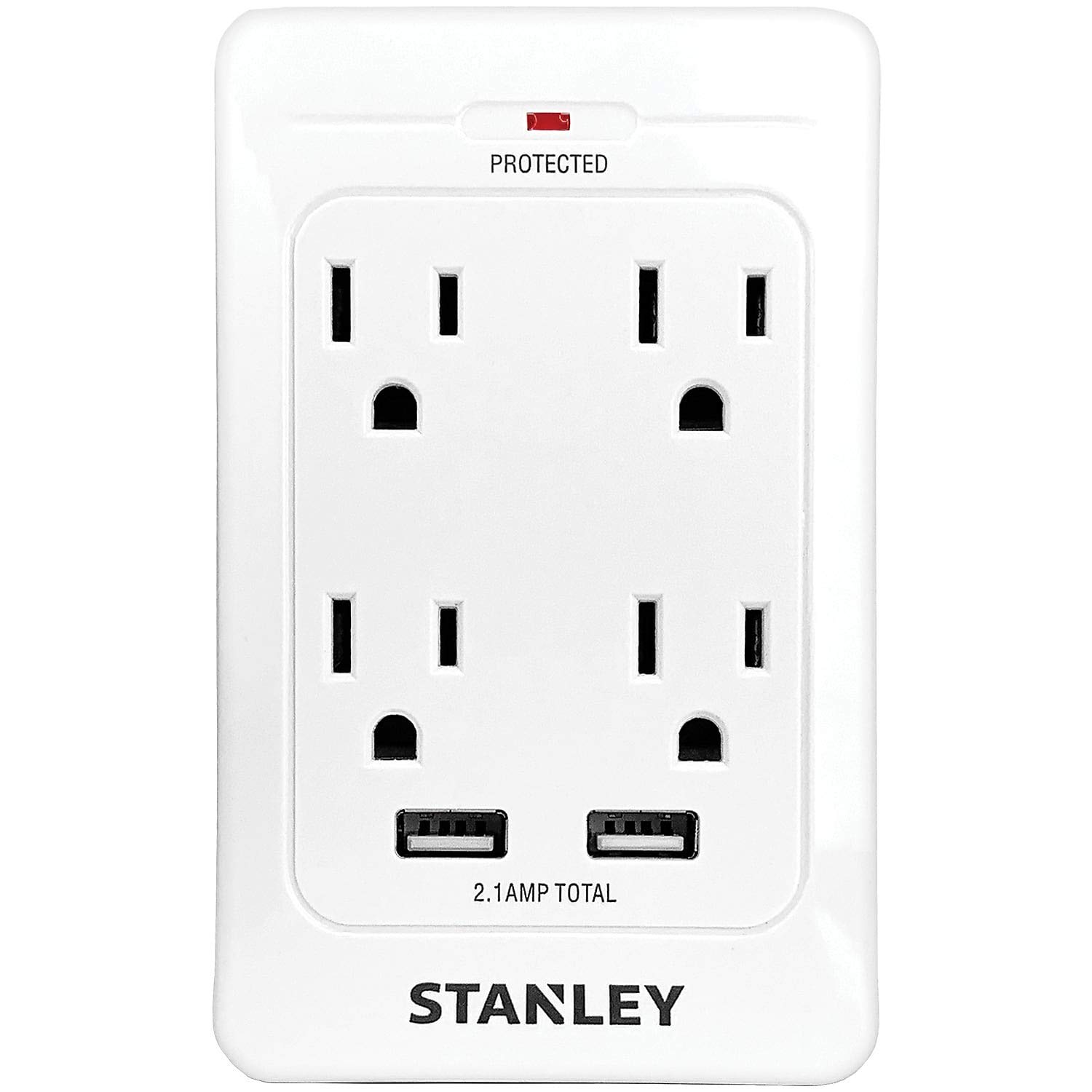
Imej 1: Depan view of the STANLEY SurgeQuad AC and USB Wall Tap, highlighting its multiple outlets and ports.
Ciri-ciri Utama:
- Converts a standard grounded wall outlet into 4 grounded AC outlets.
- Includes 2 USB charging ports (2.1 amps shared output).
- Provides 1,080 Joules of surge protection.
- Features a surge-protection LED indicator.
- Rated for 125-volt AC, 60 Hz, 15 amps, and 1,875 watts.
2. Maklumat Keselamatan
- Risiko Renjatan Elektrik: Do not open the device. No user-serviceable parts inside.
- Penggunaan Dalaman Sahaja: This product is intended for indoor use in dry locations only. Do not expose to moisture or wet conditions.
- Pembumian yang betul: Ensure the wall outlet is properly grounded before plugging in the SurgeQuad.
- Perlindungan Lebihan: Do not exceed the electrical ratings of the SurgeQuad (15 Amps, 1875 Watts). Overloading can cause damage or fire.
- Kanak-kanak dan Haiwan Kesayangan: Jauhkan daripada kanak-kanak dan haiwan peliharaan.
- Peralatan Perubatan: Not for use with life support or other medical equipment.
- Pemeriksaan: Inspect the product for any damage before each use. Do not use if damaged.
3. Persediaan
- Identify Outlet: Locate a standard 2-outlet, 3-prong grounded wall outlet.
- Pasangkan: Align the prongs of the STANLEY SurgeQuad with the wall outlet and firmly push it into place. Ensure it is securely seated.
- Sahkan Perlindungan Lonjakan: Once plugged in, the surge-protection LED indicator on the unit should illuminate, confirming that the surge protection feature is active.
The SurgeQuad is designed to plug directly into an existing duplex outlet. No additional wiring or tools are required for installation.
4. Arahan Operasi
Menggunakan Soket AC:
- Plug your electronic devices into any of the four grounded AC outlets on the SurgeQuad.
- Ensure that the total power draw of all connected devices does not exceed 1875 watts (15 amps at 125 volts).
Menggunakan Port Pengecasan USB:
- Connect your USB-powered devices (e.g., smartphones, tablets) to the two USB charging ports using appropriate USB cables.
- The two USB ports share a total output of 2.1 amps. If charging multiple devices, the current will be distributed between them.
The surge protection feature continuously monitors the power supply to protect connected devices from voltage lonjakan.
5. Penyelenggaraan
- Pembersihan: Disconnect the SurgeQuad from the wall outlet before cleaning. Wipe the exterior with a soft, dry cloth. Do not use liquid cleaners or abrasive materials.
- Pemeriksaan: Periodically inspect the unit for any signs of damage, such as cracks in the casing or loose connections. If damage is observed, discontinue use.
- Tiada Bahagian Boleh Diservis Pengguna: The SurgeQuad contains no user-serviceable parts. Do not attempt to open or repair the unit.
6. Penyelesaian masalah
Surge-Protection LED Not Lit:
- Semak Kuasa: Ensure the SurgeQuad is firmly plugged into a live, grounded wall outlet.
- Perlindungan Lonjakan Tamat: If the LED does not light up after confirming power, it may indicate that the surge protection components have absorbed a significant surge and are no longer providing protection. In this case, the unit should be replaced. The AC outlets may still provide power, but without surge protection.
Devices Not Receiving Power/Charging:
- Semak Sambungan: Ensure all device plugs and USB cables are securely connected to the SurgeQuad.
- Verify Wall Outlet: Uji alur keluar dinding dengan peranti lain untuk mengesahkan ia membekalkan kuasa.
- Lebihan beban: Disconnect some devices to check if the unit is overloaded. The total wattage for AC outlets should not exceed 1875W. For USB, ensure the combined draw does not exceed 2.1A.
- Fungsi Peranti: Test the device directly in a known working wall outlet or USB charger to rule out a device malfunction.
7. Spesifikasi
| Nombor Model | 33202 |
| Voltage | 125 Voltan AC |
| Kekerapan | 60 Hz |
| Amppemadam | 15 Amps |
| Wattage | 1875 Watt |
| Perlindungan Lonjakan | 1,080 Joule |
| Output USB | 2.1 Amps (shared) |
| Dimensi Produk | 9 x 6 x 1.8 inci |
| Berat Barang | 6.4 auns |
| warna | putih |
| Format Palam | Jenis B |
8. Maklumat Waranti
This STANLEY SurgeQuad AC and USB Wall Tap, Model 33202, comes with a Waranti Tiga Tahun Terhad from the date of purchase. This warranty covers defects in materials and workmanship under normal use. It does not cover damage resulting from misuse, abuse, accidents, unauthorized repairs, or modifications.
For warranty claims or further details, please refer to the warranty documentation included with your purchase or contact STANLEY customer support.
9. Sokongan
If you have any questions, require technical assistance, or need to report an issue with your STANLEY SurgeQuad, please contact STANLEY customer support. Contact information can typically be found on the product packaging or the official STANLEY webtapak.
Sila sediakan nombor model produk anda (33202) dan maklumat pembelian semasa menghubungi sokongan.


