1. Pengenalan
The Muse M-192 CR is a versatile clock radio designed to provide reliable timekeeping, alarm functions, and FM radio reception. It features a large, easy-to-read digital display, dual alarms, and convenient functions such as snooze, sleep, and NAP. This manual provides detailed instructions for the proper setup, operation, and maintenance of your device.
2. Arahan Keselamatan
- Baca semua arahan dengan teliti sebelum mengendalikan peranti.
- Jauhkan peranti daripada air atau lembapan.
- Do not block any ventilation openings. Ensure adequate space around the unit for proper airflow.
- Use only the AC adapter supplied with the unit.
- Elakkan daripada mendedahkan peranti kepada suhu yang melampau, cahaya matahari langsung atau kelembapan yang tinggi.
- Jangan cuba membuka atau mengubah suai unit. Rujuk semua servis kepada kakitangan yang berkelayakan.
3. Kandungan Pakej
Sila semak pakej untuk item berikut:
- 1 x Muse M-192 CR Clock Radio
- 1 x AC Adapter
- 1 x Manual Arahan (dokumen ini)
4. Produk Lebihview
Familiarize yourself with the various parts and controls of your Muse M-192 CR Clock Radio.

Rajah 1: Bersudut hadapan view of the Muse M-192 CR Clock Radio, showcasing its large digital display and control buttons.
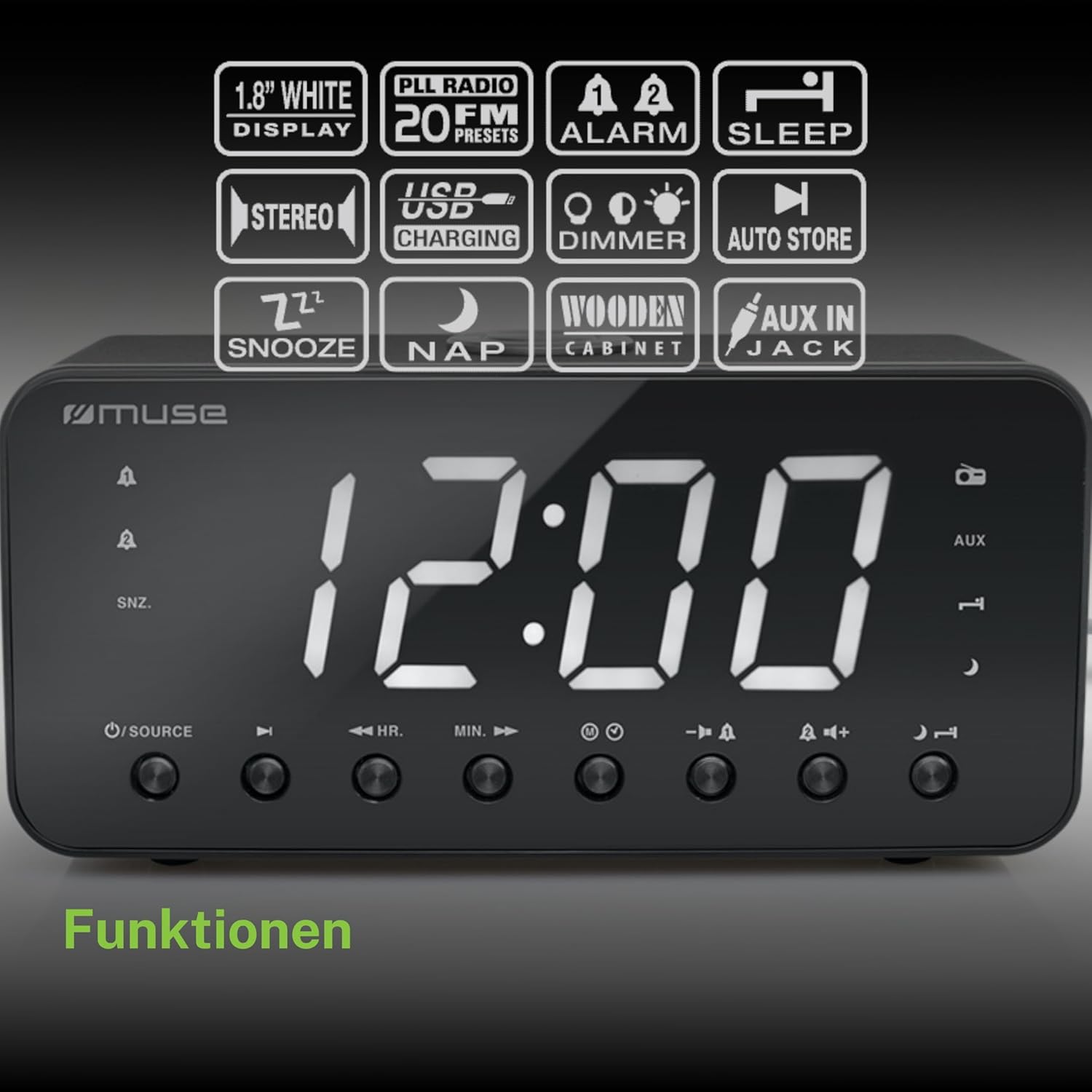
Figure 2: Diagram illustrating the key features and control buttons on the Muse M-192 CR Clock Radio, including the 1.8-inch white display, PLL FM radio with 20 presets, dual alarms, sleep, snooze, NAP functions, USB charging, dimmer, auto store, and AUX input jack.
Kawalan Panel Depan:
- paparan: Large 1.8-inch white LED display for time and status.
- Butang SUMBER: Selects between FM radio and AUX input.
- HR (Hour) Button: Adjusts hour for time and alarm settings.
- MIN (Minute) Button: Adjusts minute for time and alarm settings.
- Butang PENGGERA 1: Sets and activates/deactivates Alarm 1.
- Butang PENGGERA 2: Sets and activates/deactivates Alarm 2.
- Butang TUNDA/DIMMER: Activates snooze during an alarm; adjusts display brightness (High/Low/Off) when not alarming.
- Butang SLEEP: Sets the sleep timer for radio playback.
- NAP Button: Sets a short nap alarm.
- Butang Kelantangan / Turun Kelantangan: Melaraskan kelantangan audio.
Sambungan Panel Belakang:
- AUX IN Jack: Menyambung peranti audio luaran.
- Port Pengecasan USB: Provides power to charge compatible devices.
- DC IN Jack: Connects the AC adapter for power.
- Petak Bateri: Holds backup batteries.
5. Persediaan
5.1 Sambungan Kuasa
- Insert the small plug of the supplied AC adapter into the DC IN jack on the rear of the clock radio.
- Plug the AC adapter into a standard wall outlet. The display will light up.
5.2 Pemasangan Sandaran Bateri
The clock radio requires 2 x 1.5V AAA batteries (not included) for backup power. These batteries maintain the time and alarm settings during a power outage.
- Buka penutup petak bateri di bahagian bawah unit.
- Masukkan dua bateri AAA, perhatikan polariti (+ dan -) yang betul seperti yang ditunjukkan di dalam petak.
- Tutup penutup petak bateri dengan selamat.
Note: Battery backup only preserves settings; the display will not illuminate and alarms will not sound during a power outage if only running on battery backup.
6. Arahan Operasi
6.1 Menetapkan Masa
- In standby mode (when the radio is off), press and hold the MASA DITETAPKAN button (if available, otherwise use HR/MIN directly or a dedicated time set button not explicitly listed but implied by HR/MIN). If no dedicated button, proceed to step 2.
- Tekan ke HR butang untuk menyesuaikan jam.
- Tekan ke MIN butang untuk menyesuaikan minit.
- Release the buttons to confirm the time. The time will automatically set after a few seconds of inactivity.
6.2 Menetapkan Penggera (Penggera 1 & Penggera 2)
The Muse M-192 CR features two independent alarms.
- Tekan dan tahan butang PENGGERA 1 button until the alarm time flashes on the display.
- Gunakan HR dan MIN butang untuk menetapkan masa penggera yang diingini.
- Tekan ke PENGGERA 1 button again to select the alarm source: Buzzer or Radio.
- Tekan ke PENGGERA 1 button a third time to confirm and activate Alarm 1. An alarm icon will appear on the display.
- Ulangi proses untuk PENGGERA 2 menggunakan PENGGERA 2 butang.
To deactivate an alarm, press the corresponding PENGGERA button until its icon disappears from the display.
6.3 Fungsi Tunda
Apabila penggera berbunyi, tekan butang SNOOZE / DIMMER butang untuk menyenyapkan penggera buat sementara waktu. Penggera akan berbunyi semula selepas kira-kira 9 minit.
6.4 Fungsi Tidur
The sleep function allows you to fall asleep to the radio, which will automatically turn off after a set period.
- Semasa radio dimainkan, tekan butang TIDUR butang berulang kali untuk mengitar masa tidur yang tersedia (cth, 90, 60, 30, 15 minit atau MATI).
- Radio akan dimainkan untuk tempoh yang dipilih dan kemudian dimatikan secara automatik.
6.5 NAP Function
The NAP function sets a short alarm for a specified duration.
- Tekan ke NAP button repeatedly to select a nap duration (e.g., 10, 20, 30, 60, 90, 120 minutes, or OFF).
- The alarm will sound after the selected duration.
6.6 Operasi Radio (FM)
- Tekan ke SUMBER butang untuk memilih mod radio FM.
- Tekan dan tahan butang HR or MIN button to automatically scan for the next available station. Briefly press to manually tune.
- Laraskan kelantangan menggunakan Kelantangan Naik/Turun butang.
Menetapkan Pratetap Radio:
The unit supports up to 20 FM radio presets.
- Tune to your desired FM station.
- Tekan dan tahan butang PRESET button (often combined with a number or memory button, if not explicitly labeled, refer to the full manual for specific button). If no dedicated PRESET button, the HR/MIN buttons might serve this function in radio mode.
- Gunakan HR or MIN butang untuk memilih nombor pratetap (P01-P20).
- Tekan ke PRESET button again to save the station.
- To recall a preset, briefly press the PRESET butang dan kemudian gunakan HR or MIN untuk memilih nombor pratetap yang dikehendaki.
6.7 Input AUX
Connect an external audio device (e.g., MP3 player, smartphone) to the AUX IN jack on the rear of the unit using a 3.5mm audio cable (not included).
- Connect one end of the audio cable to your external device's headphone jack.
- Connect the other end to the AUX IN jack on the clock radio.
- Tekan ke SUMBER button to select AUX mode. The display will show "AUX".
- Play audio from your external device. Adjust volume using the clock radio's Kelantangan Naik/Turun buttons and your external device's volume control.
6.8 Pengecasan USB
The USB port on the rear of the unit can be used to charge compatible devices.

Figure 3: The Muse M-192 CR Clock Radio highlighting its jumbo white display and the USB charging port located on the rear of the unit.
- Connect your device's USB charging cable to the USB charging port on the clock radio.
- Ensure the clock radio is powered on.
- Your device should begin charging.
Note: The USB port is for charging only and does not support data transfer or audio playback.
6.9 Dimmer Paparan
Adjust the brightness of the display to suit your preference.
- Dalam mod siap sedia, tekan butang SNOOZE / DIMMER butang berulang kali.
- Cycle through the brightness levels: High, Low, and Off.
7. Penyelenggaraan
- Pembersihan: Lap unit dengan kain lembut dan kering. Jangan gunakan pembersih yang melelas, lilin atau pelarut.
- Pengudaraan: Pastikan bukaan pengudaraan bersih daripada habuk dan serpihan.
- Storan: If storing the unit for an extended period, disconnect it from the power outlet and remove the backup batteries.
8. Penyelesaian masalah
| Masalah | Kemungkinan Punca | Penyelesaian |
|---|---|---|
| Tiada kuasa / Paparan dimatikan | Penyesuai AC tidak disambungkan atau rosak. | Ensure AC adapter is securely plugged into the unit and a working wall outlet. |
| Penggera tidak berbunyi | Penggera tidak diaktifkan atau ditetapkan dengan tidak betul. | Verify alarm time and source are set correctly and the alarm icon is visible on the display. |
| Penerimaan radio FM yang lemah | Antena tidak dipanjangkan atau gangguan. | Extend the FM wire antenna fully. Reposition the unit to improve reception. |
| Paparan terlalu terang/malap | Tetapan dimmer perlu dilaraskan. | Tekan ke SNOOZE / DIMMER button to cycle through brightness levels. |
9. Spesifikasi

Figure 4: Technical drawing illustrating the dimensions of the Muse M-192 CR Clock Radio (226mm length, 86mm width, 108mm height).
- model: M-192 CR
- paparan: 1.8-inch White Digital LED
- Radio: FM PLL Radio with 20 Presets
- Fungsi Penggera: Dual Alarm, Snooze, Sleep, NAP
- Sumber penggera: Radio or Buzzer
- Ketersambungan: AUX-in, USB Charging Port
- Kuasa: AC Power (Adapter Included), Battery Backup (2 x 1.5V AAA batteries, not included)
- Kuasa Output: 2 Watt
- Dimensi (L x W x H): 22.6 x 8.6 x 10.8 cm
- Berat: 800 g
10. Waranti dan Sokongan
For detailed warranty information and technical support, please refer to the documentation provided with your purchase or contact your retailer. Keep your proof of purchase for any warranty claims.


