Bluestone Automatic Wrist Blood Pressure Monitor User Manual
Model: 80-5103
1. Pengenalan
Thank you for choosing the Bluestone Automatic Wrist Blood Pressure Monitor. This device is designed to provide quick and accurate measurements of your systolic and diastolic blood pressure, as well as your pulse rate. Regular monitoring can help you track your heart health over time. Please read this manual thoroughly before using the device to ensure correct operation and accurate results.
2. Maklumat Keselamatan
- This device is intended for adult home use only. Consult your physician for interpretation of blood pressure measurements.
- Jangan gunakan peranti ini pada bayi, kanak-kanak atau individu yang tidak dapat menyatakan persetujuan mereka.
- Elakkan mengambil ukuran di dalam kenderaan yang sedang bergerak atau semasa melakukan aktiviti fizikal.
- Do not self-diagnose or self-medicate based on the measurement results. Always consult a healthcare professional.
- Jauhkan peranti daripada medan elektromagnet yang kuat.
- Do not disassemble or attempt to repair the device. Contact customer support if issues arise.
3. Produk Lebihview
The Bluestone Automatic Wrist Blood Pressure Monitor is a compact and portable device designed for ease of use. It features a large LCD screen for clear readings and a memory function to store past measurements.
3.1 Komponen
- Wrist Blood Pressure Monitor with integrated cuff
- Sarung Penyimpanan
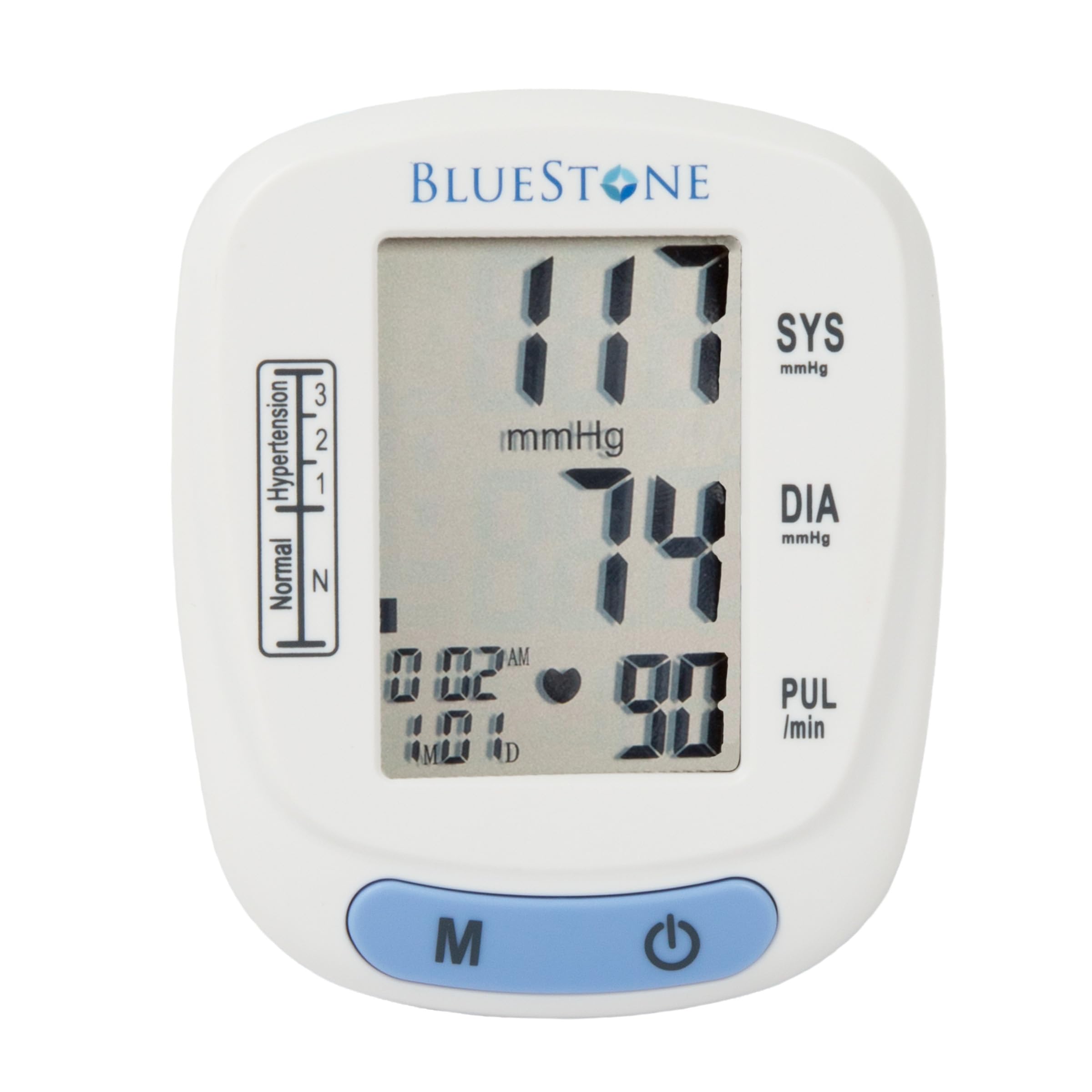
Image 3.1: Bluestone Automatic Wrist Blood Pressure Monitor on a user's wrist.
3.2 Ciri-ciri Peranti

Image 3.2: Labeled diagram highlighting the monitor's display elements and buttons.
- Skrin LCD Besar: Displays systolic, diastolic, pulse, date, and time.
- Blood Pressure Level Bar: Indicates blood pressure classification (Normal, Hypertension levels 1, 2, 3).
- Memory Button (M): Accesses stored readings.
- Butang Hidup/Mati: Powers the device on and off, and initiates measurements.
- Adjustable Cuff: Designed to fit wrists up to 10 inches in circumference.
4. Persediaan
4.1 Pemasangan Bateri
- Buka penutup petak bateri di belakang monitor.
- Masukkan dua bateri AAA (tidak disertakan), pastikan kekutuban yang betul (+/-).
- Tutup penutup petak bateri dengan selamat.
4.2 Penempatan Manset
- Remove any tight clothing from your wrist.
- Place the monitor on your left wrist with the display facing upwards. The cuff should be positioned approximately 1-2 cm above your wrist joint.
- Fasten the cuff snugly around your wrist. Ensure it is not too tight or too loose.
- Rest your arm on a table or flat surface so that the monitor is at the same level as your heart. Keep your palm open and relaxed.
5. Arahan Operasi
5.1 Mengambil Pengukuran
- Ensure the cuff is correctly placed on your wrist and your arm is positioned at heart level.
- Press the On/Off button to power on the device. The display will show all symbols briefly, then '00'.
- The cuff will automatically inflate, and the measurement will begin. Remain still and silent during the measurement.
- Once the measurement is complete, the systolic pressure, diastolic pressure, and pulse rate will be displayed on the screen. The device will automatically store this reading.
- Press the On/Off button again to turn off the device, or it will automatically shut off after approximately one minute of inactivity.
5.2 Mentafsir Keputusan
The monitor displays your systolic (SYS) and diastolic (DIA) blood pressure in mmHg, and your pulse (PUL) in beats per minute. The blood pressure level bar on the left side of the display indicates your reading's classification according to World Health Organization (WHO) guidelines:
- Biasa: Optimal blood pressure.
- Hypertension (Levels 1, 2, 3): Indicates elevated blood pressure. Consult a healthcare professional for advice.

Image 5.1: Monitor displaying a sample reading and highlighting key features.
6. Fungsi Memori
The monitor can store up to 120 measurements with date and time stamps, allowing you to track your blood pressure trends.
6.1 Storing Readings
Each successful measurement is automatically stored in the device's memory.
6.2 Recalling Readings
- With the device off, press the 'M' (Memory) button.
- Bacaan terkini akan dipaparkan dahulu.
- Press the 'M' button repeatedly to scroll through previous measurements.
- To exit memory mode, press the On/Off button or wait for the device to automatically shut off.
7. Penyelenggaraan
7.1 Pembersihan
- Lap monitor dan cuff dengan kain lembut dan kering.
- Jangan gunakan pembersih yang melelas atau rendam peranti di dalam air.
7.2 Penyimpanan
- Store the monitor in its included protective case when not in use.
- Simpan peranti di tempat yang sejuk dan kering, jauh dari cahaya matahari langsung dan suhu yang melampau.
- Jika peranti tidak akan digunakan untuk tempoh yang lama, keluarkan bateri untuk mengelakkan kebocoran.

Image 7.1: Monitor stored in its protective case.
8. Penyelesaian masalah
| Masalah | Kemungkinan Punca | Penyelesaian |
|---|---|---|
| Tiada paparan apabila dihidupkan | Bateri mati atau tidak dimasukkan dengan betul. | Gantikan bateri dengan bateri AAA baharu, memastikan kekutuban yang betul. |
| Mesej ralat (cth., 'Err') | Movement during measurement, improper cuff placement, or device malfunction. | Remain still and silent. Re-apply cuff correctly. If error persists, contact support. |
| Bacaan tidak konsisten | Postur badan yang tidak betul, bercakap semasa pengukuran, atau aktiviti fizikal baru-baru ini. | Ensure proper technique (see Section 5.1). Take measurements at the same time each day. |
9. Spesifikasi

Image 9.1: Dimensions of the Bluestone Blood Pressure Monitor.
| Ciri | Perincian |
|---|---|
| Nombor Model | 80-5103 |
| Dimensi Produk | 3" L x 2.5" W x 2.5" Th |
| Berat Barang | 8.3 auns |
| Lilitan Cuff | Fits up to 10" wrists |
| Sumber Kuasa | 2 x Bateri AAA (tidak termasuk) |
| Jenis Paparan | LCD Digital |
| Kapasiti Memori | Up to 120 readings with date/time stamp |
10. Waranti dan Sokongan
Bluestone products are manufactured with quality and care. For warranty information or technical support, please refer to the contact details provided with your purchase documentation or visit the official Bluestone webtapak. Sila simpan bukti pembelian anda untuk sebarang tuntutan waranti.


