1. Pengenalan
This manual provides detailed instructions for the Peakeep Digital Alarm Clock, Model MHP3112. This battery-operated digital alarm clock features a clear display, dual alarm settings with weekday mode options, an indoor temperature display, and a smart sensor night light for enhanced visibility in low-light conditions. Its compact and durable design makes it suitable for various indoor environments.

Rajah 1: Depan view of the Peakeep Digital Alarm Clock MHP3112, displaying current time, date, day of the week, indoor temperature, and active alarm settings.
2. Persediaan
2.1 Pemasangan Bateri
The Peakeep Digital Alarm Clock requires 3 AAA batteries for operation. Batteries are not included and must be purchased separately.
- Cari penutup petak bateri di belakang jam.
- Luncurkan penutup ke bawah untuk membuka.
- Masukkan 3 bateri AAA, pastikan kekutuban (+ dan -) betul.
- Gantikan penutup petak bateri dengan menggelongsorkannya ke atas sehingga ia berbunyi klik pada tempatnya.
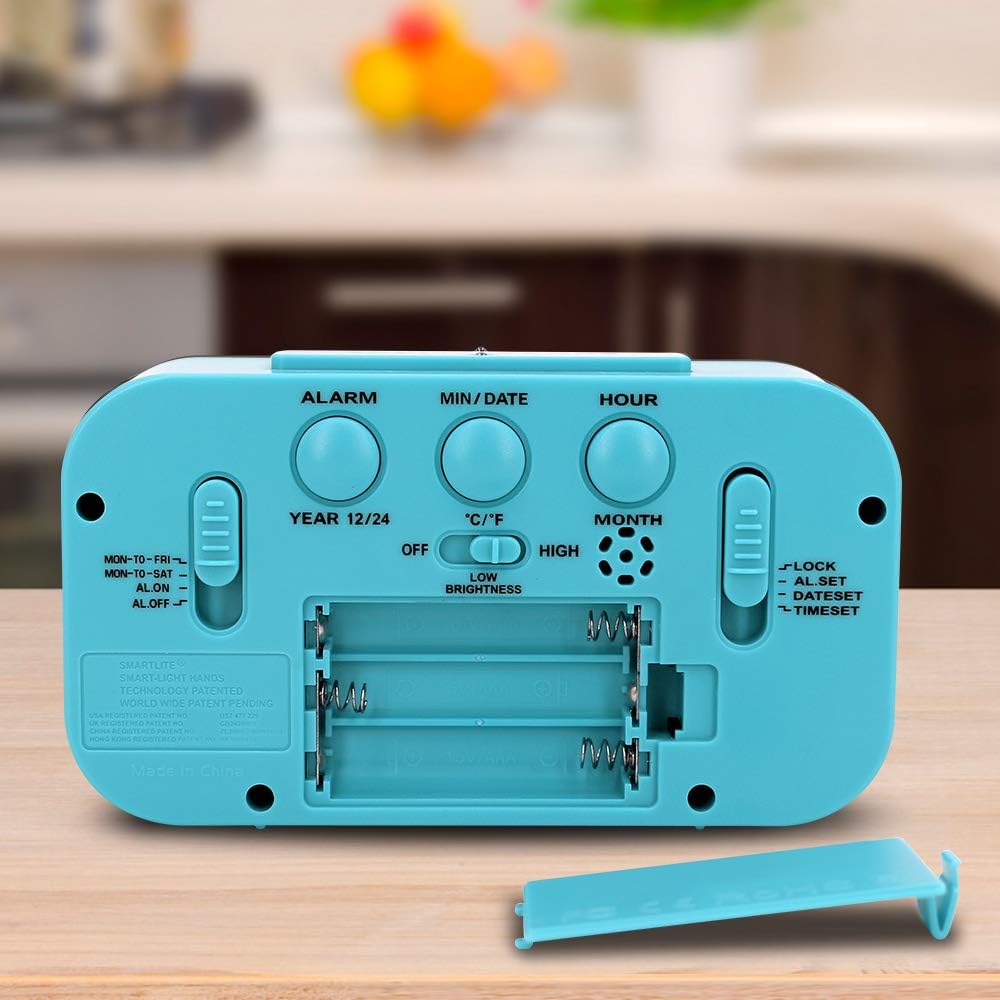
Figure 2: Rear panel of the alarm clock, highlighting the battery compartment and various setting buttons and switches.
2.2 Penetapan Masa dan Tarikh Awal
After installing batteries, the clock will power on. Follow these steps to set the current time and date:
- Cari MASA DITETAPKAN slider on the right side of the back panel. Slide it to the 'TIME SET' position.
- Gunakan JAM button to adjust the hour. Press repeatedly or hold to advance quickly. Observe the AM/PM indicator.
- Gunakan MIN/TARIKH button to adjust the minute. Press repeatedly or hold to advance quickly.
- To set the date, press the MIN/TARIKH button while in 'TIME SET' mode. The year will flash. Use the JAM butang untuk melaraskan tahun.
- Tekan MIN/TARIKH again to set the month. Use the JAM butang untuk melaraskan bulan.
- Tekan MIN/TARIKH again to set the day. Use the JAM butang untuk melaraskan hari.
- Once all settings are correct, slide the MASA DITETAPKAN slider back to the 'LOCK' position to save.
Video 1: This video demonstrates the process of setting the time, date, and alarm on a similar digital clock. It shows how to navigate through the settings using the buttons on the back panel.
2.3 Temperature Unit and Time Format
To switch between Celsius (°C) and Fahrenheit (°F) for temperature display, or between 12-hour and 24-hour time format:
- Tekan ke MIN/TARIKH button to toggle between °C and °F.
- Tekan ke 12/24HR butang untuk bertukar antara format masa 12 jam dan 24 jam.

Figure 3: The clock display showing the indoor temperature reading.

Figure 4: The clock display showing the month, date, and day of the week.
3. Arahan Operasi
3.1 Menetapkan Penggera (Penggera 1 & Penggera 2)
The clock supports two independent alarms. To set an alarm:
- Cari SET ALARM slider on the right side of the back panel. Slide it to the 'ALARM SET' position.
- Gunakan JAM button to adjust the alarm hour. Press repeatedly or hold to advance quickly.
- Gunakan MIN/TARIKH button to adjust the alarm minute. Press repeatedly or hold to advance quickly.
- To set the second alarm, press the PENGGERA button on the back panel. The alarm icon (1 or 2) will change. Repeat steps 2 and 3.
- Once the alarm time(s) are set, slide the SET ALARM slider back to the 'LOCK' position.

Figure 5: The clock display indicating two alarm settings and the active weekday mode (MON-TO-FRI).
3.2 Activating/Deactivating Alarms and Weekday Mode
Gunakan ALARM ON / OFF slider on the left side of the back panel to control alarm activation and mode:
- ON: Activates the alarm(s) for all 7 days.
- MON-TO-FRI: Activates the alarm(s) only on weekdays (Monday to Friday).
- MON-TO-SAT: Activates the alarm(s) from Monday to Saturday.
- DIMATIKAN: Deactivates all alarms.
3.3 Fungsi Tunda
Apabila penggera berbunyi, tekan butang besar SNOOZE / CAHAYA button on the top of the clock to activate the snooze function. The alarm will temporarily stop and sound again after approximately 9 minutes.
3.4 Smart Sensor Night Light
The clock features a smart sensor night light that automatically illuminates the display in low-light conditions. You can adjust its behavior:
- Gunakan CAHAYA MALAM switch on the back panel to select between 'OFF', 'LOW', or 'HIGH' brightness for the automatic night light.
- Menekan SNOOZE / CAHAYA button on top will temporarily illuminate the display for 5 seconds at full brightness, regardless of the night light switch setting.
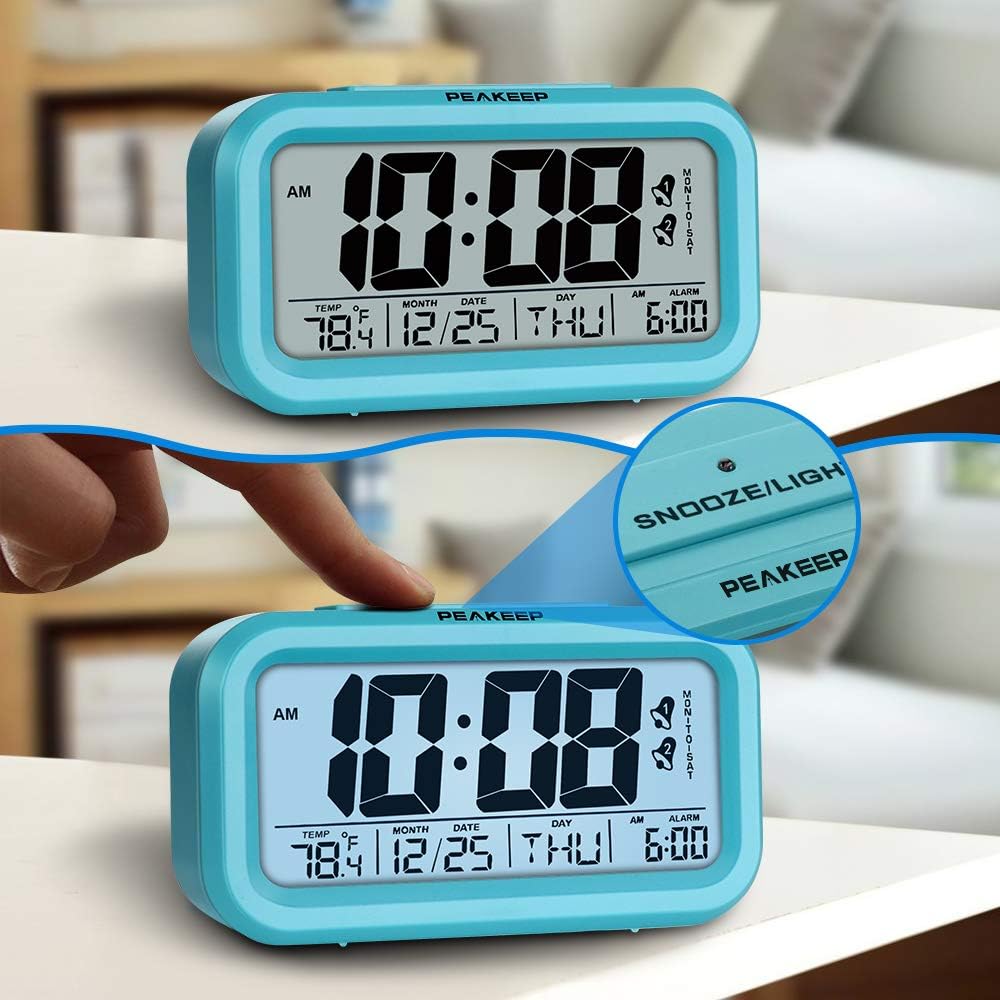
Figure 6: The top snooze/light button and the illuminated display.
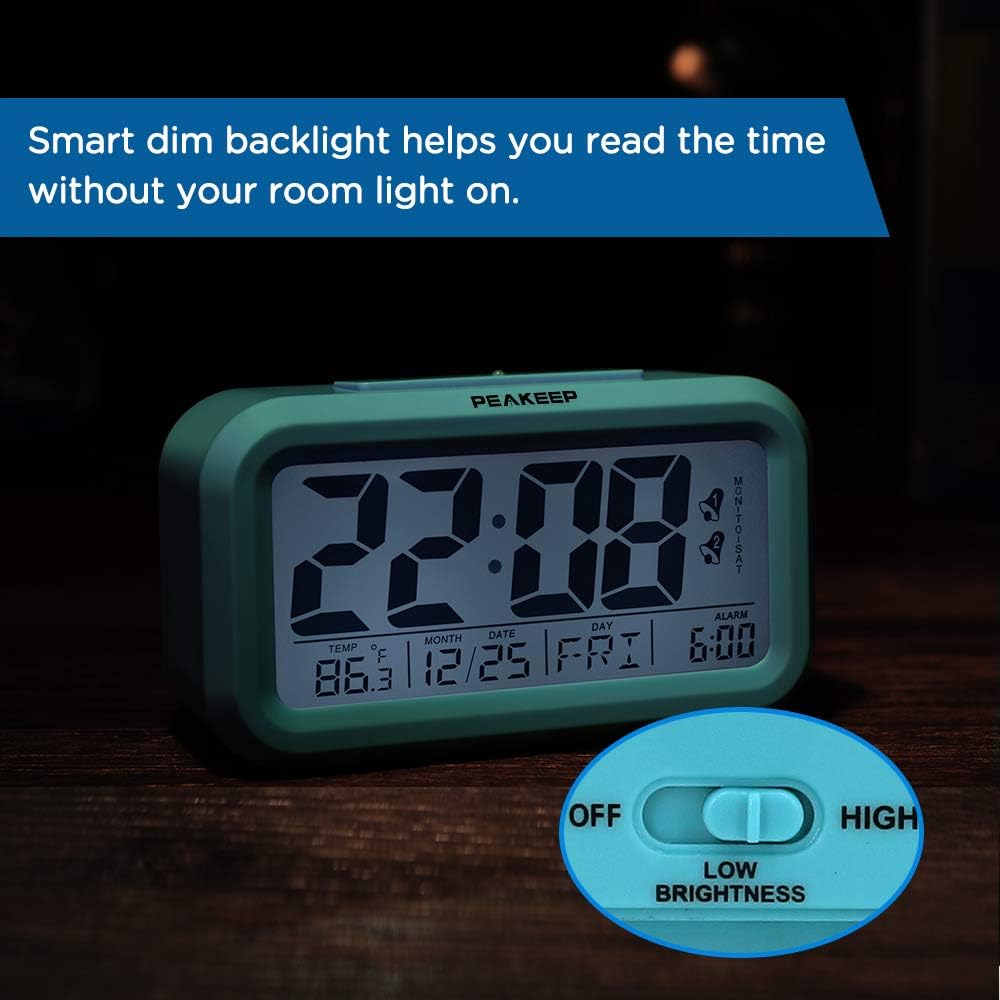
Figure 7: The clock's smart dim backlight feature in action, with the low brightness setting indicated.
Video 2: Video ini memberikan penerangan terperinciview of the Peakeep Digital Alarm Clock, demonstrating its various features including the night light, temperature display, and the ease of setting time and alarms using the back panel controls.
4. Penyelenggaraan
4.1 Penggantian Bateri
When the display dims or the clock functions become erratic, it is time to replace the batteries. Follow the battery installation steps in Section 2.1.
4.2 Pembersihan
To clean the clock, use a soft, dry cloth. Do not use abrasive cleaners or solvents, as these may damage the display or casing.
5. Penyelesaian masalah
- Tiada Paparan/Malapkan Paparan: Check battery installation and replace with fresh AAA batteries. Ensure the night light switch is not set to 'OFF' if expecting continuous illumination.
- Penggera Tidak Berbunyi: Sahkan ALARM ON / OFF slider is set to 'ON', 'MON-TO-FRI', or 'MON-TO-SAT' as desired. Ensure the alarm time is correctly set.
- Masa/Tarikh yang salah: Re-enter time and date settings as described in Section 2.2. Ensure the MASA DITETAPKAN slider is returned to 'LOCK' after adjustments.
6. Spesifikasi
| Ciri | Perincian |
|---|---|
| Jenama | Peakeep |
| Nombor Model | MHP3112 |
| Dimensi | 5.2 x 1.8 x 3 inci |
| Berat Barang | 5.6 auns |
| Sumber Kuasa | 3 bateri AAA (tidak termasuk) |
| Jenis Paparan | digital |
| Ciri Khas | 2 Alarms, Weekday Mode, Indoor Temperature Display, Smart Sensor Night Light |
| Bahan Bingkai | plastik |

Figure 8: Dimensions of the Peakeep Digital Alarm Clock.
7. Waranti dan Sokongan
For warranty inquiries or product support, please contact Peakeep customer service at: sales@us-myhome.com.