pengenalan
The Groov-e GVPS210SR is a lightweight and compact personal CD player designed for both portable and home use. It supports CD and MP3 playback, offering a programmable memory for up to 20 CD tracks and 99 MP3 tracks. Additionally, it features an integrated FM radio tuner with 40 preset channels, an LCD display, a low battery indicator, and anti-skip protection for uninterrupted listening. This manual provides detailed instructions for setup, operation, and maintenance of your device.
Kandungan Pakej
Sila pastikan semua item yang disenaraikan di bawah disertakan dalam pakej anda:
- Groov-e GVPS210SR Personal CD Player
- Fon kepala
- Micro USB Cable (for power, not charging)
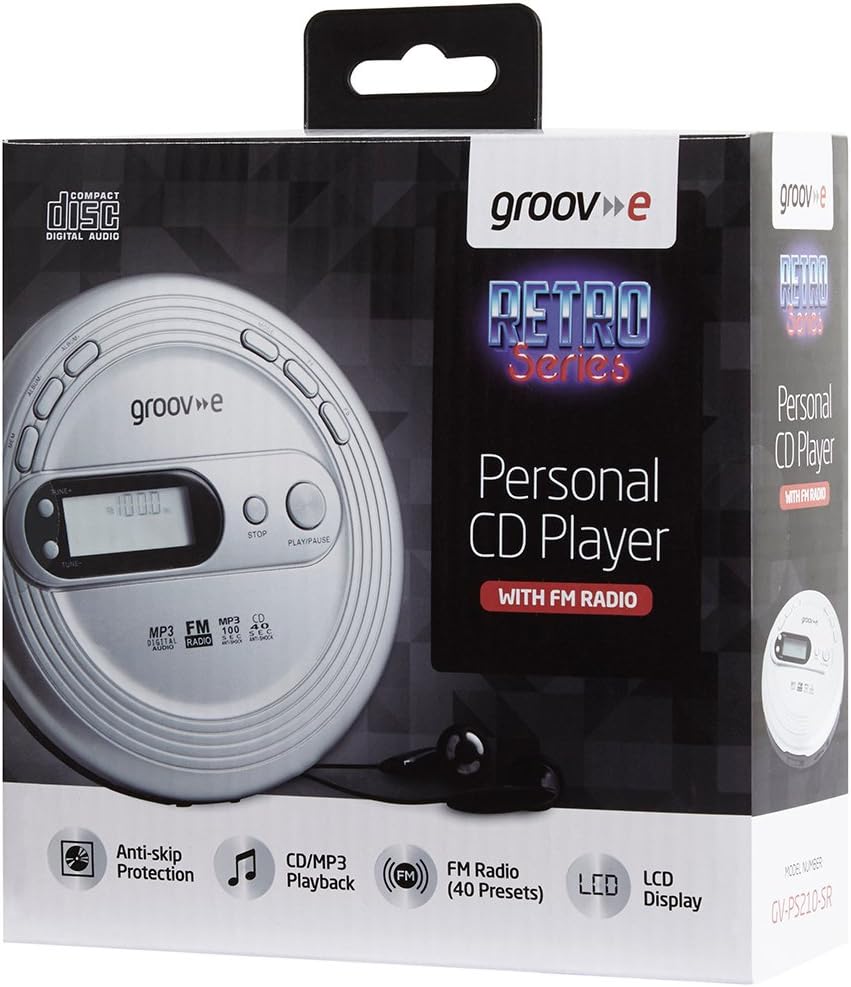
Produk Selesaiview
Familiarize yourself with the various parts and controls of your GVPS210SR CD player.

Kawalan dan Fungsi:
- Paparan LCD: Shows track number, time, FM frequency, and other status indicators.
- TUNE+ / TUNE-: Melaraskan frekuensi radio FM.
- BERHENTI: Menghentikan main balik.
- MAIN/JEDA: Memulakan atau menjeda main balik.
- MEM (Memory): Used for programming tracks or saving FM radio presets.
- ALBUM: Navigates between albums/folders on MP3 discs.
- ARAHAN: Cycles through playback modes (e.g., Repeat One, Repeat All, Intro, Random).
- FF (Maju Pantas): Melangkau ke trek seterusnya atau mara pantas dalam trek.
- FB (Fast Backward): Skips to the previous track or fast backwards within a track.
- DC IN 4.5V Jack: For connecting an optional external power adapter.
- Jack fon kepala: 3.5mm stereo output for connecting headphones.
- Petak Bateri: Located on the bottom, for AA batteries.
Persediaan
1. Menghidupkan Peranti Anda
Your GVPS210SR can be powered by AA batteries or an optional external DC 4.5V power adapter.
- Menggunakan Bateri: Open the battery compartment cover on the bottom of the unit. Insert 2 x AA batteries (not included), ensuring correct polarity (+/-). Close the cover securely.
- Using an AC Adapter (Optional): Connect a compatible DC 4.5V power adapter (not included) to the DC IN 4.5V jack on the side of the unit. Plug the adapter into a standard wall outlet.
2. Inserting a CD or MP3 Disc
- Gently press the OPEN button or slide the latch to open the CD compartment lid.
- Place the CD or MP3 disc onto the center spindle with the label side facing up.
- Tekan perlahan-lahan pada bahagian tengah cakera sehingga ia klik pada tempatnya.
- Tutup penutup petak CD dengan kuat sehingga ia terselak.
3. Menyambung Fon Kepala
Connect the included headphones or any standard 3.5mm stereo headphones into the headphone jack on the side of the unit.

Arahan Operasi
Main semula CD/MP3
- Ensure a disc is inserted and headphones are connected.
- Tekan ke MAIN/JEDA button to start playback. The LCD display will show the track number and elapsed time.
- Tekan MAIN/JEDA again to pause playback. Press it once more to resume.
- Tekan ke BERHENTI butang untuk menghentikan main balik.
- Untuk melangkau ke trek seterusnya, tekan butang FF butang.
- To go back to the beginning of the current track or to the previous track, press the FB butang.
- To fast forward within a track, press and hold the FF button. Release to resume normal playback.
- To fast backward within a track, press and hold the FB button. Release to resume normal playback.
- For MP3 discs with multiple folders, use the ALBUM butang untuk menavigasi antara folder.
Memori Boleh Diprogram
You can program up to 20 tracks for CD playback and 99 tracks for MP3 playback to play in a specific order.
- While the player is in STOP mode, press the MEM button. The display will show "P01" (Program 01).
- Gunakan FF or FB buttons to select the desired track number for the first program slot.
- Tekan MEM again to confirm the selection and move to the next program slot ("P02").
- Ulangi langkah 2 dan 3 sehingga semua trek yang dikehendaki diprogramkan.
- Tekan MAIN/JEDA to start playing the programmed tracks.
Operasi Radio FM
The GVPS210SR features an FM radio tuner with 40 preset channels.
- Dengan unit dihidupkan, tekan MODE button repeatedly until "FM" appears on the LCD display.
- To manually tune, press TUNE+ or TUNE- to adjust the frequency in small increments.
- To auto-scan for the next available station, press and hold TUNE+ or TUNE-. The player will stop on the next strong signal.
- To save a preset: Once you are on a desired station, press the MEM button. The preset number will flash. Use FF or FB to select the desired preset number (P01-P40), then press MEM sekali lagi untuk mengesahkan.
- To recall a preset: In FM mode, press the ALBUM butang untuk mengitar semula pratetap yang disimpan.
Fungsi Khas
- Perlindungan Anti-Skip: This feature helps prevent audio skipping during movement. It buffers audio data to ensure smooth playback.
- Peningkatan Bass: Tekan ke MODE button repeatedly until "BASS" appears on the display to enhance bass frequencies. Press MODE sekali lagi untuk mematikannya.
- Ulang Main semula: While playing a CD/MP3, press the MODE button to cycle through repeat options: Repeat One (repeats current track), Repeat All (repeats all tracks on disc), Random (plays tracks in random order).
- Intro Playback: Plays the first few seconds of each track. Press MODE until "INTRO" appears.

Penyelenggaraan
Membersihkan Unit
- Lap bahagian luar unit dengan kain lembut yang sedikitamp kain. Jangan gunakan pembersih atau pelarut yang melelas.
- To clean the laser lens (inside the CD compartment), use a specialized CD lens cleaner disc. Do not touch the lens directly.
Penjagaan Bateri
- Tanggalkan bateri jika unit tidak akan digunakan untuk tempoh yang lama untuk mengelakkan kebocoran.
- Replace all batteries at the same time with new ones of the same type.
- Buang bateri terpakai secara bertanggungjawab mengikut peraturan tempatan.
Menyelesaikan masalah
| Masalah | Kemungkinan Punca | Penyelesaian |
|---|---|---|
| Tiada kuasa | Bateri mati atau dipasang dengan salah; penyesuai AC tidak disambung dengan betul. | Replace batteries or check polarity; ensure AC adapter is securely plugged in. |
| Cakera tidak dimainkan / ralat "TIADA CAKERA" | Disc is dirty, scratched, or inserted incorrectly; lid not closed. | Clean the disc; re-insert disc correctly; ensure lid is fully closed. |
| Audio skipping | Disc is dirty or scratched; excessive vibration; anti-skip protection off. | Clean the disc; avoid strong vibrations; ensure anti-skip is active. |
| Tiada penerimaan radio FM | Weak signal; location interference. | Adjust position of the unit; try a different location; extend headphone cable (acts as antenna). |
| Kualiti bunyi yang lemah | Headphones not fully plugged in; dirty headphone jack; low battery. | Ensure headphones are fully inserted; clean headphone jack; replace batteries. |
Spesifikasi
- model: GVPS210SR
- Dimensi: 40 x 20 x 20 cm (lebih kurang 15.7 x 7.9 x 7.9 inci)
- Berat: 300 g (lebih kurang 0.66 lbs)
- Sumber Kuasa: 2 x AA Batteries (not included) or DC 4.5V external power adapter (not included)
- Format Audio yang Disokong: CD, MP3-CD
- Penala Radio: FM (40 presets)
- Programmable Tracks: 20 (CD), 99 (MP3)
- Ketersambungan: Bicu Fon Kepala 3.5mm
- Ciri Khas: Anti-Skip Protection, Bass Boost, LCD Display, Low Battery Indicator
Waranti dan Sokongan
For warranty information or technical support, please refer to the warranty card included with your product or visit the official Groov-e webtapak. Simpan resit pembelian anda sebagai bukti pembelian.
For further assistance, you may contact Groov-e customer service through their official channels.


