1. Pengenalan
The Sitecom MD-065IT All-in-One USB 2.0 ID Card Reader is a versatile device designed for reading and writing various types of memory cards, smart cards, and SIM cards. It facilitates access to online services such as tax filing, home banking, and digital signatures, and allows for the management of phone contacts and messages. This manual provides essential information for the proper setup, operation, and maintenance of your device.
2. Produk Lebihview
2.1 Ciri-ciri Utama
- Fungsi All-in-One: Supports reading and writing of 45 types of memory cards.
- Keserasian Kad Pintar: Works with various smart cards, including Carta Regionale dei Servizi (CRS) and Carta Nazionale Servizi (CNS).
- SIM Card Reader: Membolehkan viewing and managing phonebook contacts and messages.
- Kesambungan USB 2.0: Offers data transfer speeds up to 480 Mbps.
- Keserasian ke belakang: Compatible with USB 1.1 standard.
2.2 Kandungan Pakej
- Sitecom MD-065IT All-in-One USB 2.0 ID Card Reader
- USB 2.0 Cable (60 cm)
2.3 Susun atur Peranti
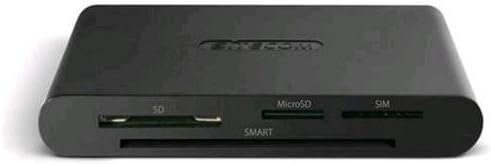
The image displays the front view of the Sitecom MD-065IT card reader. It features slots for SD cards, microSD cards, SIM cards, and a larger slot labeled 'SMART' for smart cards.
3. Persediaan
- Sambungkan Peranti: Plug the included USB 2.0 cable into the card reader and then into an available USB port on your computer.
- Pemasangan Pemandu: The device is typically plug-and-play, and your operating system should automatically install the necessary drivers. If automatic installation fails, please refer to the troubleshooting section or your computer's device manager.
- Additional Software (for Smart Cards): For specific smart card functionalities, such as those for Carta Regionale dei Servizi (CRS) or Carta Nazionale Servizi (CNS), additional software may be required. This software is not included with the card reader and must be downloaded from the official website of the service provider (e.g., your regional government or banking institution).
4. Arahan Operasi
4.1 Using Smart Cards
Insert your smart card (e.g., ID card, health card, banking card) into the designated 'SMART' slot on the front of the reader. Ensure the card is inserted correctly with the chip facing upwards and fully seated. Access to services will depend on the specific smart card and any required software installed on your computer.
4.2 Using Memory Cards (SD, MicroSD)
- Kad SD: Insert your SD card into the slot labeled 'SD'.
- Kad MikroSD: Insert your microSD card into the slot labeled 'MicroSD'.
Once inserted, your computer should recognize the memory card as a removable drive, allowing you to transfer files. Note that simultaneous reading of SD and microSD cards may not be supported by all systems or software.
4.3 Using SIM Cards
Insert your SIM card into the slot labeled 'SIM'. This feature allows you to view and manage contacts and messages stored on the SIM card. Specific software may be required for full functionality, which can often be obtained from your mobile network provider or third-party applications.
5. Penyelenggaraan
- Pembersihan: Gunakan kain lembut dan kering untuk membersihkan bahagian luar pembaca kad. Elakkan menggunakan pembersih cecair atau bahan kasar.
- Storan: Simpan peranti di tempat yang sejuk dan kering jauh dari cahaya matahari langsung dan suhu yang melampau.
- Pengendalian: Avoid dropping the device or subjecting it to strong impacts. Do not force cards into slots.
6. Penyelesaian masalah
6.1 Peranti Tidak Dikenali
- Semak Sambungan USB: Ensure the USB cable is securely connected to both the card reader and your computer's USB port. Try a different USB port.
- Mulakan semula Komputer: Kadangkala permulaan semula yang mudah boleh menyelesaikan masalah pengecaman.
- Pemeriksaan Pemandu: Open your computer's Device Manager (Windows) or System Information (macOS) to check if the device is listed and if there are any driver errors. If drivers are missing, try searching for 'Sitecom MD-065IT drivers' online.
6.2 Smart Card Not Working
- Sisipan yang betul: Ensure the smart card is inserted correctly into the 'SMART' slot with the chip facing upwards.
- Perisian yang Diperlukan: Verify that you have installed any necessary software or middleware provided by the smart card issuer (e.g., for CRS/CNS cards). This software is crucial for the card's functionality.
- Card Activation: Confirm that your smart card is activated and functional.
6.3 Memory/SIM Card Not Detected
- Correct Slot: Ensure the card is inserted into the correct slot (SD, MicroSD, SIM).
- Full Insertion: Make sure the card is fully inserted into its slot.
- Keadaan Kad: Check if the memory or SIM card itself is damaged or corrupted. Try another card if possible.
7. Spesifikasi
| Jenama | Sitecom |
| Nama Model | MD-065IT |
| Teknologi Ketersambungan | USB 2.0 |
| warna | Black/Anthracite |
| Peranti Serasi | Computers, Tablets, Smartphones (for SIM card management) |
| Berat Barang | 100 gram |
| Dimensi Produk | 14 x 13.2 x 5.2 cm |
8. Waranti dan Sokongan
For warranty information and technical support, please refer to the documentation provided with your purchase or visit the official Sitecom website. Support resources may include FAQs, driver downloads, and contact information for customer service.


