1. Pengenalan
The ArtSound RI60 is a versatile internet radio adapter designed to provide access to over 10,000 radio stations worldwide, alongside traditional FM radio. Featuring Wi-Fi connectivity and an integrated alarm clock, the RI60 offers a comprehensive audio experience. This manual provides essential information for the safe and efficient use of your device, covering setup, operation, maintenance, and troubleshooting.
2. Arahan Keselamatan
- Baca semua arahan dengan teliti sebelum mengendalikan peranti.
- Keep the device away from water, moisture, and direct heat sources.
- Jangan cuba membuka atau membaiki unit sendiri. Rujuk semua servis kepada kakitangan yang berkelayakan.
- Gunakan hanya penyesuai kuasa yang dibekalkan dengan unit.
- Pastikan pengudaraan yang betul di sekeliling peranti untuk mengelakkan terlalu panas.
- Bersihkan peranti hanya dengan kain kering dan lembut.
3. Kandungan Pakej
Sila pastikan semua item ada dalam pakej:
- ArtSound RI60 Internet Radio Unit
- Penyesuai Kuasa
- Alat Kawalan Jauh
- Manual Pengguna (dokumen ini)
4. Produk Lebihview
The ArtSound RI60 features a compact design with an intuitive display and controls. Below are images illustrating the device's appearance and dimensions.
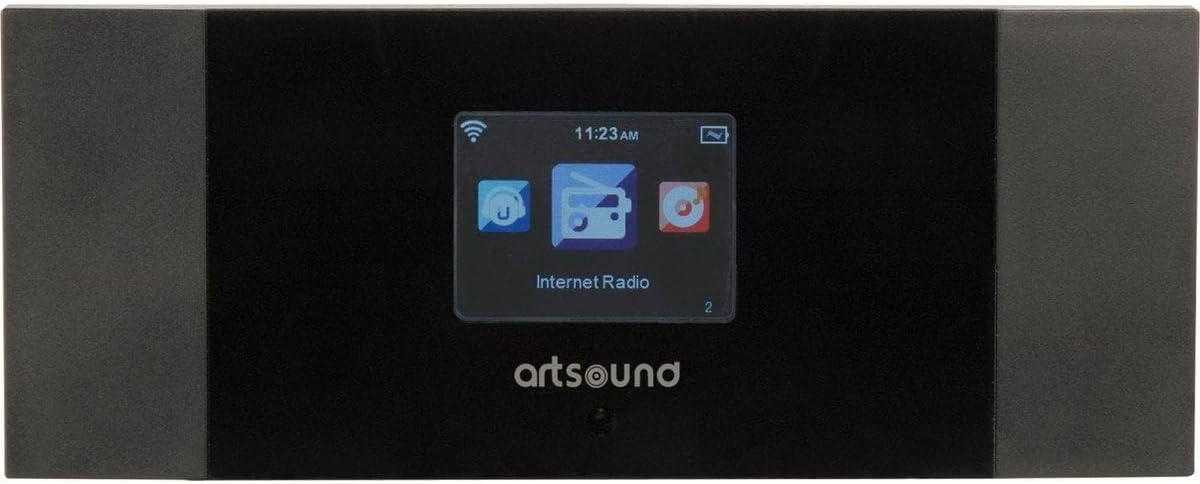
Rajah 4.1: Depan View of ArtSound RI60
This image displays the front panel of the ArtSound RI60 Internet Radio. It features a central display screen showing 'Internet Radio' and icons for Wi-Fi signal, time, and battery. The 'artsound' logo is visible below the screen. The unit has a sleek black finish with dark grey side panels.

Figure 4.2: ArtSound RI60 Dimensions
This image illustrates the physical dimensions of the ArtSound RI60 Internet Radio. The width is indicated as 190 mm and the height as 75 mm, providing a clear understanding of the device's compact size.
5. Persediaan
5.1. Sambungan Kuasa
- Connect the supplied power adapter to the DC IN port on the rear of the RI60 unit.
- Palamkan penyesuai kuasa ke salur keluar dinding standard.
- The unit will power on automatically or enter standby mode.
5.2. Initial Setup and Network Configuration
Upon first power-on, the RI60 will guide you through the initial setup process.
- Pemilihan Bahasa: Use the navigation buttons to select your preferred language on the display and confirm.
- Sambungan Rangkaian: The device will prompt you to connect to a Wi-Fi network.
- Imbas untuk Rangkaian: Select 'Scan' to find available Wi-Fi networks.
- Pilih Rangkaian: Pilih rangkaian Wi-Fi rumah anda daripada senarai.
- Masukkan Kata Laluan: Use the on-screen keyboard and navigation buttons to enter your Wi-Fi password (WPA/WPA2). Confirm your entry.
- Pengesahan Sambungan: Once connected, the device will display a confirmation message and the Wi-Fi icon will appear on the screen.
6. Beroperasi
6.1. Kawalan Asas
- Butang Kuasa: Press to turn the unit on or off (standby).
- Tombol Kelantangan: Rotate to adjust the volume level. Press to mute/unmute.
- Butang Navigasi: Use these buttons (Up, Down, Left, Right, OK) to navigate menus and select options on the display.
- Butang Belakang: Kembali ke menu atau skrin sebelumnya.
6.2. Radio Internet
The RI60 provides access to over 10,000 internet radio stations.
- From the main menu, select 'Internet Radio'.
- Anda boleh menyemak imbas stesen mengikut lokasi, genre atau mencari stesen tertentu.
- To save a station as a preset, tune into the desired station, then press and hold the 'Preset' button (or equivalent on remote/app) until the display confirms it's saved. The RI60 supports 5 programmable presets.
- To recall a preset, press the 'Preset' button and select the desired number.
6.3. Radio FM
To listen to traditional FM broadcasts:
- Daripada menu utama, pilih 'Radio FM'.
- Use the navigation buttons to manually tune to a frequency or initiate an auto-scan for available stations.
- Save preferred FM stations as presets using the same method as Internet Radio.
6.4. Fungsi Jam Penggera
The RI60 includes an alarm clock feature.
- Access the 'Alarm' settings from the main menu.
- Set the alarm time, duration, and desired alarm source (e.g., buzzer, internet radio station, FM station).
- Enable or disable the alarm as needed.
6.5. Remote Control and AirMusic Control App
The RI60 can be controlled using the included remote control or the free AirMusic Control app available for smartphones and tablets.
- Kawalan Jauh: Use the remote for convenient access to functions like power, volume, navigation, and presets.
- AirMusic Control App: Download the app from your device's app store. Ensure your smartphone/tablet is connected to the same Wi-Fi network as the RI60. The app allows for station browsing, selection, and device control from your mobile device.
7. Penyelenggaraan
7.1. Pembersihan
To maintain the appearance and functionality of your RI60:
- Pastikan peranti dimatikan dan dicabut plag sebelum dibersihkan.
- Gunakan kain lembut, kering dan tidak berbulu untuk mengelap permukaan luar.
- Do not use liquid cleaners, aerosols, or abrasive materials, as these can damage the finish or internal components.
7.2. Kemas Kini Perisian
Periodically check for software updates through the device's system settings menu. Updates can improve performance and add new features. Follow the on-screen instructions carefully during any update process.
8. Penyelesaian masalah
If you encounter issues with your ArtSound RI60, refer to the following common problems and solutions:
| Masalah | Kemungkinan Punca | Penyelesaian |
|---|---|---|
| Tiada kuasa | Penyesuai kuasa tidak disambungkan atau alur keluar rosak. | Ensure the power adapter is securely connected to the unit and a working power outlet. Try a different outlet. |
| Tiada sambungan Wi-Fi | Incorrect Wi-Fi password, router issues, or device too far from router. | Verify the Wi-Fi password. Restart your Wi-Fi router. Move the RI60 closer to the router. Check router settings for MAC address filtering. |
| Cannot find internet radio stations | No active internet connection, or station server is down. | Ensure Wi-Fi is connected and has internet access. Try accessing other internet services on your network. Some stations may be temporarily unavailable. |
| Penerimaan FM yang lemah | Weak signal, interference. | Adjust the position of the unit. Ensure the FM antenna (if external) is properly connected and extended. Move away from other electronic devices that may cause interference. |
| Alat kawalan jauh tidak berfungsi | Dead batteries, obstruction, or remote not pointed correctly. | Replace the batteries in the remote control. Ensure there are no obstructions between the remote and the RI60. Point the remote directly at the unit's sensor. |
9. Spesifikasi
| Ciri | Perincian |
|---|---|
| Jenama | Bunyi Seni |
| Nombor Model | RI.60 |
| warna | Hitam |
| Teknologi Ketersambungan | Wi-Fi |
| Ciri Khas | Wi-Fi, Alarm Clock |
| Kumpulan Radio yang Disokong | FM, Internet Radio |
| Teknologi Penalaan | digital |
| Sumber Kuasa | Powered by mains (via adapter) |
| Komponen Termasuk | Remote Control, AirMusic Control application |
| Peranti Serasi | Smartphone, Tablet (for app control), Remote Control |
| Penggunaan yang Disyorkan | Listening to music, staying informed with news, listening to radio shows |
10. Waranti dan Sokongan
ArtSound is committed to providing FREE & PROFESSIONAL assistance to its customers. Our dedicated support team is available to help with any questions or issues you may encounter, whether large or small. You can reach our support team via telephone or email.
For specific warranty details, please refer to the warranty card included with your product or visit the official ArtSound webtapak. Simpan bukti pembelian anda untuk tuntutan waranti.