1. Pengenalan
The Klein Tools CL800 is an automatically ranging True Root Mean Squared (TRMS) digital clamp meter designed for professional electricians and DIY enthusiasts. This versatile tool measures AC/DC voltage, resistance, continuity, frequency, capacitance, and tests diodes via test-leads. It also measures temperature via a thermocouple probe and features a Low Impedance (LoZ) mode for identifying and eliminating ghost or stray voltages. Built for durability, the CL800 is engineered to withstand demanding jobsite conditions.
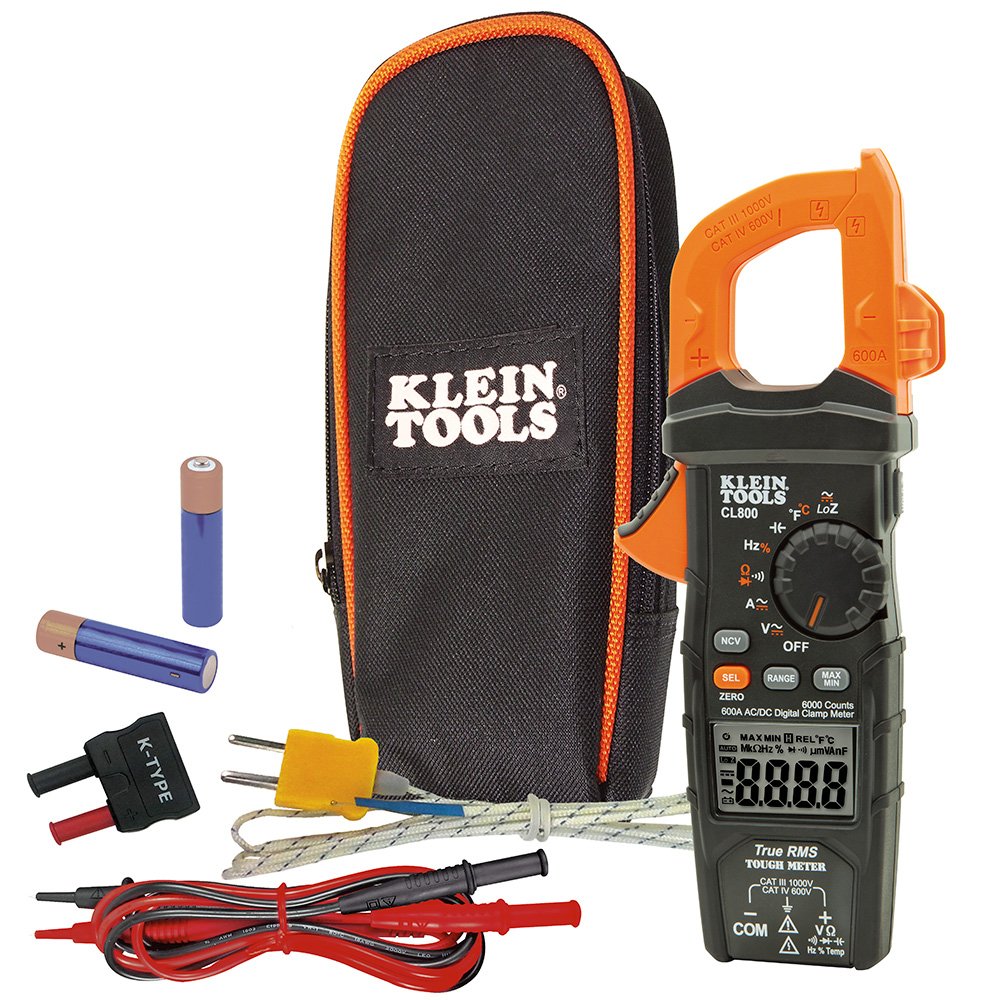
Figure 1: Klein Tools CL800 Digital Clamp Meter highlighting its True RMS measurement technology, voltage, current, resistance, temperature ranges, 2m drop protection, IP40 ingress protection, and CAT III/CAT IV safety ratings.
2. Maklumat Keselamatan
WARNING: Read, understand, and follow all instructions, cautions, and warnings attached to and/or packed with all test and measurement devices before each use.
- Do not attempt to measure resistance or continuity on live circuits.
- Sebelum setiap penggunaan, sahkan operasi meter dengan mengukur vol yang diketahuitage atau semasa.
- Jangan gunakan meter semasa ribut elektrik atau dalam cuaca basah.
- Jangan gunakan meter atau petunjuk ujian jika ia kelihatan rosak.
3. Persediaan
3.1. Pemasangan Bateri
The CL800 requires 2 AAA batteries (included). To install or replace batteries:
- Ensure the meter is OFF.
- Cari petak bateri di belakang meter.
- Gunakan pemutar skru untuk membuka penutup bateri.
- Insert the batteries, observing correct polarity (+/-).
- Gantikan penutup dan kencangkannya dengan skru.
3.2. Menghubungkan Petunjuk Ujian
The meter comes with test leads. Connect them to the appropriate jacks:
- The black lead connects to the COM (Common) jack.
- The red lead connects to the VΩHz%Temp jack for most measurements (voltage, resistance, frequency, temperature, capacitance, diode).

Rajah 2: Atas view of the Klein Tools CL800, illustrating the input jacks for connecting test leads. The black COM jack and the red VΩHz%Temp jack are clearly visible.
4. Arahan Operasi
The CL800 features a rotary dial to select measurement functions and buttons for additional settings. The backlit LCD display provides clear readings.

Rajah 3: Depan view of the Klein Tools CL800, displaying the LCD screen, rotary function dial, and control buttons for various measurement modes.
4.1. AC/DC Voltage Pengukuran
- Putar dail putar ke V~ (Jilid ACtage) atau V- (DC Voltage) kedudukan. Gunakan SEL button to toggle between AC and DC if needed.
- Connect the test leads to the circuit points you wish to measure.
- Baca voltagnilai e pada paparan.

Figure 4: An electrician uses the Klein Tools CL800 to safely measure voltage across terminals in a circuit breaker panel, demonstrating practical application.
4.2. Pengukuran Arus AC/DC (Clamp)
- Putar dail putar ke A~ (Arus AC) atau A- (DC Current) position. Use the SEL button to toggle between AC and DC if needed.
- Tekan clamp trigger to open the jaws.
- Enclose a single conductor (not a bundle of wires) within the clamp rahang.
- Baca nilai semasa pada paparan.

Figure 5: An electrician utilizes the clamp function of the Klein Tools CL800 to measure current on a wire, with the backlit display providing visibility in dim conditions.
4.3. Resistance, Continuity, Diode, Capacitance, Frequency, Temperature
Select the corresponding function on the rotary dial. For resistance (Ω), continuity ()))), diod (->|), and capacitance (--| |--), connect the test leads to the component. For frequency (Hz%) and temperature (°F/°C), connect the leads or thermocouple probe as appropriate.

Figure 6: The Klein Tools CL800 is shown measuring temperature using its thermocouple probe, demonstrating its multi-functionality beyond electrical parameters.
4.4. Low Impedance (LoZ) Mode
The LoZ mode helps identify and eliminate ghost or stray voltages. Select the LoZ function on the dial and connect the test leads to the circuit. This mode provides a more accurate reading by presenting a low impedance to the circuit, which drains away ghost voltages.
4.5. Bukan Kenalan Voltage Penguji (NCVT)
To use the NCVT feature, press the NCV button. Hold the tip of the meter near a voltagsumber e. Meter akan menunjukkan kehadiran volum ACtage with visual and/or audible alerts.
4.6. Backlit Display and Worklight
The CL800 features a backlit display for improved visibility in low-light conditions. It also includes an integrated worklight to illuminate the work area. Refer to the full user manual for specific button presses to activate these features.
5. Penyelenggaraan
5.1. Pembersihan
Wipe the meter with a dry, lint-free cloth. Do not use abrasive cleaners or solvents. Ensure the meter is off and disconnected from any circuits before cleaning.
5.2. Penggantian Bateri
Replace batteries when the low battery indicator appears on the display to ensure accurate readings and proper operation. Follow the steps in Section 3.1.
5.3. Penyimpanan
When not in use, store the meter and its accessories in the included carrying case in a cool, dry place away from direct sunlight and extreme temperatures.
6. Penyelesaian masalah
- Meter tidak menyala: Periksa pemasangan bateri dan pastikan bateri tidak habis. Gantikan jika perlu.
- Bacaan tidak tepat: Verify correct function selection on the rotary dial and proper test lead connection. Ensure batteries are not low. For DC current, remember to zero out the display using the ZERO button before measurement.
- Paparan menunjukkan "OL" (Lebihan): The measured value exceeds the meter's range for the selected function. Select a higher range if available, or ensure the measurement is within the meter's capabilities.
- Display is jumping or unstable: This can occur with AC voltage due to floating voltages. Use the LoZ mode for more stable readings in such situations.
- Negative symbol on DC voltage / semasa: Indicates reversed polarity of the test leads. The magnitude of the reading is still correct.
7. Spesifikasi
| Ciri | Spesifikasi |
|---|---|
| Pengeluar | Alat Klein |
| Nombor Bahagian | CL800 |
| Berat Barang | 12.5 auns |
| Dimensi Produk | 9.09 x 3.82 x 1.54 inci |
| Nombor Model Item | CL800 |
| Bateri | 2 bateri AAA diperlukan (termasuk) |
| Gaya Paparan | 6000 Count LCD |
| Ketepatan Pengukuran | Voltage Penguji |
| Ciri Khas | Low Battery Indicator, Auto Shut Off |
| Komponen yang Disertakan | Carrying Case, 41'' (1041.4 mm) Test Leads, Thermocouple with Adapter, and Batteries |
| Pensijilan | Meets relevant industry standards (CAT III 1000V, CAT IV 600V) |
| Perlindungan Ingress | IP40 |
| Perlindungan Guguran | 6.6 Kaki (2 m) |
8. Waranti dan Sokongan
The Klein Tools CL800 Digital Clamp Meter comes with a 1-year manufacturer's warranty. For technical support, service, or warranty claims, please refer to the contact information provided in the original product packaging or visit the official Klein Tools webtapak.


