1. Pengenalan dan Lebihview
This manual provides essential instructions for the setup, operation, and maintenance of your Bunker Hill Security Motion Detector Alarm Set. This system is designed to enhance security by detecting motion within its monitored area and alerting users with an alarm. It features a main alarm unit with an integrated keypad, a keychain remote for convenient arming and disarming, and a power adapter.
Ciri-ciri utama termasuk:
- Infrared motion detection up to 16 feet away within a 60-degree arc.
- Integrated keypad for security code entry.
- Keychain remote for arming and disarming.
- Panic button for immediate alarm activation.
- Intrusion memory function.
- Penunjuk bateri rendah.
- Selectable alarm or chime option, suitable for various applications including business doorways.
- Disyorkan untuk kegunaan dalaman sahaja.
2. Kandungan Pakej
Sila sahkan bahawa semua item yang disenaraikan di bawah terdapat dalam pakej anda:
- 1 x Bunker Hill Security Motion Detector Alarm Unit (with integrated keypad and motion sensor)
- 1 x Kawalan Jauh Rantai Kunci
- 1 x Penyesuai Kuasa
- Mounting Screws (for alarm unit installation)
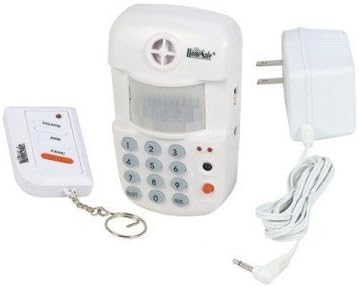
Image 1: Components of the Bunker Hill Security Motion Detector Alarm Set. Shown are the main alarm unit with an integrated keypad and motion sensor, a compact keychain remote control, and a power adapter for the main unit.
3. Maklumat Keselamatan
Read all safety instructions before operating the device. Failure to follow these instructions may result in electric shock, fire, or serious injury.
- Penggunaan Dalaman Sahaja: This device is designed for indoor environments. Do not expose it to rain, moisture, or extreme temperatures.
- Sumber Kuasa: Use only the provided power adapter. Ensure the power outlet voltage matches the adapter's specifications.
- Keselamatan Bateri: If using batteries for backup (not included), ensure correct polarity. Do not mix old and new batteries or different types of batteries. Dispose of used batteries responsibly.
- penempatan: Mount the unit securely to prevent it from falling. Avoid placing it near heat sources, direct sunlight, or areas with high vibration.
- Pembersihan: Putuskan kuasa sebelum membersihkan. Gunakan kain lembut dan kering. Jangan gunakan pembersih cecair atau aerosol.
- Servis: Jangan cuba membuka atau membaiki peranti sendiri. Rujuk semua servis kepada kakitangan yang berkelayakan.
4. Persediaan
4.1 Powering the Alarm Unit
- Unpack the main alarm unit and power adapter.
- Connect the power adapter cable to the DC input jack on the alarm unit.
- Plug the power adapter into a standard electrical outlet. The unit will power on.
- If desired, install 9V batteries (not included) for backup power. Open the battery compartment on the back of the unit, insert batteries with correct polarity, and close the compartment.
4.2 Mounting the Alarm Unit
The alarm unit is designed for wall mounting to optimize motion detection coverage.
- Choose a suitable location, typically in a corner or on a wall, where the unit can cover the desired area without obstruction. Ensure it is within range of the keychain remote.
- Mark the positions for the mounting screws on the wall.
- Gerudi lubang pandu jika perlu.
- Secure the alarm unit to the wall using the provided mounting screws.
- Ensure the unit is stable and the motion sensor lens is unobstructed.
4.3 Setting the Security Code
The default security code is typically 0000. It is highly recommended to change this code immediately for security purposes.
- With the unit disarmed, enter the current security code (default
0000). - Tekan ke
*butang. - Enter your new 4-digit security code.
- Tekan ke
#button to confirm. The unit will emit a confirmation tone.
5. Arahan Operasi
5.1 Melengkapkan Sistem
You can arm the system using either the keypad on the main unit or the keychain remote.
- Menggunakan Pad Kekunci: Enter your 4-digit security code and press the
ARMbutton. The unit will beep, indicating a delay period (typically 30-60 seconds) before the system is fully armed. Exit the protected area during this delay. - Menggunakan Alat Jauh: Tekan ke
ARMbutton on the keychain remote. The unit will beep, indicating the arming delay period.
5.2 Melucutkan Senjata Sistem
You can disarm the system using either the keypad on the main unit or the keychain remote.
- Menggunakan Pad Kekunci: Upon entering the protected area, the unit will start beeping (entry delay). Enter your 4-digit security code and press the
DISARMbutton within the delay period to prevent the alarm from sounding. - Menggunakan Alat Jauh: Tekan ke
DISARMbutton on the keychain remote. The unit will confirm with a tone.
5.3 Fungsi Panik
In an emergency, you can instantly trigger the alarm.
- Menggunakan Pad Kekunci: Tekan ke
PANICbutang pada unit utama. - Menggunakan Alat Jauh: Tekan ke
PANICbutton on the keychain remote.
The alarm will sound immediately. To stop the panic alarm, disarm the system using your security code or the remote.
5.4 Alarm/Chime Option
The unit can be set to either an alarm sound or a chime sound, useful for monitoring entries without a full alarm.
- Refer to your unit's specific buttons or settings for switching between alarm and chime modes. This is typically a dedicated button or a sequence entered via the keypad.
5.5 Intrusion Memory
If the alarm has been triggered while you were away, the unit's intrusion memory feature will indicate this upon your return. Check the unit for a specific light or indicator that signals a past alarm event. Disarming the system will usually clear this memory.
6. Penyelenggaraan
6.1 Pembersihan
To maintain optimal performance, keep the unit clean.
- Putuskan sambungan penyesuai kuasa sebelum membersihkan.
- Lap bahagian luar unit dengan kain lembut dan kering.
- Do not use abrasive cleaners, solvents, or spray directly onto the unit.
- Ensure the motion sensor lens is free from dust and obstructions.
6.2 Battery Replacement (if applicable)
If your unit uses backup batteries, replace them when the low battery indicator illuminates.
- Putuskan sambungan penyesuai kuasa.
- Buka petak bateri di bahagian belakang unit.
- Keluarkan bateri lama dan buang dengan betul.
- Masukkan bateri baharu, pastikan kekutuban yang betul.
- Close the battery compartment and reconnect the power adapter.
6.3 Testing the System
Regularly test your alarm system to ensure it is functioning correctly.
- Arm the system and intentionally trigger the motion sensor to verify the alarm sounds.
- Test the keychain remote's arm, disarm, and panic functions.
7. Penyelesaian masalah
| Masalah | Kemungkinan Punca | Penyelesaian |
|---|---|---|
| Alarm does not arm/disarm. | Incorrect security code entered; Remote battery low; Unit not receiving power. | Verify security code; Replace remote battery; Check power adapter connection and outlet. |
| Penggera palsu. | Unit placed near heat sources (vents, direct sunlight); Pets or moving objects in detection zone; Loose mounting. | Relocate unit away from heat sources; Adjust placement to avoid pets/objects; Securely mount the unit. |
| Penunjuk bateri rendah dihidupkan. | Backup batteries are low. | Replace backup batteries (if installed). |
| Alat kawalan jauh tidak berfungsi. | Remote battery low; Out of range. | Replace remote battery; Move closer to the main alarm unit. |
8. Spesifikasi
| Jenama | Bunker Hill Security |
| Nombor Model | 4331032114 |
| Julat Pengesanan | Sehingga 16 kaki (lebih kurang 4.8 meter) |
| Detection Arc | 60 darjah |
| Sumber Kuasa | AC Adapter (included) / 9V Battery Backup (batteries not included) |
| Jenis Pemasangan | Lekap di dinding |
| Berat Barang | Kira-kira 12 auns (0.34 kg) |
| Dimensi Pakej | Kira-kira 9.6 x 7.1 x 3.3 inci (24.4 x 18 x 8.4 cm) |
| Penggunaan yang Disyorkan | Dalaman |
9. Waranti dan Sokongan
For warranty information and customer support, please refer to the documentation provided with your purchase or contact Bunker Hill Security directly. Keep your purchase receipt as proof of purchase.
For technical assistance or inquiries, please visit the manufacturer's official webtapak atau hubungi bahagian perkhidmatan pelanggan mereka.


