pengenalan
This manual provides comprehensive instructions for the Mesqool Projection Alarm Clock with FM Radio. Designed for convenience and reliability, this device features a large LED display, adjustable time projection, dual alarms, FM radio with presets, a sleep timer, and a built-in USB charging port. Please read this manual thoroughly to ensure proper operation and to fully utilize all features.

Figure 1: Mesqool Projection Alarm Clock with a phone connected for charging.
Persediaan
1. Sambungan Kuasa
Connect the provided power adapter to the DC input port on the back of the alarm clock and plug it into a standard wall outlet. The clock will power on automatically.
2. Battery Backup Installation (Optional but Recommended)
For retaining time and alarm settings during power outages, install two 1.5V AAA batteries (not included) into the battery compartment on the back of the unit. Ensure correct polarity (+/-) as indicated inside the compartment.

Rajah 2: Belakang view of the alarm clock showing the battery compartment for backup power.
Arahan Operasi
1. Menetapkan Masa
- Tekan ke TETAPKAN MASA butang sekali. Digit jam akan berkelip.
- Gunakan JAM butang untuk menyesuaikan jam.
- Gunakan MIN butang untuk menyesuaikan minit.
- Tekan TETAPKAN MASA sekali lagi untuk mengesahkan dan keluar dari mod tetapan masa.
- Untuk bertukar antara format 12 jam dan 24 jam, tekan butang TU+ button during normal time display.
- Untuk melaraskan Waktu Penjimatan Siang (DST), tekan butang DST butang.

Figure 3: The clock supports 24-hour, 12-hour, and DST time formats.
2. Menetapkan Penggera
The clock supports two independent alarms (Alarm 1 and Alarm 2).
- Tekan ke ALARM1 or ALARM2 butang. Masa penggera akan berkelip.
- Gunakan JAM dan MIN butang untuk menetapkan masa penggera yang diingini.
- Tekan ke ALARM1 or ALARM2 button again to select the alarm sound: Buzzer or FM Radio.
- Press the respective alarm button one more time to confirm and activate the alarm. An alarm icon will appear on the display.
- To turn off an active alarm, press the corresponding ALARM MATI butang.
Melaraskan Kelantangan Penggera
The alarm volume can be adjusted from Level 1 to 5. Level 5 provides a loud 106dB sound, suitable for heavy sleepers. Use the volume buttons on the side of the unit to adjust the alarm volume.

Figure 4: Visual representation of adjustable alarm volume levels.
Fungsi Tunda
Apabila penggera berbunyi, tekan besar OK/SNOOZE/SLEEP button to activate the 9-minute snooze function. The alarm will sound again after 9 minutes.

Figure 5: The large button for activating the snooze function.
3. Operasi Radio FM
The FM radio operates within the 87.5–108 MHz frequency range and can store up to 20 preset stations.
- Tekan ke RADIO butang untuk menghidupkan radio FM.
- Gunakan JAM or MIN buttons to tune into the desired radio channel.
- To save a preset station, press and hold the MEM/M+ butang.
- Tekan ke OK/SNOOZE/SLEEP button to confirm storing the channel.
- Untuk mematikan radio, tekan butang RADIO DIMATIKAN butang.
Pemasa Tidur
Semasa radio dihidupkan, tekan butang OK/SNOOZE/SLEEP button repeatedly to set the sleep timer (10-90 minutes). The radio will automatically turn off after the set time.

Figure 6: Step-by-step guide for FM radio operation and setting presets.
4. Ciri Unjuran
The 180° adjustable projector allows you to display the time onto a wall or ceiling.
- To activate or deactivate the projection, use the Unjuran HIDUP/FLIP/MATI suis.
- Rotate the projector lens to adjust the projection angle.
- Adjust the focus ring on the projector to achieve a clear image.
- The projected image can be flipped 180° for optimal viewing.
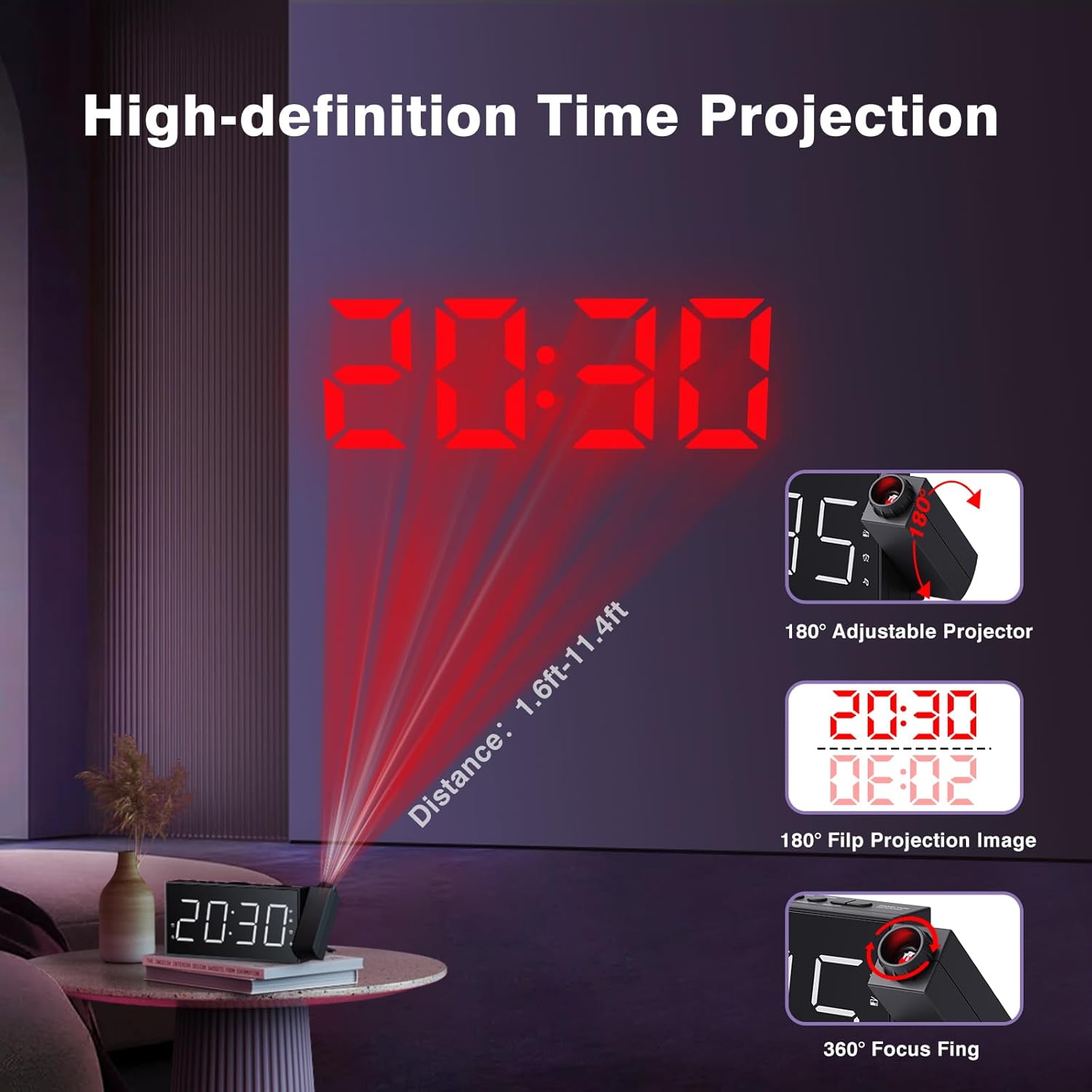
Figure 7: Time projected onto a wall from the alarm clock.

Figure 8: Demonstrating the 180-degree adjustable projection angle.
5. Pelarasan Kecerahan Paparan
The 7-inch LED display offers 5 dimming levels to suit your preference for day or night viewing. Tekan ke DIMMER button repeatedly to cycle through the brightness levels.

Figure 9: The clock display showing different brightness levels from 20% to 100%.
6. Port Pengecasan USB
A built-in USB charging port is located on the back of the unit, allowing you to charge your mobile devices. Simply connect your device's USB charging cable to the port.

Rajah 10: Belakang view of the clock highlighting the USB output and DC input ports.
Penyelenggaraan
To maintain your Mesqool Projection Alarm Clock, regularly wipe the unit with a soft, dry cloth. Avoid using abrasive cleaners or solvents, as these may damage the surface. Ensure the projector lens is clean for optimal clarity.
Menyelesaikan masalah
| Masalah | Kemungkinan Punca | Penyelesaian |
|---|---|---|
| Paparan jam kosong. | Tiada kuasa atau kuasa outage. | Check power adapter connection. Ensure battery backup is installed and functional during outages. |
| Penggera tidak berbunyi. | Alarm not set, volume too low, or alarm deactivated. | Verify alarm settings, increase alarm volume, and ensure alarm is activated (icon visible). |
| Unjuran kabur atau tidak jelas. | Focus not adjusted, or projection surface too far/bright. | Adjust the focus ring on the projector. Ensure the projection surface is within optimal distance (1.6ft-11.4ft) and sufficiently dark. |
| FM Radio static or poor reception. | Weak signal or antenna not extended. | Adjust the position of the clock or extend the antenna for better reception. |
| Pengecasan USB tidak berfungsi. | Cable issue or device not compatible. | Try a different USB cable. Ensure the device is compatible with standard USB charging. |
Spesifikasi
- Jenama: Mesqool
- model: FBA_MQL-AC-01
- Jenis Paparan: LED digital
- Dimensi Produk: 7.99"W x 3.58"H x 1.18"D
- Sumber Kuasa: AC Powered (with Battery Backup)
- Bateri tambahan: 2 x bateri AAA (tidak termasuk)
- Frekuensi Radio FM: 87.5-108 MHz (20 preset stations)
- Unjuran: 180° adjustable, focusable
- Kecerahan Paparan: 5 tahap boleh laras
- Kelantangan Penggera: 5 levels adjustable (up to 106dB)
- Output USB: For charging mobile devices
- Bahan: Akrilonitril Butadiena Stirena (ABS)
Waranti dan Sokongan
Mesqool provides a one-year warranty for this product, along with a 30-day free return policy. For technical support or warranty claims, please refer to the contact information provided in the original product packaging or visit the official Mesqool webtapak.
Panduan Pengguna rasmi (PDF) juga boleh dimuat turun: Muat turun Panduan Pengguna


