1. Pengenalan
The Aiphone JP-4HD is a video sub master station designed to integrate with the Aiphone JP-4MED master station within a security and communication system. This unit provides advanced communication and monitoring capabilities, featuring a 7-inch color touchscreen LCD for intuitive operation. It supports both hands-free (VOX) and handset (duplex) communication modes, allowing for flexible interaction.
Key functionalities include a door release button for visitor entry, and digital Pan, Tilt, Zoom (PTZ) with brightness controls for the connected door station camera, enhancing visibility and control. The JP-4HD also facilitates room-to-room calling and offers hearing aid T-Mode compatibility.
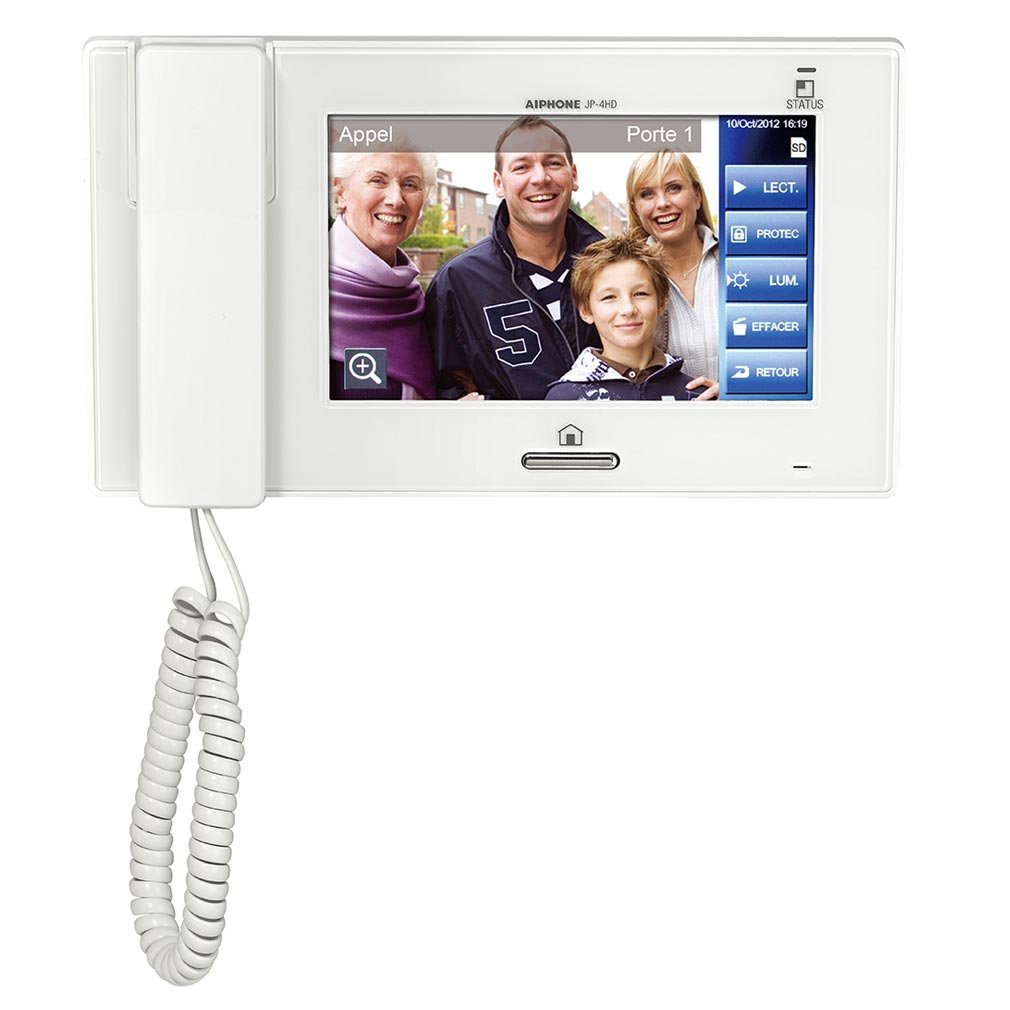
Depan view of the Aiphone JP-4HD sub master station, showcasing its 7-inch color touchscreen display and sleek design.
2. Maklumat Keselamatan
Please read and understand all safety instructions before installing or operating the JP-4HD sub master station. Failure to follow these instructions may result in injury, damage to the product, or property damage.
- Ensure all power is disconnected before performing any installation or wiring procedures.
- Pemasangan hendaklah dilakukan oleh kakitangan yang berkelayakan mengikut semua kod dan peraturan elektrik tempatan.
- Do not expose the unit to water, high humidity, or extreme temperatures.
- Do not attempt to open or repair the unit. Refer all servicing to authorized service personnel.
- Use only specified power supplies and accessories.
3. Persediaan dan Pemasangan
3.1 Pemasangan
The JP-4HD can be installed as a surface wall mount or placed on a desk. For desk mounting, the MCW-S/A accessory (sold separately) is required. Ensure the mounting location provides adequate ventilation and is free from direct sunlight or heat sources.
3.2 Pendawaian
The JP-4HD connects to either the JP-4MED master station or a JP-8Z distribution unit. Use CAT-5e or CAT-6 cable for all connections.
Wiring Distance Guidelines:
- Between Master/JP-8Z to Sub Master: CAT-5e or CAT-6 cable.
- JP-8Z to Sub Master: Up to 165 feet (50 meters).
- Master to Sub Master with power supply: Up to 650 feet (200 meters).
- Master to Sub Master without power supply: Up to 98 feet (30 meters).
Refer to the detailed wiring diagrams provided with the JP-4MED master station or JP-8Z distribution unit for specific connection instructions.
4. Arahan Operasi
4.1 Mod Komunikasi
- Hands-free (VOX): For general conversations, the unit automatically activates the microphone when speech is detected.
- Handset (Duplex): For private or noisy environments, lift the handset for simultaneous, two-way communication.
4.2 Door Release
Press the dedicated door release button on the touchscreen to unlock the connected door. Ensure the visitor is identified before granting access.
4.3 Camera Control (PTZ and Brightness)
bila viewing the door station camera feed, use the on-screen controls to digitally Pan, Tilt, and Zoom the camera view. Adjust the brightness control to improve visibility in varying lighting conditions.
4.4 Monitoring Door Station
Kepada view the door station camera feed without an incoming call, press the "Monitor" button on the touchscreen. This allows for proactive surveillance of the entrance area.
4.5 Room-to-Room Calling
The JP-4HD supports calling other sub master stations within the same system. Select the desired sub master station from the on-screen directory to initiate a call.
4.6 Hearing Aid T-Mode Compatibility
The unit is compatible with hearing aids equipped with a T-coil (telecoil) for enhanced audio clarity during communication.
5. Penyelenggaraan
To ensure optimal performance and longevity of your Aiphone JP-4HD sub master station, follow these maintenance guidelines:
- Pembersihan: Gently wipe the touchscreen and exterior surfaces with a soft, dry, lint-free cloth. For stubborn marks, slightly dampLap kain dengan air. Elakkan menggunakan pembersih yang kasar, pelarut atau semburan aerosol.
- Pemeriksaan: Periodically check all cables and connections for any signs of wear or damage. Ensure they are securely connected.
- Persekitaran: Keep the unit in a clean, dry environment within the specified temperature range (32-104°F / 0-40°C).
6. Penyelesaian masalah
If you experience issues with your JP-4HD sub master station, refer to the following common troubleshooting steps:
| Masalah | Kemungkinan Punca | Penyelesaian |
|---|---|---|
| Tiada kuasa/Unit tidak dihidupkan | Power cable disconnected; Power supply failure; System fault. | Check power connections to the master station or distribution unit. Ensure the power supply is functioning. Consult the master station manual for system power issues. |
| No audio during communication | Volume too low; Cable connection issue; Microphone/speaker fault. | Adjust volume settings on the touchscreen. Verify CAT-5e/6 cable connections. If issue persists, contact support. |
| No video from door station | Door station camera issue; Cable connection issue; System configuration. | Check the door station for power and functionality. Verify CAT-5e/6 cable connections. Consult the master station manual for camera configuration. |
| Pembuka pintu tidak berfungsi | Wiring issue to door strike; Door strike fault; System configuration. | Inspect wiring to the door strike/lock. Test the door strike independently if possible. Consult the master station manual for door release configuration. |
For further assistance, please contact Aiphone technical support.
7. Spesifikasi
| Model | JP-4HD |
| Penggunaan Kuasa | 200mA (maksimum) |
| Monitor Video | 7-inch TFT color touchscreen LCD |
| Jenis Komunikasi | Handset (Simultaneous/Duplex), Hands-free (Auto-voice actuation/VOX) |
| Melekap | Surface wall mount or desk mount (MCW-S/A sold separately) |
| Wire Type (Master/JP-8Z to Sub Master) | CAT-5e or CAT-6 cable |
| Wire Distance (JP-8Z to Sub Master) | 165 kaki (50 meter) |
| Wire Distance (Master to Sub Master with power supply) | 650 kaki (200 meter) |
| Wire Distance (Master to Sub Master without power supply) | 98 kaki (30 meter) |
| Penilaian Suhu | 32°F hingga 104°F (0°C hingga 40°C) |
| Dimensi (H x W x D) | 5.69 x 10.06 x 1.87 inci (144.5 x 255.5 x 47.5 mm) |
| Berat Barang | 2 paun (0.91 kg) |
| Pengeluar | Aiphone |
| Negara Asal | Thailand |
8. Waranti dan Sokongan
For detailed warranty information regarding your Aiphone JP-4HD sub master station, please refer to the warranty card included with your product or visit the official Aiphone webtapak.
For technical support, service, or replacement parts, please contact your authorized Aiphone dealer or Aiphone customer service directly. Contact information can typically be found on the Aiphone official webtapak atau dalam pembungkusan produk.
Aiphone Co., Ltd.
www.aiphone.com


