pengenalan
The Lux LTX100E is a versatile programmable thermostat designed to provide efficient and comfortable temperature control for your home. It offers flexible programming options, including 7-day or 5/2-day schedules, with the ability to program each day separately with 2 or 4 periods. Key features include a lighted display for easy viewing, a keypad lockout for security, and options for manual temperature hold and temporary override. This dual-powered thermostat also allows for adjustable temperature differential, user temperature calibration, and heat/cool set temperature limit stops, ensuring precise climate management.

Depan view of the Lux LTX100E Programmable Thermostat, showing the display and control buttons.
Ciri-ciri Produk
- Penjadualan Mudah: Set your home comfort level with convenient 7-day or 5/2-day program settings.
- Adjustable Temperature Limits: Customize heating and cooling temperature limits for optimal comfort.
- Penguncian Pad Kekunci: Prevents unauthorized use, maintaining your desired settings.
- Flexible Programming Periods: Choose between 2 or 4 periods per day to suit your schedule.
- Paparan Mudah Dibaca: Features a backlit display for clear visibility in various lighting conditions.
- Pilihan Kuasa Dwi: Can be powered by batteries or connected to a 24V system.
- Paparan suhu: Selectable Fahrenheit or Celsius temperature display.
- Adjustable Differential: Allows fine-tuning of temperature swing for consistent comfort.

Berakhirview of key features including battery power, 3-year warranty, and 1 heat/1 cool compatibility.
Apa yang ada dalam Kotak
Upon opening your Lux LTX100E package, you should find the following components:
- LTX100E Thermostat Unit
- Manual Arahan (dokumen ini)
- Label Pendawaian
- 2 Skru Pemasangan
- 2 Jangkar Dinding
- Jumper Wire (pre-installed for RH-RC connection)

Visual representation of the items included in the product packaging.
Pemasangan
Keserasian Sistem
The Lux LTX100E thermostat is designed for use with most 24V heating and A/C systems. Please review the compatibility chart below to ensure your system is supported before installation.

Detailed chart showing compatible and non-compatible HVAC systems for the LTX100E.
Gambarajah Pendawaian
Proper wiring is crucial for the correct operation of your thermostat. Always turn off power to your HVAC system at the circuit breaker before beginning any wiring work. Refer to the diagrams below that match your existing wiring configuration.
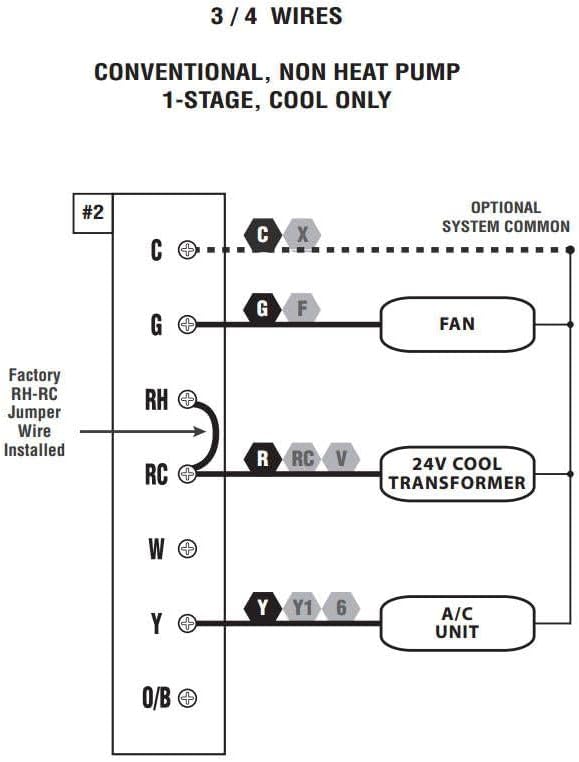
Wiring diagram for 3 or 4 wire conventional systems with 1-stage penyejukan sahaja.

Wiring diagram for 4 or 5 wire conventional systems with 1-stage pemanasan dan 1-stage penyejukan.

Wiring diagram for 5 or 6 wire conventional systems with 1-heat/1-cool and two transformers.
Note: If you are unsure about your wiring configuration or installation process, it is recommended to consult a qualified HVAC technician.
Arahan Operasi
Panel Kawalan Terlaluview
Familiarize yourself with the thermostat's control panel for easy operation.

Diagram illustrating the LCD Display Screen, Fan Mode Switch, System Mode Switch, SET, NEXT, HOLD buttons, and UP/DOWN buttons.
- Skrin Paparan LCD: Shows current temperature, time, day, and system status.
- Suis Mod Peminat: Controls fan operation (Auto, On).
- Suis Mod Sistem: Selects system mode (Heat, Off, Cool).
- Butang SET: Used to enter programming mode and confirm selections.
- Butang SETERUSNYA: Navigates through programming options.
- Butang TAHAN: Maintains a set temperature indefinitely, overriding the program.
- Butang ATAS/BAWAH: Adjust temperature settings and navigate through options.
Menetapkan Masa dan Hari
- Tekan ke SET button once. The time will flash.
- Gunakan UP or TURUN butang untuk melaraskan jam. Tekan SETERUSNYA untuk bertukar kepada minit.
- Laraskan minit dengan UP or TURUN. Tekan SETERUSNYA to switch to day of the week.
- Adjust the day with UP or TURUN.
- Tekan SET to save and exit, or wait for 10 seconds for it to save automatically.
Programming Your Schedule (7-Day or 5/2-Day)
The LTX100E allows for flexible programming. You can choose between 7-day programming (each day unique) or 5/2-day programming (weekdays together, weekend together). You can also select 2 or 4 periods per day.
- Ensure the System Mode Switch is set to PANAS or SEJUK.
- Tekan dan tahan butang SET button for 3 seconds to enter programming mode. The display will show the first program period (e.g., "MORN").
- guna UP or TURUN to adjust the start time for the current period.
- Tekan SETERUSNYA to move to the temperature setting for that period. Adjust with UP or TURUN.
- Tekan SETERUSNYA to advance to the next period (e.g., "DAY", "EVE", "NITE") and repeat steps 3 and 4.
- After setting all periods for the current day/group, press SETERUSNYA to move to the next day/group.
- Once all desired programming is complete, press SET to save and exit, or wait for 10 seconds for automatic saving.
Using Hold and Temporary Override
- Override Sementara: While in normal operation, press UP or TURUN to adjust the temperature. This temporary setting will remain active until the next programmed period begins.
- Pegangan Manual: Tekan ke TAHAN button. The current temperature will be maintained indefinitely, overriding all programmed settings. To cancel HOLD, press TAHAN sekali lagi.
Padam Kekunci
To prevent unauthorized changes to your settings, you can activate the keypad lockout feature. Refer to the full user manual (link in Support section) for detailed instructions on enabling and disabling this feature.
Penyelenggaraan
Penggantian Bateri
The Lux LTX100E thermostat is battery-powered (or dual-powered). When the battery indicator appears on the display, it's time to replace the batteries. It uses AA batteries.
- Gently pull the thermostat unit straight off the wall plate.
- Cari petak bateri di bahagian belakang unit.
- Remove the old batteries and insert new AA alkaline batteries, ensuring correct polarity (+/-).
- Align the thermostat unit with the wall plate and gently push it back into place until it clicks securely.
Note: Replacing batteries typically does not erase your programmed settings, but it's good practice to verify them after replacement.
Menyelesaikan masalah
If you encounter issues with your Lux LTX100E thermostat, try the following common troubleshooting steps:
- Tiada Paparan atau Skrin Kosong: Check if the batteries are installed correctly and are fresh. If dual-powered, ensure the 24V power supply is active.
- "ER" Code on Display: This typically indicates an internal error. Try removing the thermostat from the wall plate, waiting 30 seconds, and reattaching it. If the error persists, contact customer support.
- System Not Responding (No Heat/Cool):
- Verify the System Mode Switch is set to the desired mode (Heat or Cool).
- Check the circuit breaker for your HVAC system.
- Ensure wiring connections are secure at both the thermostat and the HVAC unit.
- Confirm the set temperature is above (for heat) or below (for cool) the ambient temperature.
- Bacaan Suhu Tidak Tepat: The thermostat has a user temperature calibration feature. Refer to the full user manual for instructions on how to calibrate the temperature sensor if you suspect it is inaccurate.
- Frequent Cycling (Short Cycling): The LTX100E allows for adjustable temperature differential (swing). Adjusting this setting can help prevent frequent on/off cycles. Consult the full user manual for details.
For more detailed troubleshooting steps, please refer to the complete user manual available in the Support section.
Spesifikasi
| Atribut | Perincian |
|---|---|
| Jenama | LUX |
| Nama Model | LTX100E-A04 |
| Jenis Pengawal | Papan kekunci |
| Ciri Khas | Vol. Rendahtage |
| warna | putih |
| Jenis Kawalan Suhu | Programmable (7-day, 5/2-day) |
| Sumber Kuasa | Dikuasakan oleh Bateri (AA) |
| Voltage | 24 Volt |
| Jenis Paparan | Manual (LCD Bercahaya Belakang) |
| Jenis Pemasangan | Lekap di dinding |
| Berat Barang | 8.8 auns |
| Dimensi Produk | 7.1 x 1.38 x 10.9 inci |
| UPC | 785971653935, 021079141005, 756655970969 |
Waranti dan Sokongan
Maklumat Waranti
The Lux LTX100E Thermostat comes with a Waranti terhad 3 tahun dari tarikh pembelian. Waranti ini melindungi kecacatan pada bahan dan mutu kerja di bawah penggunaan biasa. Sila simpan bukti pembelian anda untuk tuntutan waranti.
Sokongan Tambahan
For comprehensive instructions, advanced settings, or further assistance, please refer to the official User Manual PDF:
Muat turun Manual Pengguna Penuh (PDF)
You can also visit the official LUX webtapak atau hubungi perkhidmatan pelanggan mereka untuk mendapatkan sokongan langsung.


