1. Pengenalan
Terima kasih kerana membeliasing the Craig Electronics CMA3594-OD Stereo Portable Speaker. This speaker features Bluetooth wireless technology, hands-free phone answering, and decorative color-changing lights. This manual provides essential information for setting up, operating, and maintaining your speaker.
Aksesori yang disertakan:
- 3.5mm Jack Aux-in Cable
- Kabel Pengecas USB
2. Maklumat Keselamatan
Please read these safety instructions carefully before using your speaker and retain them for future reference. Incorrect use may result in reduced performance, damage to the speaker, or hazards.
- Jangan dedahkan pembesar suara kepada suhu yang melampau, cahaya matahari langsung atau kelembapan yang tinggi.
- Produk ini adalah BUKAN kalis air. Avoid contact with water or other liquids.
- Jangan buka atau ubah suai pembesar suara. Ini akan membatalkan jaminan.
- Gunakan hanya kabel pengecas USB yang disediakan untuk pengecasan.
- Jauhkan pembesar suara daripada medan magnet yang kuat.
- Elakkan daripada menjatuhkan atau menundukkan pembesar suara kepada impak yang kuat.
3. Produk Lebihview
Biasakan diri anda dengan komponen dan kawalan pembesar suara.

Rajah 1: Depan view of the Craig CMA3594-OD Stereo Portable Speaker, showcasing its cylindrical design and illuminated mesh with color-changing lights.
Kawalan Panel Atas

Figure 2: Top panel of the speaker showing touch-sensitive controls for power, volume, light modes, and playback.
- Butang kuasa (⏻): Tekan dan tahan untuk menghidupkan pembesar suara ON/OFF.
- Butang Main/Jeda/Panggil (▶/‖/📞): Press to play or pause music. Press to answer or end a phone call.
- Kelantangan Rendah / Trek Sebelumnya (-): Tekan untuk mengurangkan kelantangan. Tekan dan tahan untuk pergi ke trek sebelumnya.
- Naikkan Kelantangan / Trek Seterusnya (+): Tekan untuk meningkatkan kelantangan. Tekan dan tahan untuk pergi ke trek seterusnya.
- Butang Mod Cahaya (💡): Press to cycle through different color-changing light modes.
Pelabuhan Panel Belakang
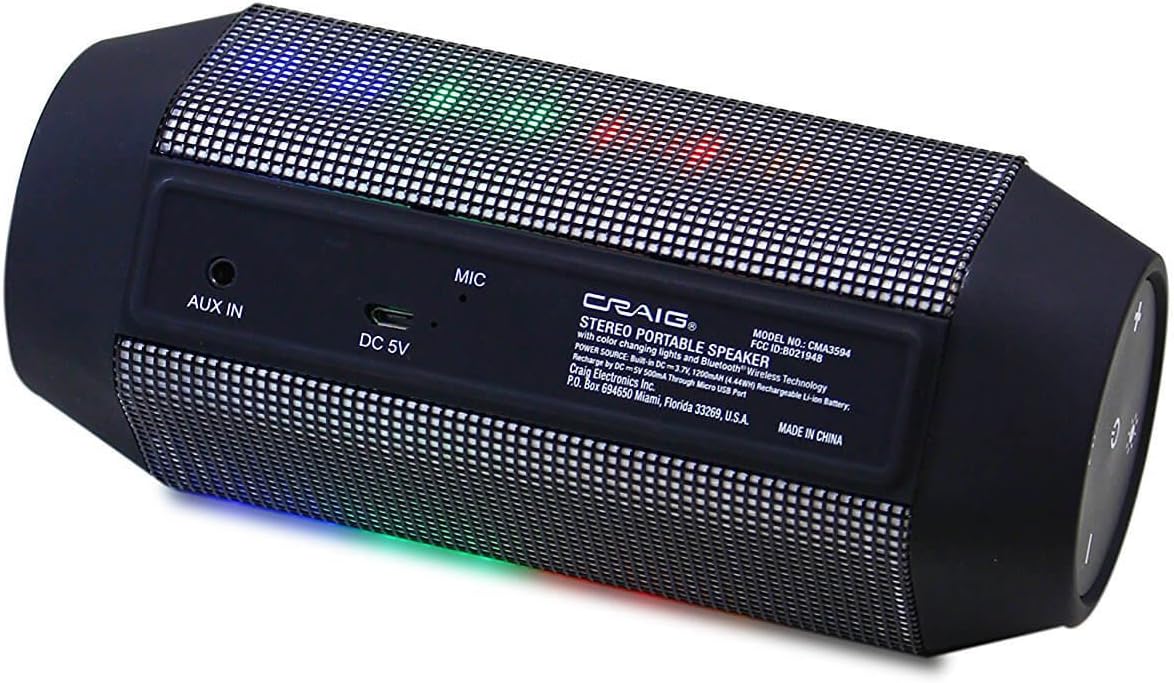
Figure 3: Rear panel of the speaker displaying the AUX IN port, DC 5V charging port, and microphone.
- AUX DI: 3.5mm audio input for connecting external audio devices.
- DC 5V: Port mikro USB untuk mengecas pembesar suara.
- MIC: Mikrofon terbina dalam untuk panggilan bebas tangan.
4. Persediaan
4.1 Mengecas Speaker
- Sambungkan hujung kecil kabel pengecas USB yang disediakan ke port DC 5V di bahagian belakang pembesar suara.
- Sambungkan hujung besar kabel pengecas USB kepada penyesuai kuasa USB (tidak disertakan) atau port USB komputer.
- The charging indicator light (usually red) will illuminate to show that the speaker is charging.
- Once fully charged, the indicator light will turn off or change color (refer to specific product behavior if different).
The speaker has a built-in rechargeable battery. A full charge typically takes 2-3 hours.
4.2 Menghidupkan/Mematikan
- Untuk Menghidupkan: Tekan dan tahan Butang Kuasa (⏻) for approximately 3 seconds. You will hear an audible prompt, and the lights will activate.
- Untuk Mematikan: Tekan dan tahan Butang Kuasa (⏻) for approximately 3 seconds. You will hear an audible prompt, and the lights will turn off.
5. Arahan Operasi
5.1 Berpasangan Bluetooth
Pembesar suara akan memasuki mod pasangan Bluetooth secara automatik apabila dihidupkan buat kali pertama atau jika tiada peranti disambungkan.

Figure 4: The portable speaker shown wirelessly connected to a smartphone, indicating active Bluetooth pairing.
- Ensure the speaker is powered on and in pairing mode (a blue LED indicator may flash, and you might hear an audible prompt).
- On your Bluetooth-enabled device (smartphone, tablet, laptop, etc.), go to the Bluetooth settings menu.
- Cari untuk available devices. The speaker will appear as "CMA3594-OD" or similar.
- Pilih pembesar suara daripada senarai untuk memulakan penggandingan.
- Once successfully paired, you will hear a confirmation tone, and the blue LED indicator will become solid.
- Anda kini boleh memainkan audio daripada peranti anda melalui pembesar suara.
Note: The speaker will attempt to reconnect to the last paired device automatically when powered on.
5.2 Sambungan Aux-in
Untuk memainkan audio daripada peranti tanpa keupayaan Bluetooth:
- Connect one end of the provided 3.5mm Aux-in cable to the AUX IN port on the speaker.
- Connect the other end of the 3.5mm Aux-in cable to the headphone jack or audio output of your external audio device.
- Pembesar suara secara automatik akan bertukar kepada mod Aux-in.
- Kawal main balik dan kelantangan daripada peranti anda yang disambungkan.
5.3 Hands-free Phone Answering
Apabila disambungkan melalui Bluetooth ke telefon pintar:
- Untuk Menjawab Panggilan: Press the Play/Pause/Call Button (📞) sekali.
- Untuk Menamatkan Panggilan: Press the Play/Pause/Call Button (📞) sekali semasa panggilan.
- Untuk Menolak Panggilan: Press and hold the Play/Pause/Call Button (📞) selama 2 saat.
Mikrofon terbina dalam membolehkan komunikasi yang jelas.
5.4 Mod Cahaya
The speaker features decorative color-changing lights.
- Press the Light Mode Button (💡) to cycle through various light patterns and colors.
- Continue pressing to find your preferred light display or to turn the lights off.
5.5 Kawalan Kelantangan
- Press the Volume Up Button (+) to increase the volume.
- Press the Volume Down Button (-) to decrease the volume.
6. Penyelenggaraan
Proper care ensures the longevity of your speaker.
- Pembersihan: Use a soft, dry cloth to wipe the exterior of the speaker. Do not use liquid cleaners or abrasive materials.
- Storan: Apabila tidak digunakan untuk tempoh yang lama, simpan pembesar suara di tempat yang sejuk dan kering, jauh dari cahaya matahari langsung dan suhu yang melampau.
- Penjagaan Bateri: To maintain battery life, fully charge the speaker before storing it for long periods and recharge it every few months if not in regular use.
7. Penyelesaian masalah
Jika anda menghadapi masalah dengan pembesar suara anda, rujuk masalah dan penyelesaian biasa berikut:
| Masalah | Penyelesaian |
|---|---|
| Speaker tidak akan dihidupkan. | Pastikan bateri telah dicas. Sambungkan kabel pengecas USB dan biarkan ia dicas selama sekurang-kurangnya 30 minit sebelum cuba menghidupkannya semula. |
| Tidak boleh berpasangan melalui Bluetooth. | Make sure the speaker is in pairing mode (flashing LED). Ensure Bluetooth is enabled on your device and it is within 32 feet of the speaker. Forget the device from your phone's Bluetooth list and try pairing again. |
| Tiada bunyi dari pembesar suara. | Check the volume level on both the speaker and your connected device. Ensure the correct input mode (Bluetooth or Aux-in) is selected. If using Aux-in, ensure the cable is fully inserted. |
| Bunyi diherotkan. | Reduce the volume on both the speaker and your connected device. Ensure the speaker is not too far from the Bluetooth device or that there are no obstructions. |
| Lampu tidak berfungsi. | Press the Light Mode Button (💡) to cycle through modes or turn them on. Ensure the speaker has sufficient battery charge. |
8. Spesifikasi
| Ciri | Spesifikasi |
|---|---|
| Nombor Model | CMA3594-OD |
| Teknologi Ketersambungan | Bluetooth, Auxiliary (3.5mm Jack) |
| Julat Tanpa Wayar | Sehingga 32 Kaki (10 meter) |
| Mod Keluaran Audio | Stereo (Saluran 2.0) |
| Sumber Kuasa | Battery Powered (Built-in Rechargeable Battery) |
| Kaedah Kawalan | Sentuh Butang |
| Ciri Khas | Portable, Hands-free Phone Answering, Color Changing Lights |
| Peranti Serasi | Desktop, Laptop, MP3 Player, Smartphone, Tablet |
| Impedans | 4 ohm |
| Dimensi Produk | 2.5 x 2.5 x 7 inci (lebih kurang) |
| Berat Barang | 1.05 paun (lebih kurang) |
| Kalis air | Tidak |
9. Waranti dan Sokongan
For warranty information and technical support, please refer to the documentation included with your purchase or visit the official Craig Electronics webtapak. Simpan bukti pembelian anda untuk tuntutan waranti.


