Produk Selesaiview
The VILTROX MC-C3 is an advanced timer remote control and intervalometer designed for precise camera control. It allows photographers to set delay times, exposure durations, interval times, and the number of shots for various photography techniques, including time-lapse and long exposure.
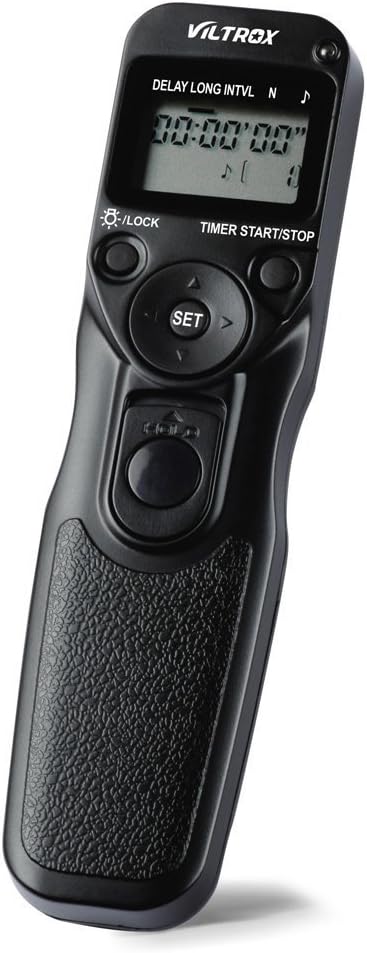
Rajah 1: The VILTROX MC-C3 Timer Remote Control, showcasing its ergonomic design and LCD display.
This device is equipped with an LCD screen for easy programming and supports manual release even when a timed sequence is active. Its versatile settings make it an essential tool for professional and enthusiast photographers alike.
Kandungan Pakej
Selepas membuka bungkusan, pastikan semua item berikut ada:
- 1 x VILTROX MC-C3 Remote Shutter Controller
- 1 x Connection Cable (C3 type for Canon cameras)
- 1 x User Manual (English & Chinese)
Panduan Persediaan
1. Pemasangan Bateri
The MC-C3 requires two AAA batteries (not included) for operation.
- Cari petak bateri di bahagian belakang alat kawalan jauh.
- Slide the battery cover downwards to open.
- Masukkan dua bateri AAA, pastikan kekutuban (+/-) betul.
- Close the battery cover by sliding it back into place until it clicks.

Rajah 2: belakang view of the MC-C3 showing the battery compartment with the cover removed, ready for AAA battery insertion.
2. Menyambung ke Kamera
The MC-C3 connects to your camera via the provided C3 connection cable.
- Ensure your camera is turned off before connecting the cable.
- Plug one end of the C3 connection cable into the remote port on your camera.
- Plug the other end of the cable into the port on the VILTROX MC-C3 remote controller.
- Turn on your camera. The remote is now ready for use.
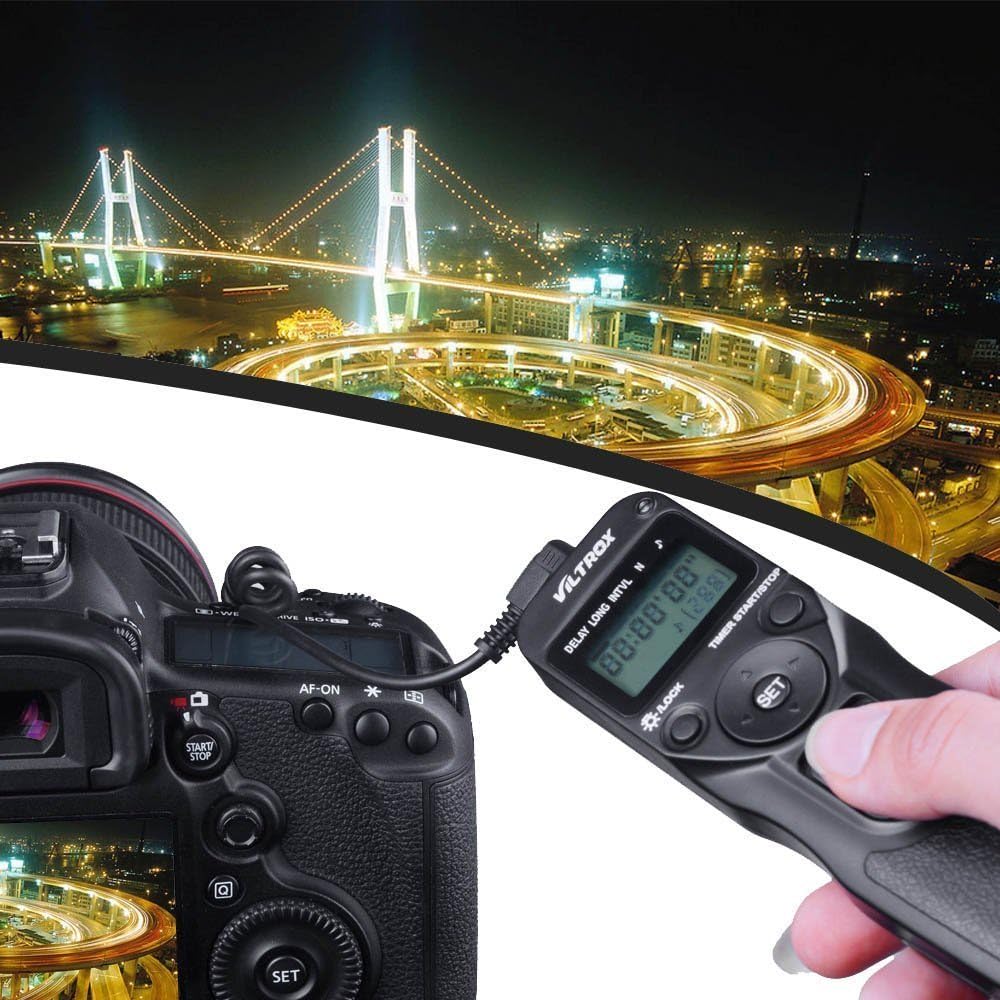
Rajah 3: The VILTROX MC-C3 connected to a Canon DSLR camera, illustrating the cable connection for remote operation.
Compatible Canon Camera Models: EOS-5Ds, EOS-7D MARK II, EOS-1D X, EOS-1Ds Mark III, EOS-1Ds Mark II, EOS-1Ds, EOS-1D Mark IV, EOS-1D Mark III, EOS-1D Mark II N, EOS-1D Mark II, EOS-1D, EOS D2000, EOS 5D Mark III, EOS 5D Mark II, EOS 5D, EOS 6D, EOS 7D, EOS 50D, EOS 40D, EOS 30D, EOS 20D, EOS 10D, EOS D60/30, EOS-1v HS, EOS-1v, EOS-3.
Arahan Operasi
The MC-C3 features an intuitive interface with an LCD screen and control buttons for setting various parameters.

Rajah 4: Close-up of the VILTROX MC-C3's LCD display and control buttons, showing the interface for setting timer functions.
Fungsi Utama:
- DELAY (Self Timer): Sets the delay before the first shot is taken. Adjustable from 0 seconds to 99 hours, 59 minutes, 59 seconds in 1-second increments.
- LONG (Exposure Timer): Sets the duration of the exposure. Ideal for bulb mode or long exposures. Adjustable from 0 seconds to 99 hours, 59 minutes, 59 seconds in 1-second increments.
- INTVL (Interval Timer): Sets the time between consecutive shots. Adjustable from 1 second to 99 hours, 59 minutes, 59 seconds in 1-second increments.
- N (Number of Shots): Sets the total number of shots to be taken. Adjustable from 1 to 399 shots, or unlimited (indicated by "--").
- TIMER START/STOP Button: Initiates or halts the programmed timer sequence.
- Butang Pelepas Pengatup: Functions as a manual shutter release. Press halfway for autofocus, fully press to take a single shot. This can be used even when a timer sequence is running.
- Butang SET: Confirms selections and enters programming mode for parameters.
- Butang Arah (Atas/Bawah/Kiri/Kanan): Navigate through settings and adjust values.
- LIGHT/LOCK Button: Toggles the LCD backlight and locks/unlocks the buttons to prevent accidental changes.
Programming a Sequence:
- Tekan ke SET button to enter programming mode. The first parameter (DELAY) will blink.
- Gunakan Atas/Bawah buttons to adjust the value for the blinking parameter.
- Gunakan Kiri/Kanan buttons to move between hours, minutes, and seconds, or to select the next parameter (LONG, INTVL, N).
- Repeat step 2 and 3 for all desired parameters.
- Once all settings are configured, press SET again to exit programming mode.
- Tekan ke TIMER START/STOP button to begin the programmed sequence. The LCD will display the remaining time and shot count.
- To stop the sequence at any time, press the TIMER START/STOP butang lagi.

Rajah 5: A hand demonstrating the comfortable grip and accessibility of the main shutter release button on the VILTROX MC-C3.
Penyelenggaraan
- Pembersihan: Use a soft, dry cloth to clean the exterior of the remote controller. Do not use liquid cleaners or solvents.
- Storan: When not in use for extended periods, remove the AAA batteries to prevent leakage and potential damage to the device. Store in a cool, dry place away from direct sunlight.
- Penjagaan Kabel: Avoid bending or kinking the connection cable excessively. Store it neatly to prevent damage.
Menyelesaikan masalah
| Masalah | Kemungkinan Punca | Penyelesaian |
|---|---|---|
| Peranti tidak dihidupkan. | Bateri mati atau tidak dipasang dengan betul. | Periksa polariti bateri. Gantikan dengan bateri AAA baharu. |
| Kamera tidak bertindak balas terhadap alat kawalan jauh. | Cable not properly connected; camera not in correct mode; incompatible camera model. | Ensure cable is securely connected to both remote and camera. Verify camera is on and in a shooting mode (e.g., P, Av, Tv, M, Bulb). Confirm your camera model is listed in the compatible models. |
| Timer sequence does not start. | "TIMER START/STOP" button not pressed; settings not confirmed. | After setting parameters, press the SET button to exit programming mode, then press TIMER START/STOP. |
| Lampu latar LCD tidak berfungsi. | Backlight feature is off; low battery. | Tekan ke LIGHT/LOCK button to toggle the backlight. Replace batteries if low. |
Spesifikasi
| Parameter | Nilai |
|---|---|
| Time Delay (DELAY) | 0s to 99hrs 59min 59s (1-second increments) |
| Interval Timer (INTVL) | 1s to 99hrs 59min 59s (1-second increments) |
| Exposure Timer (LONG) | 0s to 99hrs 59min 59s (1-second increments) |
| Number of Shots (N) | 1 to 399 times, or unlimited ("--") |
| Sumber Kuasa | 2 x bateri AAA (tidak termasuk) |
| Suhu Operasi | -20°C hingga +50°C (-4°F hingga +122°F) |
| Dimensi Item (L x W x H) | 15.5 x 4 x 2 cm (6.1 x 1.6 x 0.8 in) |
| Berat Barang | 64g (2.3oz) |
| Jenis Kabel Sambungan | C3 (for compatible Canon cameras) |
Maklumat Waranti
VILTROX offers a replacement warranty for non-human damage within the first 6 months of purchase. Please retain your proof of purchase for warranty claims.
For further details or to initiate a warranty claim, please refer to the contact information provided with your purchase or visit the official VILTROX webtapak.
Sokongan
For technical assistance, product inquiries, or support, please visit the official VILTROX brand store or contact their customer service through the platform where the product was purchased.
You can find more information and potentially updated resources on the VILTROX Brand Store on Amazon.


