1. Pengenalan
Terima kasih kerana membeliasing the Gotech GTV-7-TFT 7-inch Portable Color TFT LCD TV. This manual provides essential information for the safe and efficient operation of your device. Please read it thoroughly before use and retain it for future reference.
2. Arahan Keselamatan Penting
- Jangan dedahkan unit kepada hujan atau lembapan untuk mengelakkan kebakaran atau kejutan elektrik.
- Jangan buka casing. Rujuk semua servis kepada kakitangan yang berkelayakan.
- Elakkan meletakkan unit berhampiran sumber haba atau di bawah cahaya matahari langsung.
- Pastikan pengudaraan yang betul di sekeliling unit.
- Gunakan hanya penyesuai kuasa yang ditentukan.
- Jauhkan unit daripada medan magnet yang kuat.
- Bersihkan unit dengan kain lembut dan kering. Jangan gunakan pembersih cecair.
3. Kandungan Pakej
Sahkan bahawa semua item terdapat dalam pakej:
- Gotech GTV-7-TFT Portable TV Unit
- Alat Kawalan Jauh
- Penyesuai AC/DC
- Car Cord (Car Holder not explicitly listed as included, but mentioned as a feature)
- Jack Antena
- AV kabel
- Dudukan Boleh Tanggalkan

Image 3.1: The retail box for the Gotech GTV-7-TFT Portable TV, showing the product, remote control, and included accessories.
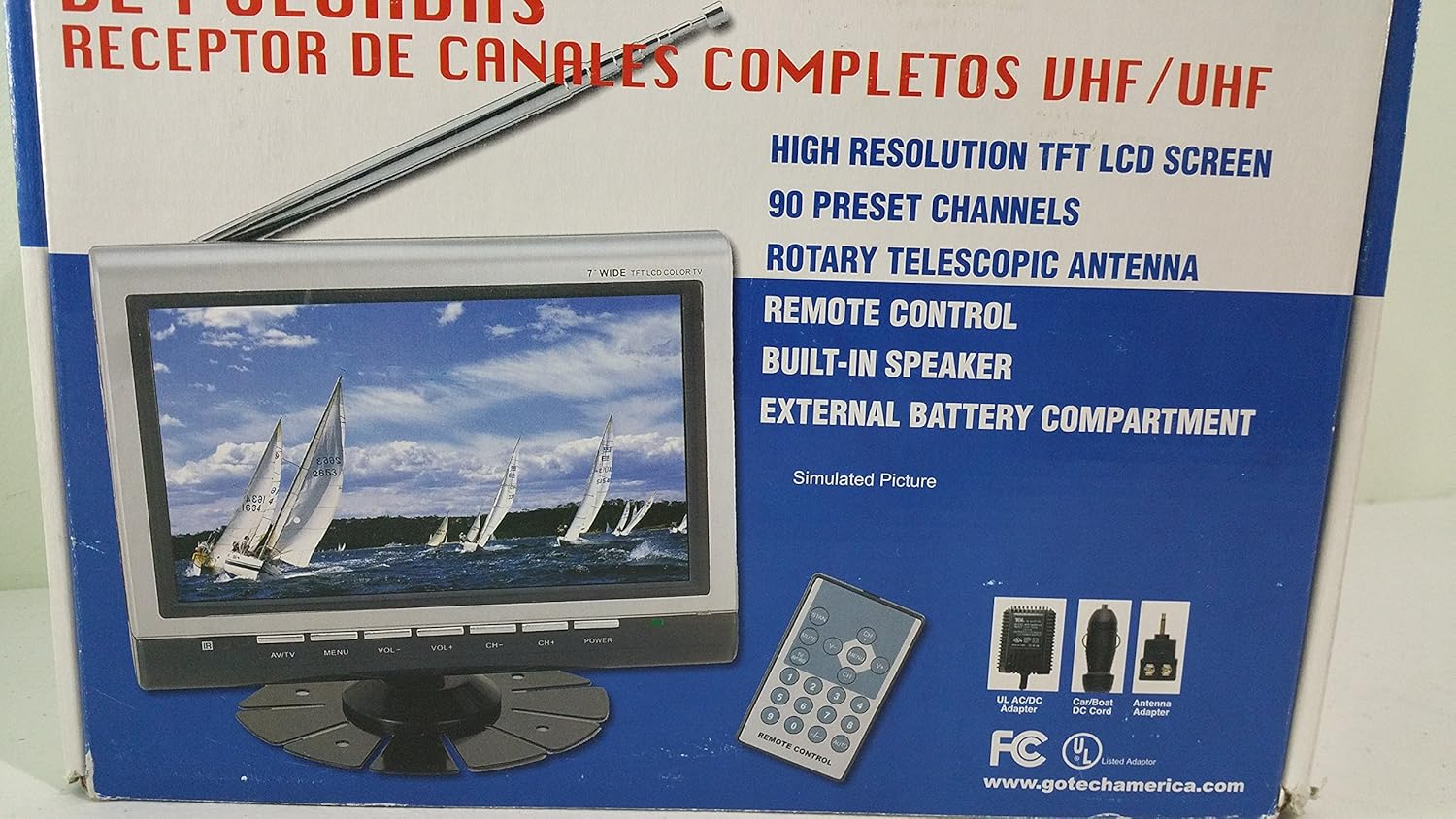
Imej 3.2: Lebih dekat view of the Gotech GTV-7-TFT TV screen and the remote control, as depicted on the product packaging.
4. Produk Lebihview
4.1 Ciri-ciri Utama
- 7-inch High Resolution TFT LCD Screen
- Full Channel VHF/UHF Receiver
- 90 Saluran Pratetap
- Digital Up/Down Tuning
- Auto Channel Programming
- Antena Teleskopik Rotary
- On-Screen Display (OSD) for Picture and Volume Adjustment
- Pembesar Suara Terbina dalam
- External Battery Compartment (requires 10x AA batteries, not included)
- Remote Control with Button Cell
- New Detachable Stand with Battery

Image 4.1: Side panel of the Gotech GTV-7-TFT packaging, detailing the product's main features.
5. Persediaan
5.1 Powering the TV
The GTV-7-TFT can be powered in several ways:
- Penyesuai AC/DC: Connect the provided AC/DC adapter to the TV's power input and then to a standard wall outlet.
- Car Cord: For in-vehicle use, connect the car cord to the TV's power input and then to your vehicle's 12V power outlet.
- Bateri Luaran: Open the external battery compartment and insert 10x AA size batteries (UM3) according to the polarity indicators. Ensure the batteries are fresh and correctly oriented.
5.2 Menyambung Antena
Extend the rotary telescopic antenna for optimal signal reception. For improved reception, you may connect an external antenna to the antenna jack using the provided antenna jack adapter.
5.3 Connecting External Devices (AV Input)
To connect external devices such as a DVD player or gaming console, use the provided AV cable. Connect one end to the TV's AV input port and the other end to the AV output ports of your external device. Select the AV input source on the TV to view kandungan daripada peranti yang disambungkan.
6. Operasi
6.1 Hidupkan/Mati Kuasa
Tekan ke KUASA button on the TV unit or the remote control to turn the TV on or off.
6.2 Penalaan Saluran
- Auto Channel Programming: It is recommended to perform an auto channel scan upon first use or when moving to a new location. Access the menu, navigate to the channel setup, and select 'Auto Scan' or 'Auto Program'. The TV will search and store available channels.
- Digital Up/Down Tuning: Gunakan CH+ dan CH- buttons on the TV or remote control to navigate through the preset channels.
6.3 Volume and Picture Adjustment
Gunakan VOL+ dan vol- buttons on the TV or remote control to adjust the volume. Picture settings (brightness, contrast, color) can be adjusted via the on-screen display (OSD) menu. Press the MENU button to access these options.
6.4 Alat Kawalan Jauh
The remote control allows convenient operation from a distance. Ensure the button cell battery is correctly inserted. Point the remote control directly at the TV's infrared sensor.
7. Penyelenggaraan
7.1 Pembersihan
Wipe the TV screen and casing with a soft, dry, lint-free cloth. Do not use abrasive cleaners, waxes, or solvents as they may damage the finish or screen.
7.2 Penyimpanan
If the TV will not be used for an extended period, remove the external batteries to prevent leakage. Store the unit in a cool, dry place away from direct sunlight and extreme temperatures.
8. Penyelesaian masalah
| Masalah | Kemungkinan Punca | Penyelesaian |
|---|---|---|
| Tiada kuasa | Penyesuai kuasa tidak disambungkan; Bateri kehabisan kuasa atau dimasukkan dengan salah. | Check power connections; Replace or correctly insert batteries. |
| Tiada gambar/bunyi | Incorrect input source; Antenna not connected or extended; No channels scanned. | Select correct input (TV/AV); Extend antenna or connect external one; Perform auto channel scan. |
| Sambutan yang kurang baik | Weak signal; Antenna position. | Adjust antenna position; Try an external antenna; Check for local signal strength. |
| Alat kawalan jauh tidak berfungsi | Battery depleted; Obstruction between remote and TV. | Replace remote control battery; Remove any obstructions. |
9. Spesifikasi
| Ciri | Perincian |
|---|---|
| Nombor Model | gtv-7-tft |
| Saiz Skrin | 7 inci (17.8 cm) |
| Jenis Paparan | Paparan Warna LCD TFT |
| Jenis Penala | Full Channel VHF/UHF Receiver |
| Saluran Pratetap | 90 |
| Jenis Output Audio | Pembesar Suara Terbina dalam |
| Kaedah Kawalan | Alat Kawalan Jauh |
| Peranti Serasi | Televisyen, Penceramah |
| Sumber Kuasa | AC/DC Adapter, Car Cord, External Battery Compartment (10x AA batteries, not included) |
10. Waranti dan Sokongan
Specific warranty information and customer support details are not provided within this manual. Please refer to the product packaging or contact your retailer for warranty claims and technical assistance.


