1. Pengenalan
This manual provides comprehensive instructions for the setup, operation, and maintenance of the EDUP EP-3701 USB WiFi Disk. The EP-3701 is a portable wireless storage device designed to expand storage and facilitate data sharing for iOS and Android smartphones and tablets without the need for cables or a computer.
Sila baca manual ini dengan teliti sebelum menggunakan peranti ini bagi memastikan ia berfungsi dengan betul dan untuk mengelakkan kerosakan.
2. Produk Lebihview
The EDUP EP-3701 acts as a bridge between your USB storage devices (like USB flash drives or external hard drives) and your mobile devices via a Wi-Fi connection. It creates its own Wi-Fi hotspot, allowing multiple devices to connect and access stored files serentak.
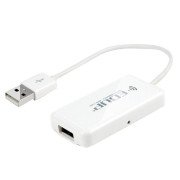
Imej 2.1: Depan view of the EDUP EP-3701 USB WiFi Disk, showing the USB host port and the integrated USB cable.
3. Ciri-ciri Utama
- Wireless Data Access: Akses files on connected USB storage devices wirelessly from smartphones, tablets, and computers.
- Sokongan Berbilang Pengguna: Allows multiple users to connect and stream/access data simultaneously.
- Reka Bentuk Mudah Alih: Compact and lightweight, ideal for travel and on-the-go use.
- Sumber Kuasa: Powered via USB, can be connected to a USB wall adapter, power bank, or computer USB port.
- Kawalan Apl: Dedicated mobile application for easy file management and device configuration.
4. Kandungan Pakej
Sahkan bahawa semua item terdapat dalam pakej:
- EDUP EP-3701 USB WiFi Disk
- Panduan Mula Pantas (manual ini)
5. Persediaan
5.1. Menghidupkan Peranti
- Connect the integrated USB cable of the EP-3701 to a USB power source (e.g., a 5V/1A USB wall adapter, a power bank, or a computer's USB port).
- The power indicator light on the device will illuminate, indicating it is powered on.
5.2. Connecting USB Storage
- Insert your USB flash drive or external hard drive into the USB host port on the EP-3701.
- Ensure the USB storage device is properly seated.
5.3. Menyambung Peranti Mudah Alih
- Pada telefon pintar atau tablet anda, pergi ke tetapan Wi-Fi.
- Locate and connect to the Wi-Fi network named "EDUP_XXXXXX" (XXXXXX will be the last six digits of the device's MAC address).
- The default password is "12345678". It is recommended to change this password after initial setup.
- Download and install the "WiFi Disk" application from your device's app store (App Store for iOS, Google Play Store for Android).
- Open the "WiFi Disk" app. The app will automatically detect and connect to the EP-3701.
6. Arahan Operasi
6.1. File Pengurusan
- Semak imbas Files: Within the "WiFi Disk" app, navigate through the folders and files on the connected USB storage.
- Muat naik Files: Pemindahan files from your mobile device to the USB storage connected to the EP-3701.
- Muat turun Files: Pemindahan files from the USB storage to your mobile device.
- Media Strim: Mainkan video, muzik dan view photos directly from the USB storage without downloading.
6.2. Tetapan Rangkaian
The "WiFi Disk" app allows you to configure network settings:
- Change Wi-Fi Name (SSID): Modify the name of the EP-3701's Wi-Fi network.
- Tukar Kata Laluan Wi-Fi: Update the password for the Wi-Fi network.
- Internet Passthrough (Bridge Mode): Connect the EP-3701 to an existing Wi-Fi network to provide internet access to connected devices while still allowing access to the USB storage.
7. Penyelenggaraan
- Pembersihan: Gunakan kain lembut dan kering untuk membersihkan bahagian luar peranti. Jangan gunakan pembersih cecair atau aerosol.
- Storan: Simpan peranti di tempat yang sejuk dan kering jauh dari cahaya matahari langsung dan suhu yang melampau.
- Kemas kini Firmware: Periodically check the "WiFi Disk" app or the EDUP official webtapak untuk kemas kini perisian tegar bagi memastikan prestasi dan keselamatan yang optimum.
- Penyingkiran Selamat: Always ensure data transfer is complete before disconnecting the USB storage device or powering off the EP-3701.
8. Penyelesaian masalah
8.1. Peranti Tidak Dihidupkan
- Ensure the USB cable is securely connected to a working USB power source.
- Cuba port USB atau penyesuai kuasa yang berbeza.
8.2. Cannot Connect to Wi-Fi Network
- Verify you are selecting the correct "EDUP_XXXXXX" network.
- Double-check the Wi-Fi password (default is "12345678").
- Restart the EP-3701 device and your mobile device.
8.3. USB Storage Not Detected
- Ensure the USB storage device is properly inserted into the EP-3701's USB host port.
- Check if the USB storage device is formatted in a supported file system (FAT32, NTFS, exFAT).
- Some high-power consumption external hard drives may require an external power source.
- Try a different USB storage device to rule out a faulty drive.
8.4. Apl Tidak Berfungsi Dengan Betul
- Ensure your mobile device is connected to the EP-3701's Wi-Fi network.
- Close and reopen the "WiFi Disk" app.
- Reinstall the "WiFi Disk" app.
- Semak kemas kini apl dalam gedung apl peranti anda.
9. Spesifikasi
| Ciri | Penerangan |
|---|---|
| Model | EP-3701 |
| Antara muka | USB 2.0 (Host), USB 2.0 (Power Input) |
| Standard Tanpa Wayar | IEEE 802.11b/g/n |
| Jalur Kekerapan | 2.4 GHz |
| Keselamatan | WPA / WPA2, WPA-PSK / WPA2-PSK |
| Disokong File Sistem | FAT32, NTFS, exFAT |
| Input Kuasa | DC 5V/1A (melalui USB) |
| Dimensi | (Approximate, based on typical USB dongle size) 60mm x 25mm x 10mm |
| Suhu Operasi | 0°C hingga 40°C (32°F hingga 104°F) |
10. Waranti dan Sokongan
EDUP products typically come with a limited warranty. Please refer to the warranty card included with your purchase or visit the official EDUP webtapak untuk terma dan syarat waranti terperinci khusus untuk wilayah anda.
For technical support, product inquiries, or warranty claims, please contact EDUP customer service through their official webtapak atau maklumat hubungan yang diberikan dalam pembungkusan produk anda.
Webtapak: www.szedup.com


