1. Pengenalan
Thank you for choosing the DBPOWER 10.5-inch Portable DVD Player. This manual provides essential information for the safe and efficient operation of your device. Please read it thoroughly before use and keep it for future reference.
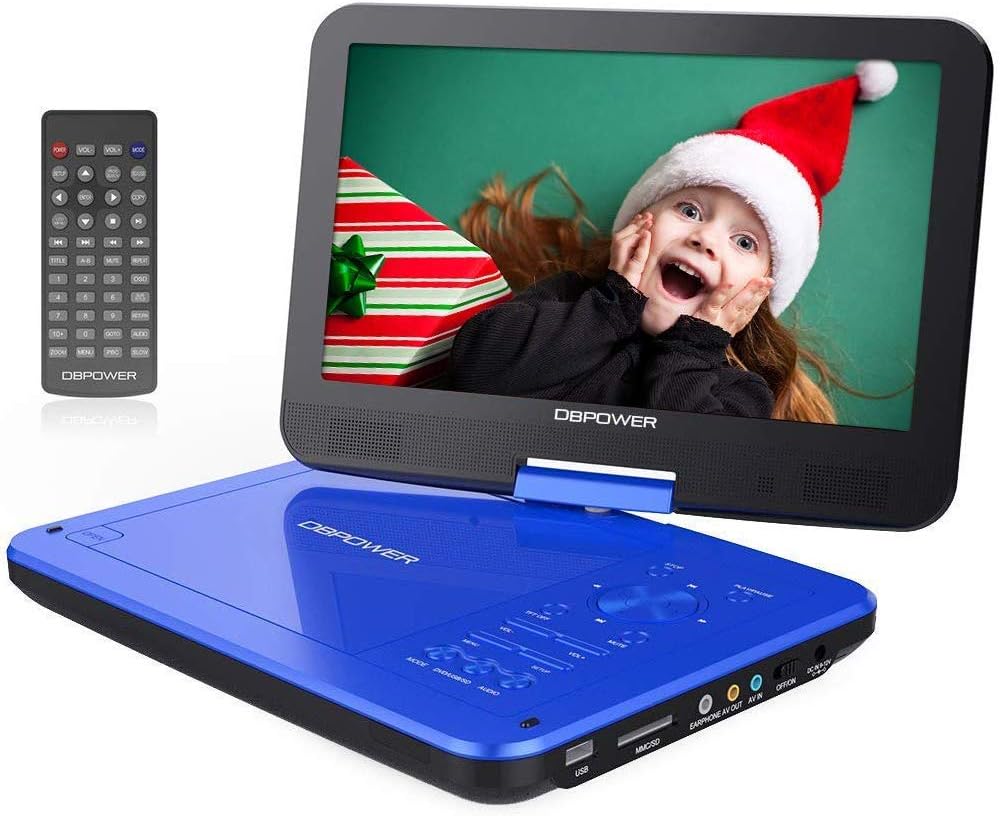
Image: The DBPOWER 10.5-inch Portable DVD Player in blue, shown with its remote control. The screen is open, displaying a vibrant image.
2. Maklumat Keselamatan
- Avoid touching the laser lens directly.
- Do not use scratched or damaged discs, as this may harm the player.
- It is normal to hear a slight sound during the first 15 seconds of disc playback.
- If the player displays "no disc," remove the disc and try another one.
- Jauhkan peranti daripada air, kelembapan dan suhu yang melampau.
- Jangan cuba membuka atau membaiki unit sendiri. Rujuk kepada kakitangan perkhidmatan yang berkelayakan.
3. Kandungan Pakej
Pastikan semua item ada dalam pakej:
- DBPOWER Portable DVD Player
- Panduan Pengguna
- Car Charger (DC9-12V)
- Power Adapter (DC9-12V)
- Alat Kawalan Jauh (2 bateri AAA tidak disertakan)
- AV Cable (3.5mm, for connecting player to TV/projector)

Image: An illustration showing the complete package contents, including the DVD player, user manual, car charger, AV cable, power adapter, and remote control.
4. Produk Lebihview
4.1 Ciri-ciri Utama
- 10.5-inch Swivel Screen: The screen can swivel and rotate 360 degrees for optimal viewsudut-sudut.
- Hayat Bateri yang Panjang: Upgraded battery provides up to 5 hours of playback time.
- Sokongan Pelbagai Format: Plays CD/DVD/CD-R/CD-RW/VCD/SVCD/CVD/DVD-R/DVD+R/DVD-RW/DVD+RW discs (excluding Blu-ray).
- USB & SD Card Playback: Directly play media files from USB drives and SD cards.
- Tahan Kejutan: Designed to withstand minor impacts.
- Pelbagai Pilihan Kuasa: Can be powered by the included AC adapter, car charger, or built-in battery.
- Output/Input AV: Connect to a TV or another player for shared viewing.
4.2 Format yang Disokong
| kategori | Format yang Disokong |
|---|---|
| Format cakera | CD, DVD, CD-R, CD-RW, VCD, SVCD, CVD, DVD-R, DVD+R, DVD-RW, DVD+RW (Blu-ray discs are not supported) |
| Format Audio | MP3, WMA, OGG, AAC (Bit rate: 32-192 kbps) |
| Format Video | AVI, MPG, MP4, VOB, FLV, RMVB, MPEG1, MPEG2 (Resolution not exceeding 720x576) |
| Format Imej | JPG |
| Format Teks | TXT |

Image: Visual representation of the 1024x600 TFT-LCD screen and icons for supported media formats including USB, SD card, and various disc types.

Imej: Dari dekat view of the side of the DVD player, highlighting the USB port, SD card slot, earphone jack, AV OUT/IN ports, ON/OFF switch, and DC power input.
5. Persediaan
5.1 Mengecas Bateri
Before first use, fully charge the player's built-in lithium battery. You can use either the AC power adapter or the car charger.
- Connect the power adapter or car charger to the DC IN port on the player.
- Plug the adapter into a wall outlet or the car charger into your vehicle's cigarette lighter socket.
- Lampu penunjuk pengecasan akan menyala. Ia akan padam atau bertukar warna apabila pengecasan selesai.

Image: This image illustrates the three power options for the portable DVD player: the internal 2500mAh battery, the car charger, and the standard power adapter.
5.2 Memasukkan Cakera
- Gently open the disc cover.
- Place the disc onto the spindle with the label side facing up.
- Tekan perlahan-lahan pada bahagian tengah cakera sehingga ia klik pada tempatnya.
- Close the disc cover firmly.
5.3 Using USB/SD Card
- Insert your USB flash drive into the USB port or your SD card into the SD card slot.
- Ensure the device is inserted correctly.

Image: A visual showing an SD card and a USB drive, indicating their compatibility with the portable DVD player for direct media playback.
6. Arahan Operasi
6.1 Main Semula Asas
- Turn on the player using the ON/OFF switch.
- The player will automatically detect and begin playing the inserted disc or media from the USB/SD card.
- Use the remote control or the buttons on the player to control playback (Play, Pause, Stop, Fast Forward, Rewind, Next/Previous Track).
- The "OK" button functions as both Play and Stop.

Image: This image illustrates the "Last Memory Function," showing the player resuming from where it left off after being powered off and on again.
6.2 Screen Rotation and Swivel
The screen can be rotated up to 270 degrees and flipped 180 degrees to achieve various viewing angles, including a tablet-like mode.

Image: Diagrams demonstrating the 270-degree rotation and 180-degree flip capabilities of the screen, along with an image of the player mounted on a car headrest.
6.3 Connecting to External Devices (TV/Projector/Another Player)
Use the included AV cable to connect the portable DVD player to a larger screen or another compatible player.
- Connect one end of the AV cable to the AV OUT port on the portable DVD player.
- Connect the other end of the AV cable to the corresponding AV IN ports (Yellow for Video, Red/White for Audio) on your TV or projector.
- Select the correct AV input source on your TV/projector.

Image: A family watching the portable DVD player's content mirrored on a large television screen via an AV cable connection.

Image: This composite image demonstrates how to sync the portable DVD player's screen to a TV, a projector, or even another similar portable player for a shared viewpengalaman dalam.
6.4 Keluaran Audio
The player features built-in stereo speakers. For private listening, connect headphones to the EARPHONE jack. You can also connect external speakers for enhanced audio.

Image: The portable DVD player with visual representations of sound waves emanating from its dual built-in speakers, emphasizing its loud volume capability.

Image: This image shows the portable DVD player connected to both headphones and an external speaker, illustrating its versatile audio output options in addition to its built-in speakers.
7. Penyelenggaraan
- Pembersihan: Use a soft, dry cloth to clean the player's surface. For the screen, use a screen-specific cleaning solution and a microfiber cloth.
- Penjagaan Cakera: Handle discs by their edges. Store them in their cases to prevent scratches. Clean discs with a soft, lint-free cloth from the center outwards.
- Storan: Apabila tidak digunakan untuk tempoh yang lama, simpan pemain di tempat yang sejuk dan kering, jauh daripada cahaya matahari langsung dan suhu yang melampau.
- Bateri: Untuk memanjangkan hayat bateri, elakkan daripada kerap mencas sepenuhnya bateri. Caskannya secara berkala, walaupun tidak digunakan.
8. Penyelesaian masalah
| Masalah | Kemungkinan Punca | Penyelesaian |
|---|---|---|
| Pemain tidak dihidupkan. | Battery is depleted; Power adapter/car charger not connected properly. | Charge the battery; Ensure power connections are secure. |
| "No Disc" message appears. | Disc is scratched, dirty, or inserted incorrectly; Unsupported disc format. | Clean or replace the disc; Ensure disc is inserted correctly; Check if disc format is supported. |
| Tiada bunyi. | Volume is too low; Mute function is on; Headphones/external speakers not connected properly. | Increase volume; Disable mute; Check audio connections. |
| Kualiti gambar yang teruk. | Disc is dirty/damaged; Screen settings need adjustment; AV cable issues. | Clean or replace disc; Adjust sharpness/brightness/contrast in settings; Check AV cable connection. |
| Alat kawalan jauh tidak berfungsi. | Bateri mati atau dipasang dengan salah; Halangan antara alat kawalan jauh dan pemain. | Replace batteries (2 AAA); Ensure correct polarity; Remove obstructions. |
9. Spesifikasi
- Nombor Model: NS-101B
- Saiz Skrin: 10.5 inci
- Resolusi Skrin: 1024x600 TFT-LCD
- Bateri: Lithium 2500mAh
- Hayat Bateri: Sehingga 5 jam
- Format Cakera yang Disokong: CD, DVD, CD-R, CD-RW, VCD, SVCD, CVD, DVD-R, DVD+R, DVD-RW, DVD+RW
- Disokong File Formats (USB/SD): AVI, MPG, MP4, VOB, FLV, RMVB, MPEG1, MPEG2 (Video); MP3, WMA, OGG, AAC (Audio); JPG (Image); TXT (Text)
- Port USB: 1
- AV Ports: AV KELUAR, AV MASUK
- Jack fon kepala: 3.5mm
- Input Kuasa: DC 9-12V
- Berat: 1.44 Kilogram
- warna: Biru
10. Waranti dan Sokongan
DBPOWER is committed to providing excellent customer support. While specific warranty details are not provided in this manual, please retain your proof of purchase for any warranty claims.
For technical assistance, troubleshooting beyond this guide, or warranty inquiries, please contact DBPOWER customer support. Refer to the contact information provided with your product packaging or visit the official DBPOWER webtapak.
"Feel free to let us know any problems you have with our player." - DBPOWER Support Team


