1. Pengenalan
The Motorola Solutions HKLN4606 Remote Speaker Microphone is designed to enhance communication efficiency for users of compatible Motorola business two-way radios. This accessory allows for convenient communication without needing to remove the radio from a belt or holster, providing flexibility and ease of use in various work environments.
It features an external speaker, a microphone, a Push-to-Talk (PTT) button, and an adjustable spring clip for secure attachment.
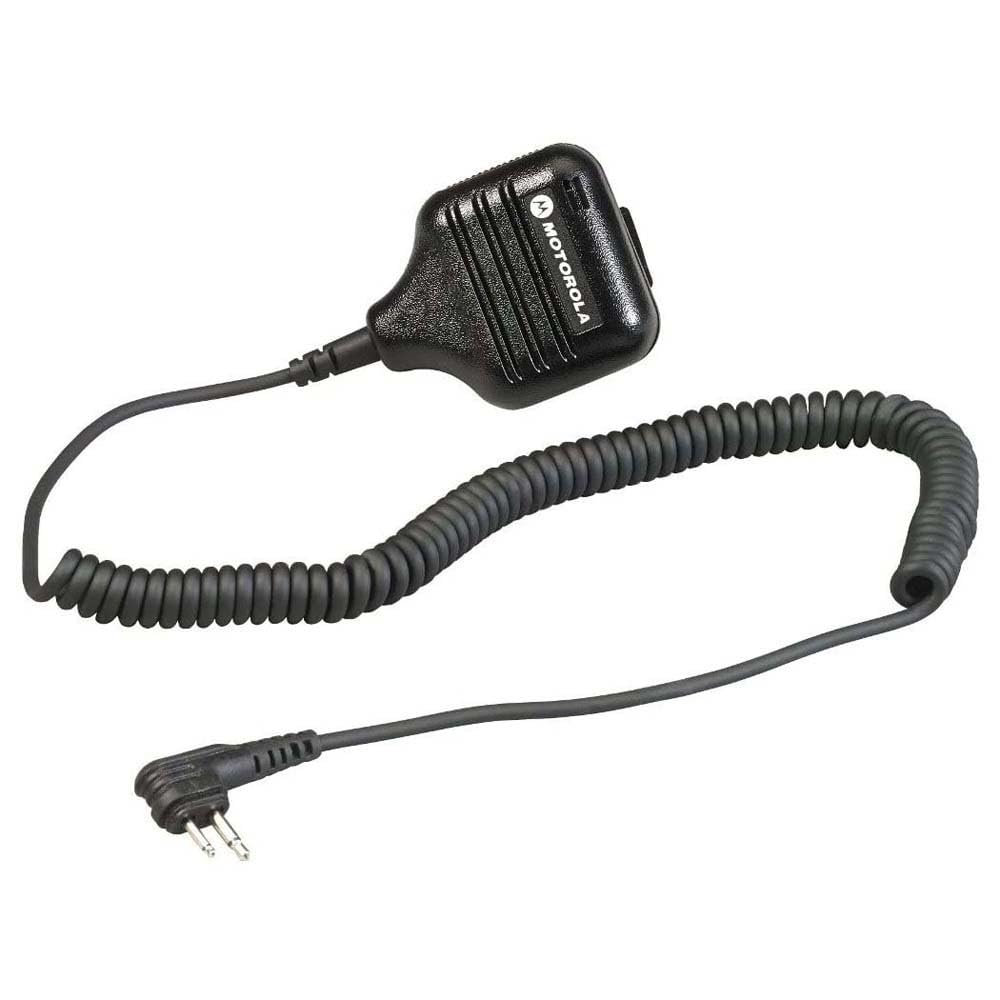
Rajah 1: Motorola Solutions HKLN4606 Remote Speaker Microphone. This image displays the black remote speaker microphone with its coiled cord and two-pin connector.
2. Apa yang ada di dalam Kotak
Setelah membuka bungkusan, pastikan item berikut disertakan:
- Motorola Solutions HKLN4606 Remote Speaker Microphone unit
Note: The main unit includes the speaker, microphone, Push-to-Talk button, adjustable spring clip, coiled cord, and radio connector.
3. Persediaan dan Pemasangan
- Kenal pasti Radio yang Serasi: Ensure your two-way radio is compatible with the HKLN4606. This microphone is designed for Motorola CLS, DLR, RM, and RDX Series Business Radios.
- Locate Accessory Port: Turn off your radio. Locate the accessory port on the side of your compatible Motorola two-way radio.
- Sambungkan Mikrofon: Align the two-pin connector of the HKLN4606 Remote Speaker Microphone with the radio's accessory port. Gently push the connector firmly into the port until it is securely seated.
- Mikrofon Selamat: Use the adjustable spring clip on the back of the microphone to attach it to your clothing (e.g., lapel, collar, shoulder strap) in a position that allows for clear audio transmission and reception.
- Hidupkan Radio: Turn on your radio. The radio should now recognize the connected accessory.
For optimal performance, ensure the connection is secure and the microphone is positioned correctly.
4. Arahan Operasi
The HKLN4606 Remote Speaker Microphone simplifies communication by allowing you to transmit and receive audio directly through the accessory.
- Menerima Audio: When your radio receives a transmission, the audio will be heard through the speaker on the remote microphone.
- Transmitting Audio (Push-to-Talk - PTT):
- Press and hold the large Push-to-Talk (PTT) button located on the side of the microphone.
- Speak clearly into the microphone, keeping it approximately 2-3 inches from your mouth.
- Lepaskan butang PTT untuk berhenti menghantar dan kembali ke mod menerima.
- Melaraskan Kelantangan: Adjust the volume using the controls on your connected two-way radio. The remote speaker microphone does not have independent volume controls.
- Kedudukan: Ensure the microphone is positioned to capture your voice clearly and that the speaker is audible to you. The adjustable clip allows for flexible placement.
5. Penjagaan dan Penyelenggaraan
Proper care will extend the life and performance of your HKLN4606 Remote Speaker Microphone.
- Pembersihan: Lap mikrofon dengan kain lembut,amp kain. Jangan gunakan bahan kimia yang keras atau pembersih yang kasar. Pastikan unit kering sebelum digunakan.
- Storan: Store the microphone in a cool, dry place when not in use. Avoid extreme temperatures.
- Pengendalian: Avoid dropping the unit or subjecting it to strong impacts. Do not pull on the cord excessively, as this can damage internal wiring or the connector.
- Pendedahan Air: Peranti ini tidak kalis air. Elakkan daripada mendedahkannya kepada hujan, percikan air atau rendaman dalam air.
6. Penyelesaian masalah
| Masalah | Kemungkinan Punca | Penyelesaian |
|---|---|---|
| No audio from speaker microphone. |
|
|
| Cannot transmit (PTT button unresponsive). |
|
|
| Poor audio quality (static, unclear). |
|
|
If troubleshooting steps do not resolve the issue, please contact Motorola Solutions customer support.
7. Spesifikasi
| Ciri | Perincian |
|---|---|
| Nama Model | HKLN4606 |
| Jenama | Penyelesaian Motorola |
| Faktor Bentuk Mikrofon | pegang tangan |
| Teknologi Ketersambungan | berwayar |
| Jenis Penyambung | M03 (Two-pin) |
| Peranti Serasi | Motorola CLS, DLR, RM, RDX Series Business Radios |
| bahan | plastik |
| warna | Hitam |
| Dimensi Item (L x W x H) | 5.3 x 2.4 x 10.9 inci (13.46 x 6.1 x 27.69 cm) |
| Berat Barang | 3.99 auns (113 gram) |
| Ciri Khas | Adjustable Spring Clip |
| Sumber Kuasa | Corded Electric (dikuasakan oleh radio) |
| UPC | 748091000447 |
| Pengeluar | Motorola Solutions Business Radios |
8. Waranti dan Sokongan
For information regarding the warranty coverage for your Motorola Solutions HKLN4606 Remote Speaker Microphone, please refer to the warranty documentation provided with your original purchase or visit the official Motorola Solutions webtapak.
If you require technical assistance, troubleshooting beyond this manual, or warranty service, please contact Motorola Solutions customer support. Contact details can typically be found on the official Motorola Solutions webtapak atau melalui pengedar sah anda.
Penting: Motorola recommends purchasing only from authorized dealers to ensure genuine products and valid warranty support.


