1. Pengenalan
Terima kasih kerana membeliasing the RCA DEDE-240M4 24-inch HD LED Television. This manual provides essential information for the safe and efficient operation of your new television. Please read this manual thoroughly before using the product and retain it for future reference.
2. Maklumat Keselamatan
- Keselamatan Elektrik: Do not expose the television to rain or moisture to prevent fire or electric shock. Ensure the power cord is not damaged or pinched.
- Pengudaraan: Ensure adequate ventilation around the television. Do not block ventilation openings. Avoid placing the TV on soft surfaces like carpets or blankets.
- penempatan: Place the television on a stable, level surface. Avoid direct sunlight, heat sources, and excessive dust.
- Pembersihan: Unplug the television before cleaning. Use a soft, dry cloth. Do not use liquid cleaners or aerosol cleaners.
- Bateri: Dispose of used batteries responsibly. Do not mix old and new batteries or different types of batteries.
3. Kandungan Pakej
Sila pastikan semua item ada dalam pakej:
- RCA DEDE-240M4 24-inch HD LED Television
- Alat Kawalan Jauh
- Kord Kuasa
- Kaki TV (Tapak dan Skru)
- Bateri AAA (2) untuk Alat Kawalan Jauh
- Manual Pengguna (dokumen ini)
4. Produk Lebihview
4.1 Sambungan Panel Belakang
The rear panel of your television provides various ports for connecting external devices. Refer to the image below for a visual guide.

Image 1: Rear panel connections of the RCA DEDE-240M4 television. From left to right, ports include USB, L/R Audio Input, Video/Y/Pb/Pr Component Input, HDMI/MHL, VGA, PC/Audio Input, Earphone, ANT (Antenna), and Coaxial Digital Audio Out.
- USB: Untuk menyambungkan peranti storan USB untuk memainkan media files (JPEG, MP3, Movie).
- INPUT (L/R, VIDEO/Y/Pb/Pr): Analog audio and video inputs for older devices.
- HDMI/MHL: High-Definition Multimedia Interface inputs for digital audio and video. MHL (Mobile High-Definition Link) support allows connecting compatible mobile devices. There are 3 HDMI inputs.
- VGA (PC INPUT): Untuk menyambungkan komputer.
- PC/AUDIO INPUT: Audio input for PC connection.
- EARPHONE: Untuk menyambungkan fon kepala.
- ANT (Antena): For connecting an external antenna or cable TV signal.
- COAXIAL (DIGITAL AUDIO OUT): For connecting to a digital audio receiver or sound system.
4.2 Alat Kawalan Jauh
The remote control allows you to operate your television from a distance. Insert the two AAA batteries provided, ensuring correct polarity.
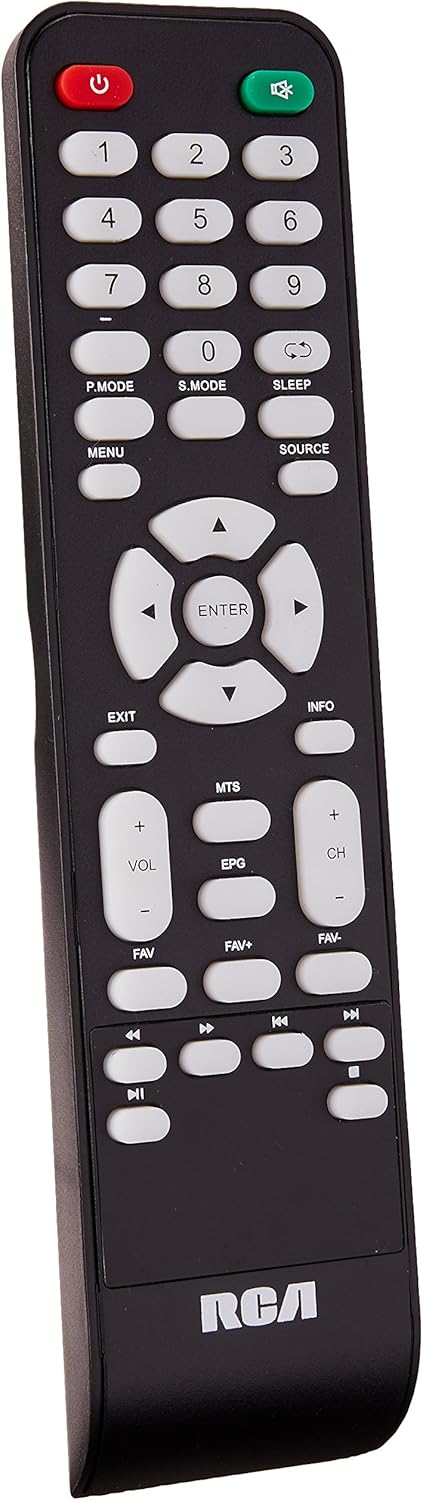
Image 2: Remote control for the RCA DEDE-240M4 television. Key buttons include Power, Number Pad, P.MODE, S.MODE, SLEEP, MENU, SOURCE, EXIT, INFO, directional arrows with ENTER, VOL+/-, CH+/-, MTS, EPG, FAV, FAV+, FAV-, and media playback controls.
- POWER (Red): Menghidupkan atau mematikan TV.
- Butang Nombor (0-9): Untuk pemilihan saluran langsung.
- MOD P.: Picture Mode selection.
- S.MOD: Sound Mode selection.
- TIDUR: Menetapkan pemasa tidur.
- MENU: Mengakses menu utama.
- SUMBER: Memilih sumber input (HDMI, AV, USB, TV).
- KELUAR: Keluar dari menu atau fungsi semasa.
- MAKLUMAT: Memaparkan maklumat program.
- Directional Arrows (Up/Down/Left/Right) & ENTER: Menavigasi menu dan mengesahkan pilihan.
- VOL +/-: Melaraskan tahap kelantangan.
- CH +/-: Menukar saluran.
- MTS: Multi-channel Television Sound (SAP/Stereo).
- EPG: Electronic Program Guide (for digital channels).
- FAV / FAV+ / FAV-: Accesses and navigates favorite channels.
- Kawalan Main Balik Media: Play, Pause, Stop, Fast Forward, Rewind, Next/Previous Track (for USB media).
5. Persediaan
5.1 Memasang Stand
- Letakkan TV menghadap ke bawah dengan berhati-hati pada permukaan yang lembut dan bersih untuk mengelakkan kerosakan skrin.
- Jajarkan tapak pendirian dengan lubang pelekap di bahagian bawah TV.
- Selamatkan dirian menggunakan skru yang disediakan. Jangan terlalu ketat.
- Letakkan TV tegak pada permukaan yang stabil.
5.2 Menyambung Peranti Luaran
Ensure the TV and all devices are powered off before making any connections.
- Antena/Kabel: Connect an RF coaxial cable from your antenna or cable wall outlet to the ANT input on the TV.
- Peranti HDMI (cth., pemain Blu-ray, konsol permainan): Connect an HDMI cable from the device's HDMI output to any of the HDMI inputs on the TV.
- Peranti USB: Insert a USB flash drive into the USB port for media playback.
- Sambungan PC: Connect a VGA cable from your computer's VGA output to the TV's VGA input. Connect an audio cable from your computer's audio output to the TV's PC/AUDIO INPUT.
- Sistem Audio: For digital audio, connect a coaxial digital audio cable from the TV's COAXIAL output to your audio receiver. For headphones, use the EARPHONE jack.
5.3 Menghidupkan
- Connect the power cord to the TV's power input, then plug the other end into a wall outlet.
- Press the POWER button on the remote control or on the TV itself.
- Ikut arahan pada skrin untuk persediaan awal, termasuk pemilihan bahasa dan pengimbasan saluran.
6. Beroperasi
6.1 Fungsi Asas
- Hidupkan/Mati Kuasa: Press the POWER button on the remote or TV.
- Pelarasan Kelantangan: Use VOL +/- buttons on the remote.
- Pemilihan Saluran: Use CH +/- buttons or the number pad on the remote.
- Pemilihan Sumber Input: Press the SOURCE button on the remote to cycle through available inputs (TV, HDMI1, HDMI2, HDMI3, AV, PC, USB). Press ENTER to confirm.
6.2 Menu Navigasi
Press the MENU button to access the main menu. Use the directional arrows to navigate through options and ENTER to select. Use EXIT to close the menu.
6.3 Main Semula Media USB
Insert a USB flash drive into the USB port. The TV should automatically detect the device and prompt you to open the media browser. If not, select the USB source using the SOURCE button. You can play JPEG images, MP3 audio, and various video formats.
7. Penyelenggaraan
- Pembersihan Skrin: Lap skrin perlahan-lahan dengan kain lembut yang tidak berbulu. Untuk tanda degil, sedikit dampbilas kain dengan air atau pembersih skrin khusus (sapukan pada kain, bukan terus pada skrin).
- Pembersihan Kabinet: Lap kabinet TV dengan kain lembut dan kering.
- Storan: If storing the TV for an extended period, unplug it, remove batteries from the remote, and cover it to protect from dust.
8. Penyelesaian masalah
| Masalah | Penyelesaian yang Mungkin |
|---|---|
| Tiada kuasa | Pastikan kord kuasa dipasang dengan selamat ke dalam TV dan salur keluar dinding. Periksa sama ada saluran keluar berfungsi. |
| Tiada gambar, tetapi bunyi hadir | Semak pemilihan sumber input. Pastikan peranti luaran dihidupkan dan disambungkan dengan betul. |
| Tiada bunyi, tetapi ada gambar | Periksa tahap kelantangan dan pastikan TV tidak disenyapkan. Periksa sambungan kabel audio untuk peranti luaran. |
| Alat kawalan jauh tidak berfungsi | Replace the batteries with new AAA batteries, ensuring correct polarity. Ensure there are no obstructions between the remote and the TV's IR sensor. |
| Mesej "Tiada Isyarat" | Verify the correct input source is selected. Check antenna/cable connection or external device connections. Perform a channel scan if using an antenna. |
9. Spesifikasi
| Ciri | Spesifikasi |
|---|---|
| Model | DEDE-240M4 |
| Saiz Skrin | 24 Inci |
| Teknologi Paparan | LED (LCD Type) |
| Resolusi | 720p (Maximum) |
| Nisbah Aspek | 16:9 |
| Ketersambungan | 3x HDMI, 1x USB, 1x RF Antenna, 1x PC (VGA), 1x PC Audio In, 1x Component (Video/Y/Pb/Pr), 1x L/R Audio In, 1x Coaxial Digital Audio Out, 1x Earphone Out |
| Jenis Pemasangan | Lekap Meja |
| Dimensi (dengan pendirian) | 62.5 x 9.4 x 40 cm (lebih kurang) |
| Berat badan | 4.6 kg (lebih kurang) |
| Bateri Diperlukan | 2 AAA (termasuk) |
10. Waranti dan Sokongan
For warranty information and technical support, please refer to the warranty card included with your product or visit the official RCA webtapak. Simpan resit pembelian anda sebagai bukti pembelian untuk sebarang tuntutan waranti.


