1. Pengenalan
This manual provides comprehensive instructions for the installation, operation, and maintenance of your Speco Technologies HT5941T Intense IR HD TVI Dome Camera. This camera is designed to deliver high-definition surveillance with advanced features such as True WDR, Intense IR, and day/night operation. Please read this manual thoroughly before installation and use to ensure proper functionality and safety.
2. Maklumat Keselamatan
- Bekalan Kuasa: Use only the specified 12VDC or 24VAC power supply. Incorrect voltage boleh merosakkan kamera.
- Pemasangan: Ensure the camera is securely mounted to prevent accidental falls. Professional installation is recommended.
- Persekitaran: Do not expose the camera to extreme temperatures, humidity, or corrosive environments beyond its specified operating conditions.
- Pembersihan: Disconnect power before cleaning. Use a soft, dry cloth. Avoid harsh chemicals.
- Servis: Do not attempt to disassemble or service the camera yourself. Refer all servicing to qualified personnel.
3. Kandungan Pakej
Sahkan bahawa semua item terdapat dalam pakej anda:
- HT5941T Dome Camera
- Chameleon Cover
- Perkakasan Pemasangan (skru, sauh)
- Panduan Mula Pantas (jika berkenaan)
4. Persediaan dan Pemasangan
4.1 Memasang Kamera
The HT5941T camera supports 3-axis adjustment for both wall and ceiling mounting. Ensure the mounting surface is strong enough to support the camera's weight.
- Pilih lokasi pemasangan yang sesuai.
- Use the provided mounting template (if included) or the camera base to mark drilling points.
- Tebuk lubang pandu dan masukkan penambat dinding jika perlu.
- Pasangkan tapak kamera pada permukaan pelekap menggunakan skru yang disediakan.
- Adjust the camera's angle for optimal viewing.
4.2 Pendawaian dan Sambungan Kuasa
The HT5941T is an HD-TVI output only camera, providing full HD resolution over coaxial cable.
- Connect a coaxial cable (RG59 or similar) from the camera's BNC output to your HD-TVI DVR or monitor.
- Connect the power cable to the camera's power input. The camera supports dual voltage operation (12VDC or 24VAC). Ensure the power supply matches the camera's requirements.
- Sahkan semua sambungan selamat sebelum menggunakan kuasa.
4.3 Chameleon Cover Installation
The included Chameleon Cover can be painted to match your décor.
- If desired, paint the Chameleon Cover before installation. Allow it to dry completely.
- Align the cover with the camera body and snap it into place.
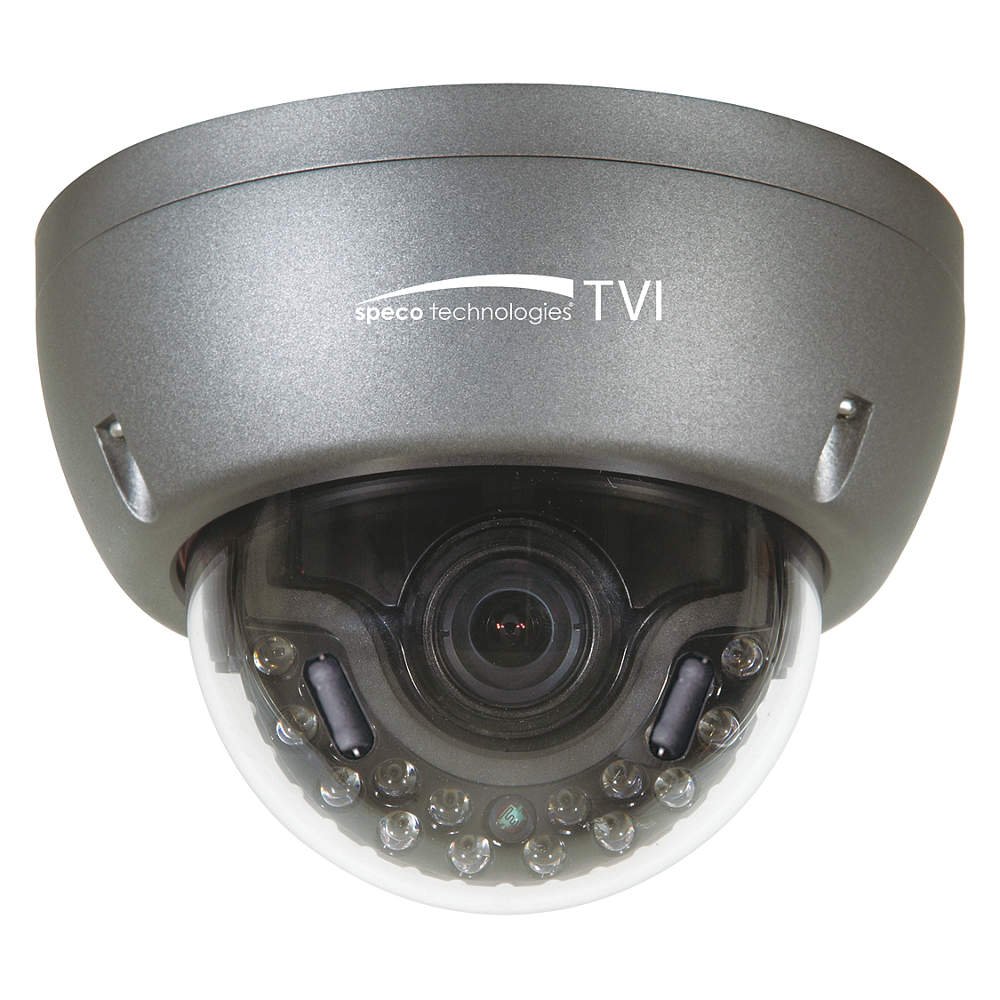
Figure 1: Speco Technologies HT5941T Dome Camera with its dark gray housing and dome design.
5. Arahan Operasi
5.1 Powering On and Initial View
Once the camera is properly wired and powered, it will automatically begin transmitting video. Connect your HD-TVI DVR or monitor to view suapan langsung.
5.2 Menu Paparan Pada Skrin (OSD).
The camera features a full OSD menu for configuration, accessible via on-board controls or UTC (Up The Coax) control from a compatible DVR.
- Mengakses OSD: Use the joystick or buttons on the camera (if present) or the UTC control function on your DVR to bring up the OSD menu.
- Navigasi: Use the directional controls to navigate through menu options. Select options to adjust settings such as exposure, white balance, and image enhancements.
- Ciri-ciri Utama:
- WDR sebenar: Wide Dynamic Range for clear images in high-contrast lighting.
- Intense IR: Adapts IR intensity to the subject, preventing saturation and providing vivid night vision.
- Day/Night Operation: Mechanical IR cut filter automatically switches between color (day) and monochrome (night) modes for optimal image quality.
6. Penyelenggaraan
6.1 Pembersihan
Regular cleaning helps maintain optimal image quality.
- Gently wipe the camera lens and housing with a soft, lint-free cloth.
- Untuk kotoran degil, sedikit dampen the cloth with water or a mild lens cleaning solution. Avoid abrasive cleaners.
- Pastikan kamera dimatikan sebelum membersihkannya.
6.2 Pertimbangan Alam Sekitar
The HT5941T features heater circuitry and anti-moisture glass to reduce fog or condensation in various weather conditions. No specific user maintenance is required for these features, but ensure the camera's power supply is stable to allow these functions to operate effectively.
7. Penyelesaian masalah
| Masalah | Kemungkinan Punca | Penyelesaian |
|---|---|---|
| Tiada output video | No power; Loose cable connection; Incorrect video format (not HD-TVI compatible DVR) | Check power supply and connections; Ensure DVR supports HD-TVI input. |
| Kualiti imej buruk (kabur, herot) | Dirty lens; Improper focus; Cable interference; Insufficient lighting | Clean the lens; Adjust focus via OSD; Use shielded coaxial cable; Verify adequate lighting or IR function. |
| IR tidak berfungsi pada waktu malam | Insufficient power; Day/Night setting incorrect; IR sensor blocked | Check power supply; Verify Day/Night mode in OSD; Ensure nothing obstructs the IR LEDs or sensor. |
| Menu OSD tidak muncul | Incorrect control method; DVR not compatible with UTC | Try on-board controls if available; Consult DVR manual for UTC compatibility and operation. |
8. Spesifikasi
| Ciri | Spesifikasi |
|---|---|
| Nombor Model | HT5941T |
| Jenama | Teknologi Speco |
| Resolusi Tangkapan Video | 1080p (HD Penuh) |
| Kadar Bingkai | 30 fps |
| Teknologi Ketersambungan | HD-TVI (Coaxial) |
| Sumber Kuasa | 12VDC & 24VAC Dual Voltage |
| Jenis Pemasangan | Wall Mount (3-axis adjustment) |
| Faktor Bentuk | Kubah |
| Teknologi Cahaya Rendah | Day/Night, Intense IR |
| Ciri Khas | True WDR, Heater circuitry, Anti-moisture glass, Chameleon Cover |
| Penilaian Perlindungan Antarabangsa | IP67 |
| Dimensi (L x W x H) | 5.12 x 4.84 x 3.66 inci |
| Berat Barang | 1.5 paun |
| bahan | Glass (lens) |
9. Waranti dan Sokongan
Untuk maklumat jaminan dan sokongan teknikal, sila rujuk Speco Technologies rasmi webtapak atau hubungi bahagian perkhidmatan pelanggan mereka. Simpan resit pembelian anda sebagai bukti pembelian untuk tuntutan waranti.
Speco Technologies Official Webtapak: www.specotech.com


