pengenalan
This manual provides essential information for the proper use and maintenance of your Avaya 96XX/96X1 Series CAT5E Ethernet Patch Cable. This cable is designed to provide reliable network connectivity for compatible Avaya devices. Please read this manual thoroughly before installation and use.
Kandungan Pakej
Sahkan bahawa semua item terdapat dalam pakej anda:
- 5x Avaya CAT5E 14FT Ethernet Patch Cables (Model: 700383326 / Part: 700451586)
Produk Selesaiview
The Avaya CAT5E Ethernet Patch Cable is a high-quality networking cable designed for connecting Avaya 96XX/96X1 series devices to a network. It features RJ45 connectors on both ends and a durable grey jacket.
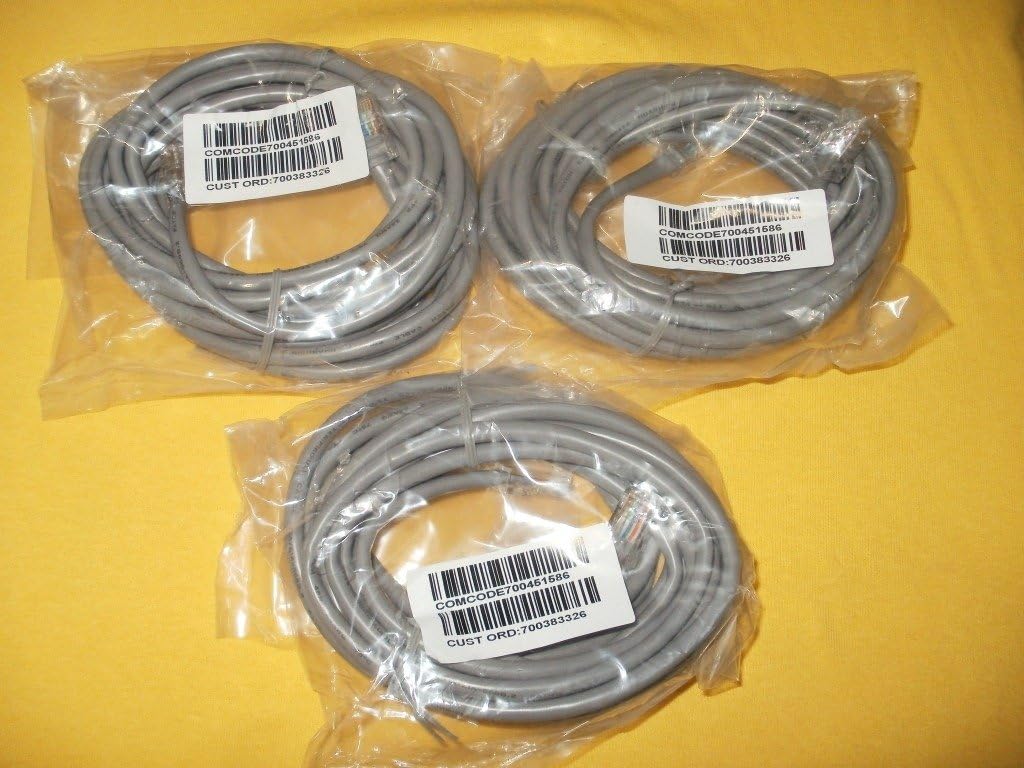
Image: Three Avaya CAT5E Ethernet patch cables, each coiled and sealed in clear plastic packaging. Labels on the packages indicate "COMCODE700451586" and "CUST ORD:700383326", confirming the model and part numbers. The cables are grey and feature standard RJ45 connectors visible through the packaging.
Ciri-ciri utama termasuk:
- Category 5e (CAT5E) Standard: Supports Ethernet speeds up to 1 Gigabit per second (Gbps).
- Penyambung RJ45: Standard connectors for Ethernet networking.
- 14-Kaki Panjang: Menyediakan ample reach for typical office and home network setups.
- Kualiti OEM: Genuine Avaya cable ensures compatibility and performance with Avaya equipment.
Persediaan dan Pemasangan
Follow these steps to properly connect your Avaya CAT5E Ethernet Patch Cable:
- Kenal pasti Pelabuhan: Locate the Ethernet (RJ45) ports on your Avaya 96XX/96X1 series device and the network device (e.g., router, switch, wall jack) you wish to connect to.
- Sambungkan Hujung Pertama: Gently insert one end of the Avaya CAT5E cable into the Ethernet port of your Avaya device until it clicks into place. Ensure a secure connection.
- Sambungkan Hujung Kedua: Insert the other end of the cable into the Ethernet port of your network device or wall jack until it clicks.
- Sahkan Sambungan: Most network devices have indicator lights that illuminate when a successful connection is established. Check these lights on both connected devices.
- Kefungsian Ujian: After connecting, test the network functionality of your Avaya device to ensure proper communication.
Nota: Always handle cables by the connector ends to avoid damaging the cable or connectors.
Garis Panduan Penggunaan
The Avaya CAT5E Ethernet Patch Cable is designed for reliable data transmission in various networking environments. Once connected, the cable facilitates communication between your Avaya device and the network. No specific operational steps are required for the cable itself beyond proper connection.
- Ensure the cable is not excessively bent or kinked, as this can degrade performance.
- Avoid placing heavy objects on the cable.
- Use the cable within its specified environmental conditions (indoor/outdoor as applicable).
Penjagaan dan Penyelenggaraan
To ensure the longevity and optimal performance of your Avaya CAT5E Ethernet Patch Cable, follow these simple maintenance guidelines:
- Pembersihan: If necessary, gently wipe the cable jacket with a soft, dry cloth. Avoid using harsh chemicals or abrasive cleaners.
- Storan: When not in use, coil the cable loosely. Avoid tight coiling or sharp bends, which can damage the internal wires. Store in a cool, dry place away from direct sunlight and extreme temperatures.
- Pemeriksaan: Periodically inspect the cable and its connectors for any signs of wear, damage, or corrosion. Replace the cable if any damage is observed.
- Perlindungan Alam Sekitar: While rated for indoor/outdoor use, protect the connectors from moisture and dust when not connected.
Menyelesaikan masalah
Jika anda mengalami masalah dengan sambungan rangkaian anda, pertimbangkan langkah penyelesaian masalah berikut:
- Tiada Sambungan Rangkaian:
- Pastikan kedua-dua hujung kabel dipasang dengan kukuh ke port masing-masing.
- Check the indicator lights on your network devices (e.g., router, switch, Avaya phone) to confirm link activity.
- Try using a different port on your network device.
- Test the cable with another known working device, or try a different Ethernet cable to rule out the cable as the source of the problem.
- Kelajuan Rangkaian Perlahan:
- Ensure the cable is not damaged (kinks, cuts, frayed connectors).
- Verify that both connected devices support CAT5E speeds.
- Periksa kesesakan rangkaian atau masalah lain dengan penyedia perkhidmatan internet anda.
- Sambungan Terputus-putus:
- Pastikan penyambung bersih dan bebas daripada serpihan.
- Periksa sambungan yang longgar.
- Avoid electromagnetic interference by keeping the cable away from power lines or other electronic devices that emit strong signals.
If issues persist after following these steps, consult the user manual for your Avaya device or contact Avaya technical support.
Spesifikasi
| Nombor Model | 700383326 |
| Nombor Bahagian | 700451586 |
| Jenis Kabel | Category 5e (CAT5E) Ethernet Patch Cable |
| Panjang | 14 kaki (kira-kira 4.27 meter) |
| Penyambung | RJ45 Male-to-Male |
| warna | Kelabu |
| Keserasian | Avaya 96XX/96X1 Series devices |
| Penggunaan Dalaman/Luar | Dalaman, Luaran |
| Pengeluar | Avaya, Inc |
| UPC | 635510933786 |
| Berat Pakej | 3.68 ounces (for 5 cables) |
| Dimensi Pakej (LxWxH) | 6 x 5.25 x 1.2 inci |
Waranti dan Sokongan
For information regarding warranty coverage for your Avaya CAT5E Ethernet Patch Cable, please refer to the official Avaya warranty documentation provided with your purchase or visit the official Avaya website. For technical assistance or further support, please contact Avaya customer service directly.
You can typically find support contact information on the official Avaya webtapak: www.avaya.com/support


