1. Pengenalan
This manual provides detailed instructions for the Sharp EL1750V EL-1750V Two-Color Printing Calculator. This device is designed for efficient financial and general calculations, featuring a two-color printing mechanism for clear record-keeping. It includes functions such as automatic tax keys, a change calculation feature, and a large display for enhanced usability.
Ciri-ciri utama termasuk:
- Two-color printing (positive numbers in black, negative in red) at 2.2 lines per second.
- 12-digit LCD display for large calculations.
- Built-in antimicrobial protection.
- Change calculation feature.
- Automatic Tax Keys (TAX+, TAX-).
- Rounding and Decimal Switches.
- Grand Total (GT) function.
- 4-key memory.
- Cost, Sell, Margin (CSM) keys.
2. Produk Lebihview
Familiarize yourself with the components and key features of your Sharp EL1750V calculator.

Rajah 1: Depan view of the Sharp EL1750V calculator, showing the display, keypad, and paper roll.

Gambar 2: Lebihview of key functions including Automatic Tax Keys, Rounding Switch, Decimal Switch, Grand Total Function, 4 Key Memory, Backspace Key, and Percent Key.
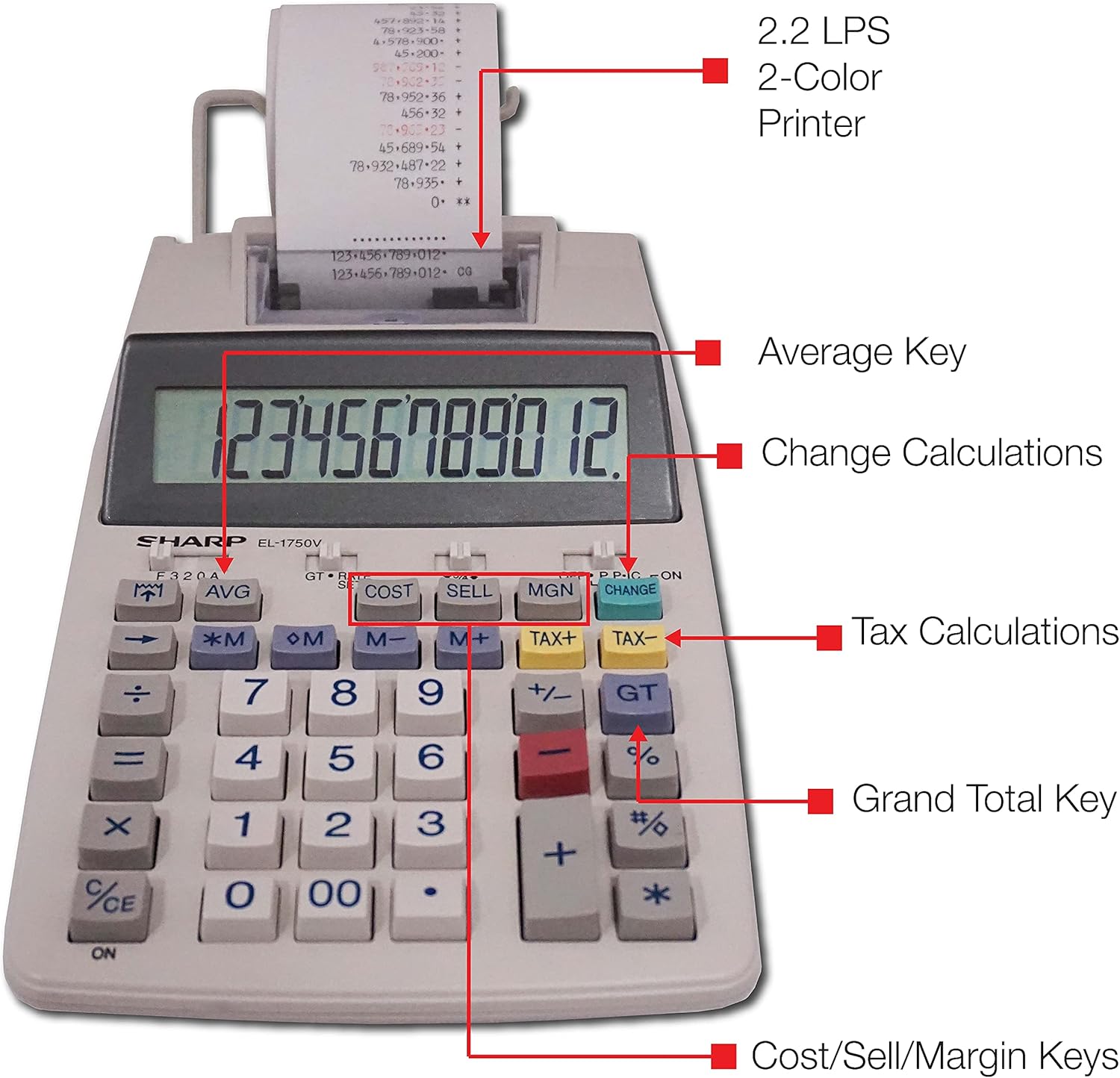
Rajah 3: Terperinci view highlighting the 2.2 LPS 2-Color Printer, Average Key, Change Calculations, Tax Calculations, Grand Total Key, and Cost/Sell/Margin Keys.

Figure 4: Dimensions of the Sharp EL1750V calculator, showing a width of 5.9 inches, depth of 9.1 inches, and height of 2 inches, with a 0.75 inch 12-digit LCD display.
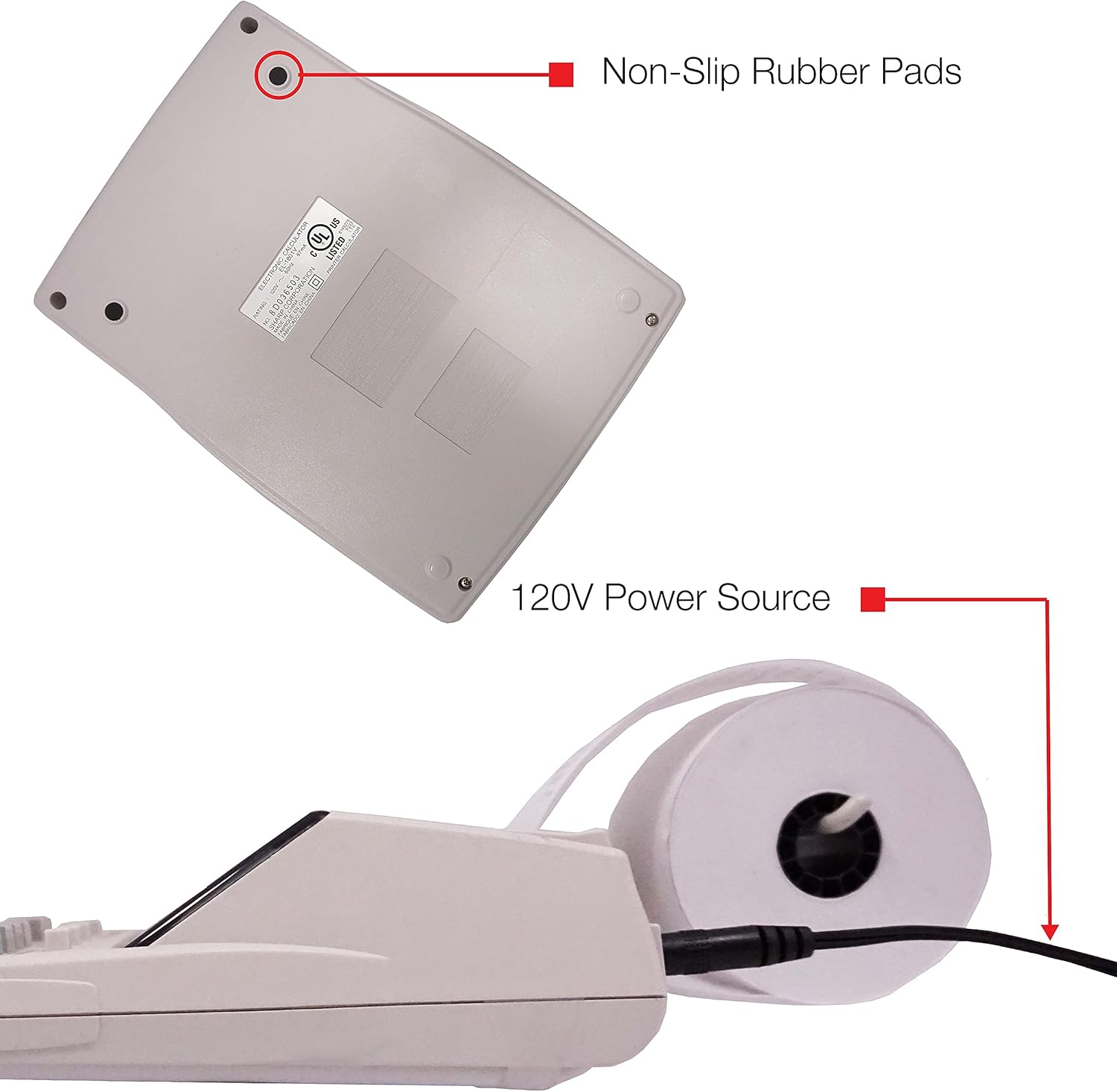
Rajah 5: Bawah view of the calculator, illustrating the non-slip rubber pads and the 120V power source input.
3. Persediaan
3.1 Sumber Kuasa
The Sharp EL1750V can be powered by an AC adapter (120V) or batteries. Ensure the correct power source is connected before operation.
- Penyesuai AC: Connect the provided AC adapter to the power input port on the side of the calculator (refer to Figure 5) and plug it into a standard 120V electrical outlet.
- Bateri: If using batteries, open the battery compartment (typically on the underside) and insert the required batteries, observing correct polarity.
3.2 Installing the Paper Roll
- Lift the printer cover to expose the paper roll compartment.
- Place a new paper roll into the compartment, ensuring the paper feeds from the bottom of the roll.
- Feed the leading edge of the paper into the printer mechanism slot until it emerges from the top.
- Tutup penutup pencetak.
- Press the paper feed key (often marked with an arrow pointing up) to advance the paper and ensure it is properly aligned.
4. Arahan Operasi
4.1 Pengiraan Asas
Perform standard arithmetic operations:
- Tambahan (+): Masukkan nombor pertama, tekan +, masukkan nombor kedua, tekan =.
- Tolak (-): Masukkan nombor pertama, tekan -, masukkan nombor kedua, tekan =.
- Pendaraban (x): Masukkan nombor pertama, tekan x, masukkan nombor kedua, tekan =.
- Pembahagian (÷): Masukkan nombor pertama, tekan ÷, masukkan nombor kedua, tekan =.
- Clear Entry (CE/C): Clears the last entered number.
- Semua Clear (AC): Clears all entries and calculations.
4.2 Fungsi Khas
- Tax Calculation (TAX+, TAX-):
- Set the tax rate using the appropriate function (refer to the calculator's specific tax rate setting procedure, usually involving a dedicated key or mode).
- Masukkan jumlahnya, kemudian tekan CUKAI+ to add tax or CUKAI- untuk menolak cukai.
- Change Calculation (CHANGE):
- Enter the total amount of the sale.
- Tekan ke PERUBAHAN kunci.
- Enter the amount received from the customer.
- Tekan = to display the change due.
- Jumlah Besar (GT): Tekan GT to recall the grand total of all previous calculations.
- Memory Functions (M+, M-, RM/CM):
- M+: Menambah nilai yang dipaparkan ke memori.
- M-: Menolak nilai yang dipaparkan daripada ingatan.
- RM/CM: Recalls memory content (first press) or clears memory (second press).
- Cost, Sell, Margin (COST, SELL, MGN): These keys are used for profit margin calculations.
- Enter two of the three values (Cost, Selling Price, Margin Percentage) and press the key for the unknown value to calculate it.
- Rounding and Decimal Switches: Adjust these switches (typically located above the keypad) to control the number of decimal places and rounding method for calculations.
5. Penyelenggaraan
5.1 Pembersihan
To maintain the calculator's performance and appearance:
- Lap bahagian luar dengan kain lembut dan kering.
- Untuk kotoran degil, sedikit dampen kain dengan air atau pembersih yang lembut dan tidak melelas.
- Do not use strong solvents or abrasive cleaners, as these can damage the surface or display.
- Avoid spraying liquids directly onto the calculator.
5.2 Penggantian Gulungan Kertas
Replace the paper roll when it runs out or the print becomes faint. Refer to Section 3.2 for installation instructions.
5.3 Penggantian Penggelek Dakwat
When the print becomes faint or incomplete, the ink roller needs to be replaced. Consult your calculator's specific instructions for ink roller replacement, as the procedure may vary slightly.
6. Penyelesaian masalah
| Masalah | Kemungkinan Punca | Penyelesaian |
|---|---|---|
| Kalkulator tidak boleh dihidupkan. | No power, AC adapter not connected, or batteries depleted/incorrectly installed. | Ensure AC adapter is securely plugged in. If using batteries, check battery installation and replace if necessary. |
| No print or faint print. | Paper roll empty or incorrectly installed; ink roller needs replacement. | Replace paper roll (Section 3.2). Replace ink roller (Section 5.3). |
| Display shows "E" or error message. | Calculation overflow, division by zero, or incorrect operation sequence. | Tekan AC to clear the error. Re-enter the calculation carefully. |
| Kertas tersekat. | Paper roll not installed correctly or paper is creased. | Open printer cover, remove jammed paper, and re-install paper roll correctly (Section 3.2). |
7. Spesifikasi
- model: Sharp EL1750V
- paparan: LCD 12 digit
- Kelajuan Mencetak: 2.2 baris sesaat
- Printing Colors: 2 (Black for positive, Red for negative)
- Sumber Kuasa: AC Adapter (120V) or Battery Powered
- Dimensi (Lebih kurang): 5.9 in (W) x 9.1 in (D) x 2 in (H)
- Berat (Lebih kurang): 0.16 ounces (Note: This weight seems unusually low for a printing calculator, likely an error in source data. User should refer to product packaging for accurate weight.)
- Bahan: plastik
- Ciri Khas: Antimicrobial protection, Change calculation, Tax functions, Cost/Sell/Margin functions, Grand Total, 4-key memory.
8. Waranti dan Sokongan
For warranty information and technical support, please refer to the documentation included with your purchase or visit the official Sharp webtapak. Simpan resit pembelian anda sebagai bukti pembelian untuk tuntutan waranti.
Pengeluar: tajam
Webtapak: www.sharpusa.com


