1. Pengenalan
Thank you for choosing the TFA 35.1133.01 Sun Funk Weather Station. This device provides accurate indoor and outdoor temperature readings, along with a weather forecast based on atmospheric pressure changes. This manual will guide you through the setup, operation, and maintenance of your weather station to ensure optimal performance and longevity.
2. Maklumat Keselamatan
- Read this instruction manual carefully before using the device.
- Simpan manual ini untuk rujukan masa hadapan.
- Jangan dedahkan peranti kepada suhu yang melampau, getaran atau kejutan.
- Elakkan cahaya matahari langsung dan kelembapan.
- Jangan rendam peranti di dalam air.
- Use only specified batteries. Ensure correct polarity.
- Remove depleted batteries promptly to prevent leakage.
- Jangan cuba membaiki peranti ini sendiri. Hubungi kakitangan yang berkelayakan untuk servis.
- Jauhkan peranti dan bateri daripada kanak-kanak.
3. Kandungan Pakej
Sila pastikan semua komponen ada dan tidak rosak:
- TFA 35.1133.01 Main Weather Station Unit
- Sensor Luaran Tanpa Wayar
- Manual Arahan
- Note: Batteries (4 x AAA) are typically required and may not be included.
4. Produk Lebihview
The TFA 35.1133.01 Sun Funk Weather Station consists of a main display unit and a wireless outdoor sensor. The main unit displays indoor temperature, outdoor temperature, and a weather forecast. The outdoor sensor transmits temperature data wirelessly to the main unit.
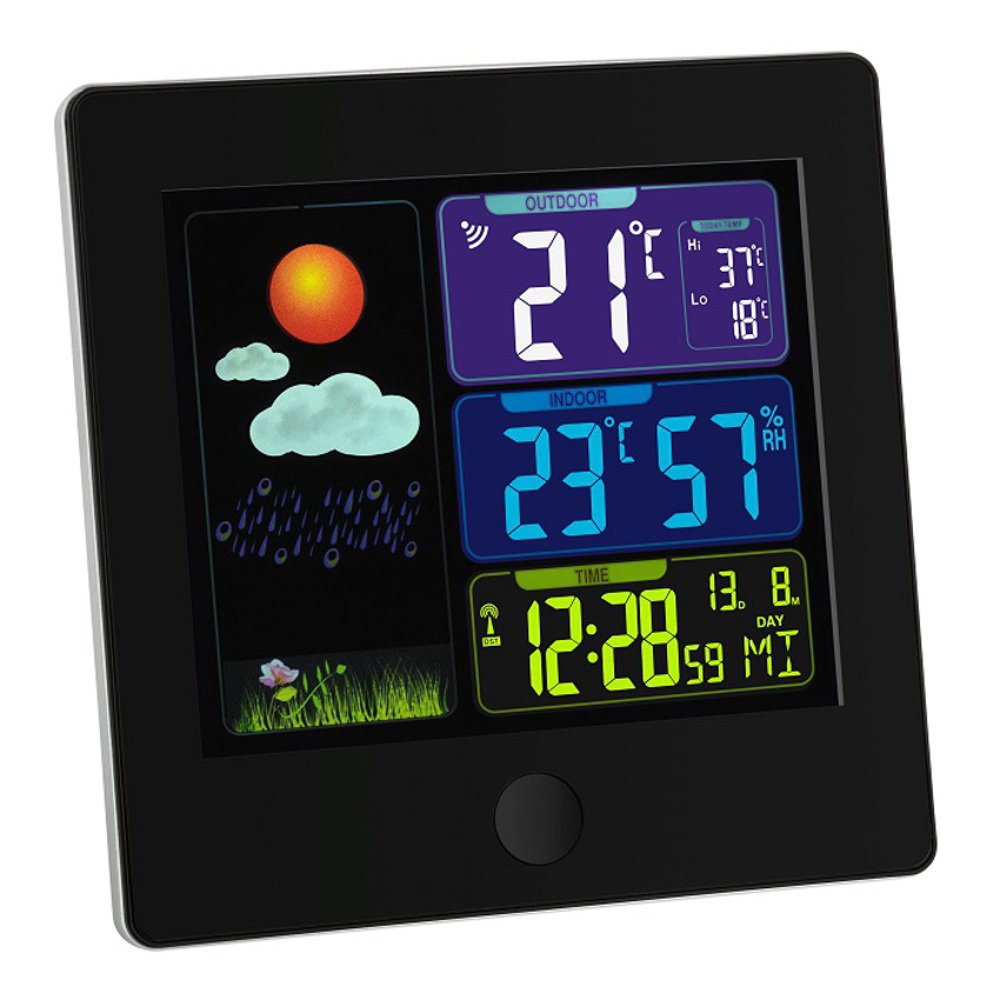
Image 1: TFA 35.1133.01 Sun Funk Weather Station. This image shows the main display unit and the compact wireless outdoor sensor. The main unit features a clear digital display, while the outdoor sensor is designed for external placement.
Ciri Unit Utama:
- Large LCD display for easy reading.
- Indoor temperature display.
- Outdoor temperature display (from wireless sensor).
- Weather forecast icons (sunny, partly cloudy, cloudy, rainy).
- Radio-controlled clock (DCF77 signal for automatic time synchronization).
- Petak bateri.
Outdoor Sensor Features:
- Penderia suhu.
- Wireless transmission to the main unit.
- Petak bateri.
- Wall mounting option.
5. Persediaan
5.1 Pemasangan Bateri
- Penderia Luaran: Open the battery compartment cover on the back of the outdoor sensor. Insert 2 x AAA batteries, observing the correct polarity (+/-). Close the cover securely.
- Unit Utama: Open the battery compartment cover on the back of the main unit. Insert 2 x AAA batteries, observing the correct polarity (+/-). Close the cover securely.
- Important: Always insert batteries into the outdoor sensor first, then into the main unit. This ensures proper synchronization.
5.2 Penempatan Sensor
- Place the outdoor sensor in a shaded, dry location, protected from direct sunlight and rain, to ensure accurate temperature readings.
- Ensure the sensor is within the wireless range of the main unit (typically up to 30 meters in open air). Walls and other obstacles can reduce this range.
- Avoid placing the sensor near heat sources (e.g., vents, windows) or cold sources (e.g., refrigerators).
5.3 Initial Synchronization and Time Setting
- After inserting batteries, the main unit will automatically search for the outdoor sensor signal. This may take a few minutes. The outdoor temperature will appear on the display once connected.
- The main unit will also attempt to receive the DCF77 radio time signal. This signal automatically sets the correct time and date. Place the main unit near a window for better reception. This process can take several minutes or even hours, depending on your location and signal strength.
- If the DCF77 signal is not received, you may need to manually set the time and date. Refer to the specific button functions on your device (e.g., MODE, SET buttons) for manual adjustment.
6. Arahan Operasi
6.1 Paparan Maklumat
The main unit's display typically shows the following information:
- Masa dan Tarikh: Automatically set by the DCF77 radio signal.
- Suhu Dalaman: Current temperature measured by the main unit.
- Suhu Luaran: Current temperature transmitted from the wireless sensor.
- Ramalan cuaca: Represented by icons (e.g., sun, clouds, rain) indicating predicted weather changes based on atmospheric pressure trends.
- Penunjuk Kekuatan Isyarat: For both the outdoor sensor and the DCF77 time signal.
6.2 Button Functions (Example)
While specific button labels may vary, common functions include:
- MOD/SET: Used to switch between display modes (e.g., time, alarm) or to enter setting mode.
- +/ADJ: Used to increase values during setting or to manually adjust time/date.
- -/MEM: Used to decrease values during setting or to view minimum/maximum temperature records.
- SALURAN: If multiple outdoor sensors are supported, this button cycles through channels.
Refer to the specific button layout on your device for precise functions.
7. Penyelenggaraan
7.1 Penggantian Bateri
- When the battery indicator appears on the display, replace the batteries in the respective unit (main unit or outdoor sensor).
- Sentiasa gantikan semua bateri dalam satu unit pada masa yang sama dengan yang baharu daripada jenis yang sama.
- Buang bateri yang habis mengikut peraturan tempatan.
7.2 Pembersihan
- Bersihkan peranti dengan lembut, damp kain. Jangan gunakan pembersih atau pelarut yang melelas.
- Ensure no moisture enters the device's interior.
7.3 Penyimpanan
- If the device will not be used for an extended period, remove all batteries to prevent leakage.
- Simpan peranti di tempat yang sejuk dan kering.
8. Penyelesaian masalah
| Masalah | Kemungkinan Punca | Penyelesaian |
|---|---|---|
| Tiada paparan pada unit utama. | Depleted or incorrectly inserted batteries. | Gantikan bateri, pastikan polariti yang betul. |
| Outdoor temperature not displayed or flashing. | Outdoor sensor out of range, depleted batteries, or interference. |
|
| Incorrect outdoor temperature reading. | Sensor yang terdedah kepada cahaya matahari langsung atau sumber haba. | Relocate the outdoor sensor to a shaded, well-ventilated area. |
| Time not automatically set (DCF77 signal). | Poor signal reception due to location or interference. |
|
9. Spesifikasi
| Ciri | Perincian |
|---|---|
| Nombor Model | 35.1133.01 |
| Jenama | TFA-Dostmann |
| Dimensi Produk | Main Unit: 2.5 x 12 x 12 cm; 168 g |
| Kuasa (Unit Utama) | 2 x bateri AAA (tidak termasuk) |
| Power (Outdoor Sensor) | 2 x bateri AAA (tidak termasuk) |
| bahan | plastik |
| Ciri Khas | Lightweight, Radio-controlled time (DCF77) |
| Penggunaan yang Disyorkan | Indoor/Outdoor temperature monitoring |
| Julat Tanpa Wayar | Up to 30 meters (open air, may vary with obstacles) |
10. Waranti dan Sokongan
10.1 Maklumat Waranti
This product is typically covered by a Waranti komersial 1 tahun from the date of purchase. This warranty covers manufacturing defects and material faults. It does not cover damage caused by improper use, accidents, unauthorized repairs, or normal wear and tear. Please retain your proof of purchase for warranty claims.
10.2 Sokongan Pelanggan
For technical assistance, warranty claims, or further information, please contact your retailer or the manufacturer's customer service department. Contact details can usually be found on the product packaging or the manufacturer's official webtapak.
Pengeluar: TFA-Dostmann


