pengenalan
This manual provides instructions for the setup, operation, maintenance, and troubleshooting of your RCA Remote Control RCR 192AA10. This remote is designed to function as a replacement for various RCA devices, ensuring seamless control of your entertainment system.
Peranti Serasi: RTD3131, RTD3133, RTD3136, RT2781H, RT2870R, RT2906, RT2910.
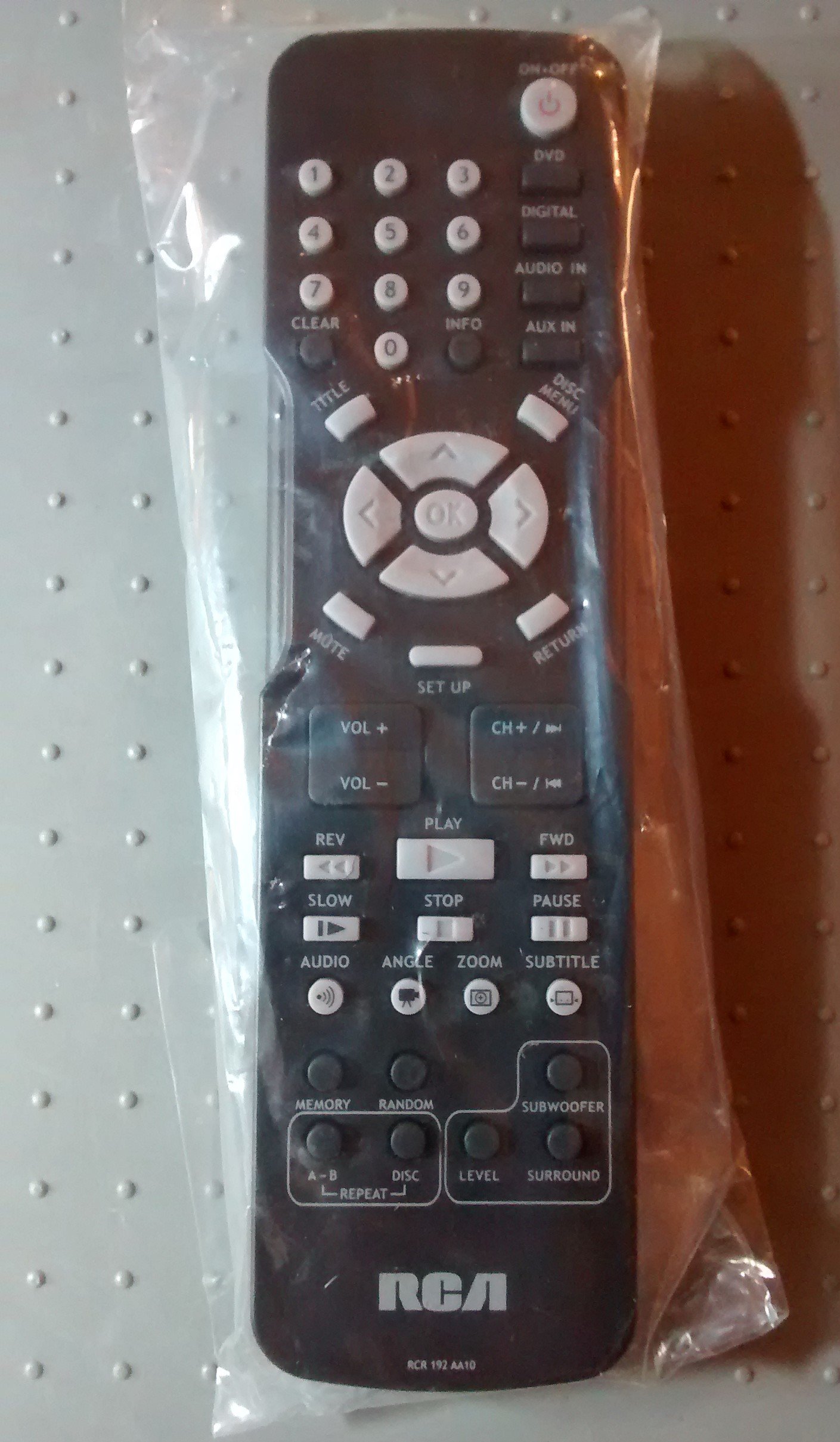
Image: The RCA Remote Control RCR 192AA10, shown sealed in its clear plastic packaging.
Persediaan
1. Pemasangan Bateri
- Cari petak bateri di belakang alat kawalan jauh.
- Slide the battery compartment cover downwards or outwards to open.
- Masukkan dua bateri AAA (tidak disertakan), pastikan terminal positif (+) dan negatif (-) sejajar dengan tanda di dalam petak.
- Gantikan penutup petak bateri dengan menggelongsorkannya semula ke kedudukannya sehingga ia berbunyi dengan selamat.
2. Penggunaan Awal
This remote control is typically pre-programmed for compatible RCA devices. No additional programming steps are usually required. Simply point the remote at your device and begin operation.
Arahan Operasi
The RCA Remote Control RCR 192AA10 features standard buttons for controlling your compatible RCA audio/video equipment. Familiarize yourself with the button layout for optimal use.
- Butang Kuasa: Menghidupkan atau mematikan peranti.
- Kelantangan Naik/Turun: Melaraskan tahap output audio.
- Saluran Atas/Bawah: Changes the television channel (if applicable).
- Butang Bisukan: Menyenyapkan output audio.
- Butang Input/Sumber: Cycles through available input sources (e.g., HDMI 1, AV, Component).
- Butang Menu: Accesses the device's on-screen menu.
- Navigation Buttons (Arrow Keys, OK/Enter): Digunakan untuk menavigasi menu dan mengesahkan pilihan.
- Pad Nombor: Untuk kemasukan saluran langsung atau input berangka lain.
For specific functions related to your device model, refer to the original device's user manual.
Penyelenggaraan
Pembersihan
- Lap alat kawalan jauh dengan kain lembut dan kering.
- Untuk kotoran degil, ringankan dampen kain dengan air atau pembersih yang lembut dan tidak melelas. Elakkan kelembapan berlebihan.
- Do not use harsh chemicals, solvents, or abrasive cleaning pads, as these can damage the remote's surface or internal components.
Penggantian Bateri
Replace batteries when the remote's performance degrades or it stops responding. Always replace both batteries at the same time with new AAA batteries. Do not mix old and new batteries or different types of batteries.
Penyimpanan
Simpan alat kawalan jauh di tempat yang sejuk dan kering jauh dari cahaya matahari langsung dan suhu yang melampau. Jika menyimpan untuk tempoh yang lama, keluarkan bateri untuk mengelakkan kebocoran.
Menyelesaikan masalah
| Masalah | Kemungkinan Punca | Penyelesaian |
|---|---|---|
| Jauh tidak berfungsi | Bateri mati atau tidak dipasang dengan betul. | Gantikan bateri dengan yang baru, memastikan kekutuban yang betul (+/-). |
| Jauh tidak bertindak balas | Obstruction between remote and device; remote too far from device. | Ensure a clear line of sight to the device's IR receiver. Move closer to the device. |
| Specific buttons not functioning | Button stuck or dirty; device incompatibility for that function. | Clean the remote. Verify the function is supported by your specific device model. |
If issues persist after attempting these solutions, consult the user manual for your specific RCA device or contact RCA customer support.
Spesifikasi
- Jenama: RCA
- model: RCR 192AA10
- Teknologi Ketersambungan: Inframerah
- warna: Hitam
- Ciri Khas: Reka bentuk ergonomik
- Dimensi Produk: 7.7 x 6.2 x 1.2 inci (anggaran)
- Berat Barang: 3.19 auns (anggaran)
- Sumber Kuasa: 2 x Bateri AAA (tidak termasuk)
- Tarikh Mula-mula Tersedia: 30 Mac 2015
Waranti dan Sokongan
For information regarding warranty coverage or technical support, please refer to the documentation provided with your original RCA device or visit the official RCA website. Specific warranty terms may vary based on the retailer and purchase date.


