pengenalan
The DigiTech TRIO is an innovative electric guitar multi-effect pedal designed to be your personal band. It listens to your guitar playing and automatically generates accompanying bass and drum parts. This manual provides comprehensive instructions for setting up, operating, and maintaining your TRIO pedal, ensuring you get the most out of its unique features.
Ciri-ciri Utama
- Seven Music Genres and Twelve Song Styles Per Genre to Choose From
- The TRIO can learn up to three different song parts that can be recalled on-the-fly
- Adjustable Tempo & Alternate Half Time/Double Time Variants Bass & Drum Level Controls
- Hands-Free Control Using a DigiTech FS3X Footswitch (optional)
- Amp & Mixer Outputs Headphone Output w/Level Control Power Supply Included
Panduan Persediaan
Follow these steps to set up your DigiTech TRIO pedal:
- Connect the included 9V DC power supply to the KUASA input on the pedal and plug it into a power outlet.
- Connect your electric guitar to the GITAR DALAM bicu menggunakan kabel instrumen standard 1/4 inci.
- Sambungkan AMP KELUAR jack to your guitar amplifier's input using another 1/4-inch instrument cable.
- For connecting to a mixer or PA system, use the CAMPURAN KELUAR jek.
- Untuk latihan persendirian, sambungkan fon kepala ke KEPALA KEPALA jek.
- Optionally, connect a DigiTech FS3X Footswitch to the KAWALAN DALAM jack for extended hands-free control.
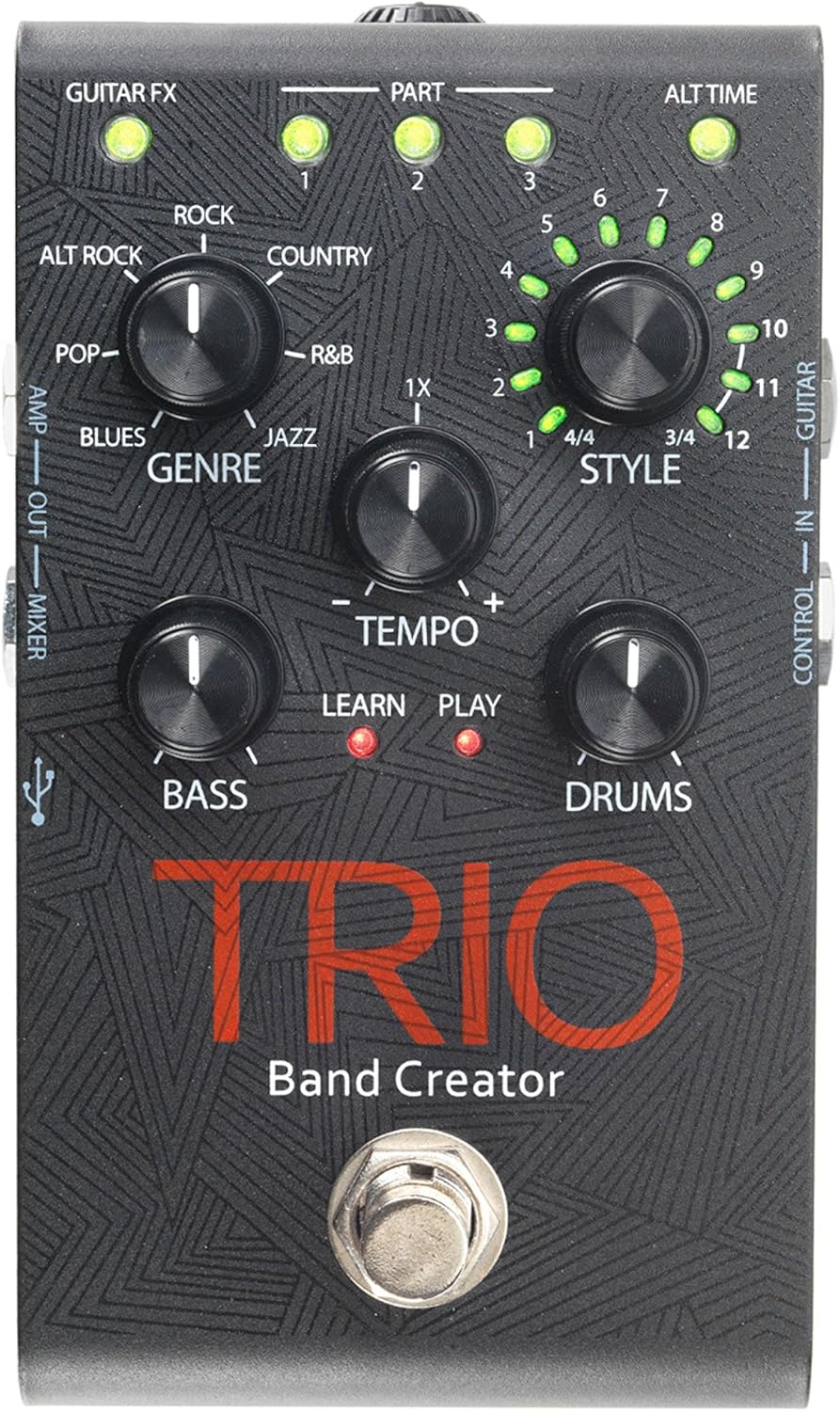
Rajah 1: Atas view of the DigiTech TRIO pedal, showing the main controls and footswitch.
Arahan Operasi
Basic Operation: Teaching the TRIO a Song
- Tekan ke BAND footswitch once to enter 'Listen' mode. The BELAJAR LED akan menyala.
- Play your desired chord progression and rhythm clearly. The TRIO will analyze your playing.
- Tekan ke BAND footswitch again to stop 'Listen' mode. The BERMAIN LED will illuminate, and the TRIO will immediately begin playing generated bass and drum parts.
- You can now play along with your virtual band.
Genre and Style Selection
- Gunakan GENRE knob to select from Blues, Pop, Alternative Rock, Rock, Country, R&B, and Jazz. The genre affects the overall feel of the generated bass and drum parts.
- Gunakan GAYA knob to choose from twelve different song styles available for each genre. This allows for further customization of the rhythm and feel.
- The MASA ALT button allows you to switch between 3/4 and 4/4 time signatures.
Looping and Song Parts
- The TRIO can learn up to 3 different song parts. To record a new part, select an empty BAHAGIAN slot (1, 2, or 3) using the corresponding buttons.
- Follow the 'Basic Operation' steps to teach the TRIO the new song part.
- During playback, you can switch between learned song parts on-the-fly by pressing the corresponding BAHAGIAN butang.
- The LOOPER footswitch allows you to record and playback your own guitar loops. Press once to start recording, press again to stop recording and start playback, and press and hold to clear the loop.
Adjusting Levels and Tempo
- The TEMPO knob adjusts the playback speed of the band and loops.
- The BASS knob controls the volume level of the generated bass line.
- The DRAM knob controls the volume level of the generated drum track.
- The LOOP knob controls the volume level of your recorded guitar loop.

Rajah 2: Bersudut view of the DigiTech TRIO pedal, highlighting the control knobs and input/output jacks.
Kawalan dan Sambungan
The DigiTech TRIO pedal features a user-friendly layout with clearly labeled controls and versatile connection options:
Kawalan Panel Depan:
- GUITAR FX: Activates built-in guitar effects tailored to the selected genre.
- PART 1, 2, 3: Buttons to select and recall different learned song parts.
- ALT TIME: Toggles between 3/4 and 4/4 time signatures.
- TEMPO Knob: Adjusts the overall playback speed.
- GENRE Knob: Selects the musical genre (Blues, Pop, Alt Rock, Rock, Country, R&B, Jazz).
- STYLE Knob: Selects one of twelve styles within the chosen genre.
- LOOP Knob: Controls the volume of your recorded guitar loop.
- Tombol BASS: Controls the volume of the generated bass line.
- DRUMS Knob: Controls the volume of the generated drum track.
- LOOPER Footswitch: Records/plays/clears guitar loops.
- BAND Footswitch: Enters 'Listen' mode to learn chords/rhythm, or starts/stops band playback.
Side and Rear Panel Connections:
- GITAR DALAM: 1/4-inch input for your electric guitar.
- AMP KELUAR: 1/4-inch output to your guitar amplebih hidup.
- MIXER OUT: 1/4-inch output for connecting to a mixer or PA system.
- KEPALA KEPALA: 1/8-inch stereo output for headphones.
- KAWALAN DALAM: 1/4-inch input for optional DigiTech FS3X Footswitch.
- KUASA: 9V DC input for the included power supply.
- USB: Mini-USB port for firmware updates.

Rajah 3: Belakang view of the DigiTech TRIO pedal, showing the power input and headphone jack.
Spesifikasi
| Ciri | Perincian |
|---|---|
| Berat Barang | 10.6 auns (0.3 kg) |
| Dimensi Produk | 4.63 x 3.19 x 2.13 inci (11.76 x 8.10 x 5.41 cm) |
| Nombor Model Item | TRIO |
| Bateri | 1 9V battery required (for internal use, not primary power) |
| Antara Muka Perkakasan | Audio 1/4 inci |
| Format Isyarat | Analog |
| Sumber Kuasa | Corded Electric (9V DC adapter included) |
| Voltage | 9 Volt |
| Amppemadam | 300 Miliamps |
Penyelenggaraan
- Pastikan pedal bersih dengan mengelapnya dengan kain lembut dan kering. Elakkan menggunakan pembersih atau pelarut yang kasar.
- Simpan pedal di tempat yang sejuk dan kering jauh dari cahaya matahari langsung dan suhu yang melampau.
- Ensure all cables are securely connected to prevent signal loss or damage.
- Elakkan daripada menjatuhkan pedal atau menyebabkannya terkena hentaman kuat.
Menyelesaikan masalah
- Tiada Bunyi: Periksa semua sambungan kabel (gitar, amp, power). Ensure the pedal is powered on and the volume knobs are not set to zero.
- Kualiti Bunyi Lemah: Sahkan bahawa instrumen anda dan amplifier are functioning correctly. Check for damaged cables.
- Band Not Generating Correctly: Ensure you are playing clear, distinct chords during the 'Listen' phase. Try different genres and styles to see if a different setting better interprets your playing.
- Footswitch Unresponsive: Disconnect and reconnect the power supply. If using an optional FS3X footswitch, ensure it is properly connected.
Waranti dan Sokongan
Untuk maklumat jaminan dan sokongan teknikal, sila rujuk laman web rasmi DigiTech webtapak atau hubungi perkhidmatan pelanggan mereka. Simpan bukti pembelian anda untuk tuntutan waranti.