pengenalan
The Logitech UE Boom is a 360-degree wireless Bluetooth speaker designed for portable audio. It features a durable, go-anywhere shape and is equipped with a water and stain resistant acoustic skin. This speaker allows for wireless music playback, phone calls, and can be paired with another UE Boom for stereo sound.

Imej: Depan view of the Logitech UE Boom Wireless Bluetooth Speaker in Northern Light color.
Ciri-ciri Utama
- Bunyi 360 Darjah: Delivers immersive audio in all directions.
- Reka Bentuk Mudah Alih: Versatile, cylindrical shape for easy transport.
- Water and Stain Resistant: Features a colorful acoustic skin with plasma coating for durability against water and stains.
- Kesambungan Tanpa Wayar: Connects via Bluetooth from up to 50 feet away. Easy pairing via NFC for compatible devices.
- Double Up Feature: Wirelessly connect two UE BOOM speakers in stereo using the UE BOOM app for enhanced sound.
- Hayat Bateri yang Panjang: Rechargeable battery provides up to 15 hours of playback.
- Telefon pembesar suara: Integrated crystal-clear speakerphone for calls.
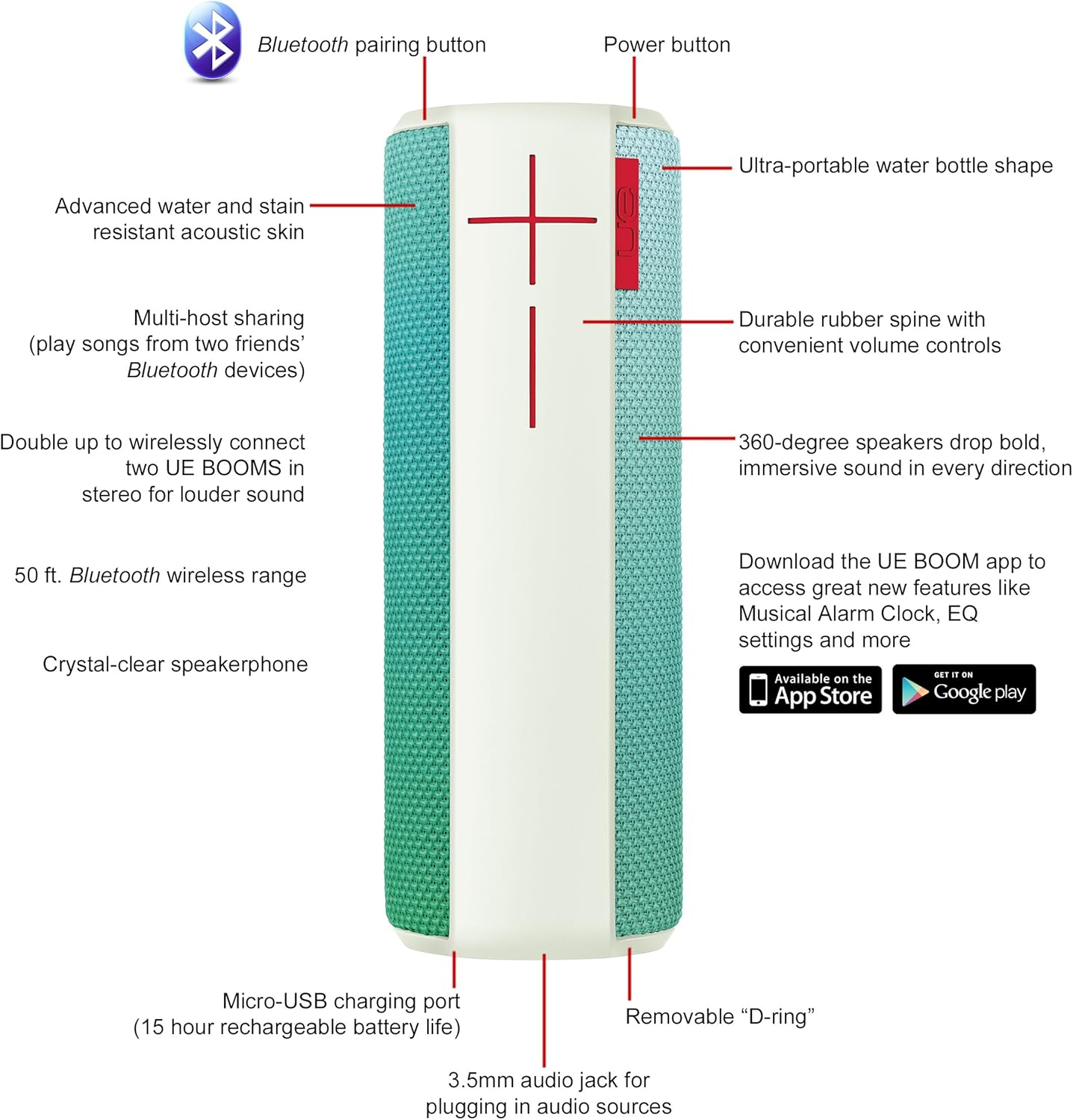
Image: Diagram highlighting key features and controls of the UE Boom speaker, including Bluetooth pairing button, power button, volume controls, micro-USB charging port, and 3.5mm audio jack.
Persediaan
Mengecas Speaker
Before initial use, fully charge your UE Boom speaker. Connect the provided micro-USB cable to the charging port located at the bottom of the speaker and plug the other end into a USB power source. The speaker's battery provides approximately 15 hours of playback on a full charge.
Berpasangan Bluetooth
- Power on your UE Boom speaker by pressing the power button.
- Press and hold the Bluetooth pairing button (usually indicated by a Bluetooth icon) until you hear an audible tone and the LED indicator flashes rapidly.
- On your mobile device (smartphone or tablet), navigate to the Bluetooth settings.
- Select "UE Boom" from the list of available devices to pair.
- Once paired, you will hear a confirmation tone from the speaker.
For NFC-enabled devices, simply tap your device to the NFC area on the speaker for quick pairing.
Arahan Operasi
Kawalan Asas
- Butang Kuasa: Located on the top of the speaker to turn it on or off.
- Kawalan Kelantangan: Large '+' and '-' buttons on the side of the speaker adjust the volume.
- Butang Bluetooth: Memulakan mod berpasangan Bluetooth.
Using the UE BOOM App
Download the official UE BOOM app from your device's app store (available on App Store and Google Play) to unlock additional features:
- Musical Alarm Clock: Wake up to your favorite music.
- Pengaktifan Jauh: Turn your speaker on/off from your device.
- Tetapan EQ: Sesuaikan pro bunyifile mengikut keutamaan anda.
- Gandakan: Connect two UE BOOM speakers for a stereo sound experience.
Speakerphone Functionality
When connected to a smartphone, the UE Boom can be used as a speakerphone. Incoming calls will be routed through the speaker, allowing for hands-free communication.
Penyelenggaraan
The UE Boom speaker features a water and stain resistant acoustic skin. To clean, gently wipe the speaker with a damp cloth. Avoid using harsh chemicals or abrasive cleaners. Ensure all ports are dry before charging or connecting other devices.
Menyelesaikan masalah
- Tiada Kuasa: Ensure the speaker is charged. Connect it to a power source using the micro-USB cable.
- Tidak Dapat Berpasangan melalui Bluetooth:
- Pastikan pembesar suara berada dalam mod berpasangan (LED berkelip).
- Semak sama ada Bluetooth didayakan pada peranti anda.
- Alihkan peranti anda lebih dekat dengan pembesar suara (dalam jarak 50 kaki).
- Cuba nyahgandingkan dan pasangkan semula peranti.
- Kelantangan Rendah atau Bunyi Herot:
- Laraskan kelantangan pada kedua-dua pembesar suara dan peranti anda yang disambungkan.
- Pastikan pembesar suara dicas sepenuhnya.
- Check for any obstructions around the speaker.
- Apl Tidak Bersambung: Ensure the speaker is powered on and connected via Bluetooth to your device. Update the app to the latest version.
Spesifikasi Produk
| Nama Model | Logitech UE Boom Wireless Bluetooth Speaker |
| Nombor Model | 980-001023 |
| Jenama | Logitech |
| warna | Northern Light |
| Jenis Pembesar Suara | Luar |
| Teknologi Ketersambungan | Bluetooth, Wayarles |
| Julat Tanpa Wayar | Sehingga 50 kaki (15.24 meter) |
| Sumber Kuasa | Dikuasakan Bateri (termasuk 1 bateri Lithium Ion) |
| Purata Hayat Bateri | 15 Jam |
| Tahap Ketahanan Air | Kalis air |
| Berat Barang | 2.2 paun |
| Dimensi Produk (LxWxH) | 2.6 x 2.6 x 7.1 inci |
| bahan | plastik |
| UPC | 097855112125 |
Video Produk Rasmi
Video: Tamatview of the Logitech UE Boom speaker's features, including 360-degree sound, water resistance, wireless connectivity, and the ability to pair two speakers for louder sound. This video demonstrates the speaker's durability and portability in various environments.
Waranti dan Sokongan
The Logitech UE Boom Wireless Bluetooth Speaker comes with a Limited Warranty. For specific warranty details, please refer to the documentation included with your product or visit the official Logitech webtapak.
For technical support or customer service, you may contact Logitech at: 646-454-3200.


