pengenalan
This manual provides essential instructions for the safe and efficient use of your EMTEC Mobile & Go 2-in-1 Flash Drive. This device offers a convenient solution for transferring and storing data between various devices, featuring both USB 3.0 and Micro-USB connectors.
Sila baca manual ini dengan teliti sebelum menggunakan produk ini dan simpannya untuk rujukan pada masa hadapan.
Maklumat Keselamatan
- Jangan dedahkan peranti kepada suhu yang melampau, cahaya matahari langsung atau kelembapan yang tinggi.
- Elakkan daripada menjatuhkan atau meletakkan peranti kepada kesan yang kuat.
- Jauhkan peranti daripada air dan cecair lain.
- Jangan cuba membuka atau mengubah suai peranti. Ini akan membatalkan jaminan.
- Ensure proper ejection of the device from your computer or mobile device before removal to prevent data loss.
Produk Selesaiview
The EMTEC Mobile & Go Flash Drive is designed for versatility, featuring two distinct connectors:
- Penyambung USB 3.0: For high-speed data transfer with computers and other USB 3.0 compatible devices. It is also backwards compatible with USB 2.0 ports.
- Micro-USB Connector: For direct connection to compatible smartphones and tablets that support USB On-The-Go (OTG) functionality.

Image: The EMTEC Mobile & Go 2-in-1 Flash Drive, displaying its USB 3.0 connector on one end and its Micro-USB connector on the other. The device is compact and features a black casing with a red indicator dot.
The packaging illustrates the product's key features and compatibility:
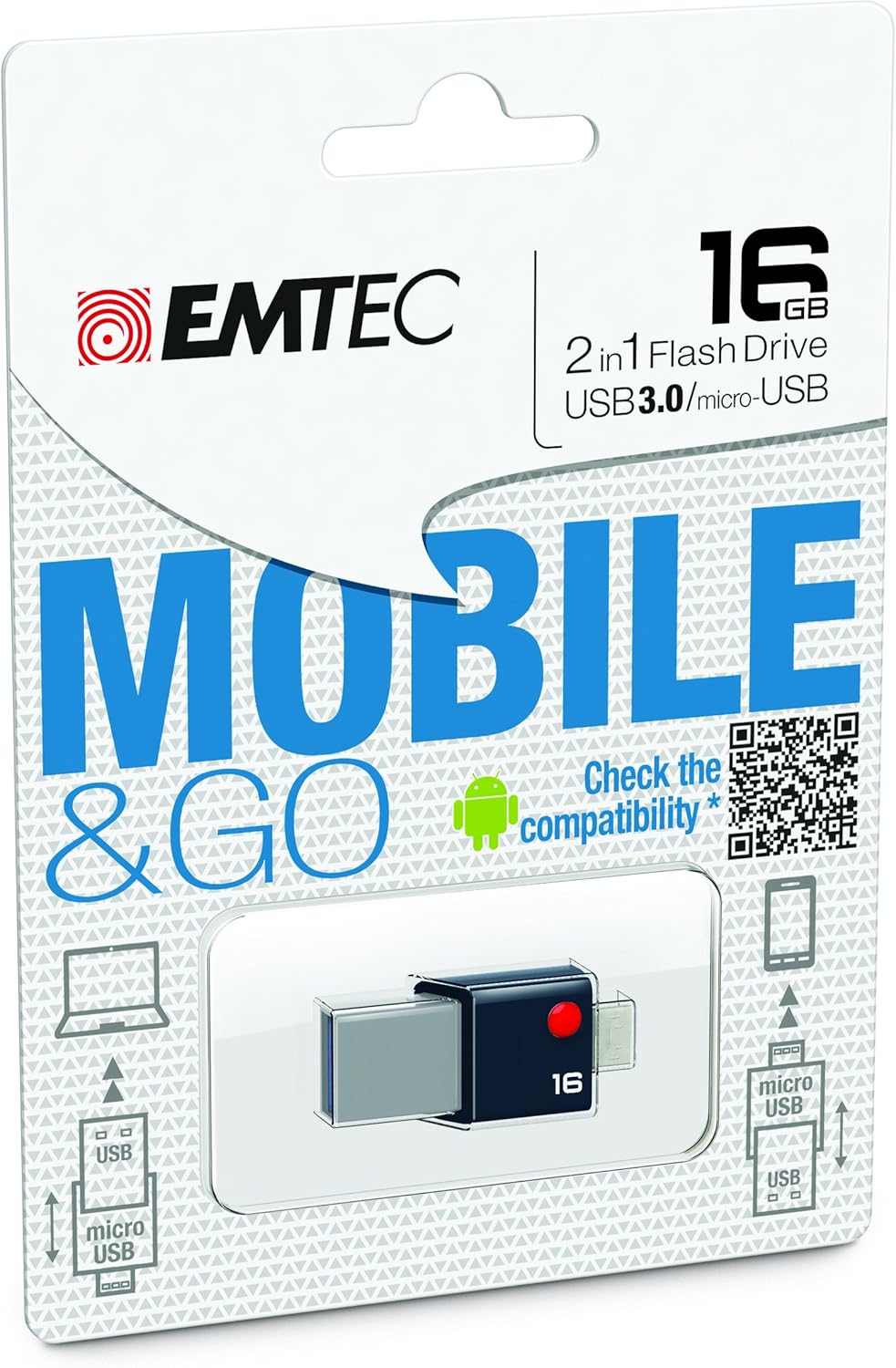
Image: Retail packaging for the EMTEC Mobile & Go 2-in-1 Flash Drive, highlighting its 16 GB capacity, USB 3.0, and Micro-USB features. The packaging also includes a QR code for compatibility checking.
Persediaan
Connecting to a Computer (USB 3.0)
- Locate an available USB port on your computer. For optimal performance, use a USB 3.0 port (often identified by a blue insert).
- Insert the USB 3.0 end of the flash drive firmly into the USB port.
- Your computer's operating system (Windows, macOS, Linux) should automatically detect the device. A new drive letter or icon will appear in your file penjelajah.
Connecting to a Mobile Device (Micro-USB)
- Ensure your smartphone or tablet supports USB On-The-Go (OTG) functionality. Not all devices are compatible.
- For compatibility information, refer to the official EMTEC OTG compatibility list: EMTEC OTG Compatibility List.
- Locate the Micro-USB port on your mobile device.
- Insert the Micro-USB end of the flash drive firmly into the mobile device's port.
- Your mobile device should detect the flash drive. You may receive a notification or find the drive listed in your device's storage settings or file permohonan pengurus.
Arahan Operasi
Memindahkan Files
- From Computer to Flash Drive: Buka komputer anda file explorer, navigate to the files you wish to transfer, and drag-and-drop them into the flash drive's folder.
- From Flash Drive to Computer: Open the flash drive's folder, select the desired files, and drag-and-drop them to a location on your computer.
- Between Mobile Device and Flash Drive: Use your mobile device's file manager application to copy or move files between the device's internal storage/SD card and the connected flash drive.
Using as Additional Storage
The EMTEC Mobile & Go Flash Drive can serve as an extension of your mobile device's storage, allowing you to store photos, videos, music, and documents directly on the drive, freeing up internal memory.
Penyelenggaraan
- Pembersihan: Use a soft, dry, lint-free cloth to gently wipe the exterior of the flash drive. Do not use liquid cleaners or solvents.
- Storan: When not in use, store the flash drive in a cool, dry place, away from dust and direct sunlight.
- Penyingkiran Selamat: Always safely eject the flash drive from your computer or mobile device before physically removing it.
- Windows: Right-click the drive icon in "This PC" or the taskbar icon, then select "Eject".
- macOS: Drag the drive icon to the Trash, or click the Eject button next to the drive in Finder.
- Android: Go to Storage settings, find the USB drive, and tap "Eject" or "Unmount".
Menyelesaikan masalah
- Problem: Flash drive not recognized by computer.
- Cuba port USB lain pada komputer anda.
- Ensure the flash drive is fully inserted.
- Mulakan semula komputer anda.
- Check Device Manager (Windows) or System Information (macOS) to see if the device is listed.
- Problem: Flash drive not recognized by mobile device.
- Verify your mobile device supports USB OTG functionality. Refer to your device's manual or the EMTEC OTG Compatibility List.
- Ensure the Micro-USB end is fully inserted.
- Try restarting your mobile device.
- Some mobile devices require a file manager app to access external storage.
- Masalah: Kelajuan pemindahan data perlahan.
- Ensure you are connected to a USB 3.0 port on your computer for optimal speeds. USB 2.0 ports will operate at slower speeds.
- Memindahkan banyak kecil files boleh menjadi lebih perlahan daripada memindahkan beberapa besar files.
- Tutup aplikasi lain yang mungkin menggunakan sumber sistem.
Spesifikasi
| Ciri | Perincian |
|---|---|
| Jenama | Emtec |
| Nombor Model | ECMMD16GT203 |
| Kapasiti Penyimpanan Memori | 16 GB |
| Antara Muka Perkakasan | USB 3.0, Micro-USB |
| Teknologi Ketersambungan | USB |
| Keserasian Sistem Pengendalian | Windows 8, 7, Vista, XP, Me, 2000 / Mac OS X / Linux 2.6x |
| Platform Perkakasan | PC, Mac |
| Dimensi Produk (LxWxH) | 1.42 x 0.31 x 0.63 inci |
| Berat Barang | 0.352 auns |
| UPC | 846143005294 |
Waranti dan Sokongan
EMTEC products are designed and manufactured to the highest quality standards. For information regarding warranty coverage and technical support, please refer to the official EMTEC webtapak atau hubungi bahagian perkhidmatan pelanggan mereka.
Anda boleh melawat Emtec Store on Amazon untuk maklumat lanjut produk.


