1. Produk Lebihview
The Renkforce W205GU is a comprehensive wireless weather station designed to provide accurate and real-time weather data. It features a radio-controlled clock, various environmental sensors, and a clear display for easy monitoring of weather conditions.
- Radio Clock: Automatic time synchronization for accuracy.
- Tetapan Masa Manual: Option for manual adjustment and time zone offset (±12h).
- Tekanan atmosfera: Monitors barometric pressure changes.
- Kelajuan Angin: Measures current, minimum, and maximum wind speeds.
- Precipitation Measurement: Tracks daily, weekly, and monthly rainfall.
- Lightning Sensor: Detects lightning strikes and estimates storm distance.
- Penderia UV: Measures UV index and highest daily UV value.
- Suhu & Kelembapan: Monitors indoor and outdoor temperature and humidity with min/max value storage.
- Dew Point, UV Index, Wind Chill: Displays calculated environmental factors.
- Ice and Frost Protection: Provides alerts for freezing conditions.
- Fungsi Penggera: Includes alarm with snooze feature.
- Kalendar: Displays date and day.
- 12/24-Hour Display: Format masa yang boleh dipilih.
- Lampu latar: For improved visibility in low light conditions.
- Penunjuk Status Bateri: Shows the charge level of the batteries.
2. Maklumat Keselamatan
Please read this manual carefully before using the device. Keep these instructions for future reference.
- Do not expose the main unit to extreme temperatures, direct sunlight, or high humidity.
- Ensure the outdoor sensor is installed in a location protected from direct impact and excessive moisture, while allowing accurate readings.
- Use only the specified battery types. Do not mix old and new batteries or different battery types.
- Buang bateri mengikut peraturan tempatan.
- Jangan cuba membuka atau membaiki peranti ini sendiri. Rujuk semua servis kepada kakitangan yang berkelayakan.
- Jauhkan peranti daripada medan magnet yang kuat.
3. Apa yang ada di dalam Kotak
Pakej termasuk komponen berikut:
- Unit Paparan Utama
- Outdoor Multi-Sensor (for wind speed, precipitation, lightning, UV, humidity, temperature)
- Mounting accessories for the outdoor sensor
- Batteries (if included in specific package)
- Manual Pengguna (dokumen ini)
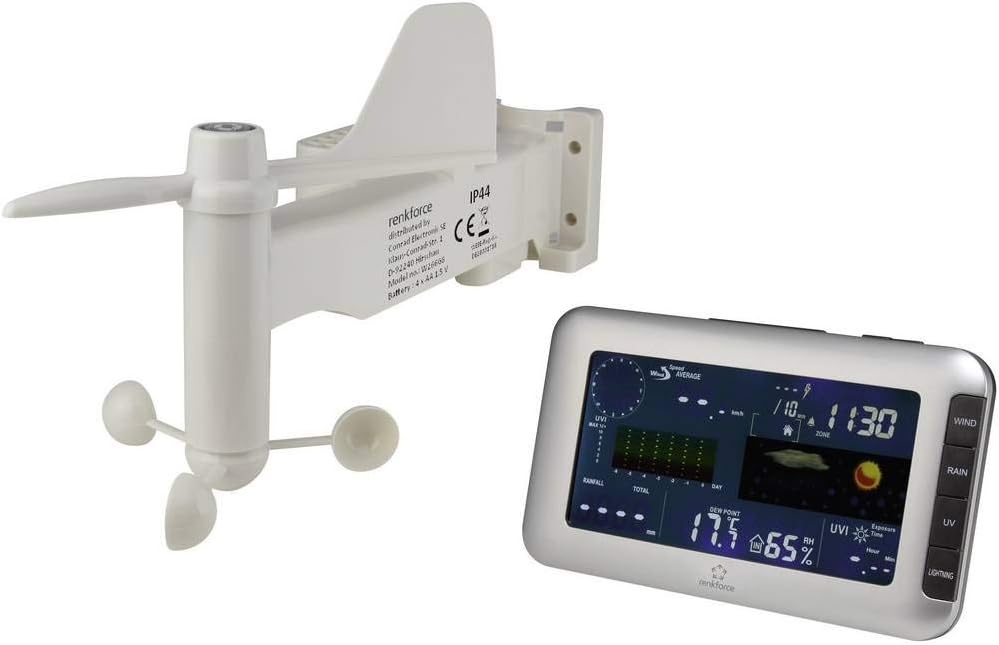
Figure 1: Renkforce W205GU main display unit and integrated outdoor sensor. The outdoor sensor measures wind speed, precipitation, UV, lightning, temperature, and humidity.
4. Persediaan
4.1 Pemasangan Bateri
Unit Paparan Utama:
- Buka penutup petak bateri di belakang unit utama.
- Insert the required batteries (e.g., AA or AAA, refer to specifications) observing the correct polarity (+/-).
- Tutup penutup petak bateri dengan selamat.

Rajah 2: Belakang view of the main display unit, showing the battery compartment and control buttons for Clock/Set, Alarm, Channel/Search, and Memory/Clear.
Outdoor Multi-Sensor:
- Locate the battery compartment on the outdoor sensor. This is typically sealed to protect against weather.
- Open the compartment and insert the specified batteries, ensuring correct polarity.
- Close the compartment tightly to maintain its weather resistance.
4.2 Penempatan dan Pemasangan Sensor
Outdoor Multi-Sensor:
- Choose an open location for the outdoor sensor, free from obstructions that could block wind, rain, or sunlight.
- Mount the sensor securely using the provided mounting accessories (pole, screws, etc.). Ensure it is level for accurate rain measurement.
- Ideal height for wind measurement is typically 2-10 meters above ground.
- Ensure the sensor is within the wireless range of the main display unit (typically up to 100 meters in open air).
Unit Paparan Utama:
- Place the main unit indoors, away from direct sunlight, heat sources, or drafts that could affect indoor temperature readings.
- Ensure it is placed where it can easily receive signals from the outdoor sensor and the radio clock signal.
4.3 Penyegerakan Awal
After installing batteries in both units, the main display unit will automatically attempt to connect with the outdoor sensor and receive the radio clock signal. This process may take a few minutes. Ensure both units are within range during this initial setup.
5. Mengendalikan Stesen Cuaca
5.1 Tetapan Masa dan Tarikh
- Radio Clock: The unit automatically synchronizes with the DCF77 radio signal (or equivalent for your region). This ensures accurate time.
- Tetapan Masa Manual: If the radio signal is not available, or for specific time zone adjustments, press the "Clock/Set" button (refer to Figure 2) to enter time setting mode. Use the "Channel/+" and "Memory/-" buttons to adjust values, and "Clock/Set" to confirm.
- Zon Waktu: Adjust the time zone offset (±12 hours) as needed in the manual time setting mode.
- 12/24-Hour Display: Toggle between 12-hour (with AM/PM) and 24-hour format during time setting.
5.2 Fungsi Paparan
The main display unit shows various weather parameters:
- Suhu & Kelembapan Dalam/Luar: Current readings are displayed. Press "Memory/Clear" to cycle through maximum and minimum recorded values.
- Tekanan atmosfera: Shows current barometric pressure and a trend indicator.
- Kelajuan Angin: Displays current wind speed. Use buttons to view minimum and maximum recorded wind speeds.
- Kerpasan: Shows daily, weekly, or monthly rainfall totals.
- Pengesanan Kilat: Indicates lightning strikes and estimates distance to the storm.
- Indeks UV: Displays the current UV index and the highest daily value.
- Titik Embun: Calculated dew point temperature.
- Angin Sejuk: Calculated wind chill factor.
5.3 Penggera dan Amaran
- Penggera Masa: Press the "Alarm" button (refer to Figure 2) to set or activate the daily alarm. Use "Channel/+" and "Memory/-" to adjust.
- Fungsi Tunda: When the alarm sounds, press any button (except "Alarm Off") to activate snooze.
- Amaran Fros/Ais: The unit will provide an alert when outdoor temperatures approach freezing point, indicating potential ice or frost conditions.
6. Penyelenggaraan
- Pembersihan: Lap unit utama dan sensor luar dengan kain lembut,amp kain. Jangan gunakan pembersih atau pelarut yang melelas.
- Penggantian Bateri: Replace batteries in both units when the low battery indicator appears on the display. Ensure to replace all batteries at once.
- Outdoor Sensor Check: Periodically check the outdoor sensor for debris (leaves, dirt) that might obstruct the wind cups, wind vane, or rain collector. Clean as necessary.
- Pengumpul Hujan: Ensure the rain collector funnel is clear of obstructions for accurate precipitation measurement.
7. Penyelesaian masalah
| Masalah | Kemungkinan Punca | Penyelesaian |
|---|---|---|
| Tiada data luar dipaparkan. |
|
|
| Bacaan suhu/kelembapan tidak tepat. |
|
|
| Radio clock not synchronizing. |
|
|
| Wind or rain readings are incorrect. |
|
|
8. Spesifikasi
| Ciri | Perincian |
|---|---|
| Nombor Model | 1208067 |
| Jenama | Renkforce |
| Sumber Kuasa | Dikuasakan Bateri |
| Teknologi Ketersambungan | Frekuensi radio |
| warna | Hitam |
| Berat Barang | 1.4 Kilogram |
| Ciri Khas | Alarm, Wireless |
| Tarikh Tersedia Pertama | 22 Disember 2014 |
9. Waranti dan Sokongan
For warranty information and technical support, please refer to the documentation provided with your purchase or visit the official Renkforce webtapak. Simpan bukti pembelian anda untuk sebarang tuntutan waranti.
You can visit the Renkforce store for more information: Renkforce Store


