1. Produk Lebihview
The Hach HQ14d Portable Conductivity Meter is designed for accurate measurement of critical water quality parameters in various field and laboratory settings. This robust instrument eliminates the need for multiple devices, offering a streamlined solution for conductivity measurements.
Ciri-ciri Utama:
- Reka Bentuk Mudah Alih: Measures critical water quality parameters without the need for multiple instruments.
- Antara Muka Intuitif: Ensures simple operation and accurate results.
- IntelliCAL Smart Probes: Probes store all calibration data, enhancing measurement reliability.
- Pembinaan Tahan Lama: Designed to withstand demanding environmental conditions.
- Kit Komprehensif: Includes all necessary components to begin testing immediately.
2. Meter Components

Rajah 2.1: Depan view of the Hach HQ14d Portable Conductivity Meter, showing the display screen, navigation buttons, and function keys. The HACH logo is visible on the screen and at the bottom of the device.
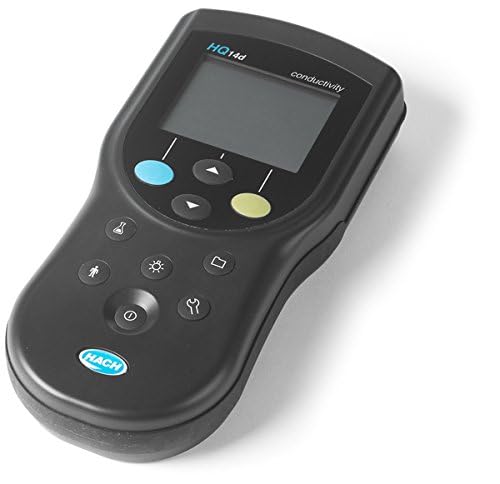
Rajah 2.2: bersudut view of the Hach HQ14d Portable Conductivity Meter, highlighting its ergonomic design and compact form factor. The side profile shows the slight curvature for comfortable handling.
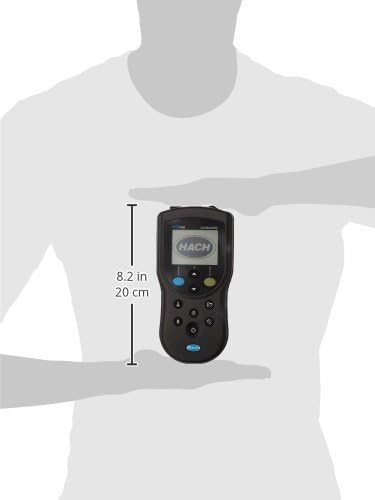
Rajah 2.3: The Hach HQ14d Portable Conductivity Meter held in a hand, illustrating its compact size and portability. A ruler indicates a height of approximately 8.2 inches (20 cm) for scale.
3. Persediaan Awal
3.1 Membongkar dan Pemeriksaan
Carefully unpack all components from the packaging. Verify that all items listed in the packing list are present and undamaged. If any items are missing or damaged, contact Hach customer support immediately.
3.2 Pemasangan Bateri
The HQ14d meter operates on standard AA batteries (included). To install:
- Cari penutup petak bateri di belakang meter.
- Use a coin or screwdriver to open the cover by turning it counter-clockwise.
- Insert the batteries, ensuring correct polarity as indicated inside the compartment.
- Replace the cover and turn clockwise to secure.
3.3 Sambungan Probe
Connect the IntelliCAL conductivity probe to the meter's input port. Ensure the connection is secure to prevent water ingress and ensure accurate readings.
4. Arahan Operasi
4.1 Menghidupkan/Mematikan
Tekan ke ⑂ (Power) button located at the bottom of the keypad to turn the meter on or off. The display will illuminate upon power-on.
4.2 Navigasi
Gunakan ▲ (Naik) dan ▼ (Down) arrow buttons to navigate through menus and adjust settings. The blue button typically acts as a Menu/Kembali button, and the green button as an Masukkan/Sahkan butang.
4.3 Mengambil Pengukuran
- Ensure the appropriate IntelliCAL conductivity probe is connected and calibrated.
- Rendam kuar ke dalam sample solution, ensuring the sensor is fully submerged and free of air bubbles.
- Wait for the reading to stabilize on the display. The meter will typically indicate when a stable reading is achieved.
- Record the measurement as needed.
4.4 Penentukuran
The HQ14d meter utilizes IntelliCAL smart probes, which store calibration data directly within the probe. This simplifies the calibration process. Refer to your IntelliCAL probe's specific manual for detailed calibration procedures. Generally, calibration involves:
- Accessing the calibration menu via the meter's interface.
- Selecting the appropriate calibration standard.
- Immersing the probe in the standard solution.
- Allowing the meter to automatically recognize and record the calibration point.
5. Penyelenggaraan dan Penjagaan
5.1 Membersihkan Meter
Wipe the meter's exterior with a damp, lint-free cloth. Do not use abrasive cleaners or solvents. Ensure no liquid enters the battery compartment or probe connectors.
5.2 Penyelenggaraan Probe
Refer to the specific IntelliCAL probe manual for detailed cleaning and storage instructions. Proper probe maintenance is crucial for accurate and consistent measurements.
5.3 Penyimpanan
When not in use, store the meter and probes in a clean, dry environment, away from direct sunlight and extreme temperatures. Ensure probe caps are securely in place to prevent drying out of sensors.
6. Penyelesaian masalah
| Masalah | Kemungkinan Punca | Penyelesaian |
|---|---|---|
| Meter tidak dihidupkan. | Bateri mati atau tidak dipasang dengan betul. | Periksa kekutuban bateri; menggantikan bateri. |
| Bacaan yang tidak stabil. | Probe not fully immersed; air bubbles on sensor; dirty probe; damaged probe. | Ensure full immersion; gently tap probe to remove bubbles; clean probe; inspect probe for damage and replace if necessary. |
| Kesalahan penentukuran. | Expired or incorrect calibration standard; dirty probe; damaged probe. | Use fresh, correct standard; clean probe; replace probe if damaged. |
| No probe detected. | Loose or faulty probe connection; damaged probe. | Ensure probe is securely connected; try another probe if available; contact support. |
7. Spesifikasi Teknikal
| Nombor Model | HQ14D53000000 |
| Jenis Produk | Meter Kekonduksian Mudah Alih |
| Jenama | HATI |
| Dimensi Pakej | 12.3 x 9.4 x 2.3 inci; 1 paun |
| Pengeluar | Hach |
| Tarikh Tersedia Pertama | 16 Disember 2014 |
8. Waranti dan Sokongan
8.1 Maklumat Waranti
Hach products are manufactured to high quality standards. For specific warranty terms and conditions, please refer to the warranty card included with your product or visit the official Hach webtapak. Simpan bukti pembelian anda untuk tuntutan waranti.
8.2 Sokongan Pelanggan
For technical assistance, troubleshooting, or service inquiries, please contact Hach customer support. Contact information can typically be found on the Hach webtapak atau dalam dokumentasi produk.
Sumber Dalam Talian: www.hach.com