pengenalan
This manual provides detailed instructions for the operation and maintenance of your Timex Women's Ironman Essential 30 Mid-Size Watch. This watch is designed for active lifestyles, featuring a durable resin construction, a clear digital display, and multiple functions including a chronograph, countdown timer, and alarm. Please read this manual thoroughly to ensure proper use and to maximize the lifespan of your watch.
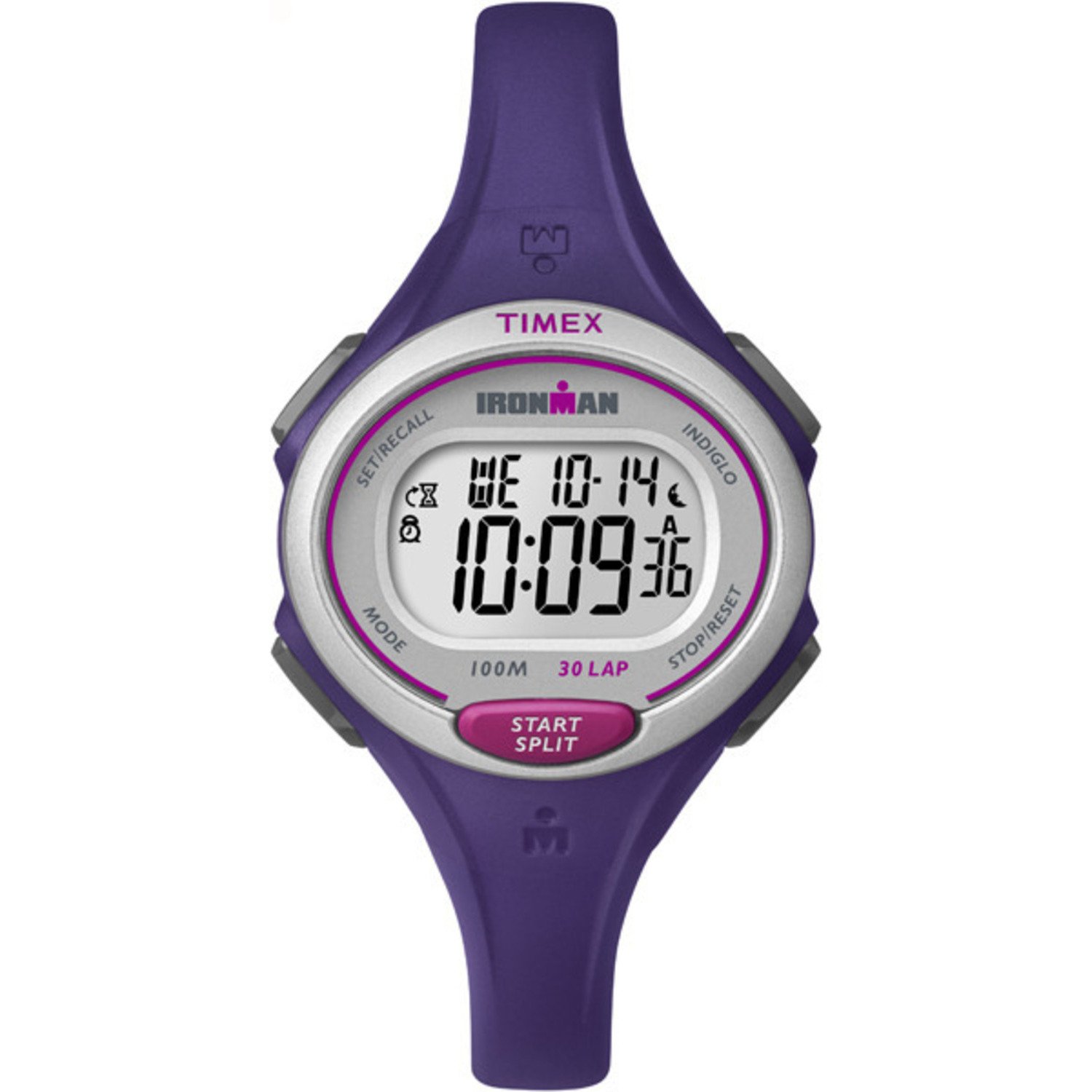
This image displays the Timex Women's Ironman Essential 30 Mid-Size Watch. It features a purple resin strap and case, a silver-tone bezel, and a clear digital display showing the time, day, and date. The watch has buttons labeled 'MODE', 'SET/RECALL', 'INDIGLO', 'STOP/RESET', and 'START/SPLIT'.
Persediaan Awal
Menetapkan Masa dan Tarikh
- Tekan ke MODE butang berulang kali sehingga skrin tetapan masa muncul (biasanya ditunjukkan dengan digit berkelip).
- Gunakan MULAI / MENGGERAK butang untuk melaraskan digit berkelip (jam, minit, saat).
- Tekan ke BERHENTI / RESET button to move to the next digit or setting (e.g., AM/PM, month, day, year).
- Ulang langkah 2 dan 3 sehingga semua tetapan masa dan tarikh adalah betul.
- Tekan ke MODE butang untuk keluar dari mod tetapan dan kembali ke paparan masa biasa.
Maklumat Bateri
Your watch comes with one Lithium Metal battery (included). The battery is pre-installed and the watch is ready for use. When the display dims or functions become erratic, it may be time for a battery replacement. Refer to the Maintenance section for more details.
Mengendalikan Jam Tangan Anda
Paparan Masa
Paparan lalai menunjukkan masa, hari dalam minggu dan tarikh semasa. Tekan ke MODE button to cycle through different functions.
Cahaya Malam Indiglo
Tekan ke INIGLO button (top left) to illuminate the watch face for easy viewdalam keadaan cahaya malap. Lampu akan kekal menyala selama beberapa saat.
Chronograph (Jam randik)
Your watch features a 100-hour chronograph with 30-lap memory.
- Tekan MODE until 'CHRONO' or 'STOPWATCH' appears.
- Tekan MULAI / MENGGERAK untuk memulakan masa.
- Tekan MULAI / MENGGERAK again to record a lap time while the main timer continues running.
- Tekan BERHENTI / RESET untuk menjeda kronograf. Tekan MULAI / MENGGERAK untuk menyambung semula.
- Untuk menetapkan semula, tekan BERHENTI / RESET apabila kronograf dijeda.
- To recall lap times, use the SET/PANGGILAN SEMULA butang dalam mod kronograf.
Pemasa Undur
The watch includes a 24-hour countdown timer.
- Tekan MODE until 'TIMER' or 'CDT' appears.
- guna SET/PANGGILAN SEMULA to enter setting mode for the timer.
- guna MULAI / MENGGERAK to adjust the hours, minutes, and seconds. Use BERHENTI / RESET untuk bergerak antara digit.
- Tekan SET/PANGGILAN SEMULA to confirm the set time.
- Tekan MULAI / MENGGERAK untuk memulakan kira detik.
- Penggera akan berbunyi apabila pemasa mencapai sifar.
Penggera
Set a customizable alarm for daily reminders.
- Tekan MODE sehingga 'ALARM' muncul.
- guna SET/PANGGILAN SEMULA untuk memasuki mod tetapan penggera.
- guna MULAI / MENGGERAK to adjust the alarm time. Use BERHENTI / RESET to move between hours and minutes.
- Tekan SET/PANGGILAN SEMULA untuk mengesahkan masa penggera.
- Untuk mengaktifkan/menyahaktifkan penggera, tekan MULAI / MENGGERAK while in alarm mode (not setting mode). An alarm icon will indicate activation.
Mod Masa Tentera 24 Jam
Your watch supports both 12-hour (AM/PM) and 24-hour (military) time formats. This setting is typically adjusted during the initial time setting process or through a dedicated option in the time setting mode.
Zon Masa Dwi
The watch allows you to set and view a second time zone (T2). This is useful for travel or tracking time in another region.
- Tekan MODE until 'T2' or 'DUAL TIME' appears.
- guna SET/PANGGILAN SEMULA to enter T2 setting mode.
- Adjust the time for the second zone using MULAI / MENGGERAK dan BERHENTI / RESET.
- Tekan SET/PANGGILAN SEMULA untuk mengesahkan.
Tahan Air
Jam tangan ini kalis air hingga 100 meter (330 kaki). Ia sesuai untuk berenang dan snorkeling. It is not recommended for diving. Elakkan menekan butang di bawah air untuk mengelakkan kemasukan air.
Tayangan video produk rasmicasing the Timex Women's Ironman Essential 30 Watch. The video demonstrates various angles and features of the watch, highlighting its design and functionality.
Penjagaan dan Penyelenggaraan
- Pembersihan: Bersihkan jam tangan anda dengan lembut, damp kain. Elakkan bahan kimia yang keras atau pembersih yang kasar.
- Penggantian Bateri: When the battery needs replacement, it is recommended to have it done by a qualified watch technician to ensure the water resistance seal is properly maintained.
- Tahan Air: While water resistant, avoid exposing the watch to extreme temperature changes (e.g., hot showers followed by cold water) as this can compromise seals. Do not operate buttons underwater.
- Storan: Simpan jam tangan anda di tempat yang sejuk dan kering jauh dari cahaya matahari langsung dan suhu yang melampau apabila tidak digunakan.
Menyelesaikan masalah
| Masalah | Penyelesaian |
|---|---|
| Paparan kosong atau malap. | Bateri mungkin lemah atau habis. Gantikan bateri. |
| Butang tidak bertindak balas. | Try resetting the watch (if a reset button is available, or by temporarily removing the battery). Ensure no buttons are stuck. |
| Masa tidak betul. | Rujuk bahagian 'Menetapkan Masa dan Tarikh' untuk melaraskan semula masa. |
| Air kelihatan di dalam jam tangan. | Immediately take the watch to a qualified service center. Do not attempt to open it yourself. |
Spesifikasi Produk
- Nombor Model: TW5K901009J
- Bahan kes: damar
- Bahan Tali: damar
- Diameter Sarung: 35mm
- Lebar Tali: 12mm
- Tahan Air: 100m (330 kaki)
- Jenis Bateri: 1 bateri Lithium Metal (termasuk)
- Fungsi: 100-hour chronograph with 30-lap memory, 24-hour countdown timer, customizable alarm, 24-hour military time mode, 2 time zones, day/date/month calendar, Indiglo night-light.
- Dimensi Produk: 3.5 x 0.25 x 3 inci; 0.96 auns
Waranti dan Sokongan
For information regarding your product's warranty, please refer to the warranty card included with your purchase or visit the official Timex website. If you require further assistance or have questions not covered in this manual, please contact Timex customer support.
You can find contact information and additional resources on the official Timex webtapak: www.timex.com


