1. Pengenalan
The Coby Car Dash Cam (Model DCHD101-V2) is designed to provide reliable video recording of your driving experience. Equipped with a 1080P Full HD camera, 4x digital zoom, and a 140° wide-angle lens, it captures clear footage. Key features include LED night vision, automatic motion detection, and G-sensor collision detection for enhanced security. The device features a 2.7-inch LCD screen for on-spot playback and supports MicroSD cards up to 32GB.
This manual provides detailed instructions for the proper installation, operation, and maintenance of your Coby Car Dash Cam to ensure optimal performance and longevity.
2. Apa yang ada di dalam Kotak
- Coby Car Dash Cam Unit
- Gunung sedutan
- Car Charger (Power Cable)
- Kabel USB
- Manual Pengguna (dokumen ini)
3. Produk Lebihview
Familiarize yourself with the components and controls of your Coby Car Dash Cam.
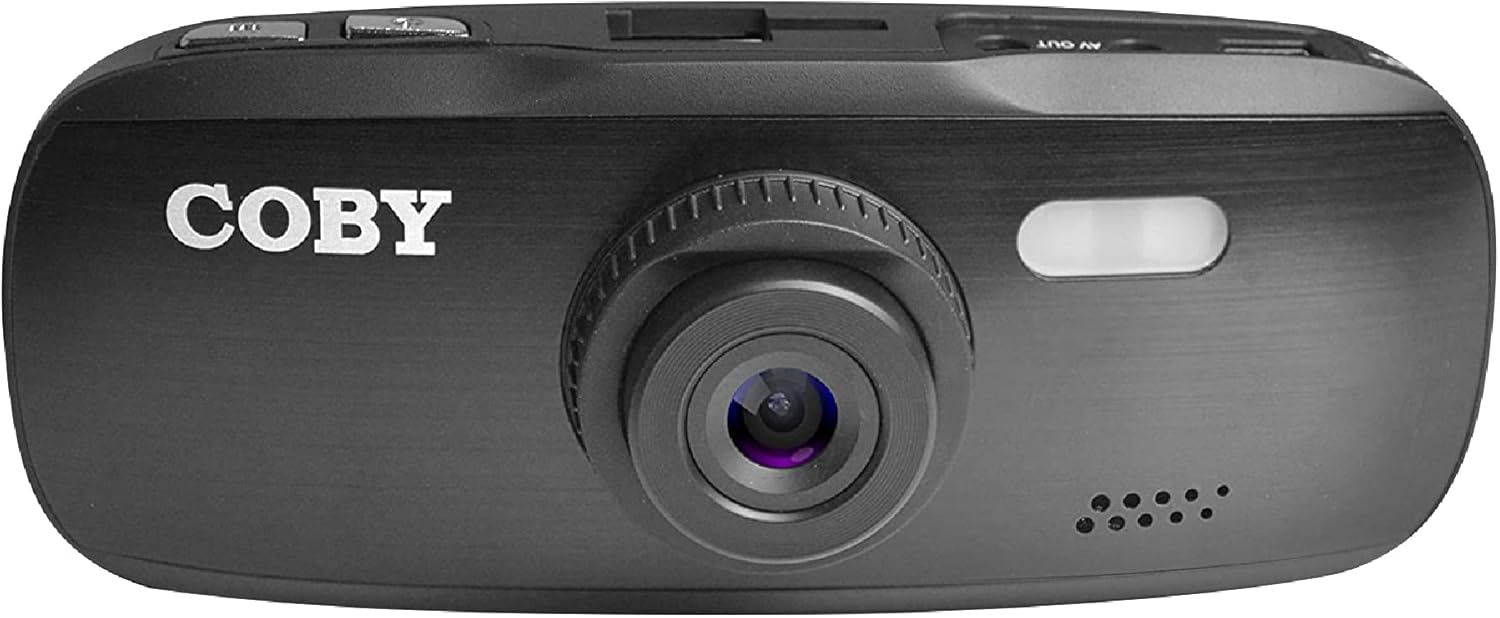
Rajah 3.1: Depan View of the Dash Cam. This image displays the front of the Coby dash cam, highlighting the main camera lens and the Coby brand logo.

Rajah 3.2: Belakang View with LCD Screen and Controls. The back of the dash cam is shown, featuring the 2.7-inch LCD screen displaying a scenic road, flanked by control buttons on both sides.

Rajah 3.3: Sisi View with Ports and Slots. This image illustrates the side of the dash cam, detailing the MicroSD card slot, AV Out port, and Micro USB port for connectivity.
3.1. Komponen dan Kawalan
- Kanta Kamera: Main lens for video recording.
- Skrin LCD: 2.7-inch display for live view, main balik dan navigasi menu.
- Butang Kuasa: Menghidupkan/mematikan peranti.
- Butang Menu: Mengakses tetapan sistem.
- Butang Mod: Switches between video recording, still photo, and playback modes.
- Butang REC: Memulakan/menghentikan rakaman video.
- Butang Naik / Turun: Navigasi pilihan menu dan laraskan tetapan.
- Slot Kad MicroSD: Insert your MicroSD card (up to 32GB, Class 10 recommended).
- Port USB Mikro: For power supply and data transfer to a computer.
- Pelabuhan Keluar AV: Untuk menyambung ke paparan luaran.
- Pembesar Suara/Mikrofon: Untuk rakaman dan main balik audio.
4. Persediaan
4.1. Installing the Suction Mount
- Clean the windshield area where you intend to mount the dash cam. Ensure it is free of dust and grease for optimal suction.
- Attach the suction mount to the dash cam by sliding it into the top mount slot until it clicks securely.
- Press the suction cup firmly against the cleaned windshield and push down the lever on the mount to secure it.
- Laraskan sudut cam dash untuk memastikan jelas view jalan di hadapan, mengelakkan halangan dari belakangview cermin atau komponen kenderaan yang lain.

Figure 4.1: Dash Cam Mounted in a Vehicle. This image shows the dash cam securely mounted on the windshield, providing a clear view of the road from the driver's seat.
4.2. Memasukkan Kad MicroSD
- Locate the MicroSD card slot on the side of the dash cam.
- Insert a Class 10 or higher MicroSD card (up to 32GB) into the slot with the gold contacts facing the back of the camera until it clicks into place.
- Untuk mengalih keluar, tolak kad masuk perlahan-lahan sehingga ia keluar.
- Nota: It is recommended to format the MicroSD card within the dash cam before first use and periodically thereafter to ensure stable recording.
4.3. Sambungan Kuasa
- Connect the provided car charger to the Micro USB port on the dash cam.
- Pasangkan hujung pengecas kereta yang satu lagi ke soket kuasa 12V kenderaan anda (soket pemetik api).
- The dash cam is designed to automatically power on and begin recording when the vehicle's ignition is turned on, and power is supplied. It will also automatically power off shortly after the ignition is turned off.
5. Arahan Operasi
5.1. Rakaman Asas
- Once powered on, the dash cam will automatically start recording in a continuous loop.
- The recording indicator (usually a red dot or flashing icon) will appear on the screen.
- To manually stop recording, press the REC button. Press it again to resume recording.
- Rakaman Gelung: The dash cam records video in segments (e.g., 1, 3, or 5 minutes). When the MicroSD card is full, the oldest unlocked files will be overwritten by new recordings.
5.2. G-Sensor (Emergency Recording)
- The built-in G-sensor detects sudden movements, such as hard braking, impacts, or sharp turns.
- When triggered, the current video segment will be automatically locked and saved to prevent it from being overwritten by loop recording.
- These locked files are typically stored in a separate folder on the MicroSD card (e.g., "EVENT" or "EMERGENCY").
5.3. Pengesanan Pergerakan
- When enabled in the settings, the dash cam can automatically start recording when motion is detected in front of the lens, even when the vehicle is parked.
- This feature is useful for monitoring your vehicle while it is stationary.
- Nota: Continuous use of motion detection while parked may drain your vehicle's battery if not connected to a constant power source or a dedicated hardwire kit.
5.4. Menu Settings and Playback
- Mengakses Menu: While not recording, press the MENU butang untuk masuk ke menu tetapan.
- Menu Navigasi: Gunakan Up dan Bawah butang anak panah untuk menatal melalui pilihan.
- Memilih Pilihan: Tekan ke REC button (often functions as OK/Confirm) to select an option or enter a sub-menu.
- Menu Keluar: Tekan ke MENU butang sekali lagi untuk keluar dari menu.
- Menukar Mod: Tekan ke MODE button to switch between Video Recording, Still Photo, and Playback modes.
- Main balik: In Playback mode, use the Up dan Bawah butang untuk memilih a file, kemudian tekan REC untuk bermain.
- Tarikh/Masa Stamp: Ensure the date and time are correctly set in the menu for accurate recording timestamps.
6. Penyelenggaraan
- Membersihkan Kanta dan Skrin: Use a soft, lint-free cloth to gently wipe the camera lens and LCD screen. Avoid abrasive materials or chemical cleaners that could damage the surfaces.
- Pengurusan Kad MicroSD:
- Format the MicroSD card regularly (e.g., once a month) using the dash cam's format function. This helps maintain card performance and prevents data corruption.
- Replace the MicroSD card periodically (e.g., every 6-12 months, depending on usage) as continuous overwriting can degrade its lifespan.
- Pertimbangan Suhu: Avoid exposing the dash cam to extreme temperatures for prolonged periods. High temperatures can affect battery life and device performance.
7. Penyelesaian masalah
| Masalah | Kemungkinan Punca | Penyelesaian |
|---|---|---|
| Dash cam tidak dihidupkan. | No power supply; low internal battery; faulty power cable. |
|
| Dash cam turns off unexpectedly or overheats. | Poor power connection; faulty MicroSD card; extreme ambient temperature. |
|
| "Card Error" or "Please Insert Card" message. | MicroSD card not inserted correctly; card corrupted; incompatible card. |
|
| Cannot access menu settings or buttons unresponsive. | Device is recording; temporary software glitch. |
|
| Suction mount does not stick. | Dirty windshield; cold temperature; worn suction cup. |
|
8. Spesifikasi
| Ciri | Perincian |
|---|---|
| Nama Model | DCHD101 |
| Nombor Model Item | DCHD101-V2 |
| Resolusi Tangkapan Video | 1080p Full HD (30 FPS), 720p (60 FPS) |
| Camera Megapixels | 5.0 Megapiksel |
| Sudut Kanta | Sudut Lebar 140 Darjah |
| Zum Digital | 4x |
| Jenis Paparan | 2.7" HD Wide Screen LCD |
| Sokongan Storan | Up to 32GB MicroSDHC card (not included) |
| Ciri Khas | G-Sensor, Loop Recording, LED Night Vision, Automatic Motion Detection |
| Jenis Pemasangan | Gunung sedutan |
| Teknologi Ketersambungan | Auxiliary (Micro USB, AV Out) |
| Berat Barang | 3.2 auns |
| Dimensi Produk | 4.3 x 1.3 x 1.8 inci |
| Pengeluar | Summit Electronics, LLC |
9. Waranti dan Sokongan
9.1. Maklumat Waranti
This Coby Car Dash Cam (Model DCHD101-V2) comes with a Waranti pengilang 30 hari from the date of purchase. This warranty covers defects in materials and workmanship under normal use. It does not cover damage caused by misuse, accident, unauthorized modification, or external causes.
Sila simpan bukti pembelian anda untuk tuntutan waranti.
9.2. Sokongan Pelanggan
For technical assistance, troubleshooting, or warranty inquiries, please contact Coby customer support. You may find contact information on the official Coby webtapak atau melalui peruncit tempat produk itu dibeli.
You can also visit the official Coby store on Amazon for more information and product updates: Coby Amazon Store.


