1. Pengenalan
This manual provides essential instructions for the setup, operation, and maintenance of your Cisco Remanufactured IP Conference Phone 8831. This device is designed to deliver high-quality audio conferencing for medium to large conference rooms.
Ciri-ciri utama termasuk:
- Liputan 360 Darjah: Optimized for rooms up to 1140 square feet.
- Full-Duplex Wideband Audio (G.722): Ensures superior high-definition audio performance for clear two-way communication.
- Detachable Control Panel: Allows for flexible placement and viewing of the display independently from the speaker unit.
- Keselamatan Dipertingkat: Utilizes 128K Advanced Encryption Standard (AES) for private and secure business-grade audio communications.
2. Maklumat Keselamatan Penting
Please read and follow these safety guidelines to prevent damage to the device and ensure user safety:
- Jangan dedahkan telefon kepada air atau kelembapan.
- Elakkan meletakkan telefon berhampiran sumber haba atau di bawah cahaya matahari langsung.
- Use only the power adapter and cables supplied with the device.
- Jangan cuba membuka atau membaiki telefon sendiri. Rujuk semua servis kepada kakitangan yang berkelayakan.
- Pastikan pengudaraan yang betul di sekeliling peranti.
3. Kandungan Pakej
Sahkan bahawa pakej anda mengandungi item berikut:
- Cisco IP Conference Phone 8831 main unit (CP-8831-K9-RF)
- Panel Kawalan boleh tanggal
- Kabel Penyambung
- Power Adapter (if applicable, or designed for Power over Ethernet)
4. Komponen Produk
The Cisco IP Conference Phone 8831 consists of a main speaker unit and a detachable control panel.
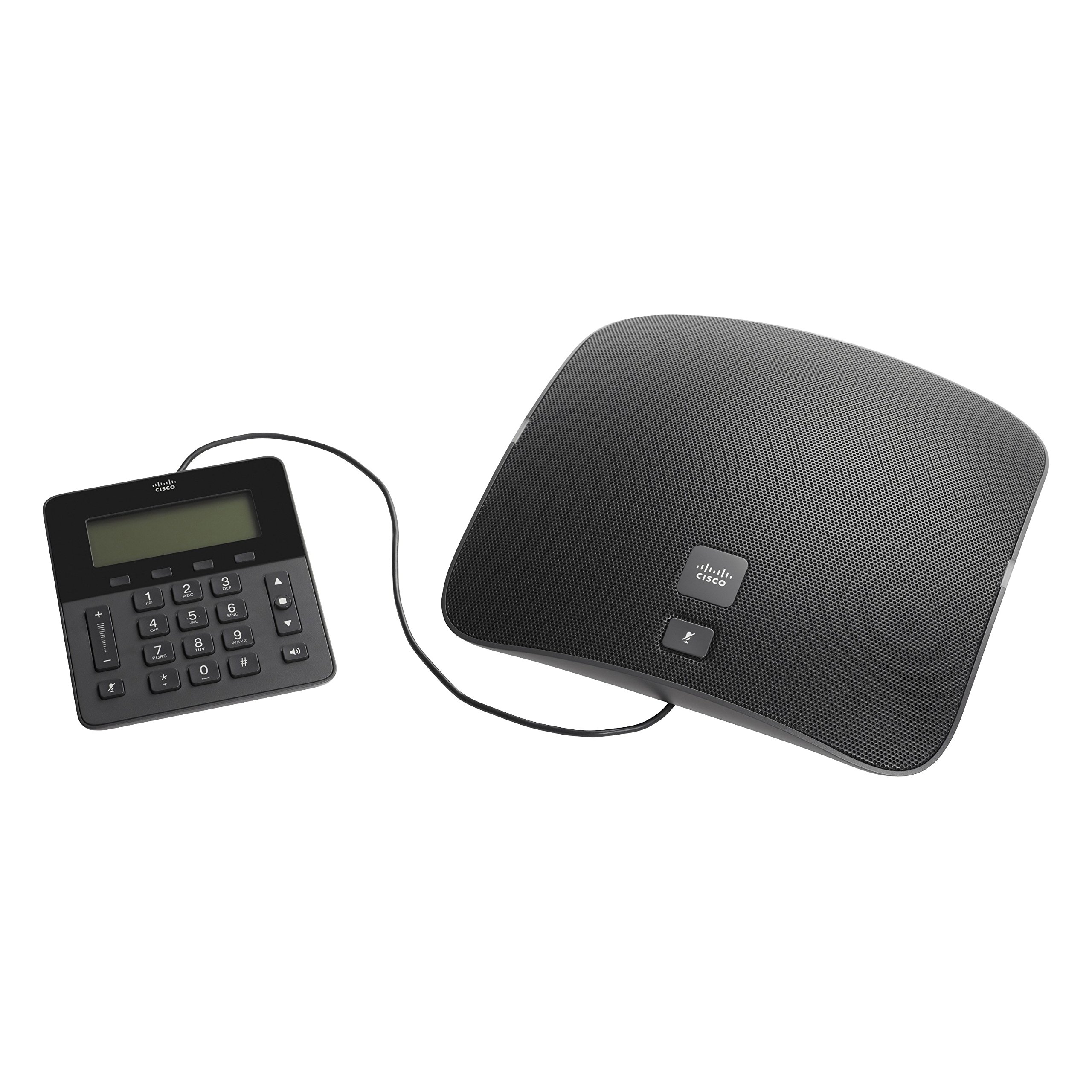
Figure 1: Cisco IP Conference Phone 8831 Overview
This image displays the Cisco IP Conference Phone 8831, consisting of two main parts: the large, oval-shaped speaker unit on the right and the smaller, rectangular control panel on the left. Both components are black and connected by a cable. The speaker unit features a perforated grille for audio output and a Cisco logo with a mute button. The control panel includes a digital display, a numeric keypad, navigation buttons, volume controls, and a mute button.
4.1. Main Speaker Unit
The main speaker unit houses the primary microphone and speaker components, providing 360-degree audio coverage. It typically includes a mute button and the Cisco branding.
4.2. Panel Kawalan
The detachable control panel features a display screen, a numeric keypad for dialing, navigation buttons, and dedicated buttons for call control (e.g., volume up/down, mute, speakerphone). This panel connects to the main unit via a cable, allowing for flexible placement.
5. Persediaan dan Pemasangan
Follow these steps to set up your Cisco IP Conference Phone 8831:
- Bongkar: Keluarkan semua komponen dari pembungkusan dengan berhati-hati.
- Sambung Panel Kawalan: Connect the control panel to the main speaker unit using the provided cable.
- Sambungan Kuasa:
- If using Power over Ethernet (PoE), connect an Ethernet cable from a PoE-enabled switch or injector to the Ethernet port on the main unit.
- If using an AC power adapter, connect the adapter to the main unit and then plug it into a power outlet.
- Sambungan Rangkaian: Connect an Ethernet cable from your network to the Ethernet port on the main unit.
- Boot-up awal: The phone will power on and begin its boot-up sequence. This may take a few minutes as it connects to your network and registers with your Cisco Unified Communications Manager or SIP-based VoIP service.
- Konfigurasi: Once registered, the phone is ready for use. Additional configuration may be required by your system administrator.
6. Operasi Asas
6.1. Membuat Panggilan
- Lift the control panel (if applicable) or ensure the speakerphone is active.
- Dail nombor yang dikehendaki menggunakan papan kekunci angka.
- Tekan ke Panggil button (or equivalent on-screen prompt).
6.2. Menjawab Panggilan
Apabila telefon berdering, tekan butang Jawab button (or equivalent on-screen prompt) to accept the call.
6.3. Melaraskan Kelantangan
Gunakan Kelantangan Naik (+) dan Perlahankan suara (-) buttons on the control panel to adjust the speaker volume during a call or the ringer volume when idle.
6.4. Membisukan Mikrofon
Tekan ke bisu button (microphone icon) on either the main speaker unit or the control panel to mute your microphone. Press it again to unmute.
6.5. Menamatkan Panggilan
Tekan ke Tamatkan Panggilan button (or equivalent on-screen prompt) to terminate an active call.
7. Penjagaan dan Penyelenggaraan
To ensure the longevity and optimal performance of your conference phone:
- Pembersihan: Use a soft, dry, lint-free cloth to clean the exterior surfaces. Do not use liquid cleaners, aerosols, or solvents.
- Storan: Simpan telefon di tempat yang sejuk dan kering, jauh daripada cahaya matahari langsung dan suhu yang melampau.
- Pengendalian: Handle the device with care to avoid dropping or physical damage.
8. Penyelesaian masalah
If you encounter issues with your Cisco IP Conference Phone 8831, refer to the following common solutions:
| Masalah | Penyelesaian yang Mungkin |
|---|---|
| Telefon tidak dihidupkan. |
|
| Tiada nada dail atau tidak boleh membuat panggilan. |
|
| Kualiti audio yang lemah. |
|
| Control panel display is blank. |
|
9. Spesifikasi Teknikal
| Ciri | Perincian |
|---|---|
| Nombor Model | CP-8831-K9-RF |
| Jenama | Cisco |
| Berat Barang | 5.05 paun (lebih kurang 2.29 kg) |
| Dimensi Produk | 0.39 x 0.39 x 0.39 inci (lebih kurang 1 x 1 x 1 cm) - Note: These dimensions appear to be placeholder values and may not reflect the actual product size. |
| warna | Hitam |
| Jenis Telefon | Corded IP Conference Phone |
| Sumber Kuasa | Corded Electric (PoE or AC Adapter) |
| Peranti Serasi | Cisco Unified Communications Manager, Business Edition, SIP-based VoIP services |
| Keupayaan Panggilan Persidangan | asas |
| Ciri Audio | Full-Duplex Two-Way Wideband (G.722) Hands-Free Speaker |
| Kawasan Liputan | Up to 1140 square feet (360-degree) |
| Keselamatan | 128K Advanced Encryption Standard (AES) |
| Negara Asal | China |
| Tarikh Mula-mula Tersedia | 22 Oktober 2014 |
10. Waranti dan Sokongan
10.1. Limited Hardware Warranty
This Cisco Remanufactured IP Conference Phone 8831 typically comes with a Waranti Perkakasan Terhad 1 Tahun. Please refer to your purchase documentation for specific terms and conditions regarding warranty coverage.
10.2. Sokongan Teknikal
For technical assistance, troubleshooting beyond this manual, or warranty claims, please contact Cisco support or your authorized reseller. You can find more information and support resources on the official Cisco webtapak:


