1. Pengenalan
The Leica M-A (Typ 127) is a fully mechanical 35mm film camera designed for photographers who appreciate traditional photographic processes. This camera operates without a battery, relying entirely on mechanical controls for shutter speed, aperture, and focusing. Its robust construction and minimalist design emphasize the fundamental aspects of photography.
2. Produk Lebihview
The Leica M-A (Typ 127) embodies the essence of analog photography with its durable all-metal body and precise mechanical operation. It features a classic rangefinder focusing system and manual controls for a direct photographic experience.
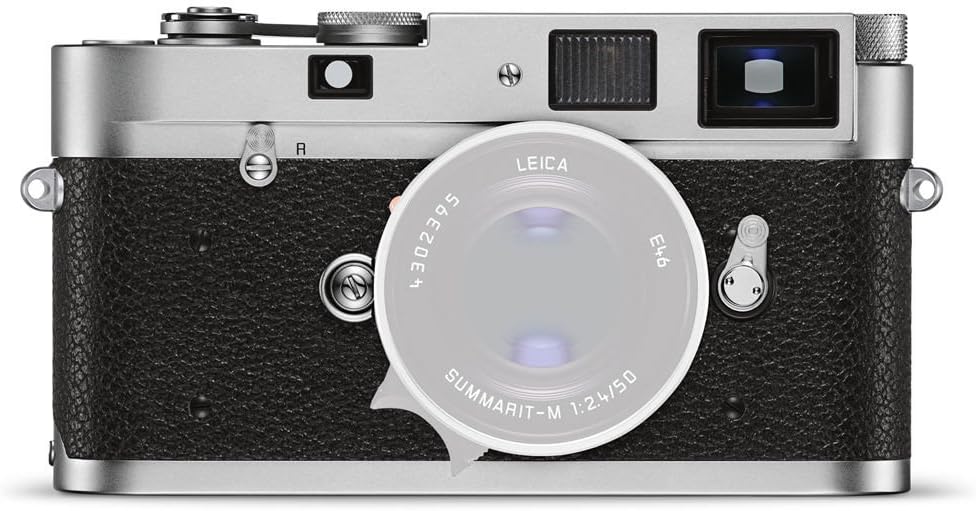
Depan view of the Leica M-A (Typ 127) camera with a lens attached, showcasing the classic rangefinder design and silver finish.

Atas view of the Leica M-A (Typ 127) camera, displaying the shutter speed dial, film advance lever, and the Leica branding.

belakang view of the Leica M-A (Typ 127) camera, showing the film ISO reminder dial and the viewpencari.
3. Persediaan
3.1. Memasang Lensa
- Sejajarkan titik merah pada kanta dengan titik merah pada pelekap kanta badan kamera.
- Gently insert the lens into the mount.
- Putar kanta mengikut arah jam sehingga ia klik pada tempatnya, menunjukkan ia telah dikunci dengan selamat.
3.2. Memuatkan Filem
- Open the camera's base plate by rotating the locking key.
- Pull up the film rewind knob to open the film chamber.
- Insert a 35mm film cassette into the chamber.
- Pull the film leader across to the take-up spool and ensure it engages with the teeth.
- Close the film chamber and replace the base plate, securing it with the locking key.
- Advance the film two frames by operating the film advance lever and pressing the shutter button to ensure the film is properly loaded and the frame counter resets.
3.3. Menetapkan Kelajuan Filem (ISO)
The M-A (Typ 127) does not have an internal light meter. The ISO dial on the back of the camera serves as a reminder for the film speed currently loaded. Rotate the dial to match the ISO of your film (e.g., ISO 100, 400, 800).
4. Arahan Operasi
4.1. Memberi tumpuan
The Leica M-A (Typ 127) uses a manual rangefinder focusing system:
- Lihat melalui viewfinder. You will see a bright frame and a central, brighter patch.
- Within the central patch, you will see a double image.
- Rotate the focusing ring on your lens until the double image in the central patch merges into a single, clear image. This indicates that your subject is in focus.
4.2. Setting Exposure (Aperture and Shutter Speed)
Exposure is set manually by adjusting the aperture on the lens and the shutter speed on the camera's top dial. There is no automatic exposure mode. Photographers must use an external light meter or their experience to determine the correct settings for desired exposure.
- Apertur: Controlled by the ring on the lens. Adjust to control depth of field and light entering the lens.
- Kelajuan Pengatup: Controlled by the dial on the top plate. Adjust to control motion blur and duration of light exposure.
4.3. Taking a Photograph
- Ensure film is loaded and advanced.
- Set the desired aperture on the lens.
- Set the desired shutter speed on the top dial.
- Focus on your subject using the rangefinder.
- Gently press the shutter release button on the top plate to capture the image.
- Advance the film using the film advance lever for the next shot.
4.4. Pemasa Kendiri
The camera is equipped with a self-timer function. To activate, wind the self-timer lever located on the front of the camera, then press the shutter button. The shutter will release after a short delay, typically 10-12 seconds.
5. Penyelenggaraan
5.1. Membersihkan Kamera
- Gunakan kain lembut dan tidak berbulu untuk mengelap badan kamera.
- For the lens, use a lens brush to remove dust, followed by a lens cleaning solution and a microfiber cloth. Avoid touching the lens elements directly.
- Simpan viewfinder and rangefinder windows clean for clear focusing.
5.2. Penyimpanan
Store the camera in a dry, dust-free environment, away from direct sunlight and extreme temperatures. If storing for extended periods, remove any film and keep the lens cap on.
6. Penyelesaian masalah
- Filem tidak berkembang: Ensure the film leader is properly engaged with the take-up spool. Check if the film rewind knob rotates when advancing the film.
- Pengatup tidak menyala: Confirm the film advance lever has been fully wound.
- Images out of focus: Practice using the rangefinder focusing system to ensure the double image merges completely.
- Exposure issues (too dark/too bright): Verify aperture and shutter speed settings are appropriate for the lighting conditions, potentially using an external light meter.
7. Spesifikasi
| Ciri | Perincian |
|---|---|
| Jenama | Leica |
| Nama Model | 10371 |
| Siri Model | M-A (Typ 127) |
| Pemasangan yang Serasi | Leica M |
| Teknologi Penderia Foto | Other (Film) |
| Penstabilan Imej | Digital (Note: This refers to post-processing, camera is mechanical) |
| Penerangan Pemeteran | Automatic (Note: This refers to the internal light meter, which is not present in the M-A. Exposure is manual.) |
| Adakah Bateri Termasuk | Tidak |
| Ciri Khas | Fully Mechanical, No Battery Required |
| Berat Barang | 1.3 paun |
| Kepekaan Cahaya | ISO 100 to ISO 3200 (film dependent) |
| Viewpencari | Optik |
| Mod Penangkapan | Manual |
| Mempunyai Pemasa Kendiri | ya |
| Jenis Fokus | Fokus Manual |
| Autofokus | Tidak |
8. Waranti dan Sokongan
The Leica M-A (Typ 127) camera comes with a manufacturer's warranty. For specific details regarding warranty coverage, duration, and terms, please refer to the documentation provided with your purchase or visit the official Leica website. For technical assistance, service, or further inquiries, please contact Leica customer support directly.
You can find more information and support resources on the official Leica webtapak: Visit the Leica Store