1. Pengenalan
Thank you for choosing the Beurer BF 700 Diagnostic Scale. This device is designed to provide comprehensive body analysis, including body weight, body fat, muscle mass, body water, bone mass, resting/active calorie requirements, and BMI calculation. It features Bluetooth technology for seamless data synchronization with the Beurer HealthManager Pro app, allowing for convenient health management and tracking of your progress.
Please read this instruction manual thoroughly before first use to ensure safe and correct operation. Keep this manual for future reference.
2. Maklumat Keselamatan Penting
Sentiasa patuhi langkah keselamatan berikut:
- This scale is intended for personal use only and is not suitable for commercial or medical purposes.
- Do not use this device if you have a medical implant (e.g., pacemaker). This may affect the function of the implant.
- Pregnant women should not use this scale for body fat analysis, as the results may be inaccurate.
- Place the scale on a firm, level surface to ensure accurate measurements. Avoid carpets or soft surfaces.
- Step onto the scale barefoot and ensure your feet are positioned correctly on the electrodes for body analysis.
- Do not use the scale in wet conditions (e.g., in the shower or on a wet floor) to prevent slipping.
- Jauhkan penimbang daripada medan elektromagnet yang kuat.
- Do not attempt to disassemble or repair the scale yourself. Contact authorized service personnel.
- Jauhkan bahan pembungkus daripada kanak-kanak untuk mengelakkan bahaya sesak nafas.
3. Kandungan Pakej
Please check that all items are included and undamaged upon receipt:
- Beurer BF 700 Diagnostic Scale
- 3 x Bateri AAA (termasuk)
- Manual Arahan
4. Persediaan
4.1. Memasukkan Bateri
- Buka petak bateri di bahagian bawah penimbang.
- Insert the 3 x AAA batteries, ensuring correct polarity (+/-).
- Tutup petak bateri dengan selamat.
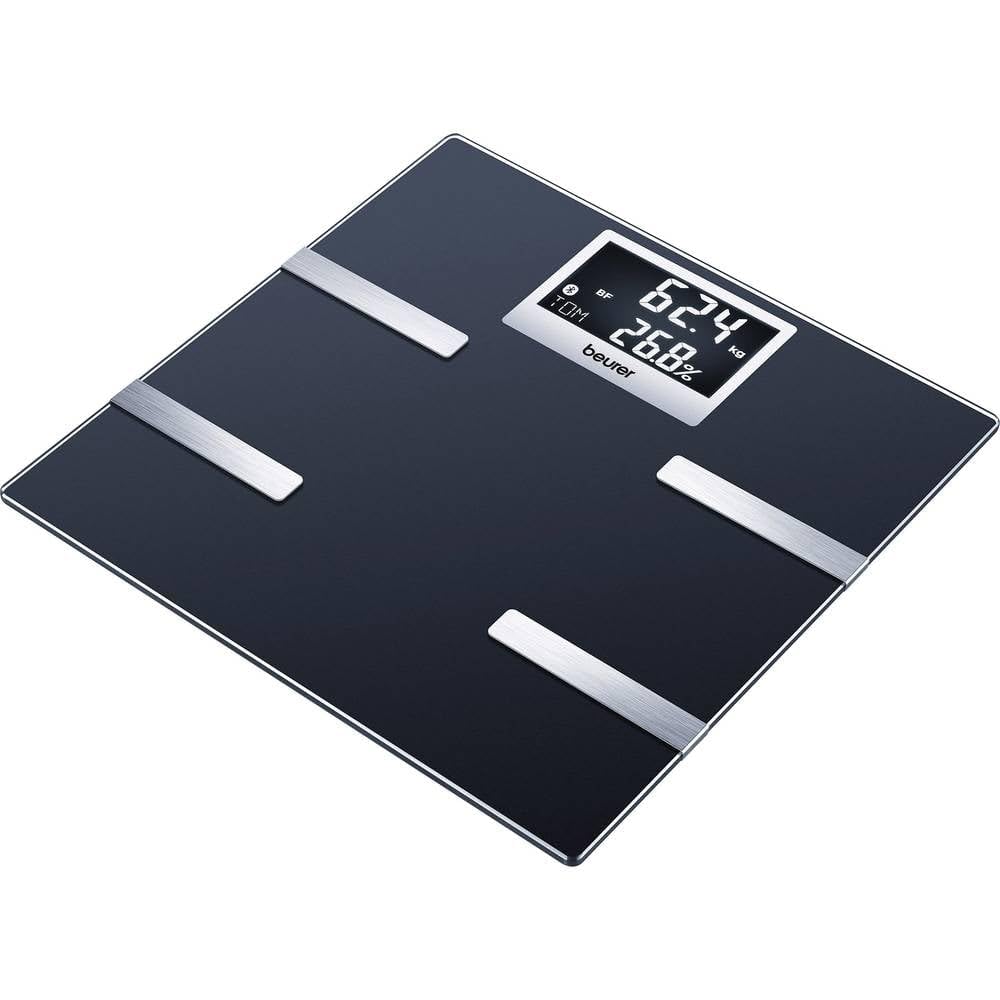
Image 1: Beurer BF 700 Diagnostic Scale. The scale is black with silver electrodes and a digital display.
4.2. Installing the Beurer HealthManager Pro App
- Download the free "Beurer HealthManager Pro" app from your smartphone's app store (Apple App Store or Google Play Store).
- Pasang aplikasi pada telefon pintar anda.
- Open the app and follow the on-screen instructions to create a user profile atau log masuk.
4.3. Pairing the Scale with Your Smartphone
- Pastikan Bluetooth didayakan pada telefon pintar anda.
- Open the Beurer HealthManager Pro app.
- In the app, navigate to "My devices" or "Add device".
- Select "Scale" and then "BF 700".
- Step onto the scale briefly to activate it. The scale will display "Bluetooth" or a pairing icon.
- The app will guide you through the pairing process. Once connected, your measurements will automatically synchronize.
Video 1: This video demonstrates the Beurer HealthManager app's capabilities, including how it connects with various Beurer devices like activity trackers, blood pressure monitors, and diagnostic scales (such as the BF 700) via Bluetooth to track and manage health data. It shows the app interface for activity, sleep, weight, blood pressure, and glucose monitoring, highlighting data synchronization and graphical representation of trends.
5. Arahan Operasi
5.1. Mengambil Pengukuran
- Letakkan penimbang pada permukaan yang keras dan rata.
- Step onto the scale barefoot. Ensure your feet are clean and dry, and positioned on the silver electrodes.
- Stand still until the measurement is complete. The display will show your weight, followed by other body analysis values (body fat, body water, muscle mass, bone mass, BMI).
- If the scale is paired with the app, the data will automatically transfer to your user profile in the Beurer HealthManager Pro app.

Image 2: A person's bare feet are shown on the Beurer BF 700 Diagnostic Scale, indicating the correct posture for taking a measurement.
5.2. Pengguna Profiles
The Beurer BF 700 supports up to 8 user profiles. The scale automatically recognizes users based on their initial weight and body composition data. For accurate automatic assignment, ensure your initial profile setup in the app is complete.
- To set up a new user, follow the instructions in the Beurer HealthManager Pro app.
- The app allows you to input personal data such as age, height, gender, and activity level, which are crucial for accurate body analysis calculations.
5.3. Unit Pengukuran
The scale allows you to switch between kilograms (kg), pounds (lb), and stones (st). This setting can typically be adjusted via a button on the underside of the scale or within the Beurer HealthManager Pro app.
6. Penyelenggaraan dan Penjagaan
- Pembersihan: Bersihkan penimbang secara kerap dengan iklanamp cloth and a mild detergent. Do not use abrasive cleaning agents or immerse the scale in water.
- Storan: Simpan penimbang di tempat yang kering, jauh daripada suhu ekstrem dan cahaya matahari langsung.
- Penggantian Bateri: Replace all batteries when the low battery indicator appears on the display. Dispose of used batteries according to local regulations.
7. Penyelesaian masalah
| Masalah | Kemungkinan Punca | Penyelesaian |
|---|---|---|
| "Err" or inaccurate readings | Scale not on a firm, level surface; feet not properly positioned; dirty electrodes; maximum weight exceeded. | Place on a hard, flat surface. Ensure bare feet are centered on electrodes. Clean electrodes. Check weight limit (180 kg). |
| No display / Scale does not turn on | Bateri mati atau tidak dimasukkan dengan betul. | Periksa polariti bateri. Gantikan bateri. |
| Isu sambungan Bluetooth | Bluetooth off on smartphone; app not open; scale not activated; interference. | Ensure Bluetooth is on. Open HealthManager Pro app. Step on scale to activate. Move closer to scale. Restart phone/app. |
| Data not synchronizing to app | No active Bluetooth connection; incorrect user profile selected in app; app issues. | Verify Bluetooth connection. Ensure correct user profile is active in the app. Restart app or phone. |
8. Spesifikasi Teknikal
- model: BF 700
- kapasiti: 180 kg (396 lb / 28 st)
- Unit Pengukuran: kg / lb / st
- Body Analysis: Body weight, body fat, muscle mass, body water, bone mass, resting/active calorie requirement, BMI
- Memori Pengguna: Sehingga 8 pengguna
- Ketersambungan: Bluetooth
- paparan: LCD dengan lampu latar putih
- Sumber Kuasa: 3 x bateri AAA (termasuk)
- Dimensi: Kira-kira 11.81 x 11.81 x 9.06 inci (30 x 30 x 23 cm)
- Berat Barang: Kira-kira 4.18 paun (1.9 kg)
- Pengeluar: Beurer
9. Waranti dan Sokongan
Beurer GmbH provides a warranty for this product. For detailed warranty conditions and information on how to claim warranty service, please refer to the warranty card included with your product or visit the official Beurer website. For technical support or further assistance, please contact Beurer customer service.
Anda boleh mendapatkan maklumat lanjut dan butiran perhubungan di laman rasmi Beurer. webtapak: www.beurer.com


