1. Pengenalan
This manual provides detailed instructions for the setup, operation, and maintenance of your DISH 123479171-AA Digital IR Remote Control. This remote is designed to control your DISH satellite receiver, television (TV), video cassette recorder (VCR), and auxiliary (AUX) devices. Please read this manual thoroughly before use to ensure proper functionality and to maximize your viewpengalaman dalam.
2. Produk Lebihview
The DISH 123479171-AA remote control is an original DISH product, offering reliable infrared (IR) control for multiple entertainment devices. Its ergonomic design ensures comfortable handling and intuitive button placement for ease of use.
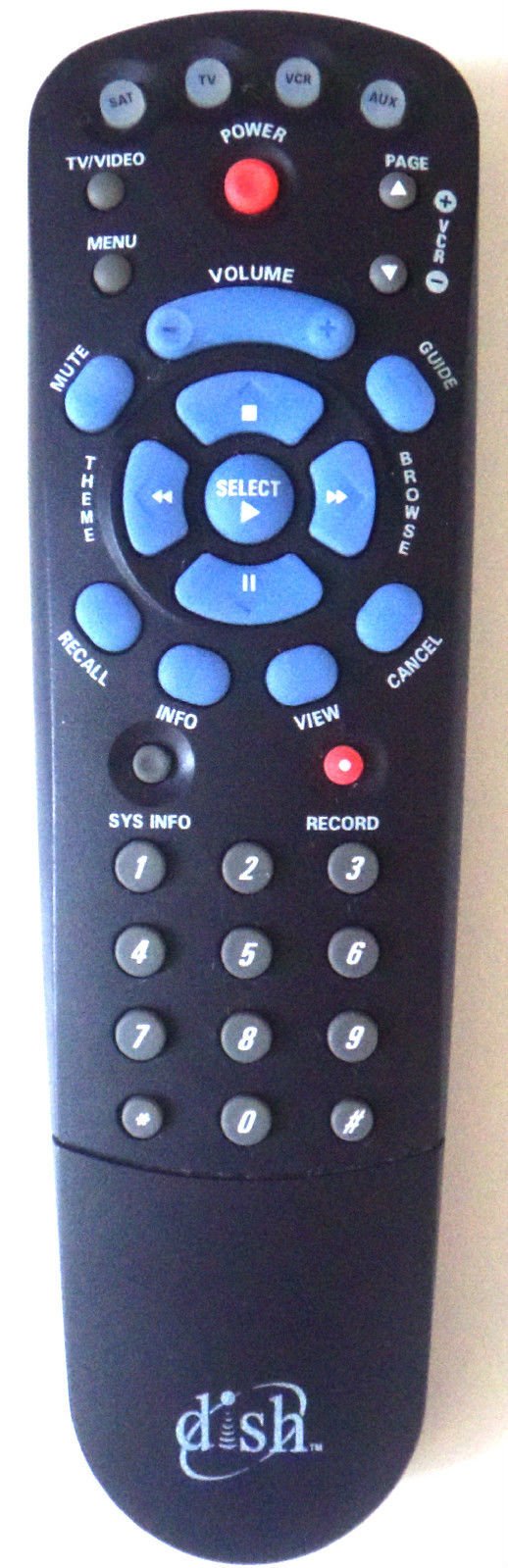
Rajah 1: DISH 123479171-AA Digital IR Remote Control. This image shows the front view of the remote control, highlighting its array of buttons for various functions.
3. Persediaan
3.1 Pemasangan Bateri
- Cari petak bateri di belakang alat kawalan jauh.
- Luncurkan penutup petak bateri ke bawah dan angkatnya.
- Insert two (2) fresh AA batteries, ensuring the positive (+) and negative (-) terminals align correctly with the markings inside the compartment.
- Gantikan penutup petak bateri dengan menggelongsorkannya semula ke tempatnya sehingga ia berbunyi dengan selamat.
3.2 Programming for TV, VCR, and AUX Devices
Your DISH remote is typically pre-programmed for DISH satellite receivers. To control other devices like your TV, VCR, or an auxiliary component, you may need to program the remote using specific codes. Refer to your DISH receiver's user manual or the DISH website for a comprehensive list of programming codes and detailed instructions for your specific device models.
- General Programming Steps (may vary):
- Turn on the device you wish to program (e.g., TV).
- Press and hold the corresponding mode button on the remote (e.g., TV, VCR, AUX) until all mode buttons light up.
- Enter the 3-digit or 4-digit programming code for your device's brand.
- Point the remote at the device and press the POWER button. If the device turns off, the programming was successful.
- If the device does not turn off, try the next code for your brand or consult the DISH programming guide.
4. Arahan Operasi
The DISH 123479171-AA remote control features a standard layout for intuitive operation. Below are common button functions:
- KUASA: Turns the selected device (SAT, TV, VCR, AUX) on or off.
- SAT/TV/VCR/AUX: Selects the device mode the remote will control.
- PANDUAN: Displays the program guide for your DISH receiver.
- MENU: Accesses the main menu of the DISH receiver or selected device.
- SELECT/OK: Mengesahkan pilihan atau memasukkan item menu.
- ARROW BUTTONS (UP/DOWN/LEFT/RIGHT): Navigates through menus and program guides.
- SALURAN +/-: Changes channels on the DISH receiver or selected device.
- JILID +/-: Adjusts the volume of the selected device (typically TV).
- MATI: Membisukan atau menyahredamkan audio.
- MAKLUMAT: Memaparkan maklumat program.
- KELUAR/BELAKANG: Kembali ke skrin sebelumnya atau keluar dari menu.
- REKOD: Initiates recording on the DISH receiver (if equipped) or VCR.
- PLAY/PAUSE/STOP/REW/FF: Controls playback functions for recorded content or VCR.
- NUMBER PAD (0-9): Memasukkan nombor saluran atau pilihan menu.
5. Penyelenggaraan
5.1 Membersihkan Alat Jauh
To clean your remote control, gently wipe its surface with a soft, dry, or slightly damp cloth. Do not use abrasive cleaners, solvents, or harsh chemicals, as these can damage the remote's finish or internal components.
5.2 Penggantian Bateri
Replace the batteries when the remote's performance degrades, or if the indicator light (if present) flashes to signal low battery power. Always replace both batteries at the same time with new AA batteries. Dispose of old batteries according to local regulations.
6. Penyelesaian masalah
If you encounter issues with your DISH 123479171-AA remote control, try the following troubleshooting steps:
- Jauh tidak bertindak balas: Periksa sama ada bateri dimasukkan dengan betul dan mempunyai cas yang mencukupi. Gantikannya jika perlu.
- Remote not controlling a specific device: Ensure the correct mode button (SAT, TV, VCR, AUX) is selected. Re-verify programming for TV, VCR, or AUX devices if applicable.
- Kawalan sekejap-sekejap: Ensure there are no obstructions between the remote and the device's IR sensor. The remote uses infrared light, so direct line of sight is required.
- Buttons sticking: Clean the remote's surface as described in the Maintenance section.
- Remote still not working: Try resetting the remote by removing the batteries for a few minutes, then reinserting them. If issues persist, contact DISH customer support.
7. Spesifikasi
| Ciri | Perincian |
|---|---|
| Pengeluar | HIDANGAN |
| Nombor Model | 123479171-AA |
| Teknologi Ketersambungan | Inframerah (IR) |
| Peranti Serasi | DISH Satellite Receiver, TV, VCR, AUX |
| Jenis Pengawal | Kawalan Butang |
| Ciri Khas | Reka Bentuk Ergonomik |
| Sumber Kuasa | 2 x Bateri AA (tidak termasuk) |
8. Waranti dan Sokongan
For information regarding the warranty of your DISH 123479171-AA Digital IR Remote Control, please refer to the documentation included with your DISH satellite receiver or visit the official DISH Network website. For technical support, programming assistance, or to order replacement parts, please contact DISH customer service directly.
DISH Network Official Webtapak: www.dish.com
DISH Customer Support: Refer to your service agreement or the official webtapak untuk nombor hubungan dan waktu operasi.


